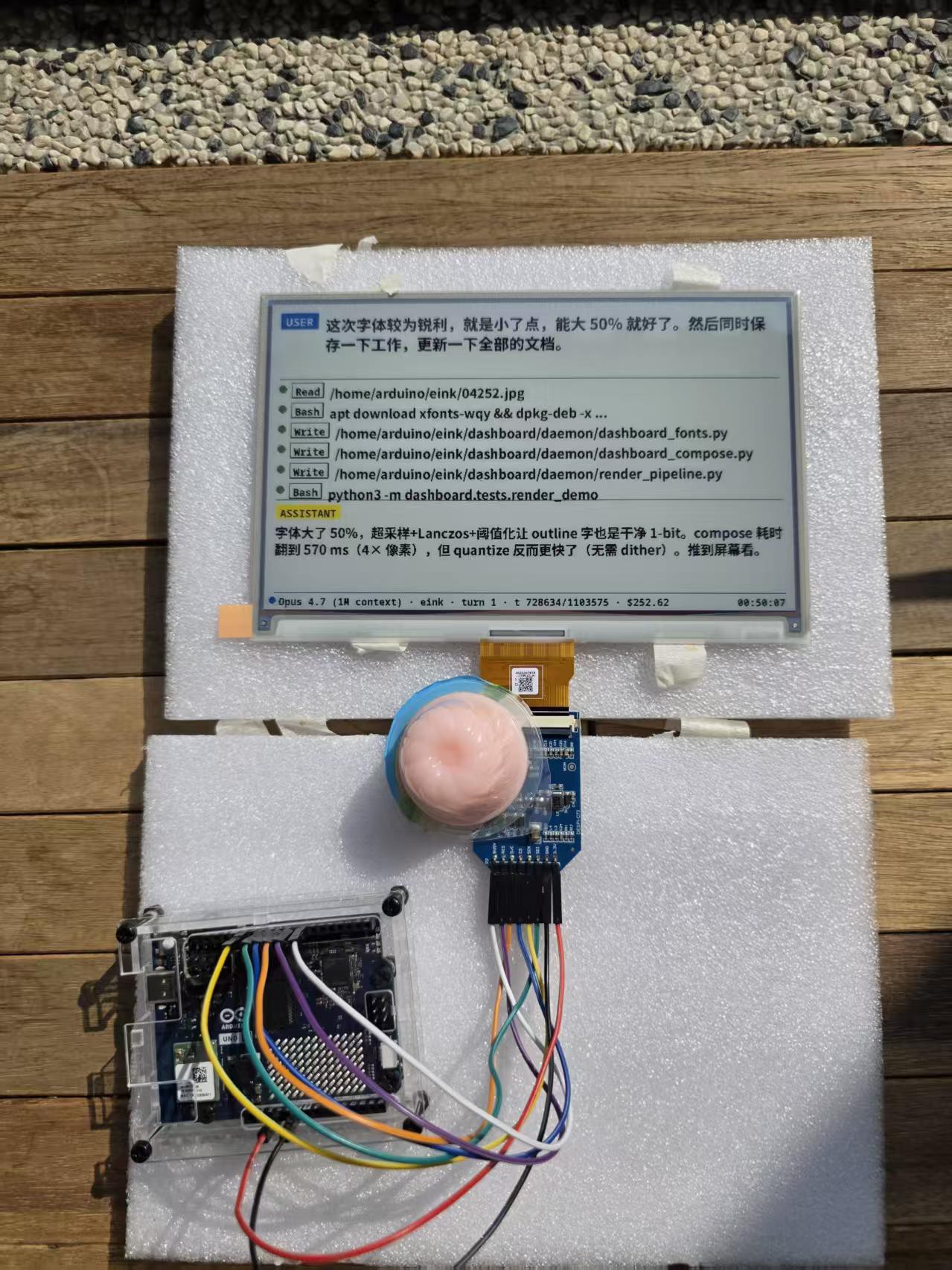
A 25-day bring-up of running Claude Code locally on UNO Q with a Spectra 6 colour e-paper dashboard. Includes corrections to widely cited SPD1657A com
To make the experience fit your profile, pick a username and tell us what interests you.
We found and based on your interests.
Project log · Arduino UNO Q + GDEP073E01 7.3" colour e-paper · April–May 2026 Status: Beta 1 · 7 production recipes verified · 40+ memory documents on board
Status flag for the community: This log contains corrections to several widely cited assumptions about GDEP073E01 — most importantly, the controller is SPD1657A, not SPD1656, and the seven-colour panel codebases that the community has been copying for the six-colour panel will silently fail in specific ways documented below. If you are working on Spectra 6, please read §VI–VIII before writing any custom-LUT code.
The goal is to build a hardware-native carrier for AI coding workflows — a dedicated peripheral that displays the running state of Claude Code on a low-glare, reflective, always-on colour surface. The form factor we converged on:
A 5-zone dashboard layout maps Claude Code's lifecycle events (UserPromptSubmit, PreToolUse, PostToolUse, Stop) to e-paper regions with throttling discipline (partial refresh ≥3 s, full refresh ≥60 s, force-scrub every 20 partials).
This log covers the 25 days from drafting the design document to verifying seven reproducible production recipes for the 6→8-colour rendering pipeline. Most of those 25 days were not spent on waveform design — they were spent debugging the toolchain.

| Component | Specifics | Notes |
|---|---|---|
| Arduino UNO Q | QRB2210 (Linux MPU) + STM32U585 (Zephyr MCU) | Dual-brain architecture; ~$70 |
| Good Display GDEP073E01 | 7.3" / 800×480 / Spectra 6 / 4 bpp | E Ink ACeP family, ~$45 |
| DESPI-C73 | FPC-to-DIP adapter for GDEP073E01 | Standard 8-pin breakout |
| Wiring | 7 × jumper wires, 3.3 V only | 5 V kills SPD1657A; not warrantable |
| USB-C cable | 5 V / 3 A PD-capable | Direct drive — no external PSU needed (see §IV.3) |
| DESPI-C73 silkscreen | UNO Q pin | Notes |
|---|---|---|
| 3.3V | 3V3 | Not 5V |
| GND | GND | |
| SDI | D11 (SPI2_MOSI) | |
| SCK | D13 (SPI2_SCK) | |
| CS | D10 | See §III.3 — SPI2 NSS conflict |
| D/C | D9 | |
| RES | D8 | |
| BUSY | D7 |
The first day on hardware (2026-04-20) produced no visible result on the panel despite three "successful" sketch uploads. Root cause analysis revealed three independent failure modes stacked on top of each other.
crab watcher service silently overwrites your sketchUNO Q ships with a Linux-side crab service that periodically rewrites the bound sketch back to a vendor default. Symptom: your code uploads, runs once, and then disappears.
Fix:
# Identify it
adb shell ps -ef | grep crab
# Stop and prevent restart
adb shell sudo systemctl stop crab-watcher
adb shell sudo systemctl disable crab-watcher
arduino-flash writes to the bootanimation partitionA more pernicious bug. The arduino-flash shell script hard-codes the target partition to bootanimation (presumably leftover boilerplate). Uploads report success — because the partition write did succeed — but the STM32 firmware never updates.
The correct path is the arduino-app-cli flow:
arduino-app-cli app create my-eink-app
# (copy your sketch into the standard structure)
arduino-app-cli app start my-eink-app
Implication: every "successful upload" log line from arduino-flash should be cross-validated against actual MCU behaviour. We spent days debugging panel timing before discovering the firmware hadn't actually changed.
D10 on the UNO Q maps to STM32 pin PB9, which the Zephyr device tree pre-assigns...
Read more »
Create an account to leave a comment. Already have an account? Log In.
Become a member to follow this project and never miss any updates