 Fredrik Andersson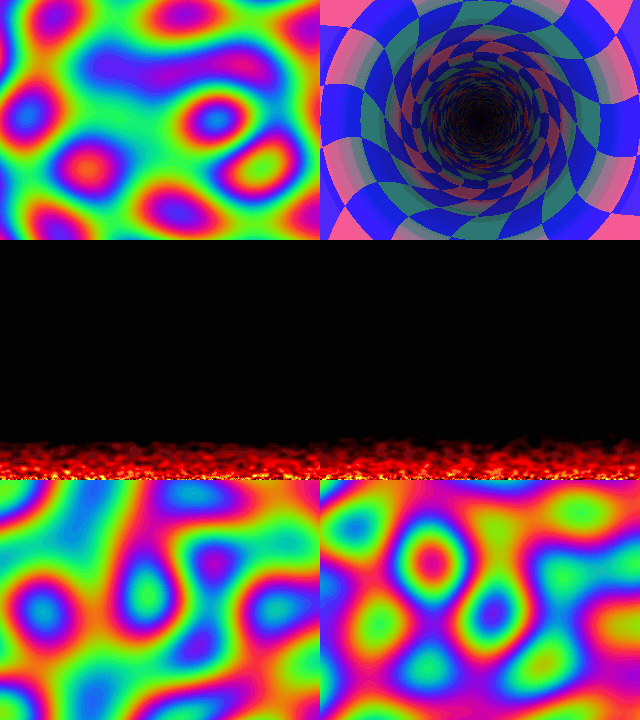
The animation above runs on a USB display that doesn't exist. Linux sees a 320x240
monitor plugged into a USB port, loads its driver and sends it pixels. The "monitor"
is about 500 lines of C running as a normal program, and it shows whatever it receives
in a window on my desktop.
Some background
I started usbip-server back in 2016. I wanted to work on USB devices without
reflashing a board and replugging a cable every time I changed a descriptor. Linux
already has USB/IP, which is meant for sharing USB devices over a network. If you
write the server side of that protocol yourself, you can put any device you like
behind it, and the device is then just a program on your computer.
So you write the descriptors and a few callbacks in C, start the program and attach
it:
$ out/usb_gud_display_device &
$ sudo usbip attach -r localhost -b 1-1
The kernel creates a virtual USB port, plugs the device in and treats it like real
hardware from then on. The repository has a keyboard, a mouse, a serial port and a
microphone built this way. Debugging is nice, too, since gdb and printf just work.
This time I wanted a display.
GUD
GUD (Generic USB Display) is a protocol Noralf Trønnes wrote so that pretty much
anything with a USB device port can act as a monitor. People have used it with
Raspberry Pis, Picos and ESP32s. The host driver has been in the kernel since 5.13, and
it's a proper DRM driver, so a GUD device turns up like any other screen. It's in the
display settings, `modetest` can see it, and it gets a framebuffer device.
The protocol is small, which made it a good match. The host asks the device about
itself with vendor control requests: how big it can be, which pixel formats it takes,
what connectors and modes it has. To change the mode, it sends the new state with
`SET_STATE_CHECK` and applies it with `SET_STATE_COMMIT`. Pixels go over a single bulk
endpoint, and before each transfer a `SET_BUFFER` request says which rectangle is
coming.
I kept my display simple: one 320x240 mode and RGB565 only. It accepts at most 64 KiB
per transfer, so a full frame of 153,600 bytes arrives in three pieces. The device
copies each piece into its framebuffer, and the main loop draws it, scaled up 2x, in an
SDL3 window.
There was one snag. The library can't reject a control request that carries data,
because by the time the device sees the request the data has already arrived.
Luckily GUD has a flag for exactly this case. With `GUD_DISPLAY_FLAG_STATUS_ON_SET`
set, the host follows every SET request with a `GET_STATUS` to ask whether it worked,
so the device only has to remember how the last request went.
Plugging it into GNOME
The first time I attached it, GNOME added a new monitor and the desktop extended onto
it.
It only works the first time, though. GNOME doesn't cope with a USB display being
connected over and over, and when you're developing one you restart it all the time.
My fix was to tell GNOME to leave the display alone, with this udev rule:
SUBSYSTEM=="drm", KERNEL=="card[0-9]*", ATTRS{idVendor}=="1d50", ATTRS{idProduct}=="614d", TAG+="mutter-device-ignore"
Now I can attach and detach it as often as I like, and other programs can draw on it.
Drawing on it
With the desktop out of the way it's a plain DRM device. List the connectors with
`modetest` to get the id, then put up some colour bars:
$ modetest -M gud -c                      # find the connector id, for example 38
$ modetest -M gud -s 38:320x240@RG16      # colour bars until Enter is pressed
There's also a framebuffer, `/dev/fbN`. It stays dark until someone sets its mode, so
I wrote a small Python script that sets the current mode again. After that anything that
writes pixels to a framebuffer works, ffmpeg included:
$ uv run tools/fb_activate.py
/dev/fb1: 320x240, 16 bits per pixel, switched on
$ ffmpeg -re -f lavfi -i mandelbrot=size=320x240:rate=15 -pix_fmt rgb565le -f fbdev /dev/fb1
Then, obviously, I had to write some old school demo effects. `tools/fb_animation.py`
does a plasma, a tunnel and fire in numpy at 30 frames per second, which is what you
see at the top. Each frame goes from Python into the framebuffer, through the kernel's
`gud` driver, over USB/IP into my device program, and finally into a window.
What's it good for?
Mostly testing. You can make the device report strange formats, answer requests wrong
on purpose or pretend its cable is loose, and see how the driver and the desktop handle
it, without building any firmware. It's also a quick way to get the device side right
before moving it to a microcontroller. LZ4 compression is next on my list.
The code is MIT licensed and on GitHub:
https://github.com/freand76/usbip-server
The display has its own page with all the details:
https://freand76.github.io/usbip-server/usb_gud_display_device.html
Discussions
Become a Hackaday.io Member
Create an account to leave a comment. Already have an account? Log In.