 Mr. Sarful hassan
Parts Required
Circuit Diagram LED Flashers
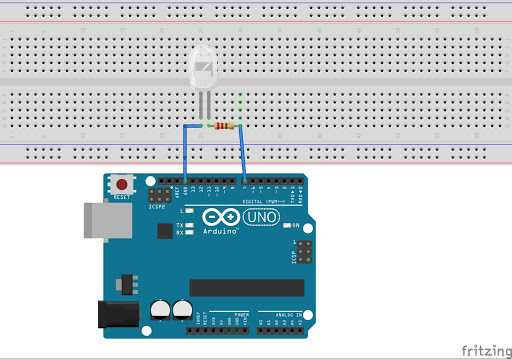
Make sure that your LED is connected the right way. Make sure the anode (positive) leg of the LED (usually the leg with the longer lead) is connected to digital pin 7. Make sure the anode of the LED (usually the lead with the longer leg) is connected to the resistor, and the cathode (usually the short leg) to ground. LEDs only light up when the anode is at a more positive voltage than the cathode. If you connect it backward, it won’t light, but won’t damage the LED either in this circuit.
Code LED Flashers
int ledPin = 7;
void setup() {
pinMode(ledPin, OUTPUT);
}
void loop() {
digitalWrite(ledPin, HIGH);
delay(1000);
digitalWrite(ledPin, LOW);
delay(1000);
}
Now press the Verify button at the top of the IDE to make sure there are no errors in your code. If this is successful, you can now click the Upload button to upload the code to your Arduino. If you have done everything correctly, you should now see the LED on the breadboard flashing on and off every second. Now let’s take a look at the code and the hardware and find out how they both work
Discussions
Become a Hackaday.io Member
Create an account to leave a comment. Already have an account? Log In.