-
A Mac and an iPad walk into a bar, Part 3
05/03/2026 at 20:55 • 0 comments![]()
Over the last several months, I have been working on Dr. PD, an open-source USB Power Delivery analyzer and programmable sink. Diving deep into the world of USB-PD and USB-C has given me a unique appreciation for these rich technologies, and I want to share some of the things I have learned.
As we saw in the previous part, it has taken 35 messages for the Mac and the iPad to set up a basic power contract and establish USB serial communications. There still remains an important task: negotiating a long-term power arrangement.
Recall that both devices are Dual-Role Ports, meaning that they can act as either source or sink based on demand. In practice, the Mac will usually act as the source — though not always, since there are ways to charge the Mac from an iPad, which is quite cool — but that does not diminish the need for a more thorough inspection of the iPad’s power requirements.
After all, there might be multiple devices connected to the Mac’s four USB-C ports, and the Mac itself has a limited amount of power available to charge other devices, even when it is connected to mains power. Therefore, its power-management system needs to understand the needs of each connected device so it can better balance the amount of power sent to each port.
Phase 5: I've got the power
The power negotiation begins with the Mac asking the iPad about its identity and battery setup:
Get Battery Cap
Source
Sink
Battery capability request:
- Requested battery reference: 0
Battery Capabilities
Sink
Source
Battery capabilities:
- USB Vendor ID: 0x05AC
- Product ID: 0x0000
- Design capacity: 40Wh
- Last full-charge capacity: 40Wh
- Battery reference: valid
Get Battery Status
Source
Sink
Battery status request:
- Requested battery reference: 0
Battery Status
Sink
Source
Battery status:
- Battery is present.
- Present capacity: 40Wh
- Charging state: charging.
Get Status
Source
Sink
Status
Sink
Source
Port status:
- Internal temperature: unsupported
- Present inputs: none
- Present battery input: none
- Event flags: none
- Temperature status: not supported
- Power status: not limited
- Power state change: not present in 6-byte SDB
Get Manufacturer Info
Source
Sink
Manufacturer information request:
- Target: 0
- Reference: 0
Manufacturer Info
Sink
Source
Manufacturer information:
- USB Vendor ID: 0x05AC
- Product ID: 0x7109
- Manufacturer string: iPad
In this exchange, the Mac first asks the iPad for information about its battery. Recall from Part 1 that the Mac learned the iPad has one battery from the Sink_Capabilities_Extended message. The iPad replies that it has a 40 Wh capacity, and that the last full charge also brought the battery to 40 Wh. This, incidentally, is a lie: this iPad’s battery is on its last legs and barely reaches 80% capacity.
Next, the Mac asks for the status of the iPad’s battery. The iPad replies that it is full and that it is charging. That is true on both counts, since the battery was at maximum charge and the iPad was topping it up with power from the Mac.
The Mac then asks for the iPad’s status so that it can determine whether there are any conditions, such as an overtemperature warning, that could affect the power profile. The iPad’s response is entirely unremarkable—to the point that it is probably perfunctory rather than a reflection of its actual status.
Finally, the Mac asks for the iPad's manufacturer information, and the iPad replies with its name, VID, and PID.
Phase 6: My turn
We're finally getting into the home stretch now.
Read moreGet Source Cap Extended
Sink
Source
Source Capabilities Extended
Source...
-
A Mac and an iPad walk into a bar, Part 2
05/02/2026 at 01:02 • 0 comments![]()
Over the last several months, I have been working on Dr. PD, an open-source USB Power Delivery analyzer and programmable sink. Diving deep into the world of USB-PD and USB-C has given me a unique appreciation for these rich technologies, and I want to share some of the things I have learned.
In the first part of this series, the Mac and the iPad managed to do the bare minimum: establish a working power contract and exchange a few high-level hints about their capabilities.
That’s enough to get electrons flowing, but it’s nowhere near enough to make full use of what a USB-C connection can actually do. At this point, the conversation shifts from what power can you provide? to what are you, and what else can you do?
The devices begin probing each other more deliberately, using structured messages to identify capabilities, supported modes, and potential roles beyond simple power delivery.
Phase 3: Is it me you're looking for?
Remember how, up to this point, the iPad and the Mac had no idea they were talking to each other? That’s about to change.
Both Source_Capabilities_Extended and Sink_Capabilities_Extended contain the Vendor ID (VID) and Product ID (PID) of their respective senders. This means that both the Mac and the iPad are now aware that they are exchanging data with an Apple device, which opens up the possibility of exchanging proprietary information and using more specialized communication mechanisms.
With this information in hand, the Mac immediately moves to learn more:
Vendor Defined
Source
Sink
Structured Vendor Defined Message: DISCOVER_IDENTITY REQ
- Meaning: Requests identity information from the partner, including product type, USB VID/PID, certification ID, and product-type VDOs.
- Standard or Vendor ID: 0xFF00
- Structured Vendor Defined Message version: 1.0
Vendor Defined
Sink
Source
Structured Vendor Defined Message: DISCOVER_IDENTITY ACK
- Meaning: Returns identity information such as product type, USB VID/PID, certification ID, and product-type VDOs.
- Standard or Vendor ID: 0xFF00
- Structured Vendor Defined Message version: 1.0
Discover Identity data:
- USB Vendor ID: 0x05AC
- Capabilities: USB host, USB device, modal operation
- Certification identifier: 0x00000000
- USB Product ID: 0x7109
- Device release number: 0x2168
- Upstream-facing port Vendor Data Object:
- Device capability bits: 0b1101
- VCONN required: no
- VBUS required: yes
- Alternate mode bits: 0b111
- Highest USB speed: USB4 Gen3
- Upstream-facing port Vendor Data Object:
- Device capability bits: 0b0111
- VCONN required: no
- VBUS required: yes
- Alternate mode bits: 0b000
- Highest USB speed: USB 2.0 only
The iPad starts spilling the beans on a bunch of its capabilities; here, we learn that it supports both USB 2.0 and up to USB4 Gen 3 (40 Gbps). (These are, technically, two separate interfaces and are therefore listed as such.)
Note the use of the Vendor_Defined message here. This is a bit of a jack-of-all-trades mechanism for devices to exchange data, both using predefined binary layouts (called structured data in USB-PD parlance) and in a completely proprietary format (called unstructured data). We’re going to see a lot more of it shortly.
Now that it has some idea of what it’s dealing with, the Mac starts to dig a bit deeper:
Read moreVendor Defined
Source
Sink
Structured Vendor Defined Message: DISCOVER_SVIDS REQ
- Meaning: Requests the list of Standard or Vendor IDs supported by the partner.
- Standard or Vendor ID: 0xFF00
- Structured Vendor Defined Message version: 1.0
Vendor Defined
Sink
Source
Structured Vendor Defined Message: DISCOVER_SVIDS ACK
- Meaning: Returns the list of Standard or Vendor IDs supported for alternate modes or vendor-defined functions.
- Standard or Vendor ID: 0xFF00
- Structured Vendor Defined Message version: 1.0
Discovered Standard or Vendor IDs:
- 0x8087
- 0xFF01
- 0x05AC
Vendor...
-
A Mac and an iPad walk into a bar, Part 1
04/30/2026 at 15:37 • 0 comments![]()
Over the last several months, I have been working on Dr. PD, an open-source USB Power Delivery analyzer and programmable sink. Diving deep into the world of USB-PD and USB-C has given me a unique appreciation for these rich technologies, and I want to share some of the things I have learned.
Most USB-PD transactions are fairly pithy affairs. When you plug your computer, phone, or tablet into a compatible power supply, the latter tells the device which power profiles it supports, the device requests one of the available profiles, and the PSU provides it.
For example, here’s my 5th-generation iPad connecting to one of the many USB-C power bricks I’ve collected over the years:
Source Capabilities
Source
Sink
The source is reporting the following capabilities:
- Supports EPR mode.
- Supports dual-role data.
- Reports unconstrained power.
- Fixed power profiles:
- 5V @ 5A
- 9V @ 5A
- 12V @ 5A
- 15V @ 5A
- 20V @ 5A
- Programmable power profiles:
- 5V-21V @ 5A PPS (power limited)
Request
Sink
Source
Power request:
- Selected source object position: 4
- Operating current: 5A
- Maximum operating current: 5A
Asserted request flags:
- USB communications capable while using this contract.
- Requests no USB suspend while using this contract.
Accept
Source
Sink
PS RDY
Source
Sink
(Note: in order to make the USB-PD transactions in this post readable, I will be omitting GoodCRC messages, which are used to confirm reception of transmissions.)
As you can see, there isn’t much going on. The connection takes place over an unmarked USB-C cable, so the power brick begins the conversation by sending a Source_Capabilities message that lists the power profiles it supports. The iPad responds by sending a Request message for 15 V @ 3 A (the fourth power profile in the list), the power brick accepts the request, and finally the power rail is brought online, at which point the power brick issues a PS_RDY message to let the iPad know that it can start drawing power.
Nothing to it—four messages (and four acknowledgments) are all that’s needed to establish a power contract that will continue working until either the source or the sink decides to renegotiate it, or until the user disconnects the cable at either end. Things may get a little more complicated if the device decides to use a Programmable Power Supply (PPS) profile or an Extended Power Range (EPR) profile, both of which require periodic messaging to maintain or adjust the contract. In most cases where the devices can only take a fixed role, however, there won’t be much more on the wire than what you see above.
(Eagle-eyed reader may have noticed that the source is offering 5A of current even though there was no interrogation of the cable, which normally limits current to 3A; in this particular case, the cable is captive (that is, attached directly to the power supply), so we can assume that it knows what current it is capable of carrying.)
From telegram to novel
Things change, however, when both devices at the ends of the cable are capable of both charging and being charged.
These are called Dual-Role Ports (DRPs) in the protocol literature, and they can dynamically decide whether to act as a source or a sink, swapping roles as needed in response to operating conditions.
For example, if you connect a mobile phone to a laptop that is connected to mains power, the laptop may decide to act as a source, since it has access to unconstrained power. If you later disconnect it from mains, it may renegotiate the USB-PD contract with the phone to a lower power level in order to conserve battery charge. If that charge drops low enough, the roles may eventually swap, with the phone ending up charging the laptop.
As you can imagine, this is not the kind of relationship that can be established in four messages. To illustrate, let me guide you through what happens when I connect my iPad to my M1 MacBook Pro: the conversation is so long (nearly 100 messages) that...
Read more -
Silence! The USB-C cable speaks
04/21/2026 at 15:57 • 0 comments![]()
Over the last several months, I have been working on Dr. PD, an open-source USB Power Delivery analyzer and programmable sink. Diving deep into the world of USB-PD and USB-C has given me a unique appreciation for these rich technologies, and I want to share some of the things I have learned.
USB 3 and USB4 are designed to support a remarkably wide range of functionality. The same connector system can carry data at rates ranging from 12 Mb/s to 80 Gb/s, transport video at resolutions such as 2K, 4K, and 8K, and deliver substantial power: the latest USB Power Delivery specification supports up to 48 V at 5 A, for a maximum of 240 W.
To a much lesser extent, this was also true of USB 2.0. Its designers addressed the problem of supporting different capabilities, such as varying data rates and host-versus-device roles, by using different connector types for different applications. I think it's collectively accepted that this lead both to some of the ugliest connectors in the history of technology, and some of the most frustrated users in the history of humankind.
One plug to confuse them all
As far as USB 3 and USB4 are concerned, however, the USB Implementers Forum appears to have largely settled on USB-C as the connector that is here to stay. That creates a problem: how do you ensure that users have the right cable for a given application without making every cable unreasonably expensive?
This is not a small issue. If all USB-C cables had to support every feature of USB 3 and USB4, they would be significantly more expensive, regardless of whether they were being used to charge a $10 thermometer or connect to a $300,000 industrial machine. A cable intended to deliver, say, 30 W to an iPad has very different requirements from one designed to deliver 240 W to a high-end PC. Use conductors that are unnecessarily thick, and the cable is overbuilt for the iPad. Use wires that are too thick, and they're wasted on the iPad. Use wires that are too thin, and they are likely to melt and set a fire when you plug them into a power-hungry PC.
Thus, there is no single kind of USB-C cable. Instead, manufacturers produce different cable types for different application classes. The simplest may support only USB Power Delivery, perhaps up to 20 V at 3 A, and may not even carry USB 2.0 data. At the other end of the spectrum are cables that support USB4 data rates of up to 80 Gb/s, including active cables that incorporate signal-conditioning or retiming circuitry to maintain signal integrity over longer runs.
![]()
A computer in every cable
When you see some USB-C cables selling for $5 and others for $150, you are not necessarily being exploited by manufacturers intent on separating you from your money. Some of that price difference may well reflect marketing excess, but much of it is simply a consequence of how the USB-C ecosystem was designed.
However, this creates another problem: how can a device distinguish between different kinds of cables? If a cable rated for 100 W is connected to a source or sink capable of 240 W, there is an obvious safety concern. It would also be both impractical and unreasonable to expect users to know exactly what each of their cables can and cannot support. (I guarantee that, if you own several USB-C cables from different manufacturers, there is a very good chance that their capabilities differ substantially!)
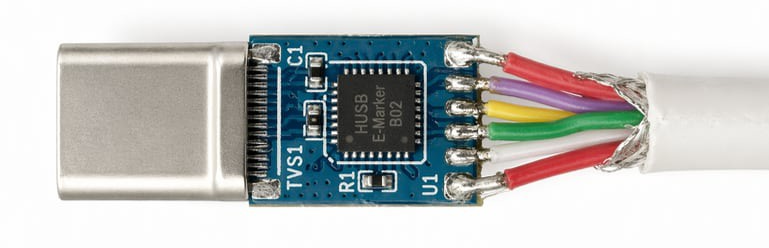
The solution adopted by the USB Implementers Forum was to require many USB-C cables to include a small identification chip. This chip, called an e-marker, communicates over the CC lines and, when queried by a device, reports the cable’s capabilities, such as its current rating and supported data features.
Only cables designed to carry more than 60 W of power, or to support data rates above 480 Mb/s, are required to include an e-marker. This makes it possible to manufacture basic cables for low-power or low-speed applications at very low cost, while the added cost of an e-marker...
Read more -
The curiously complex taxonomy of USB plugs
04/14/2026 at 18:27 • 0 commentsOver the last several months, I have been working on Dr. PD, an open-source USB Power Delivery analyzer and programmable sink. Diving deep into the world of USB-PD and USB-C has given me a unique appreciation for these rich technologies, and I want to share some of the things I have learned.
In the last decade or so, USB-C has become the dominant standard for power and data transmission. Despite the occasional attempt at proprietary formats (Lightning, anyone?), practically every device these days comes with the ubiquitous rounded port.
Without a doubt, this success is well deserved: USB-C cables are easy to acquire and inexpensive, compatible power supplies can be had for less than the cost of an espresso beverage, and inserting a plug into a receptacle does not require a degree in quantum physics.
These capabilities, however, come at a cost. USB-C receptacles and cables are surprisingly complex, and designing hardware around them can be challenging even if you decide to use off-the-shelf parts.
Anatomy of a USB-C port
Let's start by looking at a “full” USB-C port and its signals:
![]()
Let's go through these in detail:
- GND and VBUS carry power to and from a device. By default, only 5V is available, with analog signaling on CC1 and CC2 used to advertise or detect up to 3A of current. By using Power Delivery, however, devices can negotiate various voltage and current combinations up to 48V and 5A—a whopping 240W of power.
- CC1 and CC2 can be used for four (!) purposes:
- By manipulating the analog characteristics of these lines, a device can advertise 5V at either 500mA, 1.5A, or 3A without the need for more advanced digital negotiation. Default USB current corresponds to the legacy USB current level, typically 500 mA for USB 2.0 or 900 mA for USB 3.x.
- One of the two lines can be used to provide VCONN, a special 5V power rail capable of providing up to 1W of power that can be used to power accessories independently of VBUS. This is useful because an accessory may need 5V to function, but then request a higher (or lower) voltage to be delivered on VBUS to power some of its peripherals or another device. Notably, VCONN does not normally pass through the cable end-to-end; it is used to power circuitry in the cable or plug assembly and is typically not presented as a usable rail at the far end.
- The other line can be used for Power Delivery signaling. By using a dedicated serial protocol, devices can exchange information, negotiate a power contract to deliver a voltage different from the standard 5V alongside specific power and current capabilities, or enter Alternate Modes that repurpose some of the data lines in the cable for something other than ordinary USB communication. For example, monitors use an Alternate Modes to receive video data from a host device.
- Because each line takes on a different role, their relative position is used to determine the orientation of the cable in the receptacle.
- The SBU pins are used for “sideband” data. They provide an independent low-speed (up to 1MHz) channel that can be used for custom out-of-band communication between compatible devices. For example, DisplayMode Alternate Mode uses them for AUX signaling, and USB4 can also use them for sideband functions during link management and initialization.
- D+ and D- are traditional USB 2.0 data lines. These represent a single differential pair and run as a twisted pair inside the physical cable, and are capable of serial speeds up to 480Mbps.
- TX+, TX-, RX+, and RX- are SuperSpeed differential pairs. In a full-featured USB-C connection, these high-speed pairs can be used for protocols such as USB 3.x, USB4, Thunderbolt, or Alternate Modes. In the newest USB4 mode, the total link rate can reach 80 Gb/s symmetrically or 120 Gb/s in one direction with reduced bandwidth in the other. As I mentioned above, these lines...