 roelh
roelh"Just another day at the Sam Cruise Detective Agency. I hear the staccato rattle of Daisy at the old typewriter in the outer office: the band in my head starts to tune up. I reach for a strong coffee. Pulling up the blind I look out of the grimy window into the street below. Ordinary people going about their ordinary business, unaware of the intrigues on their doorsteps. What do they know of the Fat Man, or the mysterious goings on at No.19?. Luscious Lana wiggles past, a sly smile playing across her ruby red lips. A gust of wind disturbs the garbage on the sidewalk.
And then the phone rings... "
Since a few days, a new (old) game is running on Isetta: Contact Sam Cruise (CSC)

It's a ZX Spectrum game from 1986. You are the detective who has to solve a murder case. Very nice graphics.
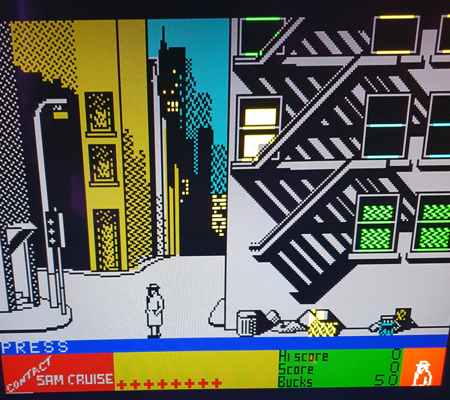
Running ZX Spectrum games
Since a few months, Isetta boots the SymbOS operating system directly. That implied that there was no fast way to run Spectrum games from internal serial flash, as before, when also SymbOS had to be started from this flash chip.
But I now have a new way to start Spectrum games from the SD card. And I added the Sam Cruise game.
While Manic Miner and The Great Escape directly approached the hardware through I/O ports, the Sam Cruise game relies on interrupt handling by the spectrum ROM. When a frame interrupt occurs, the ROM software increments a frame counter at 5C78 (that is used by CSC to start drawing a new frame), and it reads the keyboard matrix, converts to ascii and put that on location 5C08, where CSC reads it to decide which command you entered.
The games can be entered in assembly , and can then be assembled with WinApe (Amstrad simulator and assembler) on a PC, resulting in a ".com" file. I made a special include file "zx_incl.asm" for this, that is a software layer that lets Isetta behave as a ZX Spectrum.
It switches the screen to ZX Spectrum mode, converts ps/2 keyboard signals to ascii, and handles an interrupt as described above. For games that read the keyboard matrix directly through an INPUT port, it simulates the ZX keyboard matrix.
Note that on Isetta, IN and OUT instructions do not simply transfer bytes on the databus. They call a sequence of microinstructions that can do almost anything.
In general, ZX programs run without modification. But Manic Miner ran a lot too fast, due to the fast LDIR that Isetta has. I created a second LDIR (opcode ED B4) that has the same speed as on a real Z80 and used that. Now, Manic Miner has normal speed. And in a few games I disabled the automatic joystick detection.
More spectrum games (in assembly) can be found here: https://gitlab.com/z80-source-code-software/other-systems/
How to run a Spectrum game
On the Isetta computer, start the SymShell by double clicking on it's icon.
If you like, select a full screen with the "full" command.

Change the directory (with CD command) to the ZX directory where the .com file and cpvm.com are.
Then type "cpvm" to start the CP/M operating system,
and in CP/M, type the name of the .com file (you can omit the .com part), to start it.
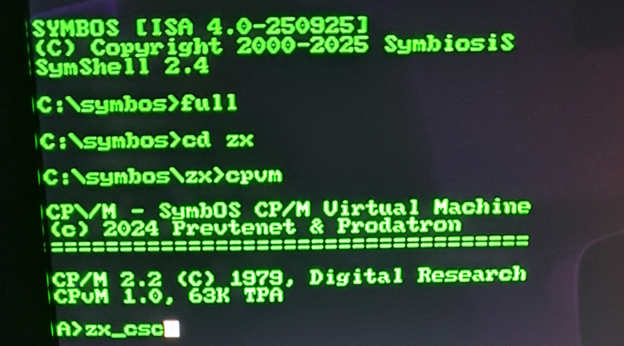
The following games are available:
zx_mm.com // Manic Miner
zx_tge.com // The Great Escape
zx_csc.com // Contact Sam Cruise
Also, the full assembly code of these games is provided. It includes the software adaption layer that lets Isetta behave as a ZX spectrum (Video, keyboard and sound). This will also enable you to run other ZX Spectrum programs.
New software pack in file section
Today I uploaded a new software pack to the file section of this project, sw_pack251227.zip.
It has several new things:
Symisa.pak // An improved SymbOS version that starts programs faster
Symbos.ini // Was missing in previous pack, causing programs that refused to start
isetta_rpi // Improved automatic test
zx // New directory with ZX Spectrum games
ucode251203 // New microcode needed for new ZX games and improved SymbOS
It is not needed to re-write all microcode. Just compare each page with the Verify command, and only re-program that page if there was a difference.
[edit: It seems Manic Miner works on the 1024k version but not on the 512k version. Have to investigate this. ]
Discussions
Become a Hackaday.io Member
Create an account to leave a comment. Already have an account? Log In.