 Tamas Feher
Running the BJR on Rust
Inside the BJR_019 lives an STM32F4 microcontroller, orchestrating motion control, sensing, and communication. Every line of firmware on that chip and the supporting software that interacts with it was written in Rust.
The decision was deliberate. I believe the Rust ecosystem is mature enough to get more widespread in the embedded community. With this project I wanted to test my assumptions.

Impressions of using Rust in embedded systems
Debugging bare-metal embedded systems is always harder. Crashes rarely announce themselves with helpful stack traces. Most often, things just stop working.
With Rust, many memory-related bugs are caught before they ever touch the hardware. The compiler enforces safety rules that can feel annoyingly strict at times. In retrospective those same rules have saved me from introducing hard-to-find bugs.
Using a different language doesn't make bugs magically disappear, but even if it fails, debugging has been much simpler.
Took a little while until I got used to the HAL's design patterns, but once I got a hold of it, I could apply it to all the other projects in rust. It also gave birth to my own higher level abstraction (BAL, the Board Abstraction Layer) that I'll introduce in a later log.
What's included?
The BJR_019 project isn’t just firmware. Alongside the embedded code, I wrote a telemetry visualization tool, also in Rust.
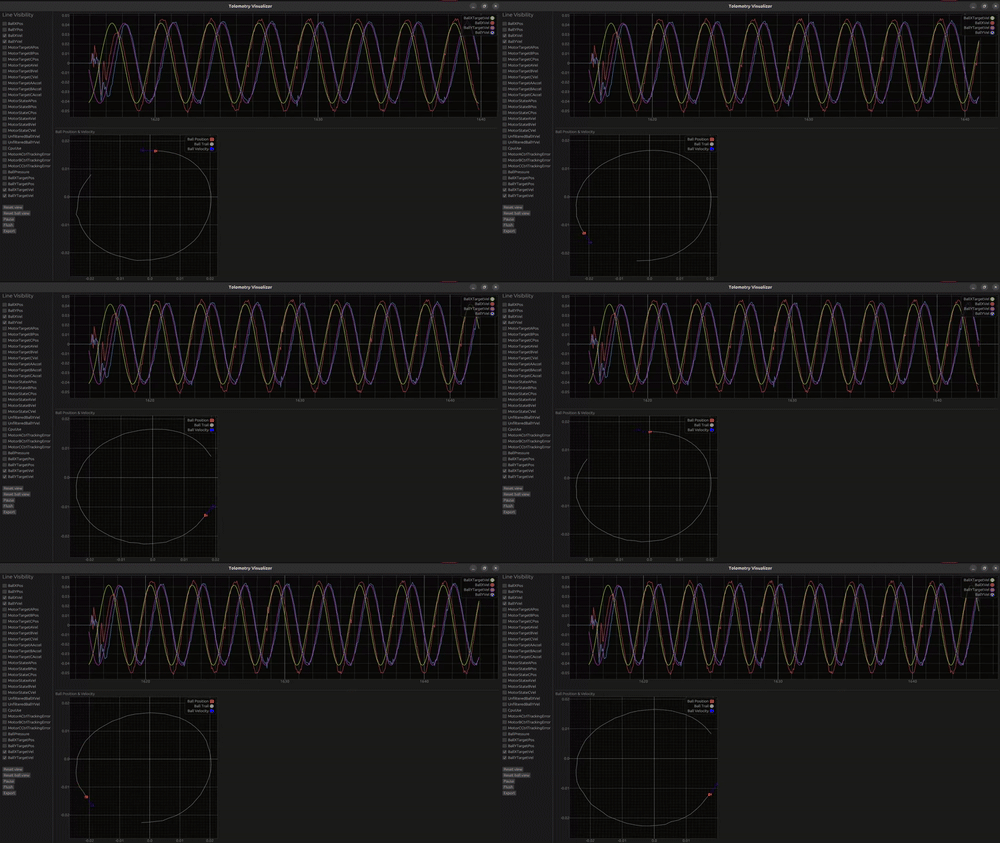
This small visualizer enabled me to chisel out control related issues with minimal data processing. I could see what's happening to the robot in real time.
Because both the firmware and the visualization software shared the same language, I could rapidly iterate on the communication protocol. Adding a new telemetry field was as simple as tweaking a few lines in one package That tight integration was a huge win for speed.
Programming and communicating with the BJR_019
One of the standout parts of this journey has been using probe-rs. an incredible toolkit for embedded Rust. With a single-line installation, I gained:
- A flashing tool
- A debugger
- A communication bridge using RTT
If you're unfamiliar with Segger's Real Time Transfer (RTT) feature, you're in for a treat! Check it out here.
Calling
cargo embed --bin bjr_app --release
Will do a couple of things:
- Build and flash the specified program
- Opens 3 RTT channels:
- The log outputs from the device
- the terminal interface for sending commands
- a binary stream of telemetry data, piped into a web socket. the telemetry visualizer connects to this socket and displays the measurement data real time.
To configure this, I added a simple Embed.toml file:
[default.general]
chip = "STM32F446RETx"

[default.rtt]
enabled = true
up_channels = [
    { channel = 0, mode = "NoBlockSkip", format = "String" },
    { channel = 1, mode = "NoBlockSkip", format = "String"},
    { channel = 2, mode = "NoBlockSkip", format = "BinaryLE", socket = "127.0.0.1:8080" },
]
tabs = [
    { up_channel = 0, name = "Log" },
    { up_channel = 1, name = "Terminal" },
]
You set it once and forget it.
Why This Matters
For me, rapid iteration is the name of the game. The faster I can flash, debug, and visualize, the faster I can tune the robot and push it forward.
Rust, combined with probe-rs, RTT and the visualizer, gave me a workflow that was fast, productive and genuinely enjoyable. It reduced friction, allowing me to focus less on plumbing and more on experimenting with the robot itself.
Discussions
Become a Hackaday.io Member
Create an account to leave a comment. Already have an account? Log In.