 diddy
diddyVersion 4.0: The "Cinematic" Update
This version transforms the web server from a simple file streamer into a rich media gallery. The headline feature is a completely custom-built, lightweight metadata engine designed specifically for the limited resources of the Pi Zero.
The user is asked during install if they want to setup a media scraper service which will run at 5am and download media art and movie synopsis.
New Feature: Automated Wikipedia "Plot" Scraper
Unlike most media servers that require complex API keys and heavy databases, V4 introduces a "Zero-Config" scraper.
Narrative Extraction: Using advanced HTML parsing (BeautifulSoup4), the scraper identifies the specific "Plot" or "Synopsis" section of a movie's Wikipedia page.
Anti-Clickbait Logic: Implemented a sophisticated filtering system to bypass SEO "teaser" text (e.g., "Ending explained...") and non-narrative facts, ensuring only the story is displayed.
Multi-Sentence Formatting: Automatically cleans Wikipedia citations (like [1], [2]) and trims the synopsis to a perfectly formatted 4-sentence blurb to maintain a clean UI.
New Feature: Intelligent Poster Gallery
Auto-Sourcing: The engine automatically finds high-quality movie posters via DuckDuckGo Image Search.
Resource Optimized: Images are automatically downloaded, converted to RGB, and resized to a standard 300x450px thumbnail. This saves significant disk space and ensures the web interface loads lightning-fast on the Pi Zero 2W.
Improved: Rich Metadata Interface
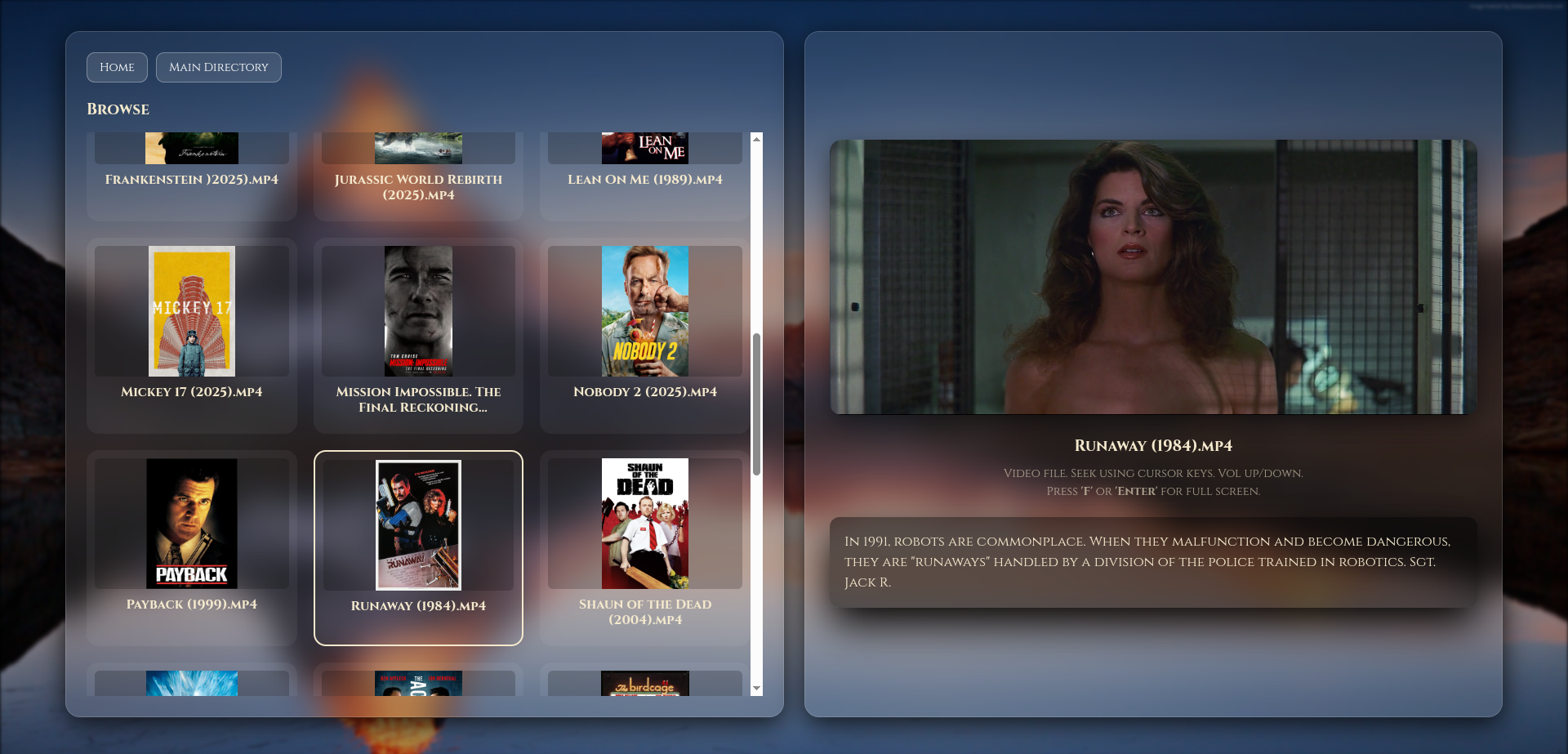
Plot Overlay: The web UI now features a dedicated synopsis window below the movie preview.
CSS Line-Clamping: Uses modern CSS logic to ensure text never overflows, keeping your library looking professional and uniform regardless of description length.
Daily Automation: A new Systemd timer-service automatically runs the scraper at 5:00 AM daily, finding metadata for any new movies you've added while you slept.
Developer Notes :
Environment Isolation: The scraper now runs in a Python Virtual Environment (venv), ensuring dependencies like Pillow and BeautifulSoup4 don't interfere with your system-wide Python installation.
Permissions Logic: The setup script automatically manages minidlna group permissions, ensuring the web server can always read and display your metadata.
Media-scraper service is set to run at 5am but can be ran at any time from within cockpit (remote administration) and search for media-scraper under services
how does it work ?
when the scraper.py runs (at 5am), this script will search DuckDuckGo search engine for movie art posters for your movie files then search Wikipedia for the plot of every movie to get the actual plot.
this is then displayed when browsing the Video section and the user clicks on a movie. The synopsis is displayed below the playing movie.
it's about 95% correct. small indie movies are hit and miss.
can be download upgraded by :-
wget -qO main.zip https://github.com/diddy-boy/mini-pi-media-server/archive/refs/heads/main.zip && unzip -o main.zip && cd mini-pi-media-server-main && unzip -o pi-setup*.zip && cp -rf pi-setup ~/ && cd ~ && rm -rf mini-pi-media-server-main main.zip && cd ~/pi-setup && chmod +x ./*.sh && sudo ./mini-pi-setup.sh
Discussions
Become a Hackaday.io Member
Create an account to leave a comment. Already have an account? Log In.