 Gordon
Timers
I think the amount I jump around working on one feature to another is kind of a good representation on how my mind works and how I work on something then quickly switch to another thing. That's why I actually like having multiple ongoing projects at the same time. I really don't have time to work on any projects right now but end up working on them when procrastinating other duties I have. I need to get my life together.
I have been working on adding timers to the MiniPico.
There are a few different "sleep" modes for the device, both modes shut off the OLED first:
- Sleep Mode 1, goes into lowest power mode and only can be woken up by pressing "ESC" button (top left button)
- Sleep Mode 2, when user specifies a sleep amount in minutes eg: "s.z10" (10 min), device will sleep for that amount of time. Due to the time stopping counting when the lowest amount of power sleep mode is used, this sleep mode sets frequency to 20mhz, and does nothing until time is up or ESC button pressed. This mode does not save a ton of power, but allows timers to be used
A timer can be called by "s.tt<n>", with n being the number of minutes we want to set the timer for. The second core handles the timers, and if a timer reaches it's end, it beeps twice.
If the user doesn't press a button for a set amount of time, the device will enter a sleep mode. If there are any timers set, the device will enter Sleep Mode 2. If no timers are set, it will enter Sleep Mode 1.
If timers are set, the timer that is next in line (time wise) will be the amount of time the device sleeps for.
This took me a while to figure out, but it's working great now. As the device is just using Pico W's internal timing and there is no real RTC, I'm sure these timers are off by a few seconds, but that's perfectly acceptable when just setting a timer for a few minutes.
I want to add alarms as well, for example every day at 6am. But this would require the use of an external RTC, so that's off the table for this device.
Post
I also wanted to find a way to send a "tweet" (I don't know what they call them anymore now that it's not twitter) to my X profile. I tried messing around with the X API directly, but to no avail. Then it appears that most people are using IFTTT, but now they charge for webhooks. So that's a no go.
So my solution was to create POST, and host it on my website. Basically this is a "chat" that if someone has the secret key, they can post a message to.
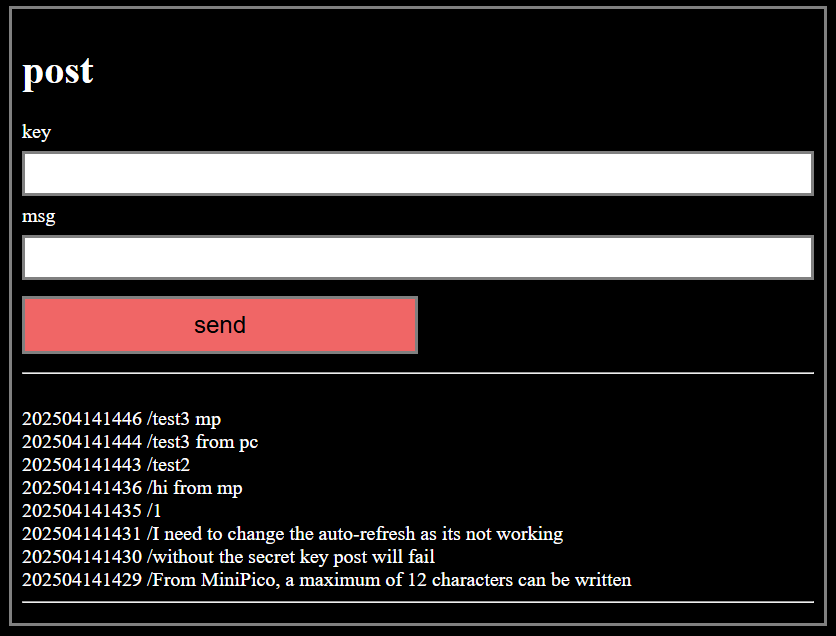
If connected to WiFi, the MiniPico is able to read all messages using the command "s.g". I had to implement text wrapping to OLED output, as well as add the ability to page up/down the console output history. Currently there are 21 lines that fit into the history, or 3 pages. That's enough to read the whole list of 8 posts.
On the server side, it's a text file that every time a post is written to, it bumps the last one off, and adds the new one. Pretty simple really.
The secret key is hardcoded into the MiniPico's firmware, so to make a post all that is needed is to write "s.p <message goes here>". I need to implement the ability to write lines longer than 16 characters, as this allows for a maximum of 12 characters to be posted.
Often when doing urequests stuff on Pico W, I get the "[Errno 12] ENOMEM" error... So I have to catch them with a "try/except" to allow user to try again. I need to research this more.
Discussions
Become a Hackaday.io Member
Create an account to leave a comment. Already have an account? Log In.