 MavisEverly
Background
The increasing interest in humanoid robots has driven demand for dual-arm collaborative robots development. As dual-arm robots require the simultaneous control of over 12 degrees of freedom for task execution, they demand algorithmic support in practical applications.
Universal Robots (UR) holds a significant market share, with many workstations utilizing UR5 and UR10 for dual-arm setups. By using myController S570, we can easily build a teleoperation project without any algorithmic support.
By wearing myController S570, users can control robot to perform tasks that align with human operation habits, greatly simplifying motion teaching of robot and data acquisition. This approach offers substantial advantages for applications such as measurement, rescue, and various unmanned operations.
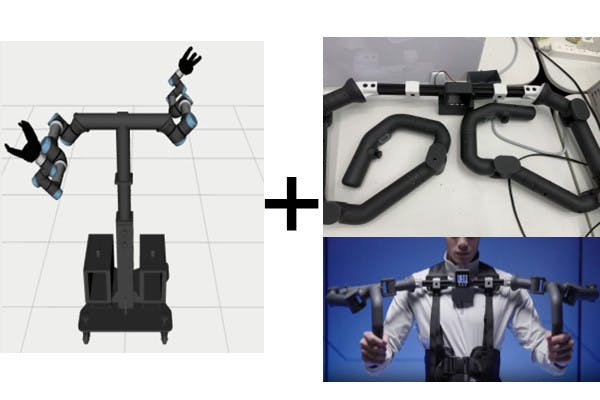
Reference of myController S570
The myController S570 is the data acquisition device which offers high compatibility with various robots. It transmits real-time data of 14 joints, 2 joysticks and 2 buttons, enabling control of the real robot via PC.It covers scenarios such as data collection, remote operation, and end-to-end application development.
- High Data Acquisition Speed: With a data collection speed of up to 100Hz, it ensures reliable end-to-end AI data collection and motion capture.
- Strong Compatibility: It can easily integrate with robots of various structures and even control accessories such as grippers or wheeled robots.
- Advantages in Robotic Remote Operation: With standard Python libraries and ROS support, it offers Bluetooth and Wi-Fi connections, making robot remote control accessible to beginners.

wearing an exoskeleton
Steps for Building the Project
Using Exoskeleton to Quickly Control UR5 Dual-Arm in ROS
This example is built on Ubuntu 20.04 + ROS Noetic + Miniconda with a Python 3.8 virtual environment.
To avoid unresolved errors, please set up the project according to the specified requirements.
1. Create a ROS Python 3.8 Virtual Environment
Please install Miniconda and activate the Base environment first.
bashconda create --name ros_py38 python=3.8 conda activate ros_py38 pip install pyqt5 catkin_pkg rospkg empy
2. Build the ROS Workspace then Clone the Third-Party and Main Project
bashcd ~mkdir myController_ws && mkdir myController_ws/src && cd myController_ws/srcgit clone https://github.com/THU-DA-Robotics/Universal_Robots_ROS_Driver.gitgit clone -b noetic_devel https://github.com/THU-DA-Robotics/robotiq.gitgit clone https://github.com/THU-DA-Robotics/dual_ur.gitgit clone -b mycontroller_s570 https://github.com/elephantrobotics/mycobot_ros.git
3. Catkin_make and Open Rviz
bashcd .. catkin_make source devel/setup.bash roslaunch mycontroller_s570 test.launch
You will see the myController S570 exoskeleton model in rviz.

4. Connect myController S570 to PC.
Please follow the gitbook.

5. Check the Serial Name and Test Data Transmission
bashconda activate ros_py38 ( you can add this line to ~/.bashrc to avoid repeated operations )ls /dev/tty*
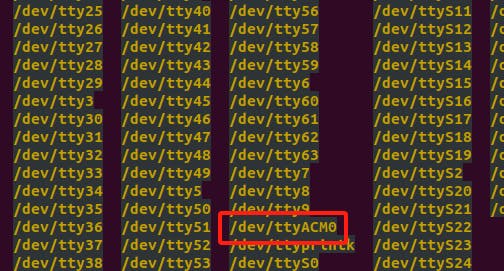
cd /home/u184/controller_ws/src/mycobot_ros/mycontroller_s570/scriptsgedit test.py
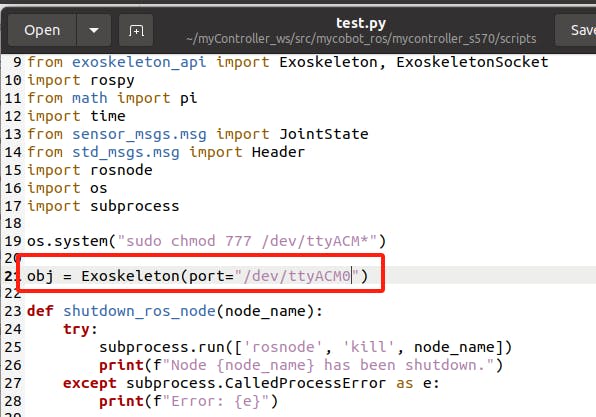
Close Gedit, create a new terminal to run the scripts.
bashconda acitivate ros_py38cd /home/u184/controller_ws/src/mycobot_ros/mycontroller_s570/scriptspython3 test.py
You will see the exoskeleton model in Rviz move with the real one.
6. Control UR5 Dual-Arm in Rviz
In this part of step,, we should modify the launch file that starts Rviz for the robot, adjusting the node names, message types, etc., so that the joint transformation information of the robot model matches the messages published by the myController S570.
6.1 Create a New Launch File
( You can download this file from the attachment of the article.)

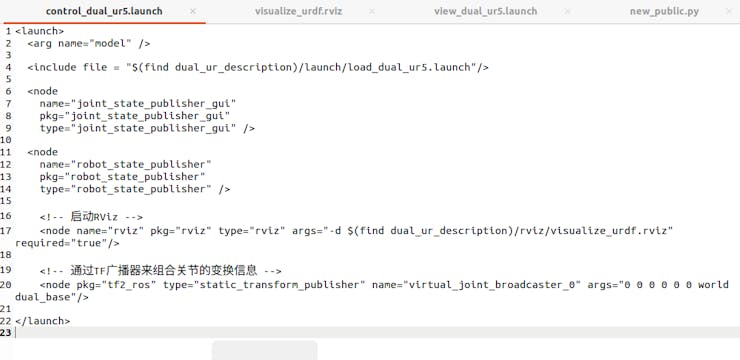
6.2 Modify Pyhon Script to Ensure the Pubilished Joints Name
( You can download this file from the attachment of the article.)

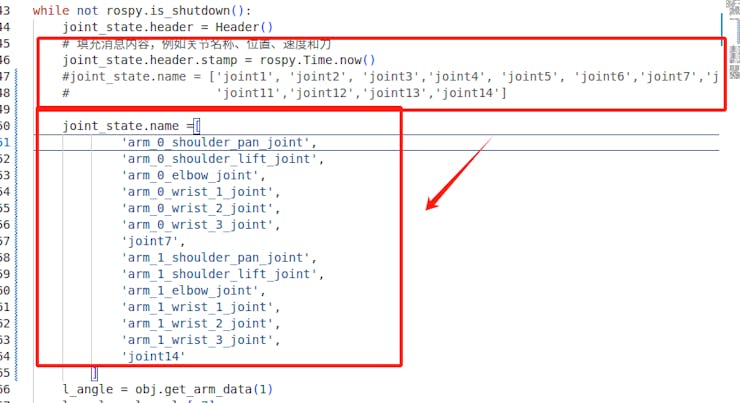
the names should match with ur5 dual-arm urdf model
6.3 Open 2 New Terminals to Test Dual-Arm Robotic Control
Open one terminal to launch rviz.
bashconda activate ros_py38cd ~/controller_wssource devel/setup.shroslaunch dual_ur_description control_dual_ur5.launch

Open another terminal to run test.py to start the exoskeleton and test motion control.
bashconda activate ros_py38cd /home/u204/myController_ws/src/mycobot_ros/mycontroller_s570/scriptspython3 test.py
Outlook for Secondary Development
For connecting this demo to a real robot for testing, you should refer to the wiki by another author of the dual-arm-robotq project.
In case of using other robots for simulation tasks, the same steps related to myController S570 installation and launch files modification in this project can be referenced. During development, the following points should be considered:
- Redundant degree-of-freedom handling.
- Joints angle mapping adjustments between the exoskeleton controller and the robot accroding to the DH models.
Summary
The wearable exoskeleton offers advantages in high compatibility and human motion capture. It enables high-speed data acquisition from joints J1 to J14, with real-time sensor feedback displayed on an electronic screen, contributing significantly to the development of unmanned tasks.
For inquiries regarding the development and application of the myController S570 exoskeleton, please feel free to contact us. We welcome further exploration of remote operation and development use cases.
Discussions
Become a Hackaday.io Member
Create an account to leave a comment. Already have an account? Log In.