 Edward
Overview
This week was all about getting the SigCore UC Control Panel into a shape that feels like a finished product — not just a test harness.
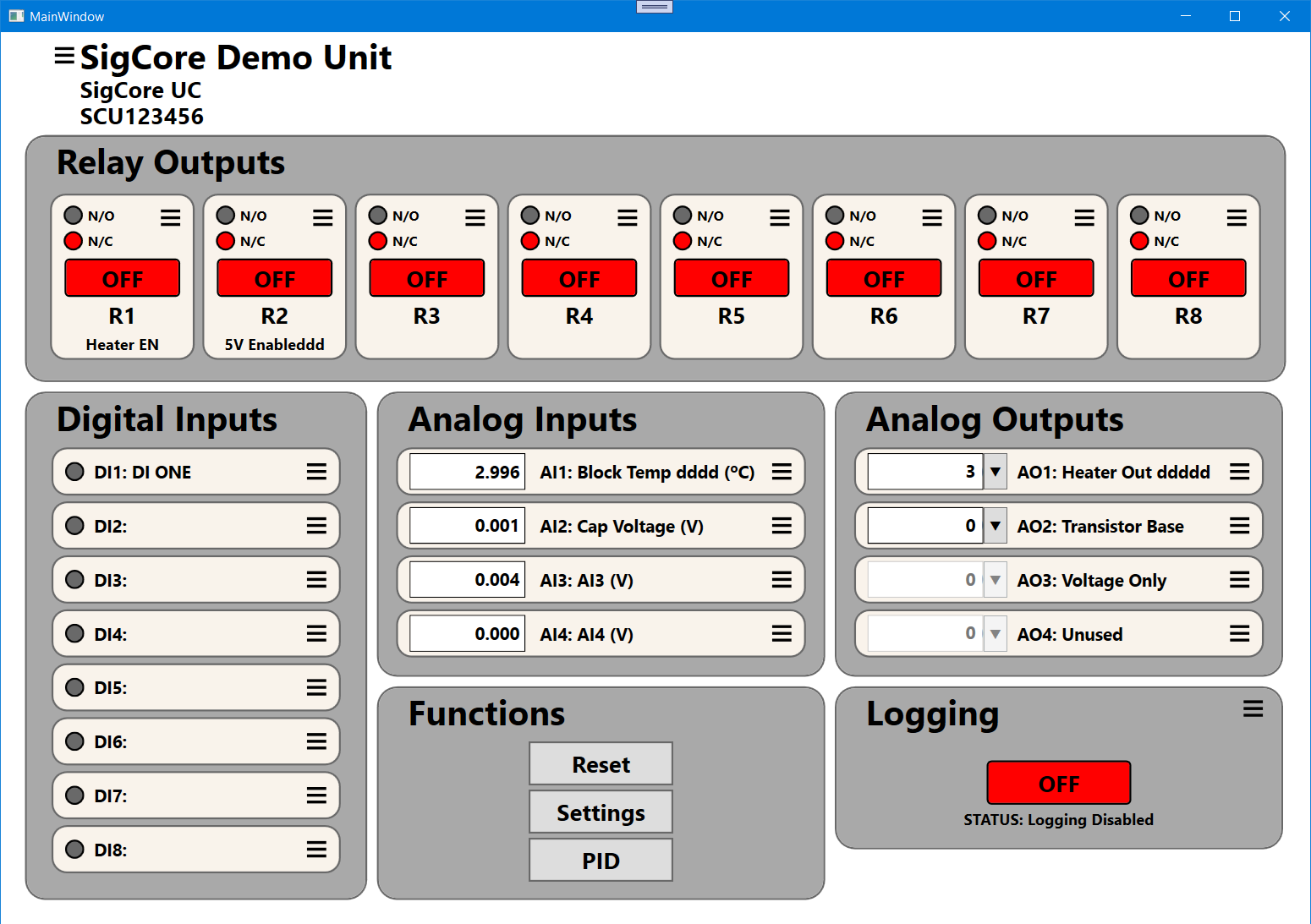
The interface is now a clean, touch-friendly dashboard that mirrors the hardware layout: relays, inputs, outputs, and live system functions all visible at a glance.
The software communicates directly with the SigCore UC hardware over TCP, automatically discovering the device, loading its FRAM-stored properties, and updating all I/O channels in real time.
What It Can Do
Full control of I/O
-
Toggle all 8 relays with independent Normally Open / Normally Closed settings.
-
Monitor 8 digital inputs and 4 analog inputs with live voltage or sensor readings.
-
Adjust 4 analog outputs for voltage or PWM operation, including per-channel scaling and calibration.
Property dialogs
-
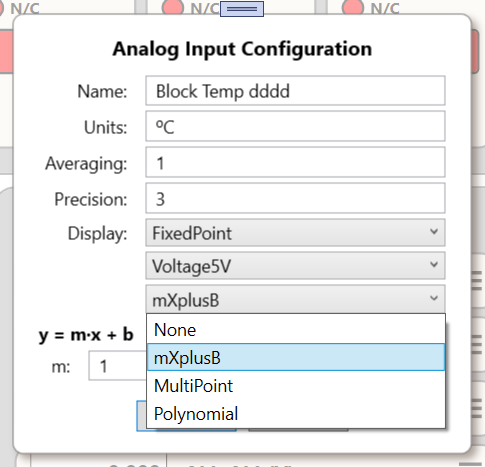
Each input, output, and relay has its own dialog with editable names, units, and parameters.
-
Properties are stored persistently in FRAM and reloaded automatically at startup.
Live operation
-
Changes take effect instantly — no restarts needed.
-
The Control Panel continuously polls and updates at user-defined sample intervals while remaining smooth and responsive.
PID control support
-
Direct access to PID loop properties.
-
Each loop has independent tuning parameters and setpoints.
-
Designed for heater control, feedback regulation, and automation loops.
Logging system
-
Integration with a MySQL backend to continuously log all channel data with precise timestamps.
-
Will enable long-term trend plotting and experiment archiving.
How It Works
The Control Panel is written in C# (WPF) and communicates with the SigCore UC server over a JSON-based TCP protocol.
When launched, it:
-
Connects to the device (auto-discovery via mDNS).
-
Retrieves device properties and populates all channel groups.
-
Begins asynchronous polling and live updates.
Each group — relays, digital inputs, analog inputs, and analog outputs — runs in its own lightweight update loop, keeping the interface responsive even during heavy communication. All cross-thread updates are marshaled through the UI Dispatcher to prevent race conditions.
The architecture cleanly separates hardware control from presentation:
-
SigCore Server handles all device control and communications with the outside world.
-
SigCore Control Panel provides the user interface to monitor and control the server’s behavior.
Dialogs and property windows follow an MVVM pattern, making it easy to expand the system with new channel types or logging features later.
Challenges This Week
Decimal input bug
A stubborn issue blocked typing decimal points and commas in analog input dialogs. The culprit turned out to be an overzealous input validation filter. Fixed by handling input through double.TryParse() and bypassing locale restrictions.
Modal dialog behavior
Some dialogs occasionally dropped behind the main window. This was fixed by ensuring all dialogs are application-modal and always stay on top of the parent window.
Async initialization
The initial property load caused occasional UI freezes. Reworked to use background tasks (Task.Run) with Dispatcher.Invoke for updates.
Logging integration
The MySQL logger now runs independently but isn’t yet tied into the UI toggle. Batched insert handling is next.
Closing Thoughts
The Control Panel has evolved from a prototype test tool into a professional-grade front end for the SigCore UC hardware.
It’s stable, visually clear, and fast — exactly what you want when you’re monitoring a live control system.
The really cool thing about the Control Panel Software is that it provides complete control of the device, just like a physical front panel. Every relay, input, output, and property is right at your fingertips.
You can operate it exactly as you would a hardware console — toggling relays, adjusting analog outputs, tuning PID loops, and watching live feedback in real time.
It makes the SigCore UC feel like a cohesive, integrated system — hardware and software working together seamlessly.
Discussions
Become a Hackaday.io Member
Create an account to leave a comment. Already have an account? Log In.