Close
0%
0%

Another Type 30 Display Reproduction At 36% Scale

One would think that two Type 30 Display Reproductions would be enough for one man. Wrong. One last kick at the can.

Similar projects worth following
Back in September 2025 I made my first DEC Precision CRT Display Type 30 Reproduction. At 66% scale it just felt too big. In October I took another crack at it and ended up with a 57% scale version that exactly matched the PiDP-1 Replica it is meant to compliment and felt about right size wise. But a couple of weeks ago I got some new information that undermined some of the assumptions I had made when modeling the displays so here I am in November making my final Type 30 Reproduction.

When I started my Type 30 reproduction project(s) I sent a request to the Computer History Museum (CHM) through their contact page asking if it would be possible to get some measurements of the Type 30 display. In mid-October 2025 I received a reply from an wonderful archivist at the CHM who kindly agreed to take some measurements for me. 

A quick anecdote. While the archivist was at the CHM to get the measurements they were introduced to Peter Samson of Tech Model Railway Club and PDP-6 fame who was volunteering that day and let them into the PDP-1 room. ;-)

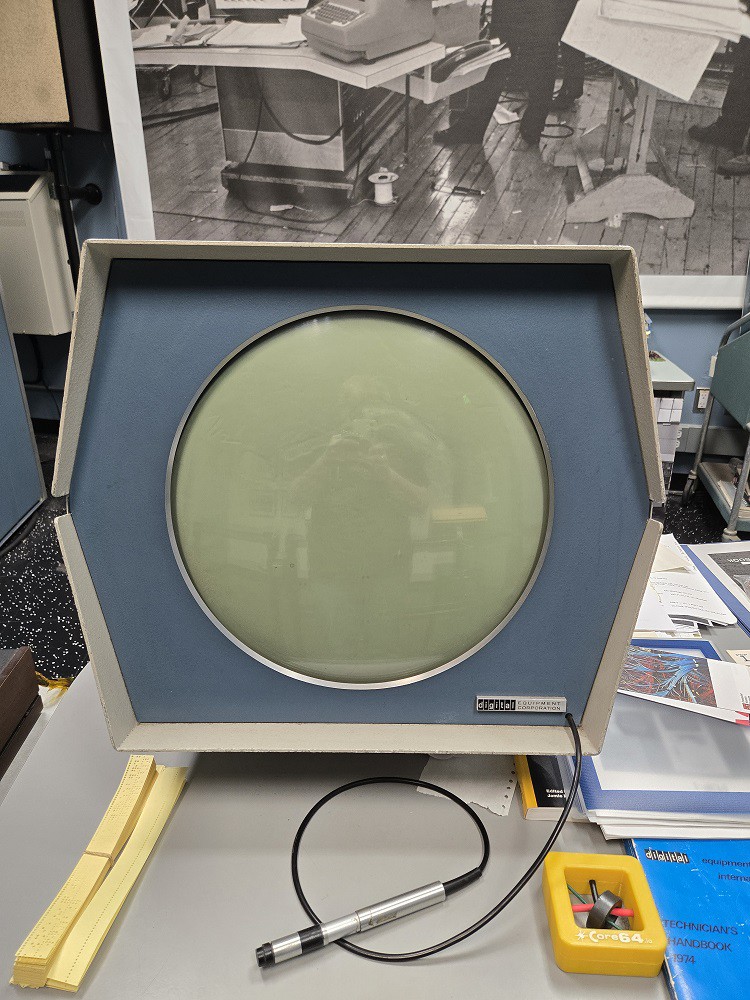
So I sent this photo: 
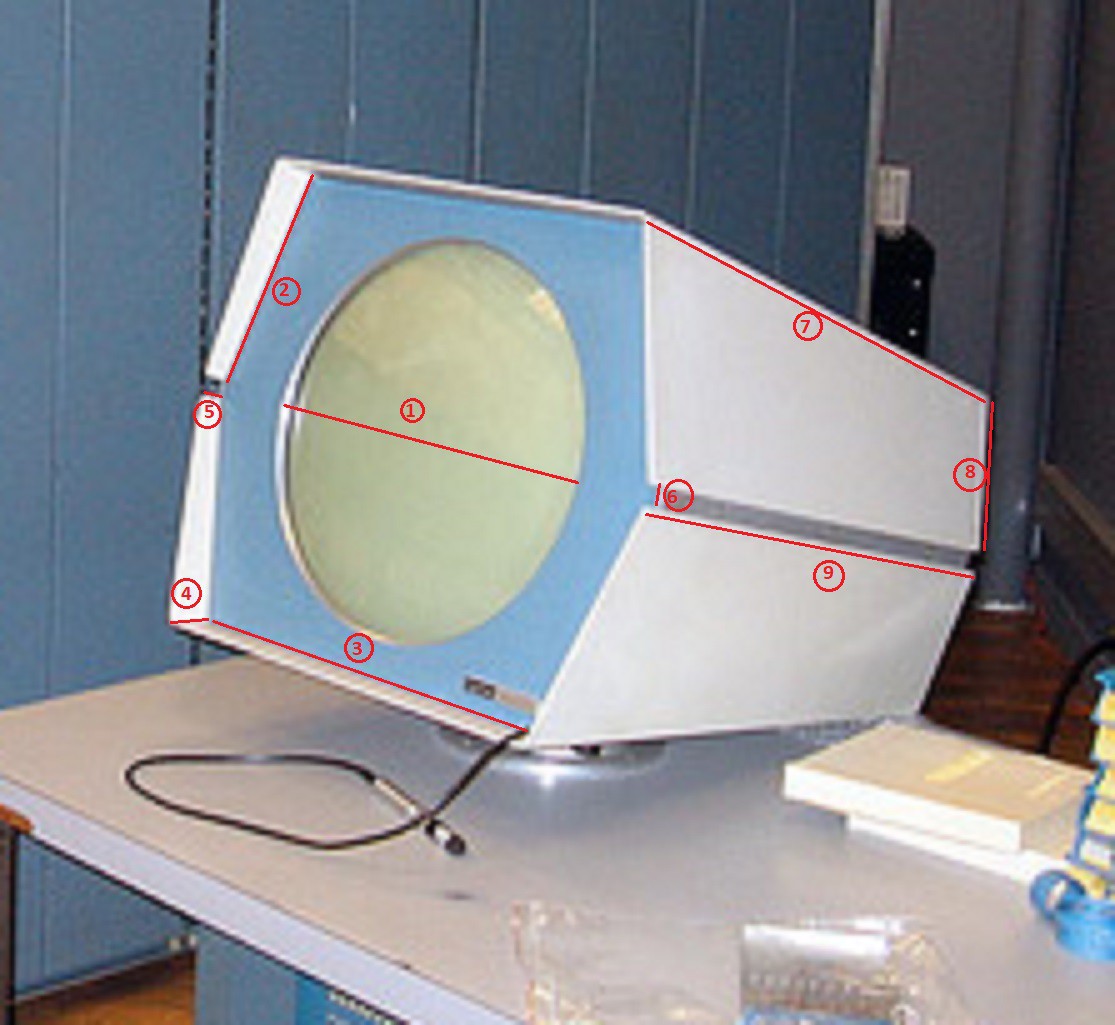

And received the following measurements:

  1. 14”
  2. 8 ½”
  3. 17”
  4. 1 5/8”
  5. 3/4”
  6. Same as 5 (above)—3/4”
  7. 26 1/4“
  8. 6 3/8“
  9. 25"
  10. The black cable of the light pen (not including rubber attachment nor silver pen) 17”
  11. The rubber attachment between cable and silver light pen 1 5/8”
  12. The silver light pen 6 ½ “

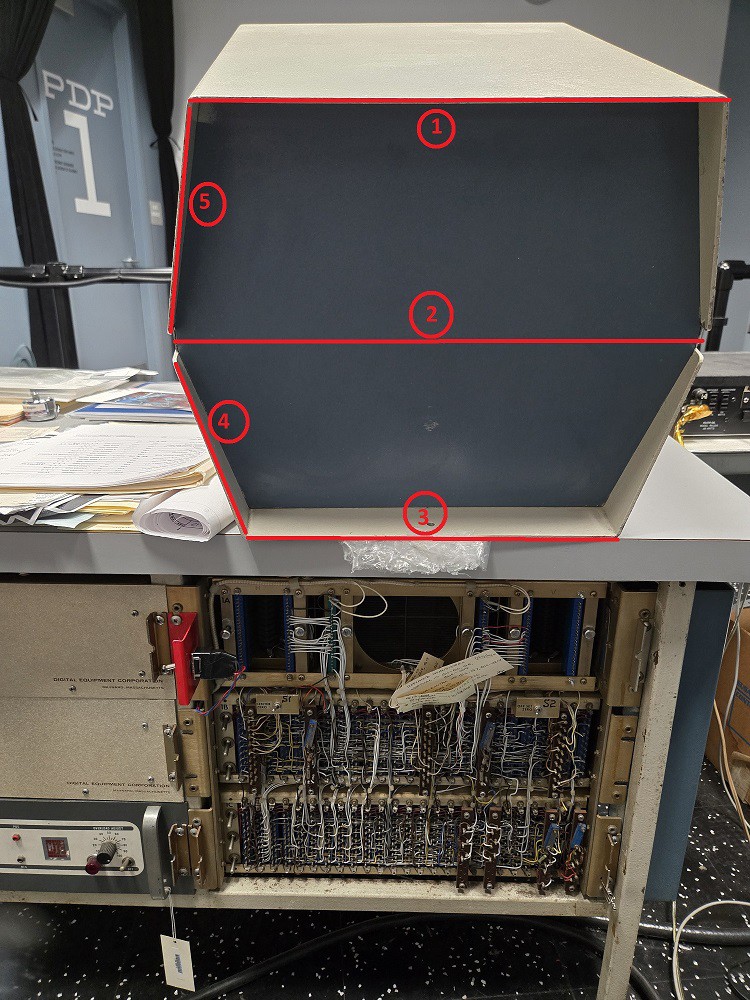
In addition they also sent me the following photos:
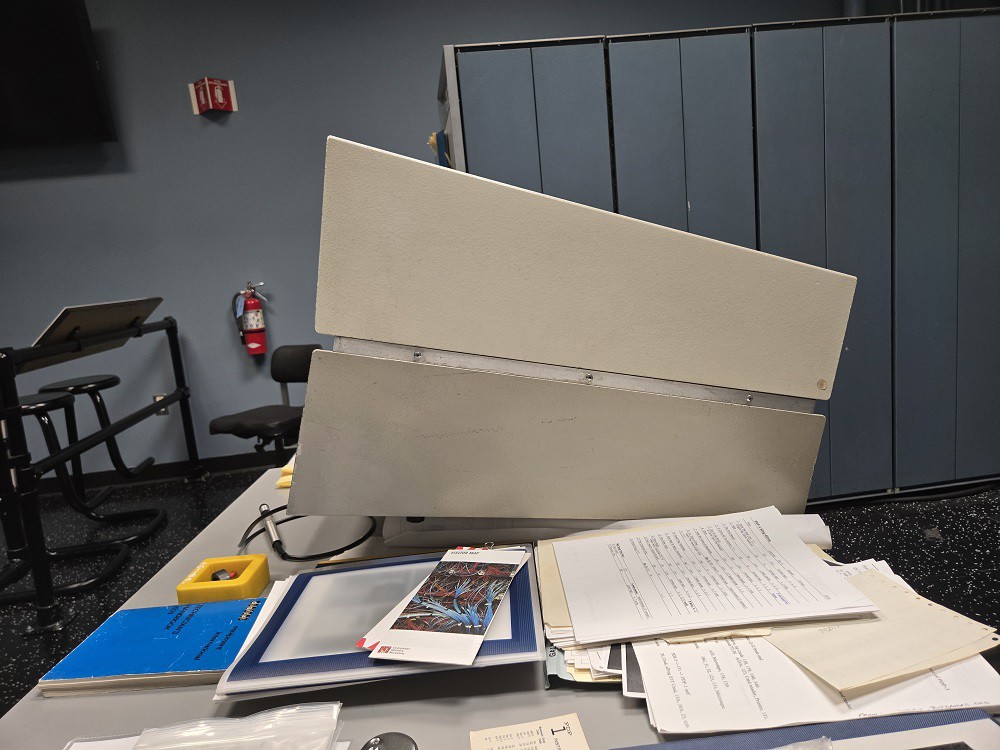


And measurements for the back (I added the red line and numbers):

  1. 12 3/4”
  2. 16 1/4 ”
  3. 12 3/4”
  4. 6 1/4”
  5. 6 3/8"

So a few things. I think these are some pretty cool pictures from the PDP-1 room at CHM taken in October 2025 not 60 years ago. The picture of the back (I had not actually seen a photo of the back till now) has a good view of the circuitry that presumably drove the display. I have to complement the restoration team. The monitor is at least 60 years old and looks great, and of course it works!

Looking at the measurements, the one number that surprised me was the 14" measurement of the round opening in front of the tube. I had read the following in the CRT 30 manual:

The DEC Precision CRT Display Type 30 is a 16-inch random-position, point-plotting cathode ray tube which permits rapid conversion of digital computer data into graphics and tabular form.

I made the assumption that the opening was 16 inches whereas in hindsight I'm sure now it was the tube face itself that was 16 inches in diameter. This is something I would never have known without the CHM's help. I had also read somewhere that the CRT was "19 inches" which I thought at the time was the diameter of the display but which I now believe is the length of the tube (especially given that the sides are about 27 inches deep). 

With a 14 inch opening it means that the scale of my smaller reproduction with it's 8 inch opening is 8/14 or 57% scale which is only 1% larger than the 56% scale that the PiDP-1 console is.  The large reproduction is actually 75% scale (10.5/14).  No wonder it was so big.

Now that I have a more complete picture of the Type 30 display I would like to model the whole thing not just the front.  While the front face by itself is fairly recognizable, I feel it is the shape of the whole monitor that is truly iconic.

To keep the actual size down to something reasonable I first thought 25% scale might be good. That would mean that the screen opening would be 14  x .25 or 3.5 inches and there is a nice display that would work, the Waveshare 3.4 inch DSI LCD Compatible Display (https://a.co/d/aHfCzc6). But a couple of members of the Google Groups PiPD-1 Forum convinced me that targeting the Waveshare 5 inch display would be a better choice for a few reasons:

  • The 5 inch display has an HDMI display (the 3.4 inch is DSI).
  • Some members of the PiDP-1 Group have used the 5 inch display and like it for its sharpness, but also say you would not want to go much smaller for usability reasons (which usually means playing Spacewar ;-).
  • The 25% scale might look a little "toy like".  

So a 5 inch display it is. To have a 5 inch display means scaling the Type 30 at 36%!  Third Time's A Charm.
Logo.svg

A properly scaled image to print.

svg+xml - 85.58 kB - 11/11/2025 at 18:33

Preview

Case.3mf

The sides of the Display.

3mf - 103.06 kB - 11/09/2025 at 01:30

Download

Front Panel.3mf

Attach to the front of the Case. Holds the 5 inch screen in place.

3mf - 115.66 kB - 11/09/2025 at 01:27

Download

Back Panel.3mf

Attach to the back of the Case. Opening for the Wire Holder that prevents the USB and HDMI cables from pulling free and damaging the Display. Print as two parts.

3mf - 157.00 kB - 11/09/2025 at 01:24

Download

Wire Holder.3mf

Plug to secure the USB and HDMI cables as they exit from the back of the Display.

3mf - 118.48 kB - 11/09/2025 at 01:31

Download

View all 7 files

  • A Final Touch

    Michael Gardi11/11/2025 at 18:39 0 comments

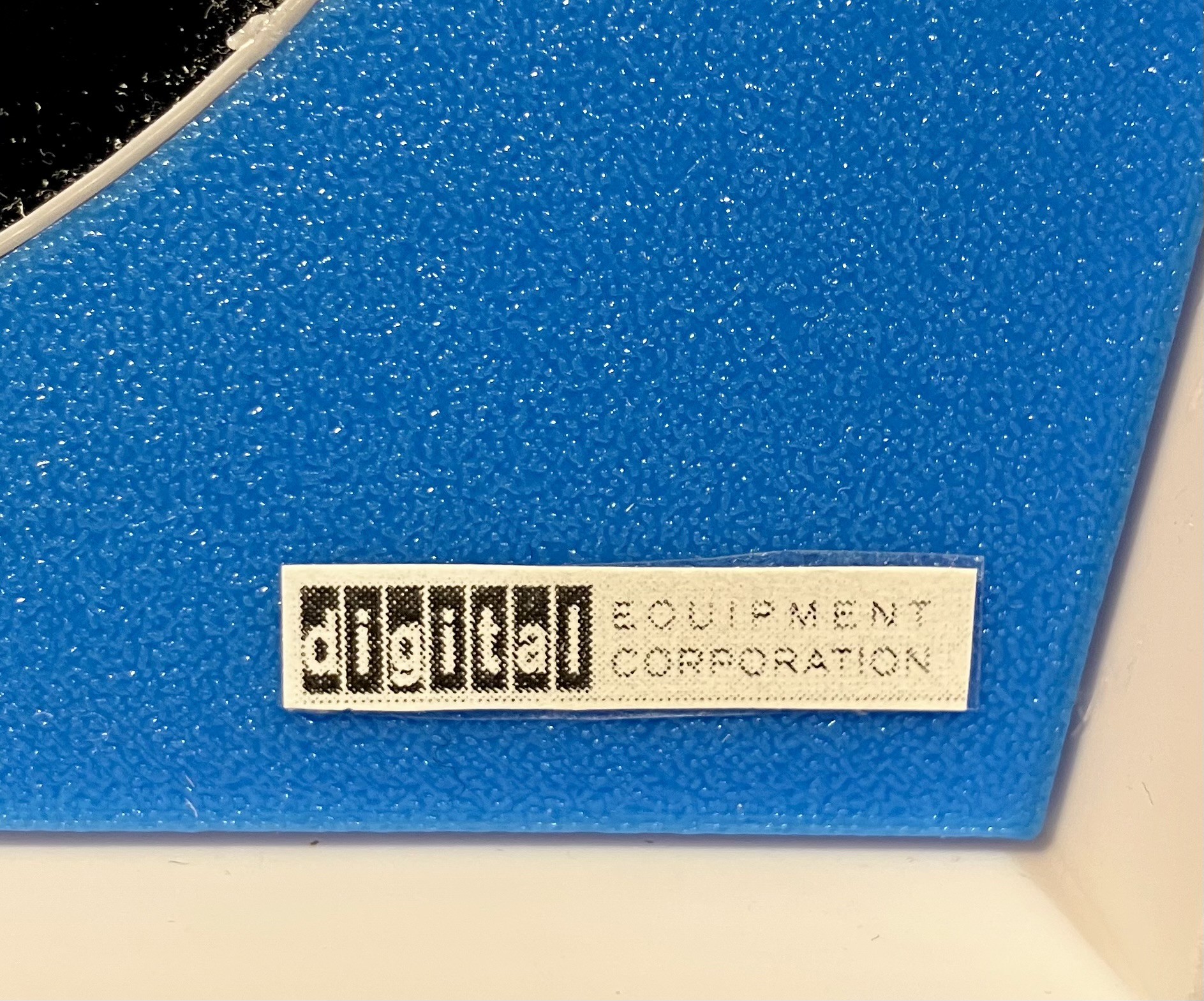
    The Type 30 Display did not look right to me without the Logo in the lower right corner of the Front Panel. So you will find in the Files section Logo.svg with very small but properly scaled Logo images (28 mm x 5 mm). I printed mine of card stock. cut one out, and attached it to the display with two sided tape.

    Better.

View project log

  • 1
    Print The Parts

    Print the parts with no supports and the following settings unless otherwise instructed. 

    Print Resolution: .2 mm 

    Infill: 20% 

    Perimeters: 3 

    Filament: I used PLA 

    Colors: Lake Blue, Black, White, Grey

    Notes: Print the parts in their default orientation.  I have only provided the 3D model files (3mf) in this project.  I'd be happy to provide Fusion (f3d) or Step files upon request. 

    .

    To make a 36% Scale Type 30 Reproduction you will need to print the following parts: 

    - Case (White) - In the default orientation you will need to add supports. 

    1 - Front Panel (Lake Blue)

    - Accessories (Gray) - Includes a rim for the Front Panel (1), locking tabs for the Display (4), and side groove covers for the Case (2)).

    - Back Panel (Black) - Prints in two parts to facilitate insertion into the Case.

    1 - Simple Stand (Black) - Optional.

    - Wire Holder (Black) - Prints in two parts to allow wire insertion.

  • 2
    Prepare The Front Panel
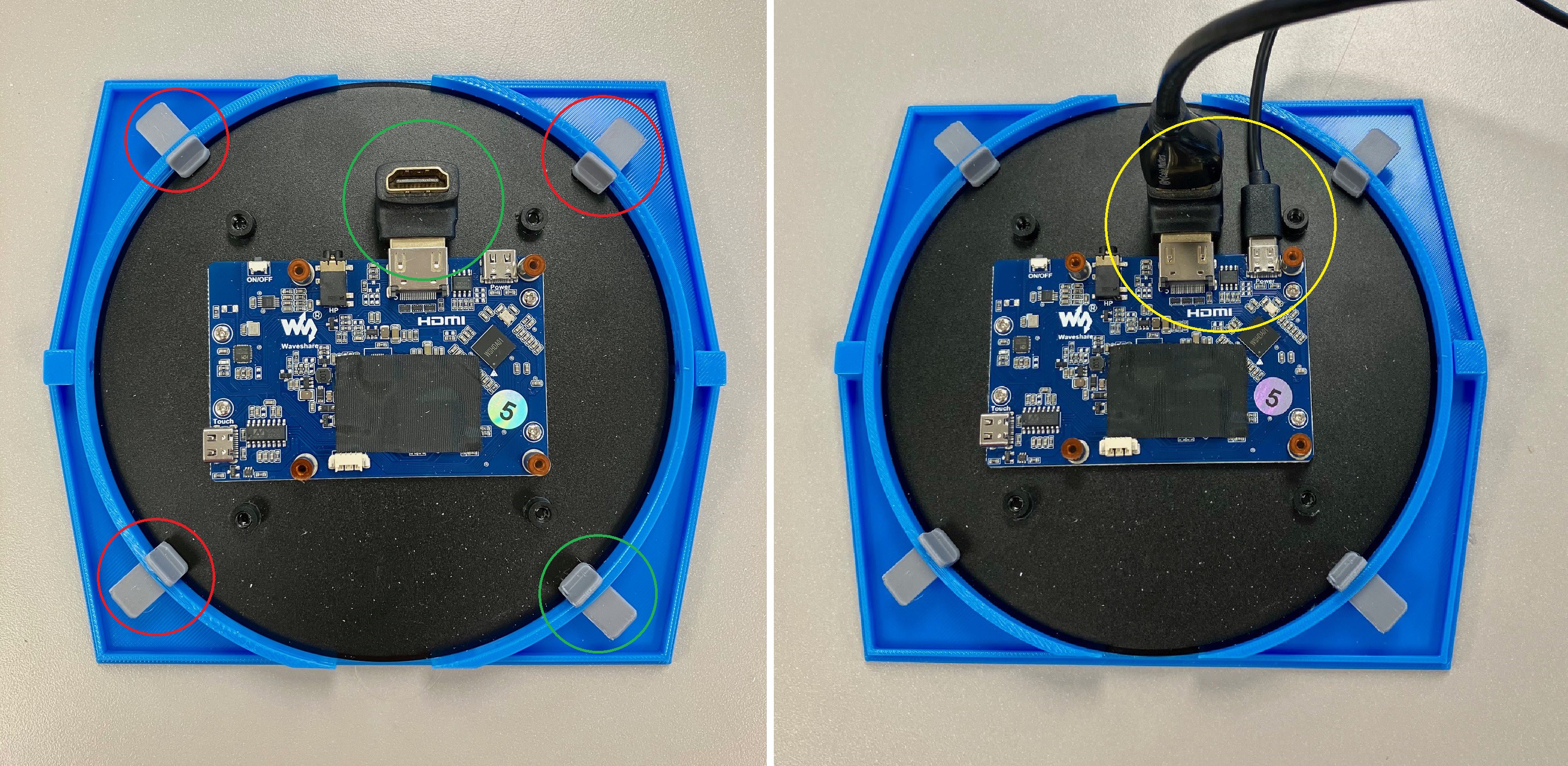
    1. Push the Rim into the round opening in the Front Panel from the back.  I added a 90 Degree HDMI Adapter to the display electronics so that the cable would extend straight back (green circle)
    2. Carefully press the Display into the round slot in the back of the Front Panel and secure it in place with 4 locking tabs (red circles).
    3. Attach the USB power and HDMI cables to the display electronics mounted on the back of the Display (Yellow Circle).
  • 3
    Attach The Front Panel

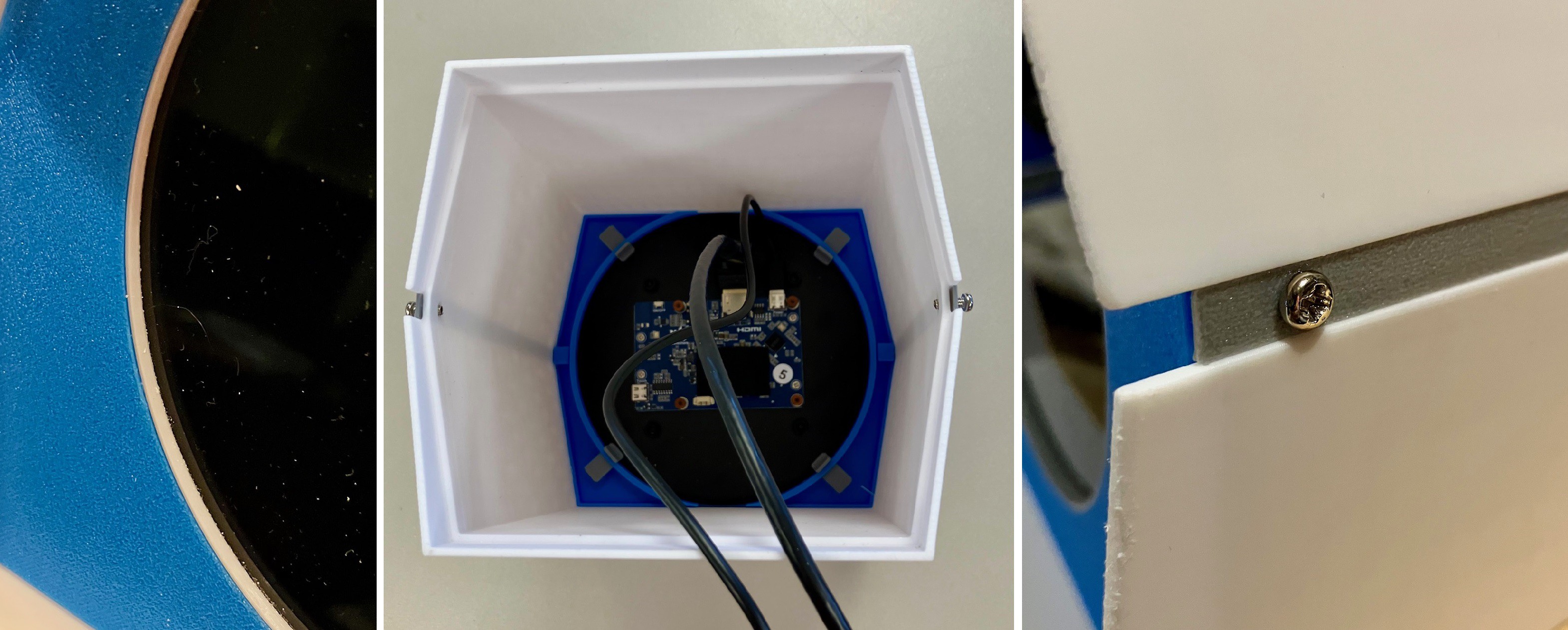
    1. Place the Accessory groove covers into the slots on the sides of the case lining up the holes at each end. You can hold them in place with 4 M3 x 10 mm bolts partially inserted about 4 mm.
    2. Carefully push the Front Cover into the Case from the front as far as it will go with the cables going out the back. 
    3. Bolt the Front Panel in place with 2 M3 x 10 mm bolts. Note the bolts are self threading so go easy.

View all 7 instructions

Enjoy this project?

Share

Discussions

Dithermaster wrote 11/20/2025 at 01:36 point

@michael: If you'd like the DEC logo on laser-engraved thin metal instead of card stock, I'd make one for you.

  Are you sure? yes | no

Michael Gardi wrote 11/20/2025 at 14:50 point

OMG that sounds amazing. Thank you. What do you need from me?

  Are you sure? yes | no

Similar Projects

Does this project spark your interest?

Become a member to follow this project and never miss any updates