 zpekic
Note: the online utilities presented here are in progress, but the assembly part seems to be working, disassembler probably coming over the holidays, time permitting.
My goal is to extend the Tiny Basic somewhat, to make it a bit more powerful and/or align it with other Basic dialects. For example, this could mean addition of:
- FOR / NEXT loops
- INPUT statement with prompt
- multiple statements on a line (delimited by colon)
- support for DATA / READ / RESTORE
- parsing of integers in hex and/or binary format
- possibly others...
for all of the above - beside microcode changes - I also need to modify the interpreter itself, which is written in TBIL. To do that, obviously a TBIL assembler is needed. For this part of the project, to jump 50 years from 1976 (when Tiny Basic was introduced) to 2026 (almost there!) I decided to use some AI vibe coding. There are many such platforms, I am most familiar with Lovable. I created an online assembler / disassembler tool which allows TBIL source code to be assembled (2 pass) into binary / hex / vhdl file I could use to provide as code to the Basic CPU.
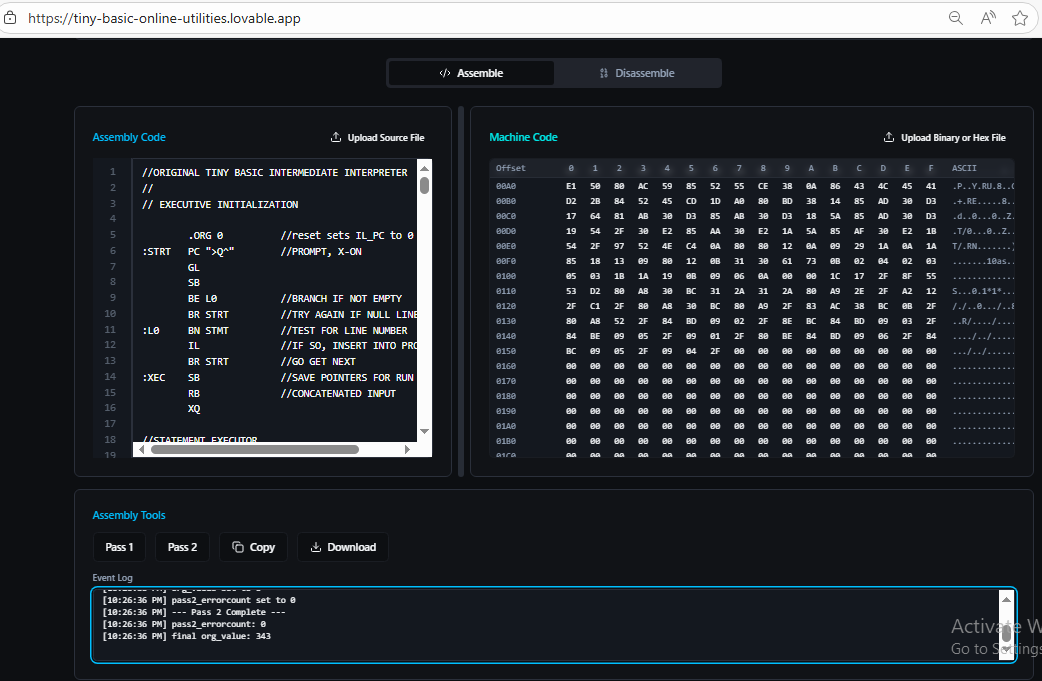
Steps to try out the assembler:
- Navigate to online app
- Download the original version of interpreter
- Modify the interpreter, syntax is pretty obvious (only change from documented interpreter is that I use comma between branch target and "text" strings)
- Copy and/or upload the *.tba file using the "Upload source..." button
- Click Pass 1 button (observe if there are any errors)
- If no errors, click Pass 2 button (observe the action log)
- Binary code in hex format should appear in .... Switch to "Disassembly" mode to reveal the download options in .hex, .bin or .vhdl formats
The source code of the app is here. All changes have been done by lovable dev bot, purely through "vibe coding". I did a similar vibe coding online tool about 6 months ago and I see certain improvements. At that time, often after changes there would be a build break. When I developed this new app, there was no build break at all.
Vibe coding is still just .. coding
What this means is that all the good coding advices still apply. Most notably, everything about planning and designing the app before writing the actual code. In this case the UX of the app is rather boilerplate, using a one-page layout with standard controls such as editable text boxes, file upload / download, resizable panels, buttons etc. The AI tool shines with this part (although the code it produces is still bloated and slow, requires targeted prompting to refactor it into a leaner implementation), but where it obviously needs serious prompting is the business logic. After all, there is no proliferation of TBIL assemblers from 40+ years ago it can learn from :-) I put effort to explain exactly what needs to be done for each line of source code in both pass1 and pass2 of the assembler. I also included some links for context. Therefore, when I asked it to implement assembly pass 1 and 2 it was "on rails" and fairly successful, with only minor tweaks needed.
The original text of the instructions I provided ("knowledge" in Lovable parlance) is below. I also asked it to extract it as markdown document file and check it in. I organized the "knowledge" into:
- Links for more context (targeted sources as generic "Tiny Basic" would completely confuse it)
- Concepts. Each concept is as clearly defined as possible and includes "action" when applicable (what to do when concept is encountered)
- Steps for pass 1, organized by assembly instruction
- Steps for pass 2, organized by assembly instruction
http://www.ittybittycomputers.com/IttyBitty/TinyBasic/TBEK.txt
https://hackaday.io/project/204482-celebrating-50-years-of-tiny-basic
http://www.ittybittycomputers.com/IttyBitty/TinyBasic/

DEFINITIONS USED FOR ASSEMBLY PASS1 AND PASS2:
octaldigit

octaldigit is single digit in range 0 to 7 (inclusive). Represents values 0 to 7

constant

constant is decimal, hex (prefixed 0X, valid digits are decimal and A, B, C, D, E, D), or binary (prefixed by 0B, valid digits are 0, 1) integer. If any of these are prefixed by '-' (minus sign) then value is 0-constant (evaluate as 2's complement integers)

expression

expression is a string of one or more constants with operators + - * / (integer division) % (integer modulo) between them.
Action when encountered: expression_value is evaluated by parsing the expression using common operation precedence which can be changed using parenthesis ( and ). If expression_value cannot be evaluated log error and stop processing.


"text" or 'text'

text is any number of characters (each character is 8-bit US ASCII) between single or double quotes. Empty text (nothing between the quotes) is not allowed and if detected generates error.

Action when text is detected: text_transformed string is generated from text using following rules:

last character in text is copied over by adding 128 to its ASCII code
if character sequence ^^ is detected, only single ^ is copied over to text_transformed
if character sequence A^ to Z^ is detected then single character is copied to text_transformed which equals ASCII code of upper case character minus 64 (so M^ is copied over as value 13)
otherwise each character is copied from text to text_transformed, verbatim without changing the case
length of text_transformed is count of characters, which is always >0 and equals the number of bytes to represent the string in standard 8-bit ASCII

:label

label is string that must start with : (colon) and contain up to 8 alphanumeric characters or _. Label cannot stand by itself on the line. Label cannot start with _ or number after the colon. Label must be at the beginning of the line to be valid, or not be present on the line at all.
Action when valid label is encountered:
label is upper-cased
label_dictionary is checked if key with value of the label exists, if yes log error and stop processing
label is added to label_dictionary as key (without the : character), and the value is a structure that contains line_number and org_value

//comment

comment is any string that starts with two consecutive / characters.
Action on comment: when encountered, comment is removed or ignored starting with first / onwards to the end of string or line, and processing continues on the remaining string.

target

target must be a valid key in the label_dictionary, otherwise error is reported and processing stops.
Action when target is detected: target_value is assigned to be equal to org_value stored in the label_dictionary entry under the target key. target_value is then checked to be in range 0 to 2047 (inclusive), otherwise log error and stop processing.

relativebranch

relativebranch must be a valid key in the label dictionary, or character * (asterisk). If relativebranch is * character then the relativebranch_value is 0. If relativebranch is a label, then there are 2 cases:
if org value of label is >= org value then relativebranch_value = org value of the label - current org value + 31.
if org value label is <= org value then relativebranch_value =  org value of the label - current org value + 31
In all cases if relativebranch_value > 63 or less than 0 then log error and stop processing.

forwardbranch

forwardbranch must be a valid key in the label dictionary, or character * (asterisk). If forwardbranch is * character then the forwardbranch_value is 0. If forwardbranch is a label, then the forwardbranch_value equals org_value of the label - current org_value - 1. If forward_branch value is >31 then log error and stop processing.

LSB(value)
returns (value AND 0xFF)
AND is a logical AND operation, check resulting value to be in range 0 to 255, if not log error and stop processing

MSB(value)
returns (value AND 0xFF00) / 256
AND is a logical AND operation, check resulting value to be in range 0 to 255, if not log error and stop processing

PROCESSING OF EACH LINE WHEN EXECUTING ASSEMBLY PASS1:

copy current line (from loaded assembly file) to lineString
remove comment from lineString (see definition of comment)
remove leading and trailing blanks (space and tabs) from lineString
convert lineString to upper case except anything under single or double quotes (see definition of "text" and 'text')
if lineString is empty, stop processing

if lineString contains label, process label, remove label from lineString

validate that lineString is not empty, if it is the log error in activity log

Recognize following content in the lineString (UPPERCASE with optional parameters), action to take is below each. If the content does not match any of the below, log error in activity log with line number.

.ORG expression
org_value = expression_value. If the new org_value is less than previous, log error and stop processing

SX octaldigit
org_value = org_value + 1

NO
org_value = org_value + 1

LB expression
org_value = org_value + 2

LN expression
org_value = org_value + 3

DS
org_value = org_value + 1

SP
org_value = org_value + 1

SB
org_value = org_value + 1

RB
org_value = org_value + 1

FV
org_value = org_value + 1

SV
org_value = org_value + 1

GS
org_value = org_value + 1

RS
org_value = org_value + 1

GO
org_value = org_value + 1

NE
org_value = org_value + 1

AD
org_value = org_value + 1

SU
org_value = org_value + 1

MP
org_value = org_value + 1

DV
org_value = org_value + 1

CP
org_value = org_value + 1

NX
org_value = org_value + 1

LS
org_value = org_value + 1

PN
org_value = org_value + 1

PQ
org_value = org_value + 1

PT
org_value = org_value + 1

NL
org_value = org_value + 1

PC "text"
org_value = org_value + 1+ lengthOf(text_transformed)

GL
org_value = org_value + 1

IL
org_value = org_value + 1

MT
org_value = org_value + 1

XQ
org_value = org_value + 1

WS
org_value = org_value + 1

US
org_value = org_value + 1

RT
org_value = org_value + 1

JS target
org_value = org_value + 2

J target
org_value = org_value + 2

BR relativebranch
org_value = org_value + 1

BC forwardbranch, "text"
org_value = org_value + 1 + lengthOf(text_transformed)

BV forwardbranch
org_value = org_value + 1

BN forwardbranch
org_value = org_value + 1

BE forwardbranch
org_value = org_value + 1

FS
org_value = org_value + 1

FE
org_value = org_value + 1

PROCESSING OF EACH LINE WHEN EXECUTING ASSEMBLY PASS2:

copy current line (from loaded assembly file) to lineString
remove comment from lineString (see definition of comment)
remove leading and trailing blanks (space and tabs) from lineString
convert lineString to upper case except anything under single or double quotes (see definition of "text" and 'text')
if lineString is empty, stop processing

if lineString contains label, check that label exists as key in the label_dictionary (created in pass1). If not, log error and stop processing

validate that lineString is not empty, if it is the log error in activity log

Recognize following content in the lineString (UPPERCASE with optional parameters), action to take is below each. If the content does not match any of the below, log error in activity log with line number. Every instruction below writes 1 or more consecutive bytes to "machine code" binary array.

.ORG expression
org_value = expression_value. If the new org_value is less than previous, log error and stop processing
Machine code not changed

SX octaldigit
Write byte (0x00+octalDigit) to machine code at org_value, increment org_value

NO
Write byte 0x08 to machine code at org_value, increment org_value

LB expression
Write byte 0x09 to machine code at org_value, increment org_value
Write byte LSB(expression_value) to machine code at org_value, increment org_value

LN expression
Write byte 0x0A to machine code at org_value, increment org_value
Write byte MSB(expression_value) to machine code at org_value, increment org_value
Write byte LSB(expression_value) to machine code at org_value, increment org_value

DS
Write byte 0x0B to machine code at org_value, increment org_value

SP
Write byte 0x0C to machine code at org_value, increment org_value

SB
Write byte 0x10 to machine code at org_value, increment org_value

RB
Write byte 0x11 to machine code at org_value, increment org_value

FV
Write byte 0x12 to machine code at org_value, increment org_value

SV
Write byte 0x13 to machine code at org_value, increment org_value

GS
Write byte 0x14 to machine code at org_value, increment org_value

RS
Write byte 0x15 to machine code at org_value, increment org_value

GO
Write byte 0x16 to machine code at org_value, increment org_value

NE
Write byte 0x17 to machine code at org_value, increment org_value

AD
Write byte 0x18 to machine code at org_value, increment org_value

SU
Write byte 0x19 to machine code at org_value, increment org_value

MP
Write byte 0x1A to machine code at org_value, increment org_value

DV
Write byte 0x1B to machine code at org_value, increment org_value

CP
Write byte 0x1C to machine code at org_value, increment org_value

NX
Write byte 0x1D to machine code at org_value, increment org_value

LS
Write byte 0x1F to machine code at org_value, increment org_value

PN
Write byte 0x20 to machine code at org_value, increment org_value

PQ
Write byte 0x21 to machine code at org_value, increment org_value

PT
Write byte 0x22 to machine code at org_value, increment org_value

NL
Write byte 0x23 to machine code at org_value, increment org_value

PC "text"
Write byte 0x24 to machine code at org_value, increment org_value
Write every byte of text_transformed starting with position 0, increment org_value after each write

GL
Write byte 0x27 to machine code at org_value, increment org_value

IL
Write byte 0x2A to machine code at org_value, increment org_value

MT
Write byte 0x2B to machine code at org_value, increment org_value

XQ
Write byte 0x2C to machine code at org_value, increment org_value

WS
Write byte 0x2D to machine code at org_value, increment org_value

US
Write byte 0x2E to machine code at org_value, increment org_value

RT
Write byte 0x2F to machine code at org_value, increment org_value

JS target
Write byte (0x30 + (0x07 AND MSB(target_value)) to machine code at org_value, increment org_value
Write byte LSB(target_value) to machine code at org_value, increment org_value

J target
Write byte (0x38 + (0x07 AND MSB(target_value)) to machine code at org_value, increment org_value
Write byte LSB(target_value) to machine code at org_value, increment org_value

BR relativebranch
Write byte (0x40 + (0x3F AND LSB(relativebranch_value)) to machine code at org_value, increment org_value

BC forwardbranch, "text"
Write byte (0x80 + (0x1F AND LSB(forwardbranch_value)) to machine code at org_value, increment org_value
Write every byte of text_transformed starting with position 0, increment org_value after each write

BV forwardbranch
Write byte (0xA0 + (0x1F AND LSB(forwardbranch_value)) to machine code at org_value, increment org_value

BN forwardbranch
Write byte (0xC0 + (0x1F AND LSB(forwardbranch_value)) to machine code at org_value, increment org_value

BE forwardbranch
Write byte (0xE0 + (0x1F AND LSB(forwardbranch_value)) to machine code at org_value, increment org_value

FS
Write byte 0x25 to machine code at org_value, increment org_value

FE
Write byte 0x26 to machine code at org_value, increment org_value
Note that FS and FE are "extended" instructions, not present in original TBIL, but I needed them to implement FOR/NEXT loop in extended version. Out of total of 256 op-codes 248 are used in original TBIL (very high % of utilization!), 250 in extended, leaving 6 free. Out of these 6, 5 could be used for implementing additional statements, but 1 should be left as an "prefix", to allow 2 byte op-codes, similar to Z80.
Discussions
Become a Hackaday.io Member
Create an account to leave a comment. Already have an account? Log In.