Close
0%
0%

SushiPython IoT Framework & Boards

OS-like firmware for ESP32 - A complete environment: Web UI, Menus & Drivers out-of-the-box for MicroPython From breadboard to real projects

Similar projects worth following
SushiPython IoT is a firmware framework for boards based on ESP32 SoC, providing an environment that integrates solid system management with MicroPython.
It is useful for students and makers to accelerate projects by using reliable building blocks to manage core functions, allowing you to focus on application development without getting lost in low-level system details.

APPLICATIONS

* Student projects
* Home automation systems
* IoT hubs
* Alarm systems
* Domotics servers
* Remote monitoring and data logging systems (e.g., weather stations)
* Local and remote control systems (via local interface, web interface, or modem)
* General purpose applications

Overview

An environment integrating system management and MicroPython for scripting with high level API for certain complex tasks. 

The purpose is have a common core on which base specific applications:

System management managed tasks

  • Wi-fi network connection (as client or access point)
  • On-device user interface
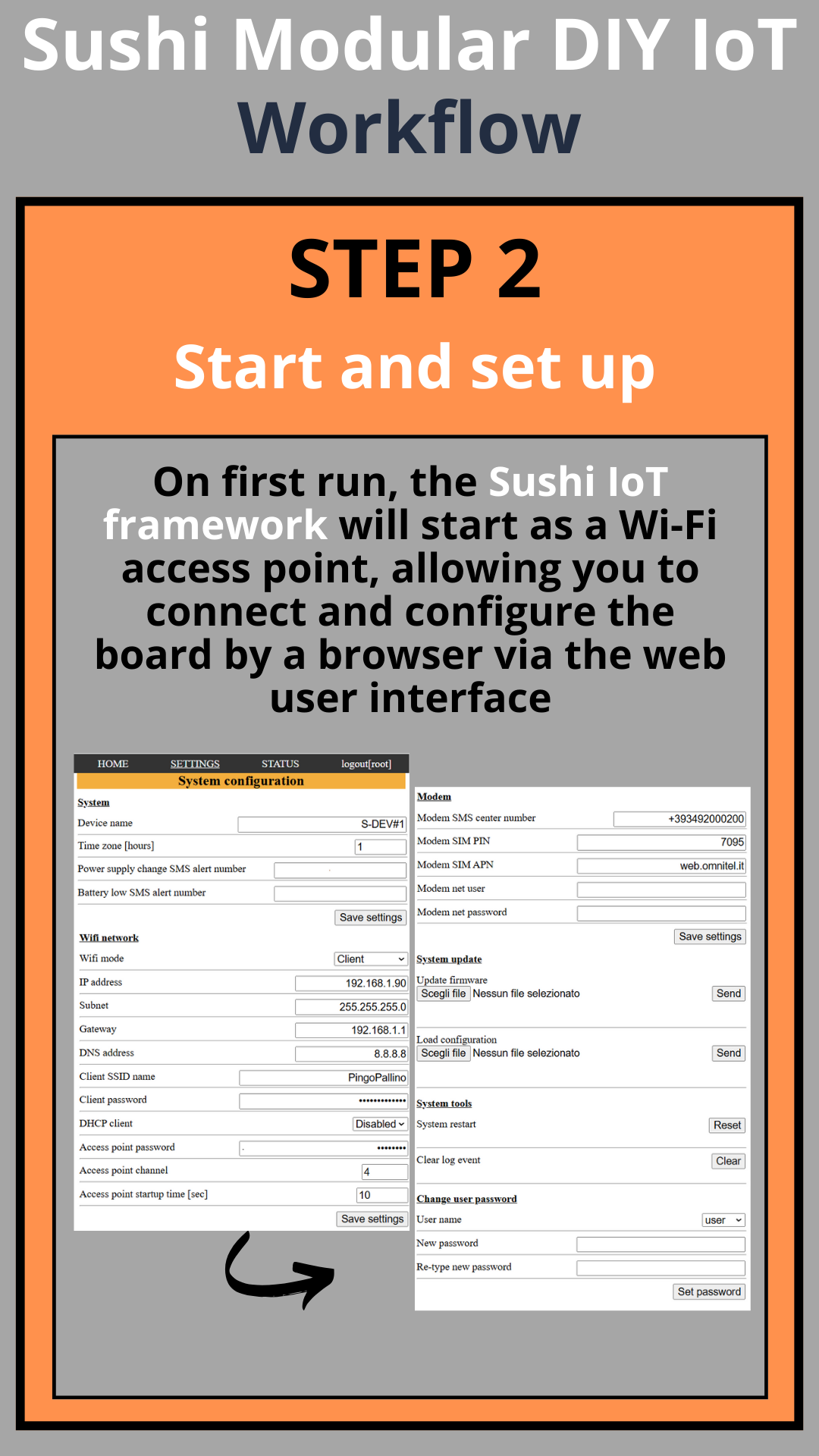
  • System setup by web UI or Micropython scripting
  • Web user interface
  • Log & events
  • Components drivers and libraries (OLED, 4G modem, temperature sensor...)
  • System health monitor
  • Battery and power supply monitor
  • ...

MicroPython standard enviroment

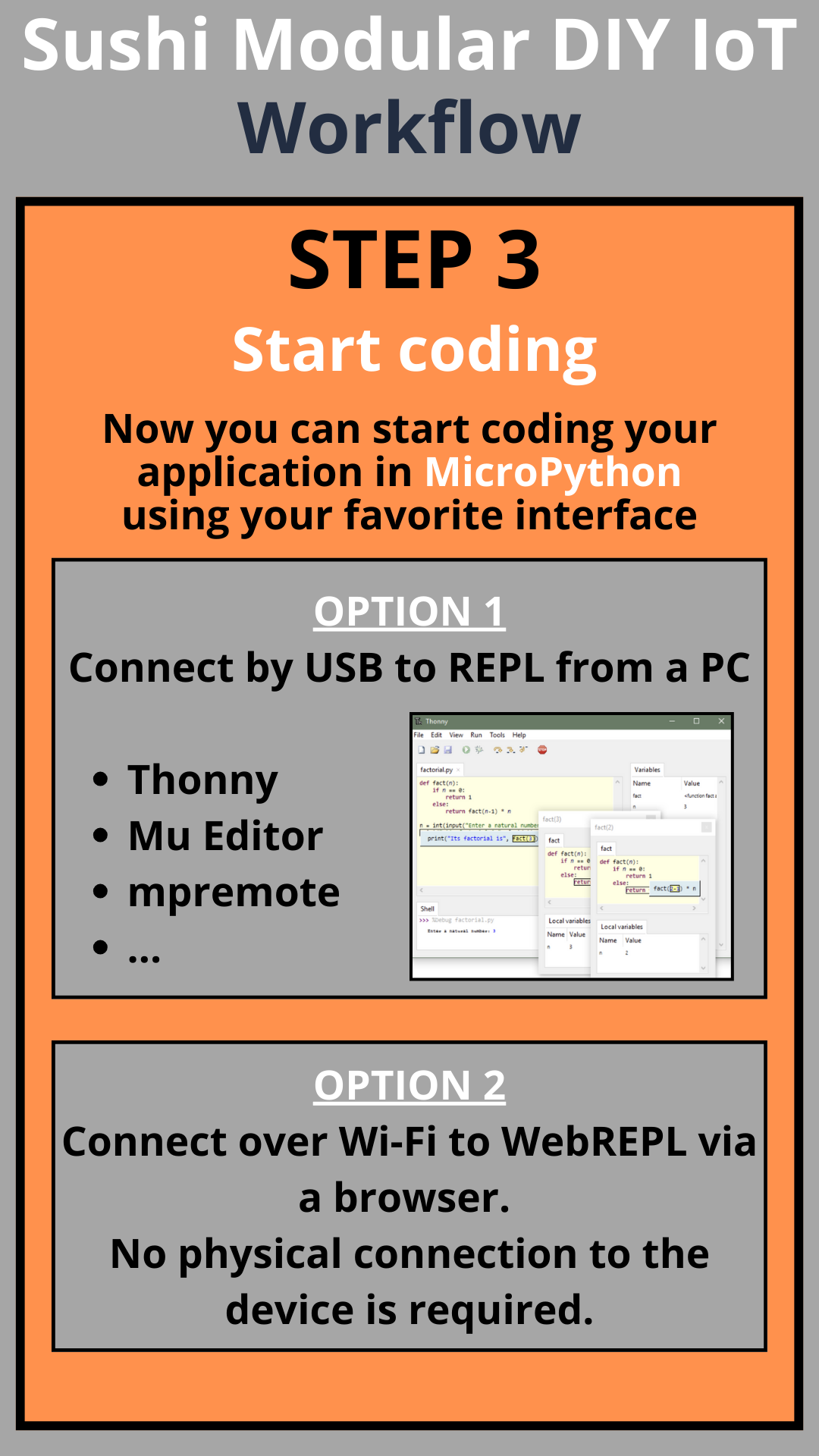
  • USB/UART REPL
  • WebREPL

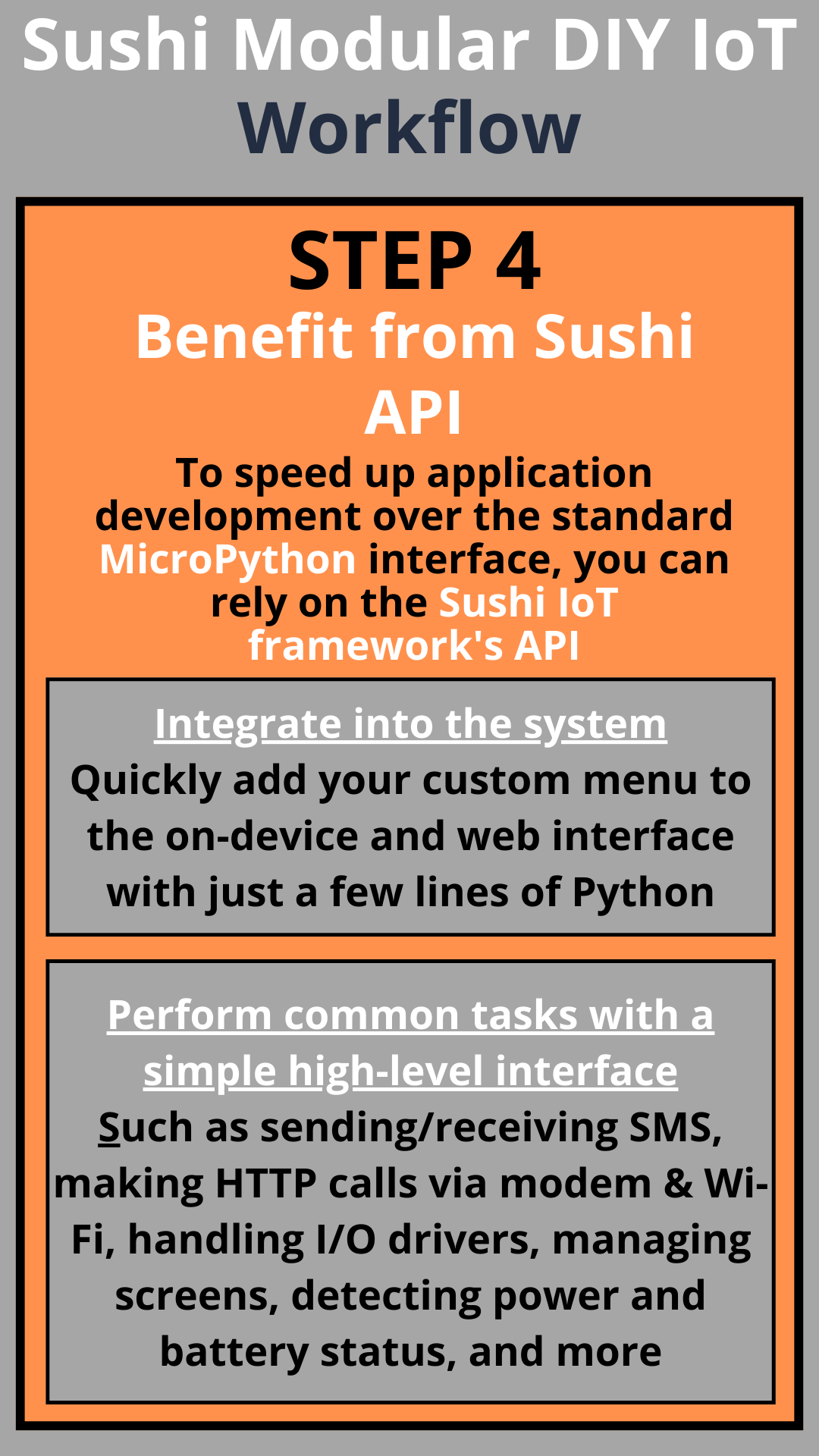
MicroPython high level API

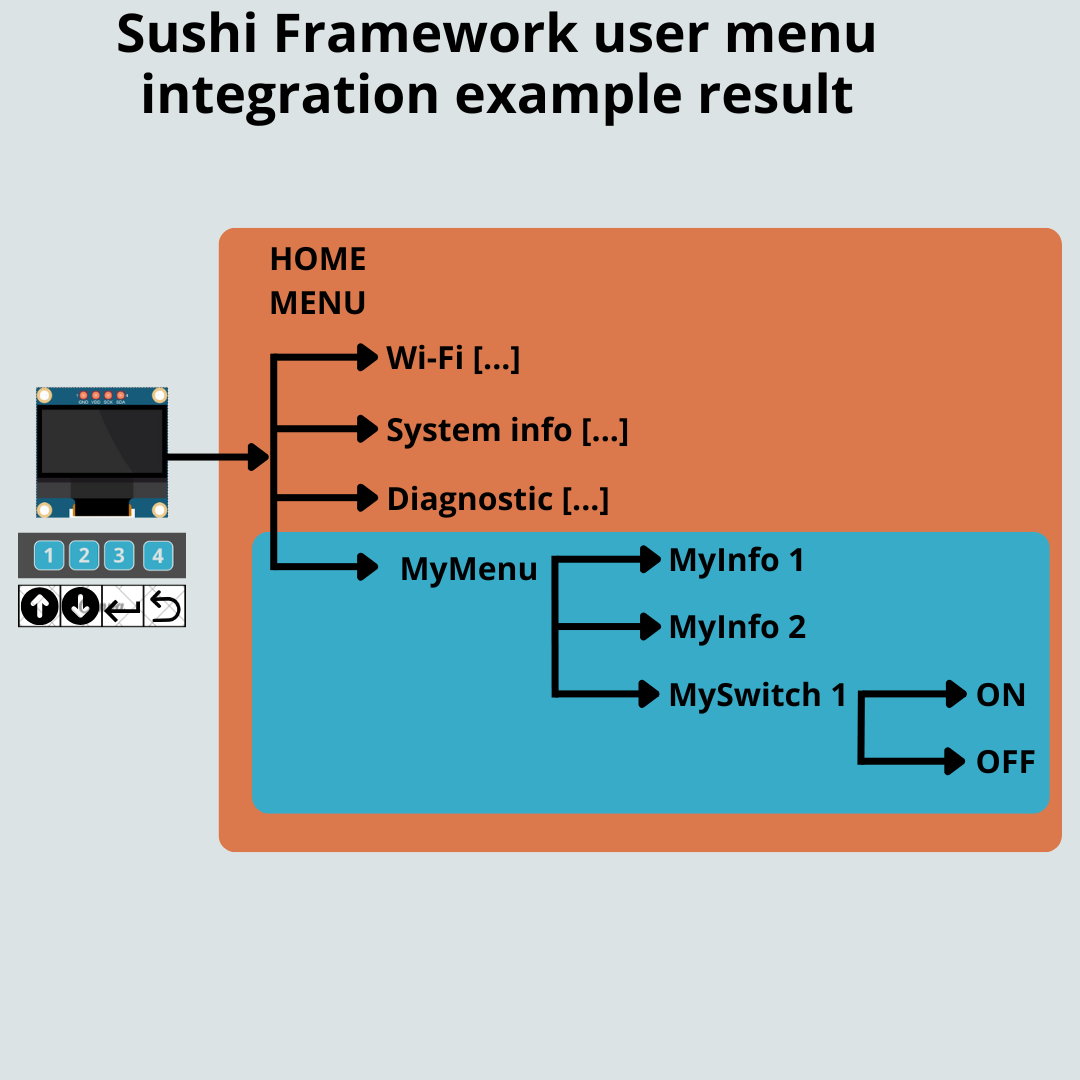
  • Custom menu integration into UI
  • Send/receive SMS 
  • manage http calls (by wifi & modem)
  • ... continuous extension, see the reference 

Features

Works on very common commercial boards based on ESP32 SoC, widely available online for DIY electronics projects.

It simplifies development:

  • Hardware management: Wi-Fi, LCD, keyboard, modem, I/O expansion, relays, power detection, battery level, buzzer.
  • Software features: System management via web UI (network and system settings, logs, status, etc.) and a physical interface for on-device menus.
  • Embedded MicroPython environment: Users can run their own scripts freely, while built-in libraries provide optional system management features.
  • Embedded high-level MicroPython libraries for rapid access to hardware and software functions (custom menus, web pages, I/O expansion, SMS, HTTP requests, etc.).

Manages all essential components typically present in an IoT system, regardless of the specific application:

  • Physical interface management (keyboard, display, status LEDs)
  • Wireless connection as client or access point
  • Drivers for all hardware components present on the board (I/O expander, modem, etc.)
  • Web interface with user-level access (web server and UI)
  • Modular menu management for physical interface
  • High-level API for many typical functions: HTTP requests, SMS, GSM calls, web server extension, I2C communication, etc.

Code Demo

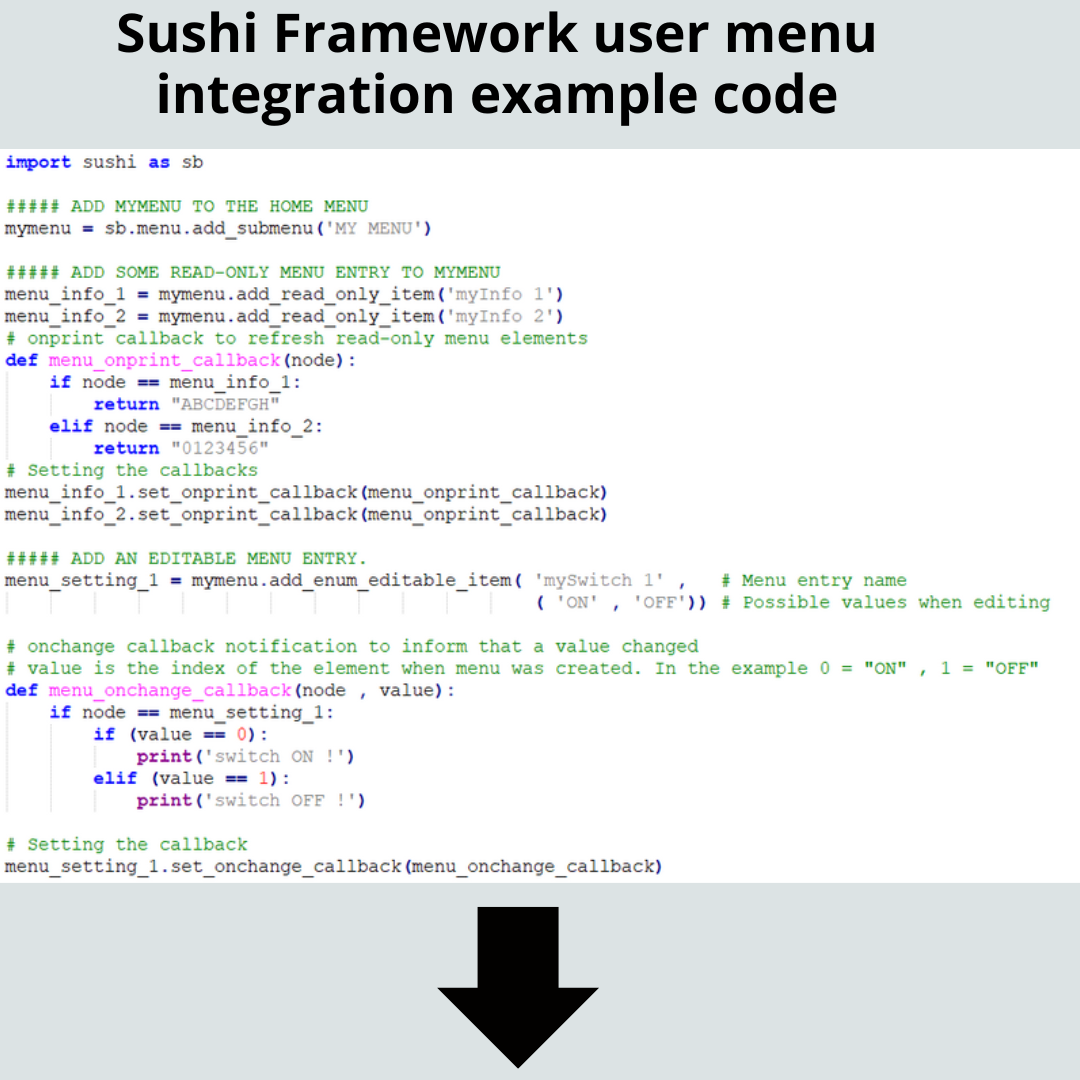
Manage relays via a custom menu

Custom menu integration
Custom menu 1 Custom menu 2

Workflow

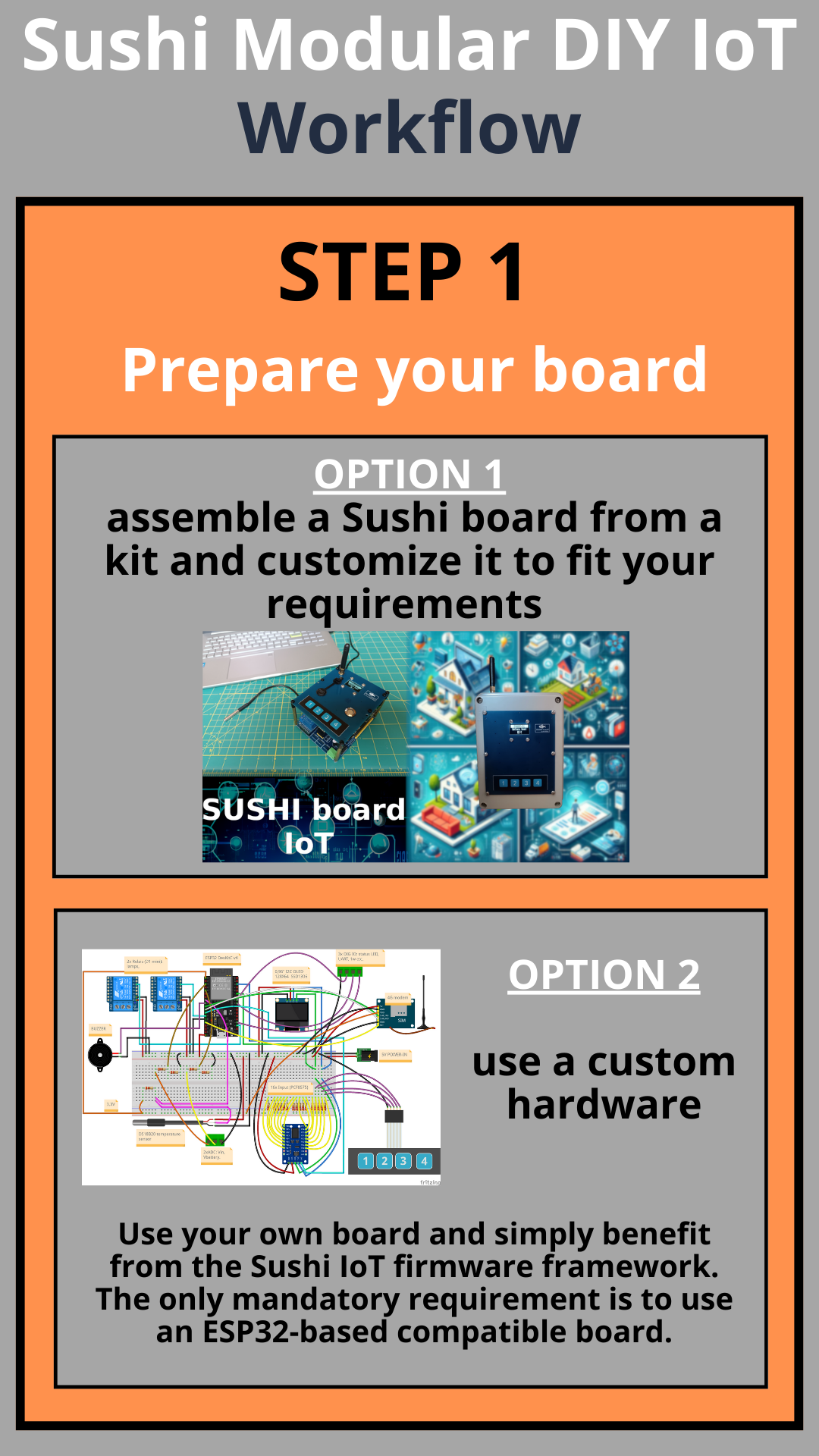
Typical Sushi IoT Project Workflow
Workflow-1


Workflow-2

Workflow-3 Workflow-4

Credits

This project embeds MicroPython, a lean and efficient implementation of Python 3 optimized for microcontrollers. We acknowledge and thank the MicroPython developers and contributors for their outstanding work. MicroPython is released under the MIT License.

Next Steps Roadmap

  • Extend MicroPython libraries with complete example projects showing real IoT applications.
  • Add support for additional ESP32 boards and modules.
  • Provide step-by-step tutorials for beginners and makers.
  • Micropython home domotics project with Sushi IoT

    Marco01/17/2026 at 15:14 0 comments

    Sushi Home project

    Description

    Home domotics demo project using a Sushi Board, code in Micropython on SushiPython framework.

    Features

    • Heater system thermostat: control a relay output connect to heater system
      • Local control on physical interface
      • Remote control by SMS
    •  Main power loss/return detection
      • Alert by SMS
    • Get status by SMS

    Version : v1.0.0 - 2026-01-11

    Video demo : Sushi IoT on instagram

    Source files

    • sushi_home.py : main program script file.
    • sushi_home_config.py : sushi IoT configuration e project settings

    Instructions

    Start guide

    • Assemble the Sushi Board (see hardware components section).
    • Download and flash the latest [SushiPython IoT Firmware](https://github.com/sushi-iot/sushipython/releases) onto the board.
    • Connect the ESP32DevKitC board to your PC by the USB connector (or use WebREPL if you prefer).
    • If you are new to MicroPython see this [basic MicroPython  guide](https://sushi-iot.github.io/sushipython/coding/).    
    • Transfer the '.py' project source files (see source files list) to the board using your favourite MicroPython interface.  
    • Edit these settings in "sushi_home_config.py" :
      • "MODEM_ENABLED_NUMBERS" : phone numbers enabled to send/receive SMS
      • "modem_sim_sms_center" : operator SMS center number (necessary to let the modem manage SMS messages)
      • "modem_sim_pin" : your SIM pin
      • "modem_apn" : SIM operator APN
      • "modem_user" : SIM operator user (if required)
      • "modem_passwd" : SIM operator password (if required)
    • Run the main script file.
    • From the REPL output it's possible check the script execution output.
    • To interrupt the script execution and return to the REPL prompt press "CTRL+C" (as you can see from the py code to manage all the tasks the script run a main loop).

    Testing the project

    • Heater system
      • When the heater must start, it switches on the relay output. This is visible from the red LED on it.
      • By scrolling the user menu, enter "Thermostat". This menu is added by this project. From here it is possible to set the heater target temperature.
      • From the "DIAGNOSTIC" menu it is possible to check the actual temperature read from the sensor.
      • It is possible to set the target temperature by sending an SMS with the text "#SET-TEMP=...", for example "#SET-TEMP=22.5". Note: the source number must be included in the `MODEM_ENABLED_NUMBERS` list.
    • Main power loss/return detection
      • By plugging or unplugging the main power supply, the script sends a status SMS message informing about the change to every number defined in the `MODEM_ENABLED_NUMBERS` list.
    • SMS status monitor
      • It is always possible to check the system status by sending an SMS with the text "#STATUS?". The script replies only to this number (if it is included in the `MODEM_ENABLED_NUMBERS` list) with a status SMS.

    Hardware components

    This project uses a full Sushi Iot Board kit.  
    All details on Sushi Board can be found on [Sushi-Iot-Board Github repo](https://github.com/sushi-iot/sushi-iot-board).

    Overview

    [Sushi IoT on instagram](https://www.instagram.com/sushi_board_iot/)

    Hardware connections table

    For test/demo purposes, this project does not require any external hardware.
    In a real application, the heater system must be connected to the relay output and an external DS18B20 cabled temperature sensor is recommended to measure the environment correctly (for test purpose by default is used the onboard DS18B20 sensor).

    Resources

    Sushi-Iot-Board
    SushiPython IoT Firmware download
    Online coding manual
    SushiPython IoT project overview
    SushiPython microPython quick reference

  • Sushi IoT Board 1

    Marco11/22/2025 at 13:24 0 comments

    Description

    With the purpose of having a common core on which to base different projects inside the Sushi IoT firmware, I worked on the Sushi Board.

    This board performs a simple, basic connection to different components that are usually built on a breadboard.

    The idea is to share the hardware and then work on specific projects that will also be shared here.

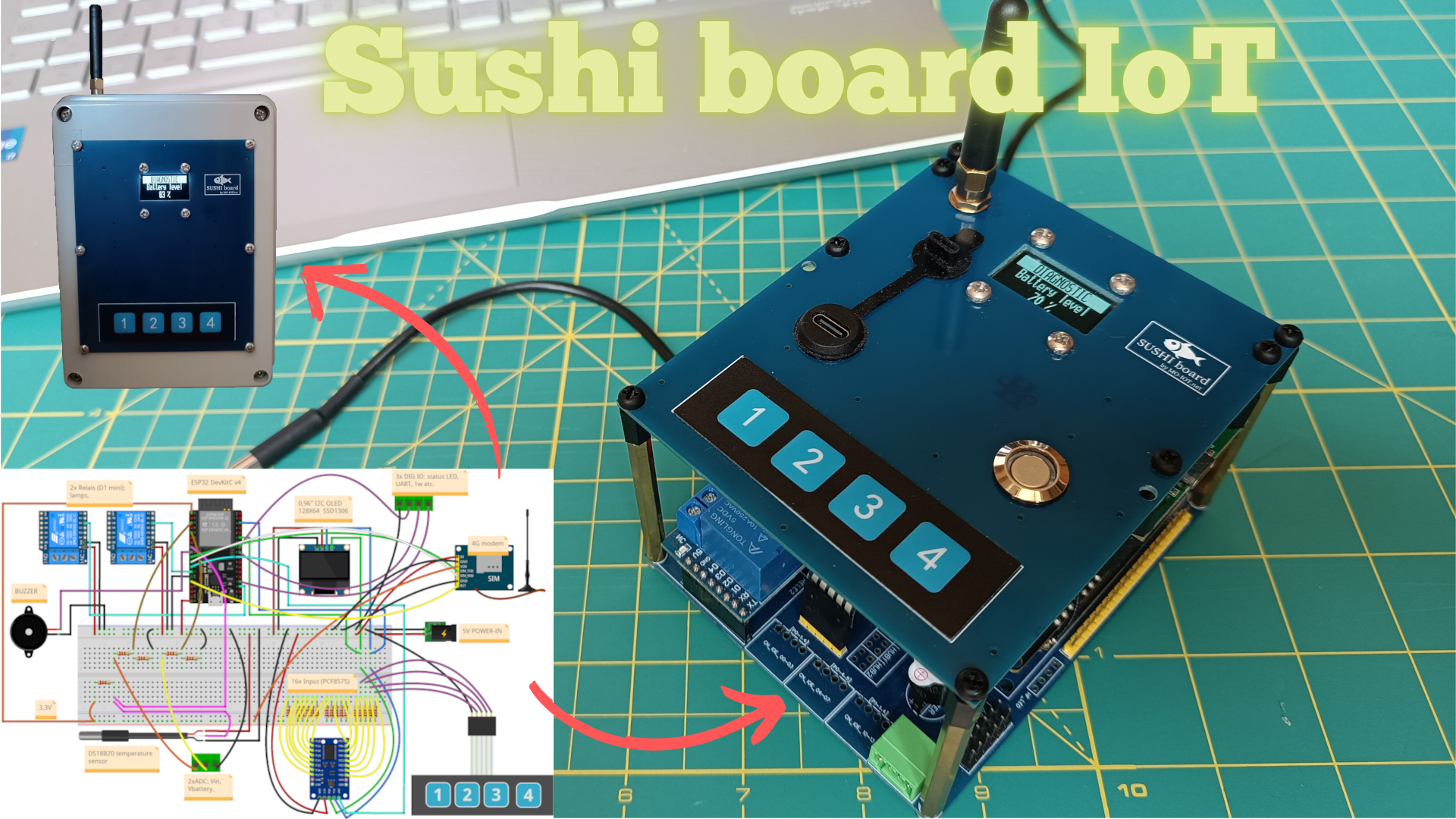
    Sushi Board is an ESP32-based programmable modular embedded system for general-purpose IoT, suitable for STEM education and DIY electronics projects. 

    100% based on widely available commercial modules, making it cost-effective and easy to source.

    For MAKERs

    • A carrier board that connect all the essential components needed to create a complete IoT unit, suitable for various applications, minimizing the complexity of assembling different components and boards without requiring extensive soldering or wiring.
    • Only the CPU is mandatory; then you simply plug in the modules you need for your specific purposes.

    For students and educational purposes

    • Sushi Board offers a modular system that can be shared across multiple projects, from simple setups to more complex, DIY electronics systems.
    • It’s not just for desk experiments; you can build something practical and functional.

    Advantages

    • Based on ESP32 SoC: a reliable choice in the IoT field. You have access to a powerful ecosystem with numerous resources available online.
    • 100% based on very common commercial modules widely available online for Arduino and DIY electronics projects. Sushi board just help you connect them all together.
    • You can code with your favourite compiler : Arduino, microPython (even without a PC), Scratch, ESP-IDF, etc.
    • Open source hardware: both the CPU module and the Sushi Board come with wiring diagrams provided.

    Applications

    • Generic IoT & sensors educational experiment
    • Fast prototyping
    • Home automation systems
    • IoT central units
    • Alarm systems
    • Domotics servers
    • Remote monitoring and data sampling systems (example weather centrals)
    • Local and remote devices control (by local user interface, web interface, modem interface)

    Hardware features

    All the ingredients that are needed for a myriad of applications:

    • ESP32-DevKitC V4
    • 16x digital GPIN
    • 2x Relay OUT (10A 250V AC)
    • 5x digital direct GPIO, 1 x GPO , 2 x GPI (LEDs, extra UART, etc.)
    • Physical keyboard
    • OLED Display
    • Connectivity: Wi-Fi, Bluetooth, modem 2G/3G/4G, UART, I2C
    • Power supply modes: 5V (USB adapter or wired) ; Battery only ; 5V + backup battery (for when grid power is missing)
    • Backup battery
    • Power status and battery level acquisition
    • Buzzer for audio alerts
    • Temperature sensor
    • Size: 90x110 mm (both carrier and TOP boards)

    Hardware guide and schematics

    https://github.com/sushi-iot/sushi-iot-board

    Example & projects

    https://github.com/sushi-iot/sushipython/tree/main/examples

    Instagram demo

    https://www.instagram.com/sushi_board_iot/

    Projects pictures

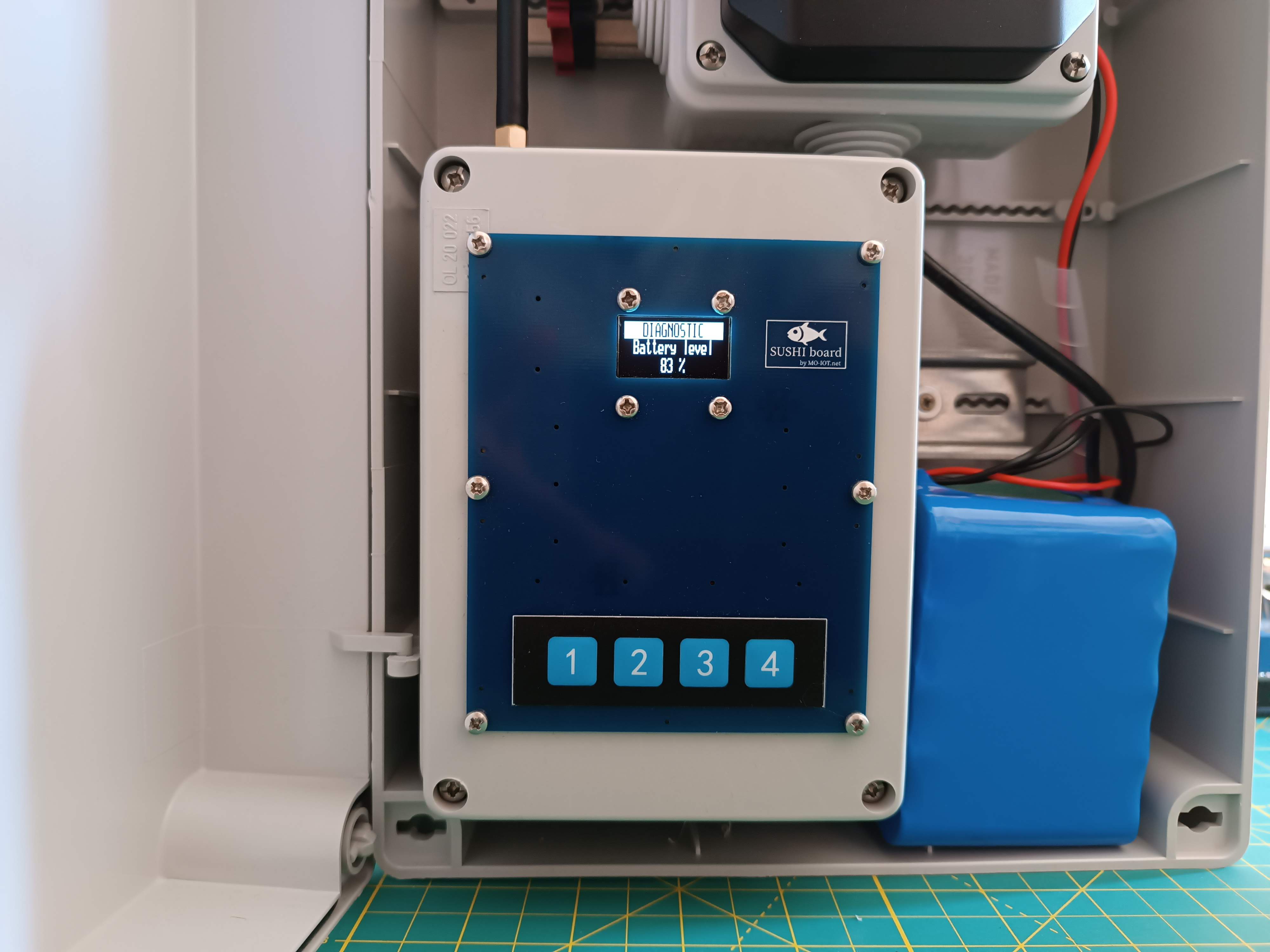
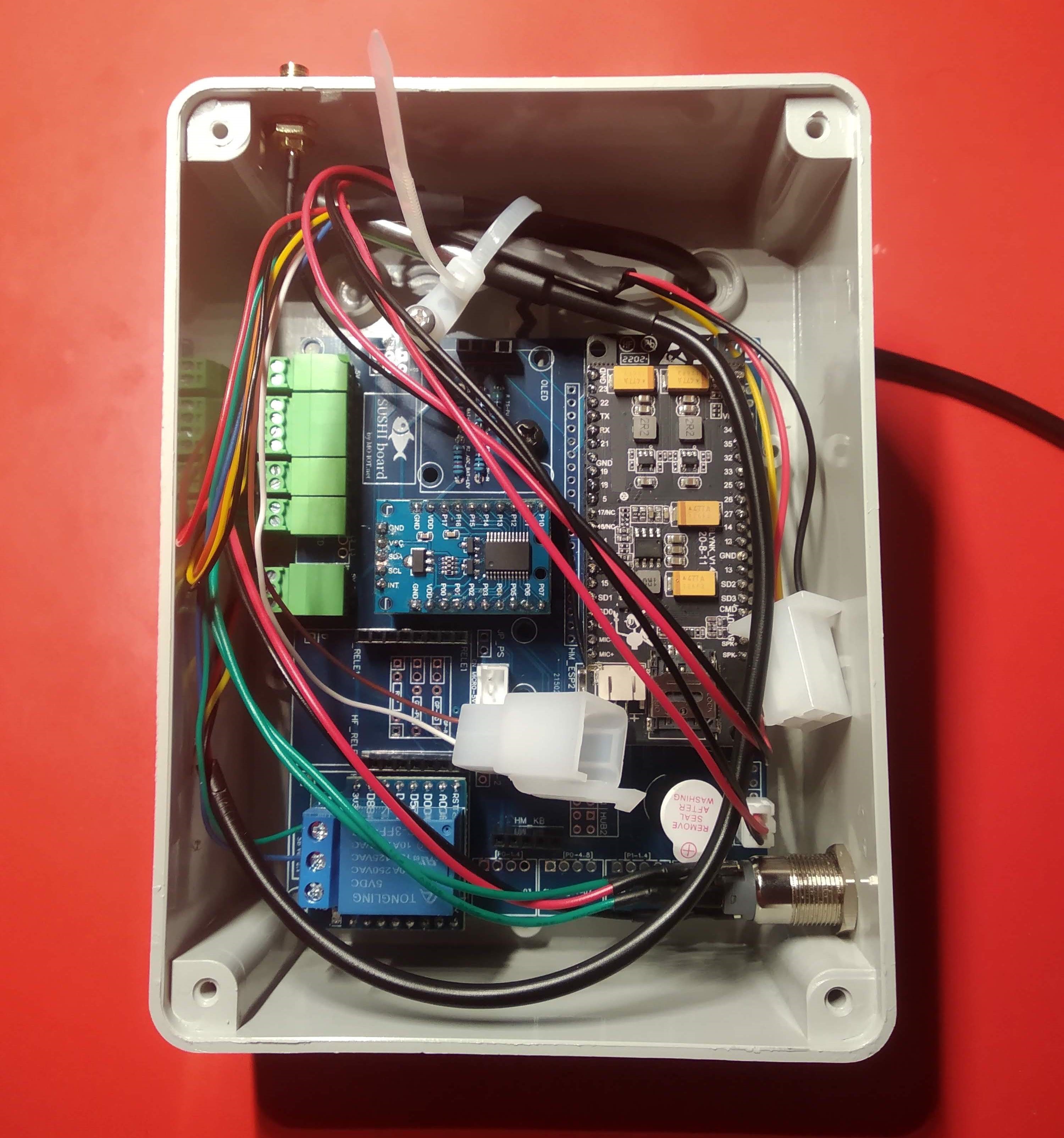
    Follow some picture of a project done using this board. All details will follow in separated posts.

    This is a Sushi board mounted in a junction box and installed inside an electrical panel. It functions as a weather data acquisition center, reading data from external sensors and sending it to the cloud via GSM. The same hardware can also serve as the central unit of an alarm system.

    The case is made from a standard electrical junction box. There is a cut in the cover that stays hidden behind the top Sushi board, so the closed box looks neat even if the homemade cut isn't perfect.

    The wiring inside the case


  • Sushi Framework example on bread board: add menu to UI to switch ON/OFF a relay.

    Marco11/14/2025 at 21:47 0 comments

    SushiPython - IoT MicroPython example

    • Project: Menu example
    • Description: Add a custom menu to physical user interface to switch ON/OFF a relay OUTPUT
    • Video demo : Sushi IoT on instagram

    Source files

    • "menu_example.py" : main example code
    • "menu_example_config.py" : sushi IoT configuration

    Source files on GitHub : dkc_menu example

    Instructions

    • Connect the components on the breadboard.
    • Download and flash the SushiPython IoT Firmware onto the board.
    • Connect ESP32DevKitC to your PC by the USB connector (or use WebREPL if you prefer).
    • If you are new to MicroPython see this basic MicroPython guide.
    • Transfer the '.py' example source files to the board using your favourite MicroPython interface.
    • Run the main script file. Note that it's normal on the first run (and in general, if the device configuration has changed): the device will store the settings and restart itself.

    Hardware components

    This project uses the following hardware:

    In each component overview file there are some brief info. All components can be found widely on the web, so just as example it's provided some link where can be bought.

    Overview

    Hardware connections table

    PinConnected ToTypeNote
    ESP32.USBUSB Power suppplier5V PowerPowers the board and peripherals
    ESP32.GNDBB.GNDGNDCommon ground network (1)
    ESP32.5VBB.VCC5VShared power rail (1)
    Relay.VCCBB.VCC5VPower supply for relay module
    Relay.GNDBB.GNDGNDCommon ground
    Relay.INESP32.GPIO15DigitalRelay control signal
    Keypad.GNDBB.GNDGNDCommon ground
    Keypad.K1ESP32.GPIO19DigitalButton 1
    Keypad.K2ESP32.GPIO18DigitalButton 2
    Keypad.K3ESP32.GPIO5DigitalButton 3
    Keypad.K4ESP32.GPIO4DigitalButton 4
    OLED.VCCBB.VCC5VPower supply (2)
    OLED.GNDBB.GNDGNDCommon ground
    OLED.SDAESP32.GPIO21SDAI2C data
    OLED.SCLESP32.GPIO22SCLI2C clock

    Notes:

    • (1) “BB.VCC” & “BB.GND” indicates a connection to the breadboard power or ground rails.
    • (2) Some OLED may require 3.3V, in this case connect to ESP32.3V3 pin.

    Resources

    SushiPython IoT Firmware download
    Online coding manual
    SushiPython IoT project overview

    Quick reference
    In the REPL, run:

      sushi.help()

    or see the result directly here.

View all 3 project logs

Enjoy this project?

Share

Discussions

Similar Projects

Does this project spark your interest?

Become a member to follow this project and never miss any updates