 Michael Gardi
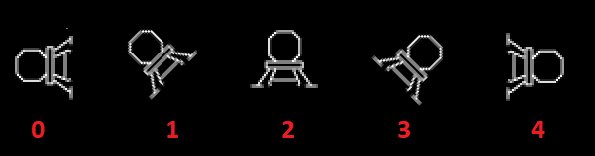
All the pieces are now in place to convert the LEM "elevator" into a space ship. First of all you have to be able to change the direction that the LEM is pointing in. There are 5 possible orientations. To use a compass analogy they are West, North West, North, North East, and East. The LEM is not allowed to point downward (yet?). I assigned a rotation number to each orientation.
I covered inputs in the previous log, but here is the complete input code including the LEM rotation controls.
/ Check for inputs.
        cla               / Clear the accumulator.
rcw,    jsp .             / Call the input routine.
        dac cin           / Save as current input.
        rar 4s            / Combine plyaer 1 and player 2 inputs.
        ior cin
        dac cin

        and (400000       / Check for left.
        sza i             / Is left?
        jmp ckr           /   No - Check for right bit.

        lac pin           /  Yes - Check the previous input.
        and (400000
        sza               / Is previous input left?
        jmp ckr           /  Yes - Wait for left bit to be cleared.
        lac rot           / Get the current rotation.
        sza i             / Already at 0?
        jmp ckr           /  Yes - Check for right bit.

        sub (1            / Rotate counter-clockwise by one.
        dac rot           / Save change.
        jmp ckt           / Skip right bit check.

ckr,    lac cin           / Refetch the input.
        and (200000       / Check for right.
        sza i             / Is right?
        jmp ckt           /   No - Check for thrust bit.

        lac pin           /  Yes - Check the previous input.
        and (200000
        sza               / Is previous input right?
        jmp ckt           /  Yes - Wait for right bit to be cleared.
        lac rot           / Get the current rotation.
        sub (4            /
        sza i             / Already at 4?
        jmp ckt           /  Yes - Check for thrust bit.
        lac rot           /   No - Update rotation.
        add (1            / Rotate clockwise by one.
        dac rot           / Save change.

ckt,    lac cin           / Refetch the input.
        dac pin           / Move to previous input.
        and (100000       / Check for thrust.
        dac thr
        sza i             / Is thrust?
        jmp ckm           /   No - Keep going.

        lac vy            /  Yes - Apply thrust velocities.
        add tv
        dac vy
        lac vx
        sub th
        dac vx

/ Apply velocties to game position.
ckm,
It's pretty straight forward except for the extra checks for left and right rotation to force the player to click the button for each rotation change. Without this check the LEM would always rotate to the end stop before the user could release the button. There are also end stop checks that keep the rotation value rot in the 0-4 range.
You can see in this code that there is a new velocity vector vx to keep track of horizontal movement, plus velocity change values in the variables tv (thrust vertical) and th (thrust horizontal).
A lot depends on the orientation of the LEM:
- What LEM and exhaust bitmaps to display.
- The offset to display the exhaust bitmap relative to the LEM.
- The thrust allocated to vertical and horizontal velocities.
This orientation checking work is performed at the front end of the draw the LEM subroutine.
/ Setup to display the LEM, exhaust, and apply velocity.
lt1,    jmp .
lm1,    dap lt1
        lac scx            / Get the current screen coordinates of the LEM.
        dac tcx
        sub (4400          / Left edge of bitmap.
        dac bsx
        lac scy
        (4400              / Top edge of bitmap.
        dac bsy

cr0,    lac rot            / Setup lbn to point to the first row of the appropriate LEM bitmap.
        sza                / Rotation 0?
        jmp cr1            /   No - Check rotation 1.
        init lbn, l00      /  Yes - Set for counter-clockwise 90.
        init ldt, t00

        lac scx            / Set coordinates for exhaust.
        add (12000
        dac tcx
        lac scy
        add (400
        dac tcy

        lac tac            / Set the thrust values based on LEM orientation.
        cma                / Invert.
        dac th             / Negative horizontal with full thrust.
        dzm tv             / No vertical thrust.

        jmp lbn            / Draw LEM.

cr1,    sub (1
        sza                / Rotation 1?
        jmp cr2            /   No - Check rotation 2.
        init lbn, l01      /  Yes - Set for counter-clockwise 45.
        init ldt, t01

        lac scx            / Set coordinates for exhaust.
        add (7400
        dac tcx
        lac scy
        sub (7000
        add (400
        dac tcy

        lac tac            / Set the thrust values based on LEM orientation.
        sar 1s             / Split thruts between horizontal and vertical.
        cma                / Invert.
        dac th             / Negative horizontal with half thrust.
        dac tv             / Negative vertical with half thrust.

        lbn                / Draw LEM.

cr2,    lac rot
        sub (2
        sza                / Rotation 2?
        jmp cr3            /   No - Check rotation 3.
        init lbn, l02      /  Yes - Set for upright.
        init ldt, t02

        lac scx            / Set coordinates for exhaust.
        add (2400
        dac tcx
        lac scy
        sub (7000
        dac tcy

        lac tac            / Set the thrust values based on LEM orientation.
        cma                / Invert.
        dzm th             / No horizontal thrust.
        dac tv             / Negative vertical with full thrust.

        jmp lbn            / Draw LEM.

cr3,    lac rot
        sub (3
        sza                / Rotation 3?
        jmp cr4            /   No - Check rotation 3.
        init lbn, l03      /  Yes - Set for clockwise 45.
        init ldt, t03

        lac scx            / Set coordinates for exhaust.
        sub (2400
        dac tcx
        lac scy
        sub (6000
        sub (400
        dac tcy

        lac tac            / Set the thrust values based on LEM orientation.
        sar 1s             / Split thruts between horizontal and vertical.
        dac th             / Positive horizontal with half thrust.
        cma                / Invert.
        dac tv             / Negative vertical with half thrust.

        jmp lbn            / Draw LEM.

cr4,    init lbn, l04      / Must be rotation 4.
        init ldt, t04

        lac scx            / Set coordinates for exhaust.
        sub (5000
        dac tcx
        lac scy
        add (400
        dac tcy

        lac tac            / Set the thrust values based on LEM orientation.
        dac th             / Positive horizontal with full thrust.
        dzm tv             / No vertical thrust.

/ Draw the LEM based on an 18-bit by 18 word bitmap.
lbn,    lac .
...
For each orientation labeled cr0-cr4, the first two lines insert the addresses of the appropriate LEM and exhaust bitmaps into their respective drawing routines. The next block of code sets the offsets, tcx and tcy, where the exhaust bitmap will be drawn (if necessary). And finally a thrust value is assigned to the tv and th variables according to the following table.
| Orientation | Horizontal Thrust | Vertical Thrust |
|---|---|---|
| 0 | Negative Full Thrust | No Thrust |
| 1 | Negative Half Thrust | Negative Half Thrust |
| 2 | No Thrust | Negative Full Thrust |
| 3 | Positive Half Thrust | Negative Half Thrust |
| 4 | Positive Full Thrust | No Thrust |
As you can see the thrust is split equally between the horizontal and vertical variables for orientations 1 and 3 and applied fully for the other three directions.
Another little demo. You will notice that the horizontal velocity has been added to the status.
Discussions
Become a Hackaday.io Member
Create an account to leave a comment. Already have an account? Log In.