 Michael Gardi
When I was working as a software developer our team would often talk about "the long pole in the tent", meaning "the most important issue or problem that prevents or slows progress". This is especially true in a new project like Lunar Lander for the PDP-1. Of course as each "long pole" gets understood and resolved, the next longest takes its place.
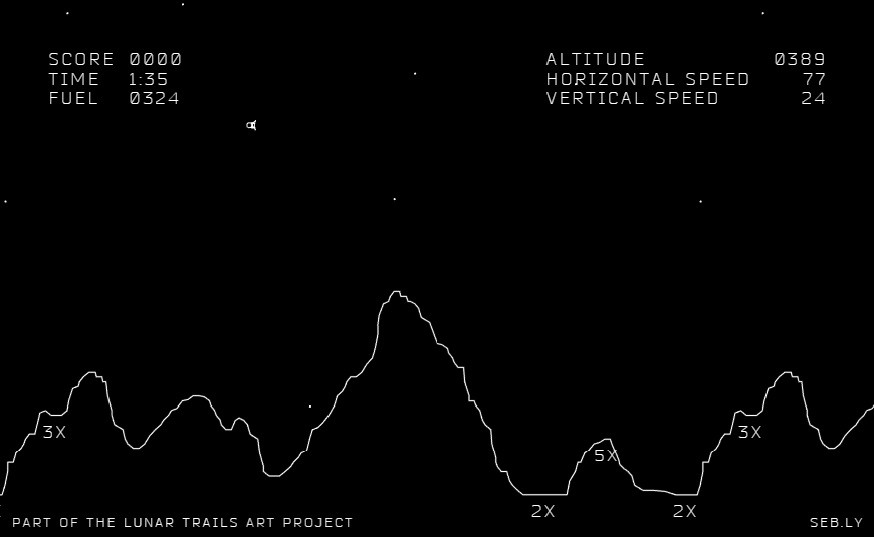
So far displaying the LEM and implementing gravity felt like the most important features. For me the next "longest pole" was how to display the current state of the game. Arcade Lunar Lander showed the game "status" in the upper corners of the screen.
There was an optional piece of hardware that provided an automated way to display alphanumeric and special characters on the Type 30 Display, the Type 33 Symbol Generator. This saved valuable processing time that would otherwise be spent by the main CPU constantly drawing each character from scratch. Unfortunately, for the default Type 30 Display that I am targeting, drawing text requires the programmer (me) to write software to generate the character shapes as a series of points, rather than using a dedicated hardware circuit. And to reiterate, with no "frame buffer" memory this means redrawing each character each frame. So to that end, drawing text needs to be as efficient as possible.
I mentioned back in the Drawing the LEM log post that for the ICSS project Norbert Landsteiner "compiled" small 5 x 7 character bitmaps directly into PDP-1 opcodes, a very efficient way of rendering a bitmap of dots to the screen. I will do the same with one small difference.
Norbert's code had each character's bitmap (0-9,A,B,C,D,E,F) coded as two 18-bit words (7 rows of 5-bits with a bit left over) of data. His character compiler, written in PDP-1 assembler, was part of the ICSS code and run at program initialization. Each character was compiled into "machine" code which was stored at the "end" of the program space, with the code's start address stored in a lookup table.
What I ended up doing was writing a Python script to convert the 5x7 character bitmaps into assembler which I inserted into the main Lunar Lander code.
CHARS = [
   [[' ', 'x', 'x', 'x', ' '],  #0
    ['x', ' ', ' ', ' ', 'x'],
    ['x', ' ', ' ', ' ', 'x'],
    ['x', ' ', ' ', ' ', 'x'],
    ['x', ' ', ' ', ' ', 'x'],
    ['x', ' ', ' ', ' ', 'x'],
    [' ', 'x', 'x', 'x', ' ']],

...

   [[' ', 'x', 'x', 'x', ' '],  #9
    ['x', ' ', ' ', ' ', 'x'],
    ['x', ' ', ' ', ' ', 'x'],
    [' ', 'x', 'x', 'x', 'x'],
    [' ', ' ', ' ', ' ', 'x'],
    [' ', ' ', ' ', 'x', ' '],
    [' ', 'x', 'x', ' ', ' ']]
]

scale = 4
for d_idx, digit in enumerate(CHARS):
    has_plotted = False
    print(f"c{d_idx},\tlio dgy\t\t\t\t/{d_idx}")
    print("\tlac dgx")
    for r_idx, row in enumerate(digit):
        # Process the next row.
        last_x = 0
        for c_idx, char in enumerate(row):
            if char == 'x':
                if (c_idx - last_x) > 0:
                    diff = oct((scale*(c_idx - last_x))<<8)[2:]
                    print(f"\tadd ({diff}")
                last_x = c_idx
                if has_plotted:
                    print("\tioh")
                print("\tdpy-i 4300")
                has_plotted = True
        # Skip to the next row if there is one.
        if r_idx <= len(row):
            print("\tlac dgx")
            print("\trcr 9s")
            print("\trcr 9s")
            step = oct(scale<<8)[2:]
            print(f"\tsub ({step}")
            print("\trcr 9s")
            print("\trcr 9s")

    print(f"\tjmp ndg\n")
Which produced:
c0, lio dgy                /0
    lac dgx
    add (2000
    dpy-i 4300
    add (2000
    ioh
    dpy-i 4300
    add (2000
    ioh
    dpy-i 4300
    lac dgx
    rcr 9s
    rcr 9s
    sub (2000
    rcr 9s
    rcr 9s
    ioh
    dpy-i 4300
    add (10000
    ioh
    dpy-i 4300
    lac dgx
    rcr 9s
    rcr 9s
    sub (2000
    rcr 9s
    rcr 9s
    ioh
    dpy-i 4300
    add (10000
    ioh
    dpy-i 4300
    lac dgx
    rcr 9s
    rcr 9s
    sub (2000
    rcr 9s
    rcr 9s
    ioh
    dpy-i 4300
    add (10000
    ioh
    dpy-i 4300
    lac dgx
    rcr 9s
    rcr 9s
    sub (2000
    rcr 9s
    rcr 9s
    ioh
    dpy-i 4300
    add (10000
    ioh
    dpy-i 4300
    lac dgx
    rcr 9s
    rcr 9s
    sub (2000
    rcr 9s
    rcr 9s
    ioh
    dpy-i 4300
    add (10000
    ioh
    dpy-i 4300
    lac dgx
    rcr 9s
    rcr 9s
    sub (2000
    rcr 9s
    rcr 9s
    add (2000
    ioh
    dpy-i 4300
    add (2000
    ioh
    dpy-i 4300
    add (2000
    ioh
    dpy-i 4300
    jmp ndg

...

c9, lio dgy                /9
    lac dgx
    add (2000
    dpy-i 4300
    add (2000
    ioh
    dpy-i 4300
    add (2000
    ioh
    dpy-i 4300
    lac dgx
    rcr 9s
    rcr 9s
    sub (2000
    rcr 9s
    rcr 9s
    ioh
    dpy-i 4300
    add (10000
    ioh
    dpy-i 4300
    lac dgx
    rcr 9s
    rcr 9s
    sub (2000
    rcr 9s
    rcr 9s
    ioh
    dpy-i 4300
    add (10000
    ioh
    dpy-i 4300
    lac dgx
    rcr 9s
    rcr 9s
    sub (2000
    rcr 9s
    rcr 9s
    add (2000
    ioh
    dpy-i 4300
    add (2000
    ioh
    dpy-i 4300
    add (2000
    ioh
    dpy-i 4300
    add (2000
    ioh
    dpy-i 4300
    lac dgx
    rcr 9s
    rcr 9s
    sub (2000
    rcr 9s
    rcr 9s
    add (10000
    ioh
    dpy-i 4300
    lac dgx
    rcr 9s
    rcr 9s
    sub (2000
    rcr 9s
    rcr 9s
    add (6000
    ioh
    dpy-i 4300
    lac dgx
    rcr 9s
    rcr 9s
    sub (2000
    rcr 9s
    rcr 9s
    add (2000
    ioh
    dpy-i 4300
    add (2000
    ioh
    dpy-i 4300
    jmp ndg
How Fast Is The LEM Going?
Being able to emit a character to the screen is only half the battle. Since "gravity" was working I was interested in showing the vertical velocity. I had an integer vertical velocity value vy, which I needed to display as a decimal value. Normally you would just use the modulo by 10 ( % 10) operator to get the remainder as the next digit to display (right to left), then divide the current value by 10 ( / 10) and loop until the current value is < 10 at which point you would display it and quit. Problem is the PDP-1 has no modulo or divide operators.
You can accomplish the same thing by using multiple subtractions by 10. Sounds slow, but since I anticipate the numbers being displayed to be 3 digits or less, it don't think it will be an issue. Here is the PDP-1 code to display a number on the screen.
/ Subroutine to display a multi digit number on the screen.
/ The position to display the LAST digit is stored in dgx,dgy.
/ The number to display will be passed stored in num.
ddr,    jmp .
ddg,    dap ddr                / Get ready for return.

        lac num                / Get ready to keep going.
        dac quo                / Set quotient with number.
        dzm rem                / Zero remainder.

        lac num                / Check for single digit passed.
        sub (12
        sma                    / Number < 10?
        jmp clc                /  No - Keep going.
        lac num                / Yes - Display the number.
        dac rem                / Set remainder with digit to display.
        dzm quo                / Zero quotient.

/ Display the digit in remainder.
d1g,    law dtb                / Load the address of the digit address table.
        add rem                / Add the character offset we want.
        dap . 1                / Save the combined address.
        jmp i .                / Jump indirect to the correct character code.
                               / Return will be jump to ndg.
ndg,    lac dgx                / Shift x coordinate to left.
        sub (14000
        dac dgx

        lac quo                / Done if zero quotient.
        sza i                  / Not Zero?
        jmp ddr                /  No - Done displaying number.

/ Divide quotient by 10 via multiple subtractions.
clc,    lac quo                / Move quotient to remainder.
        dac rem
        dzm quo                / Zero quotient.

div,    lac rem                / Get remainder.
        sub (12                / Subtract 10 from remainder.
        sma                    / Result minus?
        jmp qpl                /  No - update qutoient and keep going.
        jmp d1g                /  Yes - Display this next digit.

qpl,    dac rem                / Save remainder.
        lac quo                / Increase the quotient by 1.
        add (1
        dac quo
        jmp div
One thing of note in the above code are the lines:
d1g,    law dtb                / Load the address of the digit address table.
        add rem                / Add the character offset we want.
        dap . 1                / Save the combined address.
        jmp i .                / Jump indirect to the correct character code.
                               / Return will be jump to ndg.
ndg,    lac dgx                / Shift x coordinate to left.
After all of the digit characters were added to the code I made the following table.
/ Table of digit display addresses.
dtb,    c0
    c1
    c2
    c3
    c4
    c5
    c6
    c7
    c8
    c9
This little snippet of code is a "jump table" implementation. The offset (0-9) of the character to display in the rem variable is added to the address of the dtb table which was loaded into the AC register by the law opcode. This combined address is saved into the "jmp i ." instruction (dap saves just the address part of AC, and the 1 at the end of "dap . 1 " is an offset so the address is stored in the next instruction). Finally when the jmp is executed, the i (indirect bit) causes the flow to jump to the address that the address in jmp points to. There is a lot of stuff going on here in just 4 lines of code. Yes self modifying code, but essential on a machine with no indexed addressing mode or a stack for that matter.
I wrote a similar Python script to generate "code" for a few additional letters and special characters, then put it all together in the vertical velocity display that you can see in the short video that follows.
This makes me confident that I will be able display the state of the game in progress, I will just have to be careful that I don't go overboard and end up with too many dots to display in each frame. This is a case where "sometimes less is more" will have to be a design guideline.
Discussions
Become a Hackaday.io Member
Create an account to leave a comment. Already have an account? Log In.