 Michael Gardi
Adding explosions, while satisfying, caused the code to start looking a little disheveled. This was because up till this point the code was pretty linear.
Default Game Code Running
- Check Inputs
- Apply Velocities
- Show Status
- Draw Terrain
- Draw LEM
- Check Collisions
With explosions, a number of these steps needed to be bypassed while the explosion animation was playing.
Explosion Animation Running
- Show Status (with 0 velocities).
- Draw Terrain
- Draw Explosion Frames
So I started by moving the bulk of the code from my main line off into subroutines (such as they are on a PDP-1). I guess I could have done this sooner, but I found it advantageous to have all of the code in one place while doing initial development.
Then I took advantage of a PDP-1 feature, Flags. The DEC PDP-1 computer has six independent "program flags," which are user-addressable flip-flops that function as software-controlled switches or synchronizers. The are controlled by the opcodes:
- stf n - Set the selected program flag where n is a number 1-6.
- clf n - Clear the selected program flag where n is a number 1-6.
- szf n - Skip the next instruction if program flag n is zero where n is a number 1-6.
In addition these flags are mapped to 6 lights on the Console. I wish I had been more aware of Flags in my early development stage as they would have been an easy way to display runtime debugging "codes".
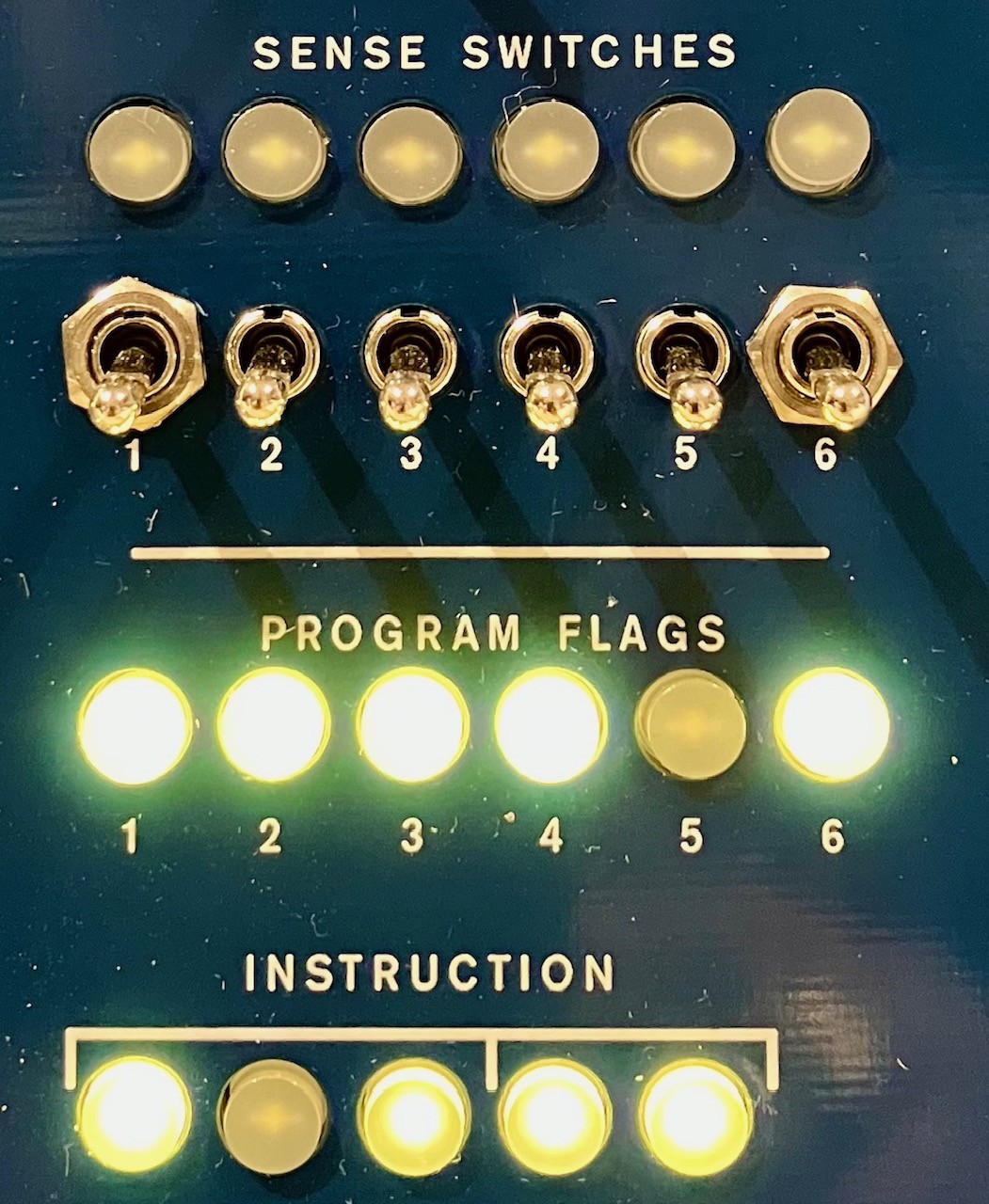
So with that done here is my current main line.
/ Start a new game.
a0,     law rcb            / Configure to read control boxes.
        dap rcw
        jmp a2

a1,     law rtw            / Configure to read testword.
        dap rcw
        jmp a2

/ Start over.
a2,     lac (17500         / Set the LEM at 8,000 meters.
        dac gmy
        lac (7640          / Center of the game space.
        dac gmx
        dzm vy             / Initialize velocities to zero.
        dzm vx
        lac (2
        dac rot            / Set LEM to upright position.

/ Setup the initial active game components.
        clf 1              / Enable input checking.
        clf 2              / Enable velocity application to game space.
        clf 3              / Enable collision detection.
        clf 4              / Enable draw LEM. Disable explosion.
        clf 5              / Enable show status.
        clf 6              / Enable show targets.

/ Main loop.
fr0,    load \ict, -1      / Loops about every 100 milliseconds.

        lac sec            / Get the second count.
        sub (1             / Reduce by one.
        sza i              / Not Zero?
        jmp dsc            /  No - Do the one second code.
        dac sec            / Yes - Save the new second count.
        jmp inp            / Continue to check inputs.

dsc,    lac (12            / Reset the second counter.
        dac sec

// Put the one second code here.

        lac 5sc            / Check the 5 second counter.
        sub (1
        dac 5sc            / Save result.
        sza                / Is AC Zero?
        jmp inp            /   No - Bypass to check inputs.
        lac (5             /  Yes - Reset 5 second counter.
        dac 5sc

// Put the five second code here.

/ Draw the targets.
        szf 6              / Is the Targets flag zero?
        jmp inp            /   No - Bypass drawing targets.
        jsp dtv            /  Yes - Draw the target landing locations.

/ Check for inputs.
inp,    szf 1              / Is the Input flag 0?
        jmp avl            /   No - Bypass input checks.
        jsp pip            /  Yes - Process inputs.

/ Apply velocities to game position.
avl,    szf 2              / Is the Velocity flag 0?
        jmp dst            /   No - Bypass velocity updates.
        jsp agv            /  Yes - Apply velocity changes.

/ Draw the vertical and horizontal velocity values.
dst,    szf 5              / Is the Status flag 0?
        jmp dtn            /   No - Bypass updating the status.
        jsp dvv            /  Yes - Draw the game status text.
        jsp dhv

/ Draw the terrain.
dtn,    jsp dtr            / Draw the terrain.

/ Draw the LEM.
plm,    szf 4              / Is the LEM/Explosion flag 0?
        jmp dxn            /   No - Draw the explosion.
        jsp lm1            /  Yes - Draw the LEM.
        lac thr
        sza                / Is thrust on?
        jsp lt0            /  Yes - Show LEM exhaust.
        jmp ctn            /   No - Skip explosion.

/ Draw the explosion.
dxn,    lac skp            / Check for skip frame.
        add (-1
        dac skp
        sza                / Zero?
        jmp cnt            /   No - Skip drawing explosion.
        jsp dex            /  Yes - Draw an explosion frame.
        lac (20            / Update skip.
        dac skp
        lac nel            / Update counter.
        add (-1
        dac nel
        sza i              / Not Zero?
        jmp a2             /   No - Restart game.

/ Check for contact with the terrain.
ctn,    szf 3              / Is the Collision flag 0?
        jmp cnt            /   No - Bypass collision checking.
        jsp lti            /  Yes - Perform collision detection.

cnt,    count \ict, .      / Use up rest of time of main loop.

        jmp fr0            / Next frame.

/ Insert constants and variables, end of program.

    constants
    variables
start 4
Much better for moving forward.
One thing that feels wrong but is perfectly valid on a PDP-1 is the ability to jump to anywhere from anywhere in the code. For instance there is a jmp a2 (restart game) in the "Draw the explosion." code above. Even more unsettling are similar "goto" style exits from various subroutines, but because the PDP-1 has no stack and very little state (only two registers) with a little care these jumps will work without problems.
Discussions
Become a Hackaday.io Member
Create an account to leave a comment. Already have an account? Log In.