Close
0%
0%

PCB ReTrace

Browser-based PCB reverse engineering suite. Digitize boards from photos, map components, trace nets, and stitch images. 100% Local-first.

Similar projects worth following
PCB ReTrace is a local-first web application designed for electronics engineers, repair technicians, and hardware hackers. It helps you move from a physical PCB to a digital representation (BOM, Netlist, and Schematics) using only photographs.

It runs 100% client-side using HTML5, Vanilla JS, and WebAssembly. No data is ever uploaded to a server.

The Problem

When repairing legacy hardware or analyzing a complex PCB without schematics, we often rely on high-resolution photos. But photos are static. You can't "click" a trace to see where it goes, and flipping between top and bottom board images mentally is error-prone. Existing software is often expensive, platform-locked, or relies on cloud services where you risk uploading sensitive IP.

The Solution: PCB ReTrace

PCB ReTrace is a browser-based suite designed to digitize and document physical circuit boards. It bridges the gap between a physical photo and a digital CAD file, running entirely in your browser using Local-first principles.

📺 Watch the Workflow Demo: 


Key Features

🔒 100% Private & Offline Capable

  • Zero Cloud Uploads: All images and project data are stored locally in your browser’s IndexedDB.
  • Security: Perfect for proprietary or NDA-protected boards.
  • Cross-Platform & Mobile Ready: Runs on Linux, Windows, macOS via Chrome/Edge/Firefox. Fully compatible with Android and iOS — perfect for taking to the workbench on a
    tablet.

📸 Smart Image Stitching & X-Ray

  • Auto-Alignment: Stitch multiple macro shots into a high-res map using WASM-powered computer vision.
  • X-Ray Vision: Align Top and Bottom board images precisely. Trace vias and connections through the board views.

📝 Visual BOM Management

  • Interactive Mapping: Click a component on the photo to add it to your BOM.
  • Cross-Probing: Clicking a row in the BOM list instantly zooms to that component on the board.
  • Live Editing: Add values, packages, and descriptions on the fly.

🕸️ Netlist Tracing & Export

  • Draw Traces: Visually draw connections over your photos to define Nets.
  • Smart Node Inspector: Finely tune pad and pin assignments with smart auto-suggestions for component naming and built-in pinout cheat sheets.
  • KiCad Ready: Export your work as a verified Netlist for CAD recreation.

🗺️ Schema ReTrace (Built-in Schematic Generator) - NEW!

  • Instant Schematic Generation:  Move beyond raw netlists. Schema ReTrace turns your mapped components and traced nets into a readable visual schematic diagram.
  • Seamless Integration: Your schematic updates directly alongside your board photos as you trace nets and assign pins in the main view.
  • Visual Validation: Makes spotting mistakes incredibly easy — if a connection looks wrong on the board, it will visually stand out on the schematic.
  • 100% Local: Schematic generation runs completely locally in the browser with no server uploads required.

Technical Details

PCB ReTrace is built for performance and longevity:

  • Core: Vanilla JavaScript (ES6+) for zero dependencies.
  • Performance: WebAssembly (WASM) handles heavy image processing.
  • Storage: Custom IndexedDB implementation to handle large image datasets locally.
  • License: Dual licensed (AGPL v3 Open Source & Commercial).

Try It Out

  • Visualizing Netlist Connections on Inspector & Schematic Polishing

    dev-lab5 hours ago 0 comments

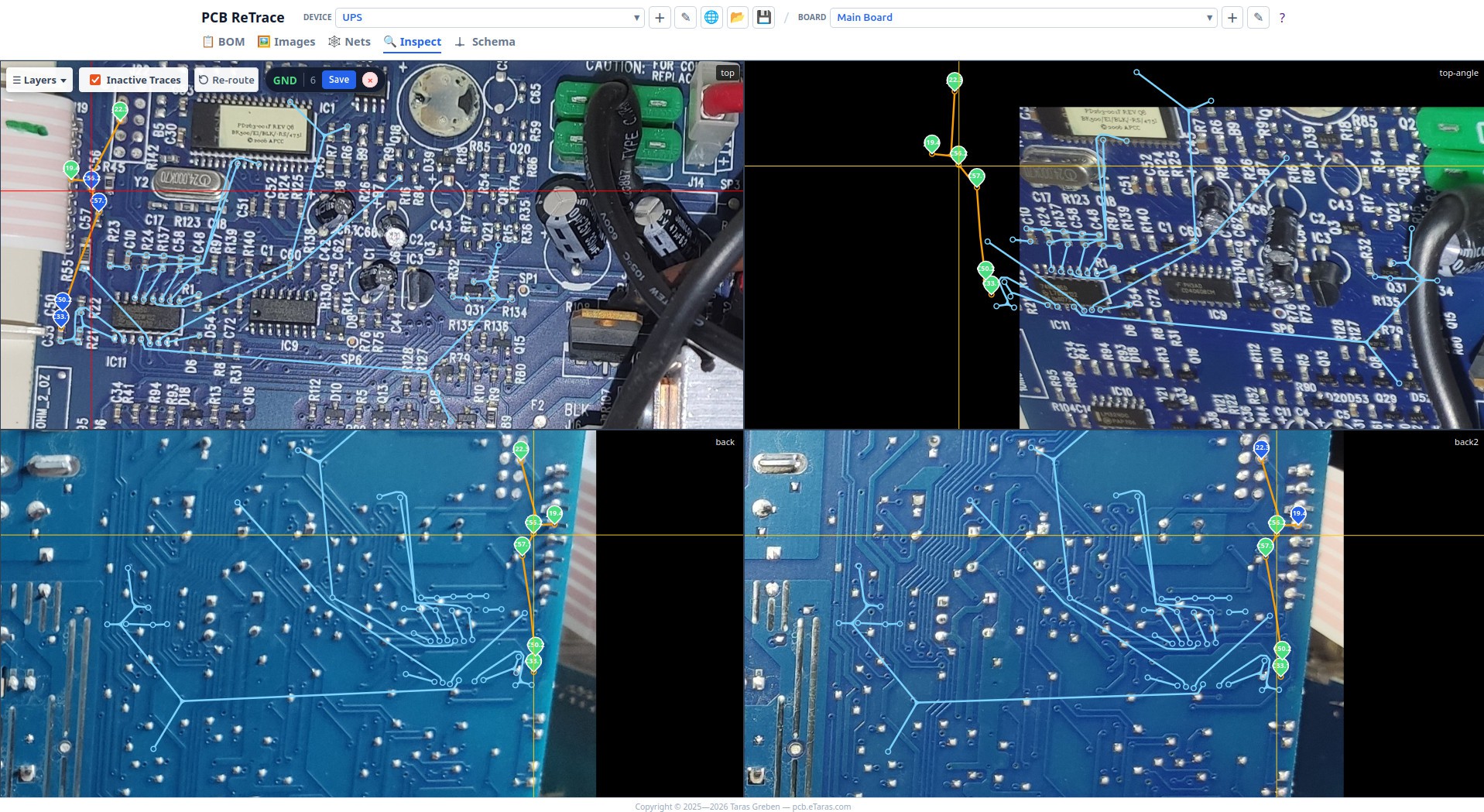
    Just pushed another set of updates to PCB ReTrace. The biggest highlight is a new feature for the Inspector view: netlist connections are now visualized directly on top of physical PCB photos.

    Visual Connectivity in the Inspector

    Up until now, you could trace nets, but verifying them required jumping back and forth. Now, the Inspector can draw connection lines directly overlaid on your board photos.

    • How it works: These lines are not designed to resemble the actual physical copper traces on the board. Instead, the tool automatically calculates connections using your netlist and pin coordinates.
    • Homography Reprojection: The magic relies on the existing homography matrix. It maps these calculated connection paths directly onto your PCB photos, meaning they line up accurately even if your pictures were taken from different angles, or show different sides of the PCB.
    • All Nets Visible: You can now visualize connections for all nets at once to quickly audit the entire board's connectivity in context.

    Schema ReTrace Improvements

    Alongside the Inspector view, the built-in schematic editor was polished with several workflow upgrades:

    • Re-route Button: Sometimes, after moving symbols around, schematic wires can get tangled. I've added a dedicated "Re-route" button next to "Auto Layout". It recalculates of all wire routes from scratch.
    • Sorting: The Nets and Components list panels now use standard natural sorting, and you can navigate through the items using Up/Down buttons.

    Bug Fixes

    • 3+Leg Passives: Standard symbols for passives (Resistors, Diodes, Caps) assumed a rigid 2-pin layout. If a net connected to a third pin (e.g., a diode in a SOT-23 package, or a variable resistor), the schematic router would panic and drop the trace in the center of the component. Schema ReTrace now dynamically converts these into a multi-pin representation so they render and route correctly.
    • KiCAD Netlist Export: Fixed a bug where exporting a KiCAD netlist behaved incorrectly if you were managing multiple active projects in your workspace.
    • Sticky Text Validator: Fixed a UI issue where a text input validator (like the node name validator) was incorrectly cached and reused for all input text dialogs.

    Try it out here: https://pcb.etaras.com/studio.html  

  • ​Encrypted Project Sharing and KiCad Import Progress

    dev-lab05/23/2026 at 09:45 0 comments

    Two small but useful updates this time.

    1. Projects can now be exported as AES-256 encrypted ZIPs - same passphrase-protected format that 7-Zip, PeaZip, and GNOME Archive Manager understand natively, so the open data format stays open. The README inside is always left unencrypted so recipients know what they're looking at. Designed for small teams sharing boards without making them public.
    2. KiCad symbol import (more than 22k symbols) now shows live progress through decompression, parsing, and database writes instead of a silent frozen UI.

    Both live at PCB ReTrace.

  • Big Update: Introducing "Schema ReTrace" – Generate Schematics directly in your browser!

    dev-lab04/24/2026 at 21:28 0 comments

    Up until now, you could successfully map components and extract a KiCad-compatible netlist. But let’s be honest—while a netlist is great, what we really want when reverse engineering a board is a readable schematic diagram.

    What is Schema ReTrace?

    I've updated the web app to include a built-in schematic generator. Now, instead of just exporting a raw netlist and trying to visualize the connections in your head (or relying solely on external tools), you can generate schematic diagrams right alongside your board photos.

    How it works:
    Schema ReTrace takes the data you've already painstakingly mapped out — your identified components and traced nets—and turns it into a visual schematic.

    • Seamless Integration: As you trace nets and assign component pins in the main view, Schema ReTrace can process those connections.
    • Visual Validation: It makes it infinitely easier to spot mistakes. If a schematic looks incredibly weird, you'll see it visually rather than hunting through rows of netlist data.
    • 100% Client-Side: Just like the rest of PCB ReTrace, this runs entirely locally in your browser. No data is sent to any servers, keeping your reverse-engineering projects completely private.

  • Update: Smart Node Naming & Pinout Help

    dev-lab12/26/2025 at 13:09 0 comments

    Just pushed a big workflow upgrade for tracing nets. The Inspector now includes Smart Naming to automate the tedious part of documenting connectivity.

    • Auto-Suggestions: When you add a net node, the tool auto-generates the name (e.g., R1.1). It calculates distance and angle to pick the right component, and even handles board rotation and bottom-side mirroring automatically.
    • Collision Handling: If R1.1 is already taken, it smartly suggests R1.2.
    • Cheat Sheet: Added a built-in pinout guide (click the ? in the input box) so you don't have to remember things like Tantalum polarity.

    Note: This magic relies on your Component REFs. The more components you map in the BOM first, the smarter the suggestions become!

    Try it out: https://pcb.etaras.com/studio.html

View all 4 project logs

Enjoy this project?

Share

Discussions

Similar Projects

Does this project spark your interest?

Become a member to follow this project and never miss any updates