 dev-lab
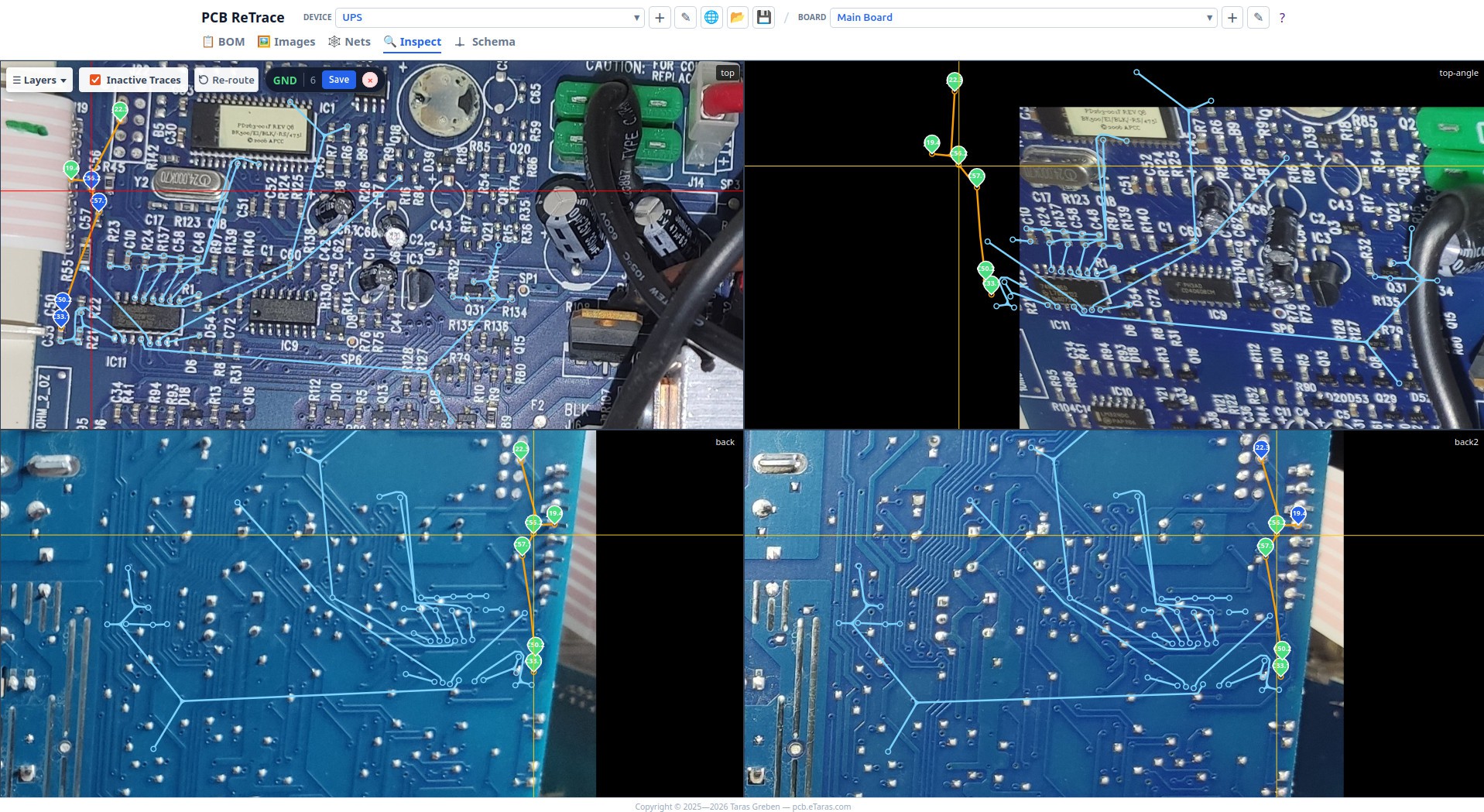
Just pushed another set of updates to PCB ReTrace. The biggest highlight is a new feature for the Inspector view: netlist connections are now visualized directly on top of physical PCB photos.
Visual Connectivity in the Inspector
Up until now, you could trace nets, but verifying them required jumping back and forth. Now, the Inspector can draw connection lines directly overlaid on your board photos.
- How it works: These lines are not designed to resemble the actual physical copper traces on the board. Instead, the tool automatically calculates connections using your netlist and pin coordinates.
- Homography Reprojection: The magic relies on the existing homography matrix. It maps these calculated connection paths directly onto your PCB photos, meaning they line up accurately even if your pictures were taken from different angles, or show different sides of the PCB.
- All Nets Visible: You can now visualize connections for all nets at once to quickly audit the entire board's connectivity in context.
Schema ReTrace Improvements
Alongside the Inspector view, the built-in schematic editor was polished with several workflow upgrades:
- Re-route Button: Sometimes, after moving symbols around, schematic wires can get tangled. I've added a dedicated "Re-route" button next to "Auto Layout". It recalculates of all wire routes from scratch.
- Sorting: The Nets and Components list panels now use standard natural sorting, and you can navigate through the items using Up/Down buttons.
Bug Fixes
- 3+Leg Passives: Standard symbols for passives (Resistors, Diodes, Caps) assumed a rigid 2-pin layout. If a net connected to a third pin (e.g., a diode in a SOT-23 package, or a variable resistor), the schematic router would panic and drop the trace in the center of the component. Schema ReTrace now dynamically converts these into a multi-pin representation so they render and route correctly.
- KiCAD Netlist Export: Fixed a bug where exporting a KiCAD netlist behaved incorrectly if you were managing multiple active projects in your workspace.
- Sticky Text Validator: Fixed a UI issue where a text input validator (like the node name validator) was incorrectly cached and reused for all input text dialogs.
Try it out here: https://pcb.etaras.com/studio.html
Discussions
Become a Hackaday.io Member
Create an account to leave a comment. Already have an account? Log In.