 ElectroScope Archive

Why DS3231?
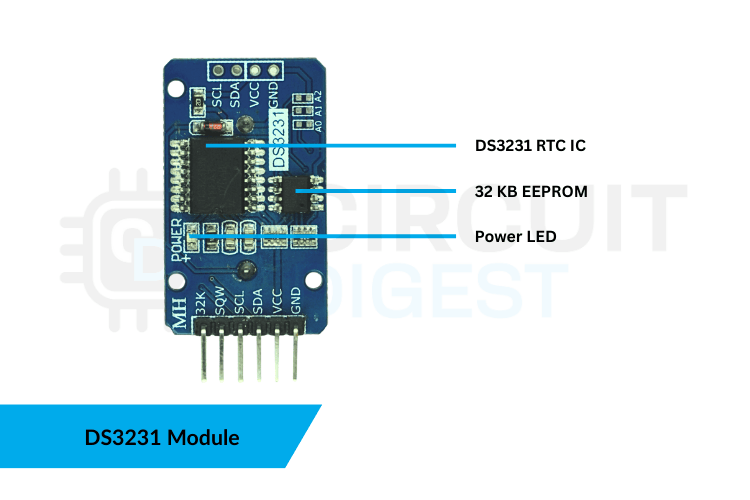
The DS3231 is an I²C RTC with a Temperature-Compensated Crystal Oscillator (TCXO), so it stays accurate across temperature swings. It tracks seconds, minutes, hours, day/date, month, and year, and keeps running on its backup battery when the main power drops.
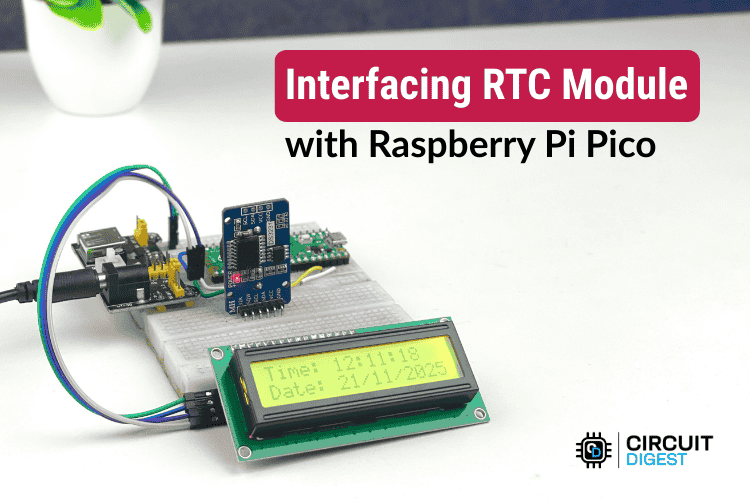
Parts You’ll Need
-
Raspberry Pi Pico (any variant)
-
DS3231 RTC module (with CR2032 battery)
-
16×2 I²C LCD (with backpack)
-
Breadboard + jumper wires
-
USB cable to program Pico
-
Optional power supply for stand-alone use
Setting the Time
Before the Pico can show the correct time, you need to set the DS3231’s internal clock once:
1) Auto-Sync from Host (Compile-Time): Include this line in your setup code to set RTC to your computer’s current date/time at upload:
rtc.adjust(DateTime(F(__DATE__), F(__TIME__)));
Then re-upload your sketch with that line commented out so it won’t reset on each restart.
2) Manual Set: To program a specific date/time, call:
rtc.adjust(DateTime(2026, 01, 04, 12, 30, 00));
Replace values with YEAR, MONTH, DAY, HOUR, MINUTE, SECOND.
Arduino Code (Essentials)
Below is the core code for the clock display:
#include <Wire.h>
#include "RTClib.h"
#include <LiquidCrystal_I2C.h>

#define DS3231_ADDR 0x68
#define LCD_ADDR    0x27

RTC_DS3231 rtc;
LiquidCrystal_I2C lcd(LCD_ADDR, 16, 2);

void setup() {  Wire.begin();   lcd.begin();  lcd.backlight();
  if (!rtc.begin()) {    lcd.print("RTC NOT FOUND");    while (1);  }
  if (rtc.lostPower()) {    rtc.adjust(DateTime(F(__DATE__), F(__TIME__)));  }
}

void loop() {  DateTime now = rtc.now();  float temp = rtc.getTemperature();
  lcd.setCursor(0, 0);  lcd.print("Time:");  lcd.print(now.hour());  lcd.print(":");  lcd.print(now.minute());    lcd.setCursor(0, 1);  lcd.print(now.day());  lcd.print("/");  lcd.print(now.month());  lcd.print(" ");  lcd.print(temp);  lcd.print("C");
  delay(1000);
}
This initializes I²C, sets up the RTC if needed, then repeatedly reads and prints the current time/date and temperature.
Common Gotchas
-
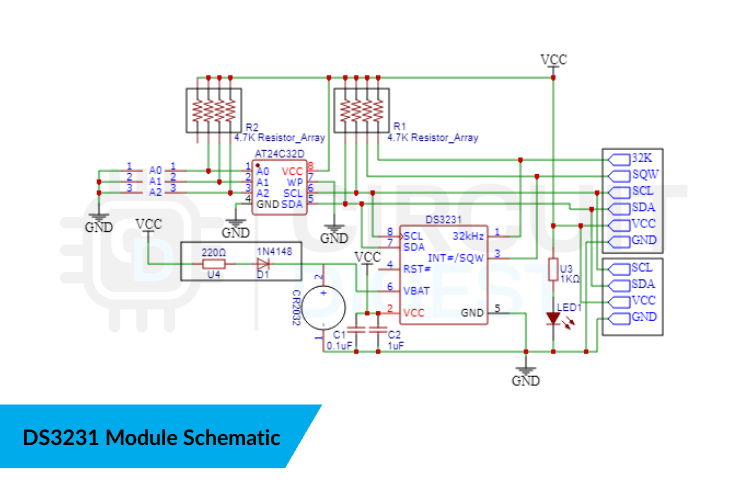
RTC not detected: Poor wiring or missing pull-ups can stop I²C communication.
-
LCD shows garbage: Check the I²C address (often 0x27 or 0x3F).
-
Time resets on restart: Don’t leave the auto-sync line active after the first upload.
What You Learn
This Raspberry Pi Pico RTC DS3231 project teaches essential embedded skills:
-
I²C communication between Pico and peripherals
-
Battery-backed RTC handling
-
Displaying formatted data on character LCDs
-
Syncing external modules with compile time

 Jean-Philippe Paumier
 clewsy
 ted
ted
 bobricius