 ElectroScope Archive

Project Overview
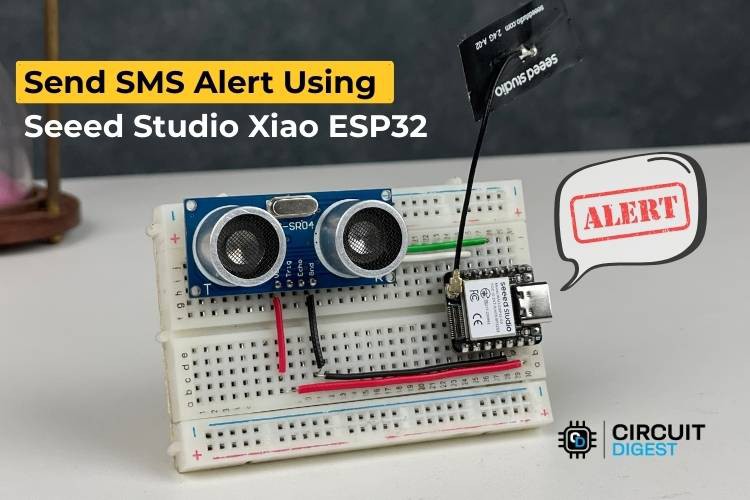
This DIY IoT alert system uses a Send SMS Alert using Seeed Studio XIAO ESP32 microcontroller and an HC-SR04 ultrasonic distance sensor to detect nearby movement and send SMS notifications over Wi-Fi via a cloud API. Instead of GSM hardware, the ESP32 sends HTTP requests to a free SMS service, keeping the design compact, cheap, and easy to replicate.
What You’ll Need
| Component | Purpose |
|---|---|
| Seeed Studio XIAO ESP32-S3 | Main microcontroller with Wi-Fi |
| HC-SR04 Ultrasonic Sensor | Proximity/motion detection |
| Breadboard & jumper wires | Prototype wiring |
| Wi-Fi network | Internet connectivity |
| Free CircuitDigest Cloud API key | SMS delivery service |
You can swap the HC-SR04 with other digital sensors (e.g., PIR motion, temp sensors) without changing the core logic.
How It Works
-
Boot & Wi-Fi: On power-up, the XIAO ESP32 connects to your Wi-Fi network.
-
Distance Checking: The HC-SR04 repeatedly measures how far an object is.
-
Trigger Detection: If an object is within a defined threshold (e.g., <100 cm), the code triggers an SMS alert.
-
SMS API Request: An HTTP POST with your API key and message data is sent to the cloud SMS API.
-
Deliver Alert: The cloud service forwards the text to your phone via the mobile network.
Wiring Guide
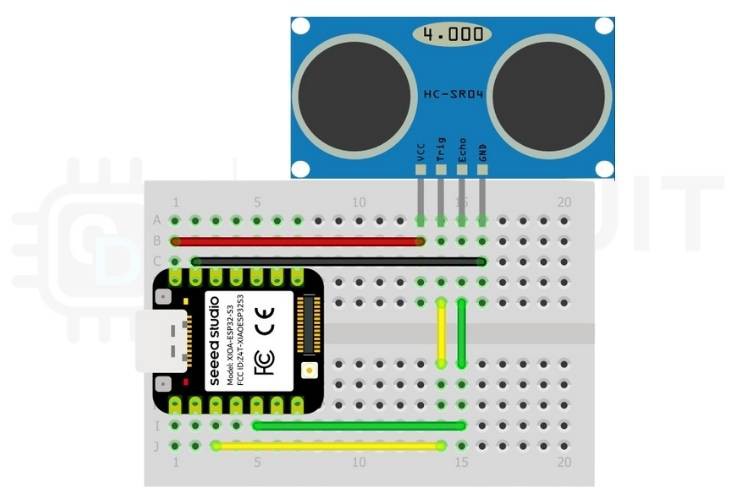
Keep the hardware simple with just four connections:
| HC-SR04 Pin | XIAO ESP32 Pin | Notes |
|---|---|---|
| VCC | 5V | Power |
| GND | GND | Ground |
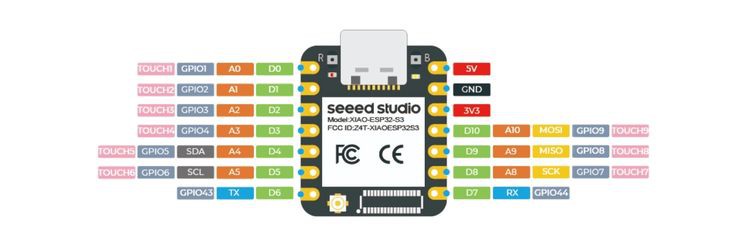
| Trig | GPIO 5 | Trigger signal |
| Echo | GPIO 3 | Echo pulse input |
No level shifting is needed for basic operation with the HC-SR04, and the tiny XIAO form factor fits neatly on a breadboard.
Arduino Code Summary
Libraries & Credentials
#include <WiFi.h>

// Pins
#define TRIG_PIN 5
#define ECHO_PIN 3

// Wi-Fi
const char* ssid     = "YOUR_SSID";
const char* password = "YOUR_PASS";

// SMS API
const char* apiKey     = "YOUR_API_KEY";
const char* templateID = "103";
const char* mobileNum  = "91XXXXXXXXXX";

// SMS text variables
const char* var1 = "Sensor";
const char* var2 = "Object Detected";

bool alertSent = false;
Send SMS Function
This function sends an HTTP POST request with JSON containing the recipient and dynamic text variables:
void sendSMS() {  if (WiFi.status() == WL_CONNECTED) {    WiFiClient client;    if (client.connect("www.circuitdigest.cloud", 80)) {      String payload = "{\"mobiles\":\""+String(mobileNum)+"\","                       "\"var1\":\""+String(var1)+"\","                       "\"var2\":\""+String(var2)+"\"}";      client.println("POST /send_sms?ID="+String(templateID)+" HTTP/1.1");      client.println("Host: www.circuitdigest.cloud");      client.println("Authorization: "+String(apiKey));      client.println("Content-Type: application/json");      client.println("Content-Length: "+String(payload.length()));      client.println();      client.println(payload);      while (client.connected() || client.available()) {        if (client.available()) Serial.println(client.readStringUntil('\n'));      }      client.stop();    }  }
}
Distance Measurement
A simple function to read the distance from the ultrasonic sensor:
float readDistance() {  digitalWrite(TRIG_PIN, LOW); delayMicroseconds(2);  digitalWrite(TRIG_PIN, HIGH); delayMicroseconds(10);  digitalWrite(TRIG_PIN, LOW);  long duration = pulseIn(ECHO_PIN, HIGH);  return duration * 0.034 / 2; // cm
}
Main Loop
Measure and send SMS when the object comes closer than the threshold:
void loop() {  float dist = readDistance();  Serial.println(String(dist) + " cm");  if (dist < 100 && !alertSent) {    sendSMS();    alertSent = true;  }  if (dist >= 100) alertSent = false;  delay(500);
}
Complete code builds the Wi-Fi connection, handles cloud API messaging, and ensures SMS is sent only once per “event.”
Testing & Troubleshooting
-
Wi-Fi: The Serial Monitor should print connection progress and IP address.
-
Sensor feedback: You’ll see continuous distance readings.
-
SMS status: The API response appears in Serial output.
Common issues include incorrect API keys, incorrect phone number format (include country code), or Wi-Fi disconnects. If Wi-Fi drops, the module keeps trying to reconnect...
Read more »
 Augusto

 Rodmg
Rodmg
 Hari Wiguna
 Rohan Barnwal