 NormalL User
Here is a demo of my fast SD card interface for the Ben Eater 6502:
This demo streams uncompressed data at a rate of over 130KBs. I made this after thinking about how I can do better audio for my previous 'Ben
Eater Bad Apple!' Demo for the 6502 and Worlds Worst Video Card.
For my Bad Apple! Demo Version 2.0 I am working on I want to use the PCM audio out of the VIA serial port I was experimenting with recently, https://hackaday.io/project/204469-abusing-a-6522-via-serial-port-for-pcm-audio while also keeping the 30 FPS video I already have working from this earlier Demo with just primitive audio using the 6522 VIA PB7 square wave output.
One of the constraints I have put on myself is only using ‘Official Ben Eater’ chips/hardware, other than a simple SD card adapter and allowing myself a few passives like diodes and resistors.
While it is great that Ben now has added a SID chip (and modern replacements) to the system in recent videos, I am saving a deep dive into the SID for making original music for my 32k ROM based ‘Demo Scene’ style Demo I am also working on. (I had the honor of modifying Monty on the Run by Rob Hubbard for Ben's outro.)
However the math just was not mathing! I was reading too slowly from the SD card. Even with a very fast ‘bit-bang’ routine it was taking over 40 CPU cycles per byte to shift in the data. There just was not enough cycles/SD card transfer speed to do both the video and PCM audio, even at a very low 1,990 bytes/15,920 1 bit samples a second and still keep the 30fps video.
Then a great suggestion from a very smart person lead me to realize that I could rewire the existing PS/2 Keyboard hardware Ben uses and also wire in a couple left over AND gates from Ben’s VGA interface to allow much faster reads from the SD card.
Here is Ben's original video where he goes over this interface:
And here is my re-wired interface for fast SD card reads:
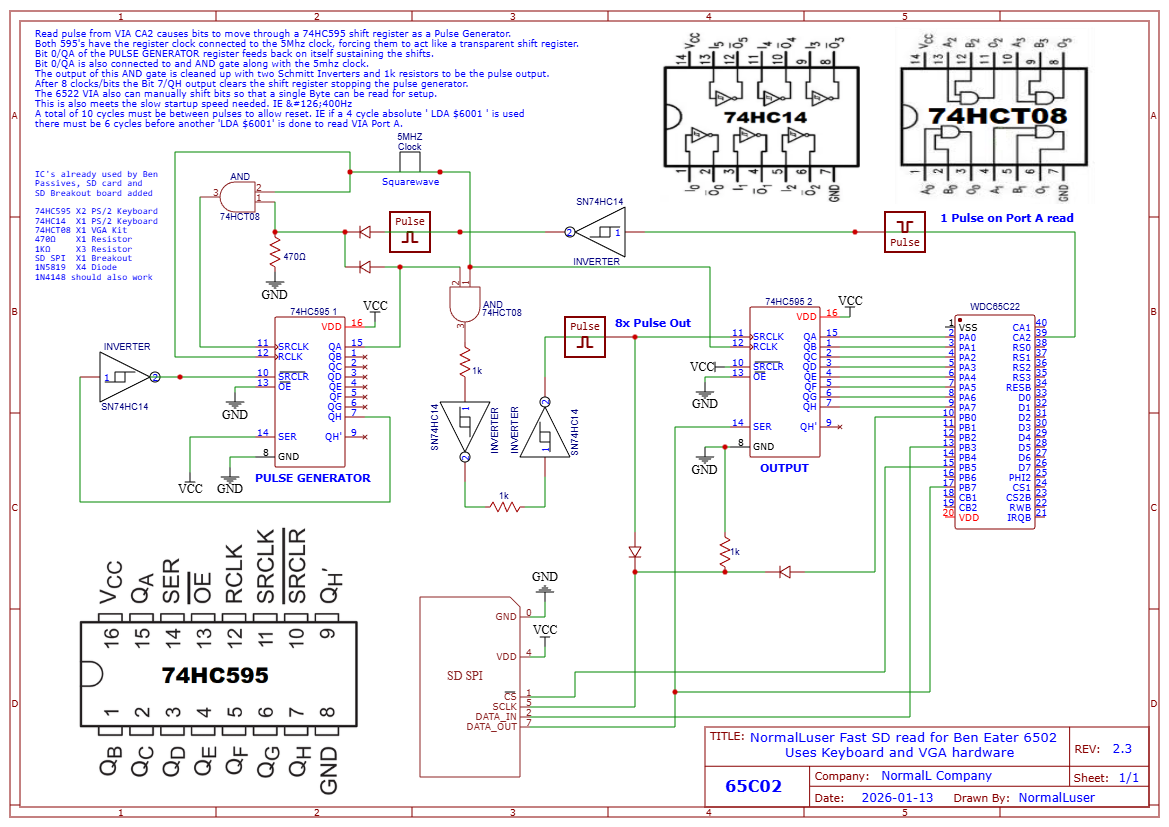
What I ended up doing was using one 74HC595 from the keyboard hardware and connected it to one of the VIA 8 bit parallel ports. This was easy. The tricky part was figuring out how to use other 74HC595 as a ‘Pulse Generator’. VIA Port A is setup to pulse the VIA CA2 pin each time it is read. This is inverted using the 74HC14 from the keyboard hardware and fed into an unused 74CHT08 AND gate from the VGA hardware along with the system clock. This is then fed to the clock input of the ‘Pulse Generator’ 74HC595. This is setup so that the serial input is tied high, and the QA/bit 0 output feeds back to the AND gate CA2 is connected to, keeping the Pulse generator input clock going.
QA/bit 0 is also connected to another unused AND gate along with the system clock. The output of this is cleaned up with resistors and a couple more Schmitt inverter gates from the keyboard hardware and sent along to the SD card clock and the other 74HC595 shift register. This is what clocks in the bits. Cleaning up this signal was key and took the most experimentation.
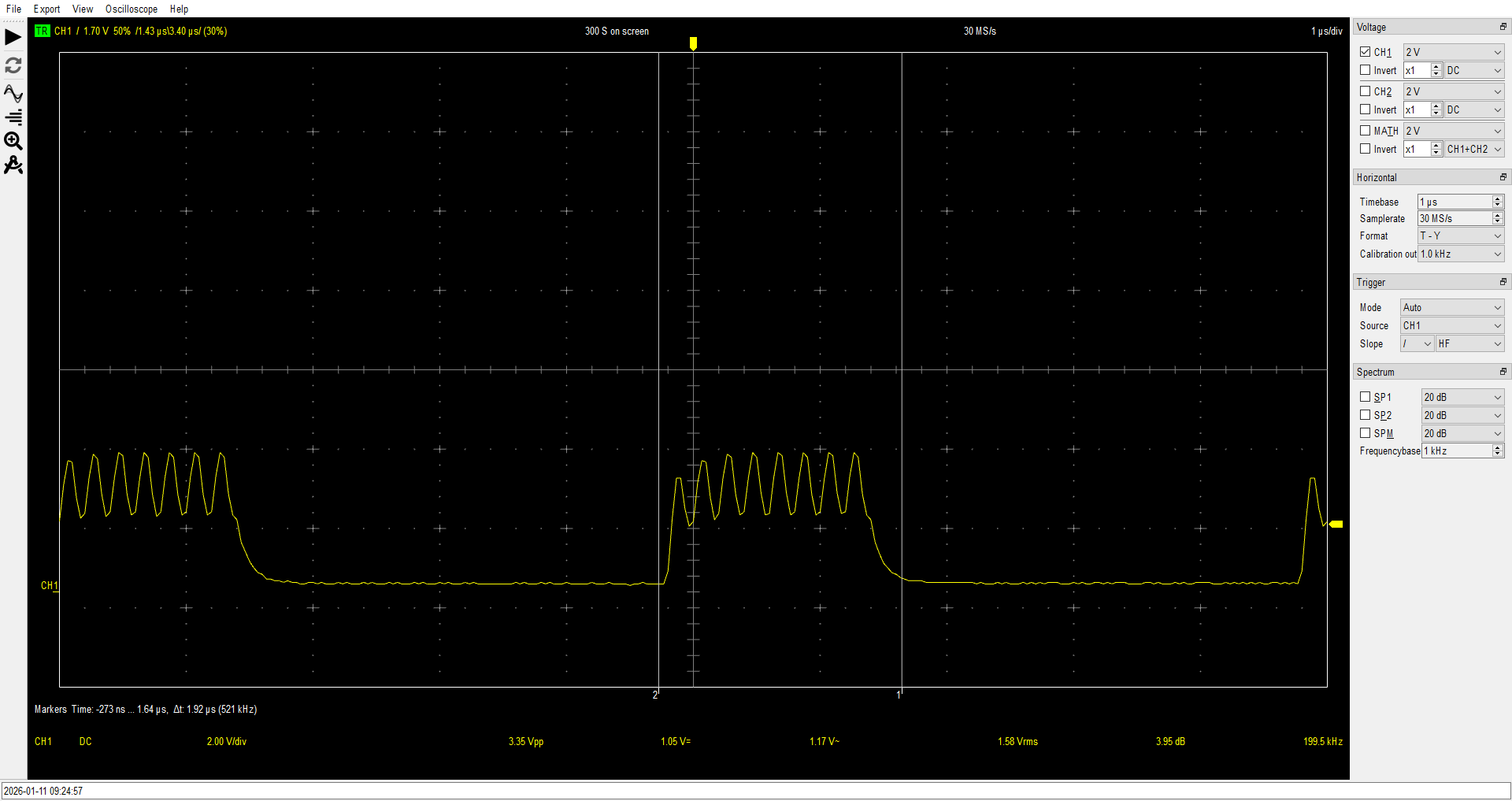
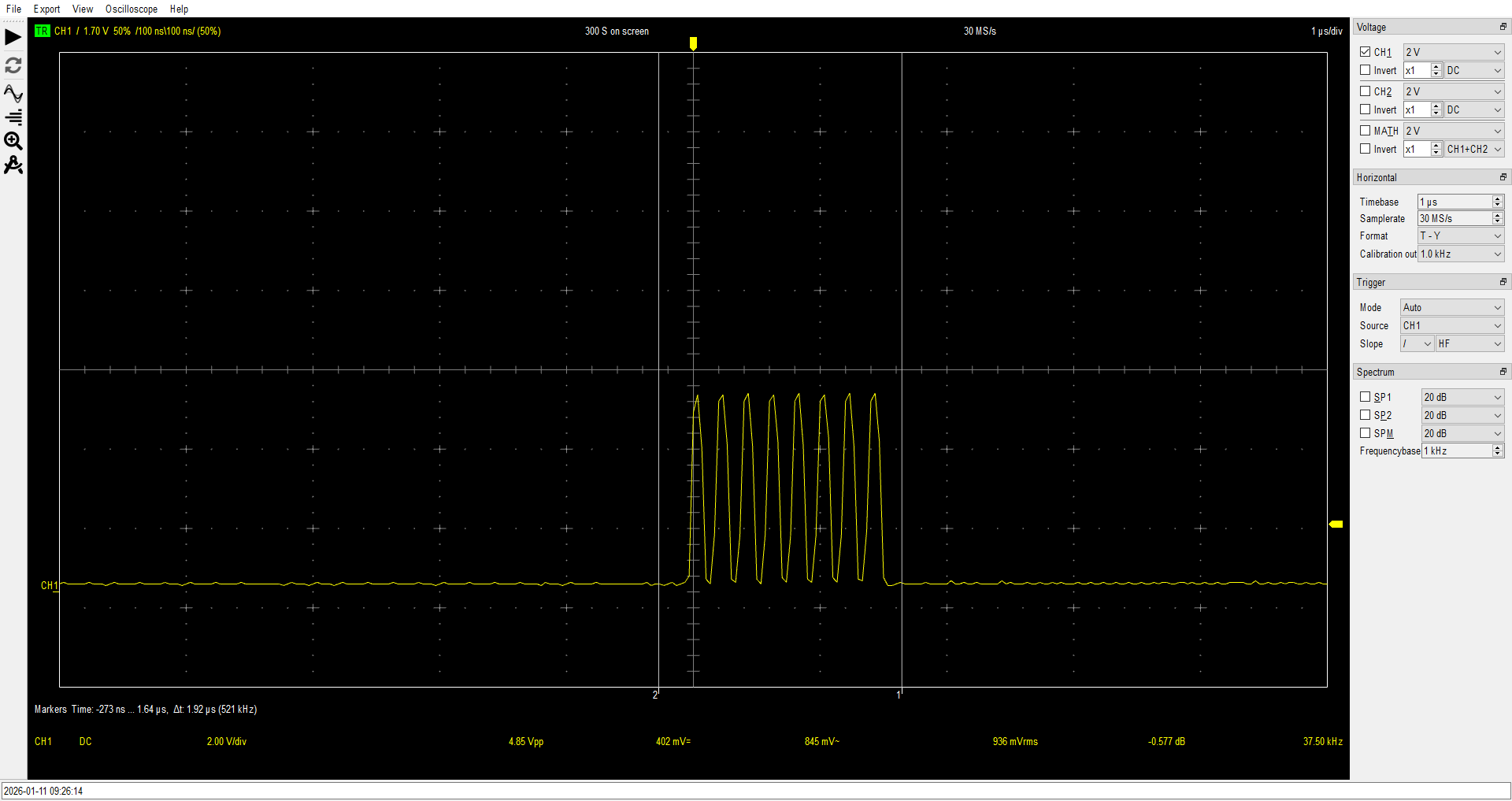
Since these are ‘latching’ as opposed to ‘transparent’ shift registers the register clock RCLK on both is simply tied to the system clock, forcing them to act more or less like ‘transparent’ shift registers, eliminating the need to have latching circuitry or having to deal with timing of the latching at 5Mhz. My $60 USB oscilloscope was used to the absolute limit to debug this circuitry as it was!
To stop it after exactly 8 bits have been transferred the output of QH/Bit 7 of the pulse generator is sent back through an inverter to the clear pin, SRCLR. This sets the output bits back to low and stops both the clock of the pulse generator itself and the clock output to the SD card/output shift register.
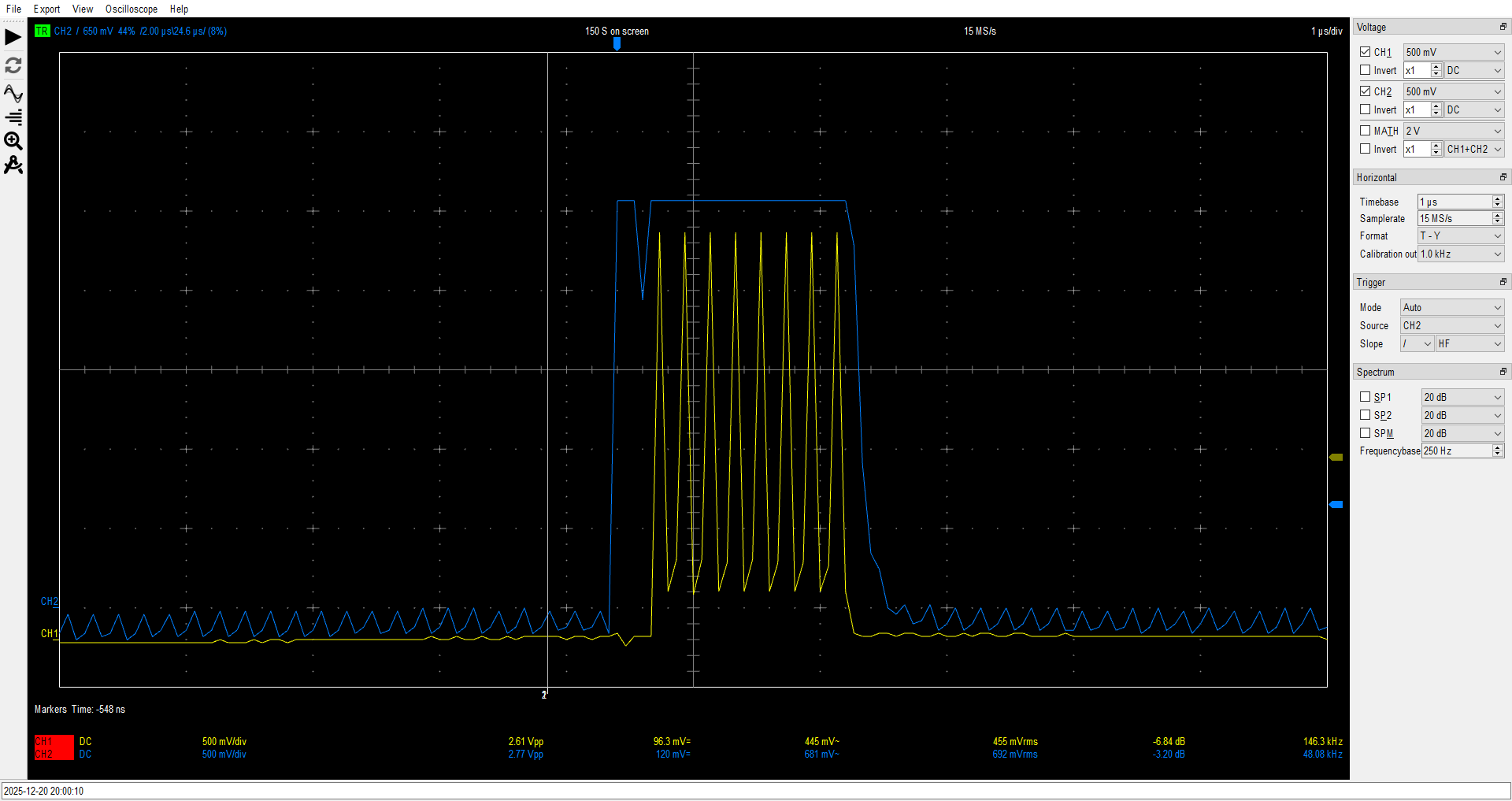
The blue is the output of bit 0 of the shift register that is connected to the AND gate along with the system clock producing the 8 pulses in yellow, after going through the Schmitt inverters and resistors,
Testing shows that 2 clock cycles are needed after each shift operation at 5Mhz for everything to reset and settle. Meaning that after each 4 cycle LDA VIA_PORTA, you only need to wait 6 cycles before you can read again for a total of 10 cycles per byte.
For instance, I have an unrolled ROM based routine that can transfer bytes to the screen buffer at just 12 cycles per byte by doing this:
LDA VIA_PORTA ; 4 cycles 3 bytes
STA (Screen),Y ; 6 cycles 2 bytes
INY ; 2 cycles 1 byte
This setup works with my system clocked at 5mhz, and it should work at slower clock speeds as well.
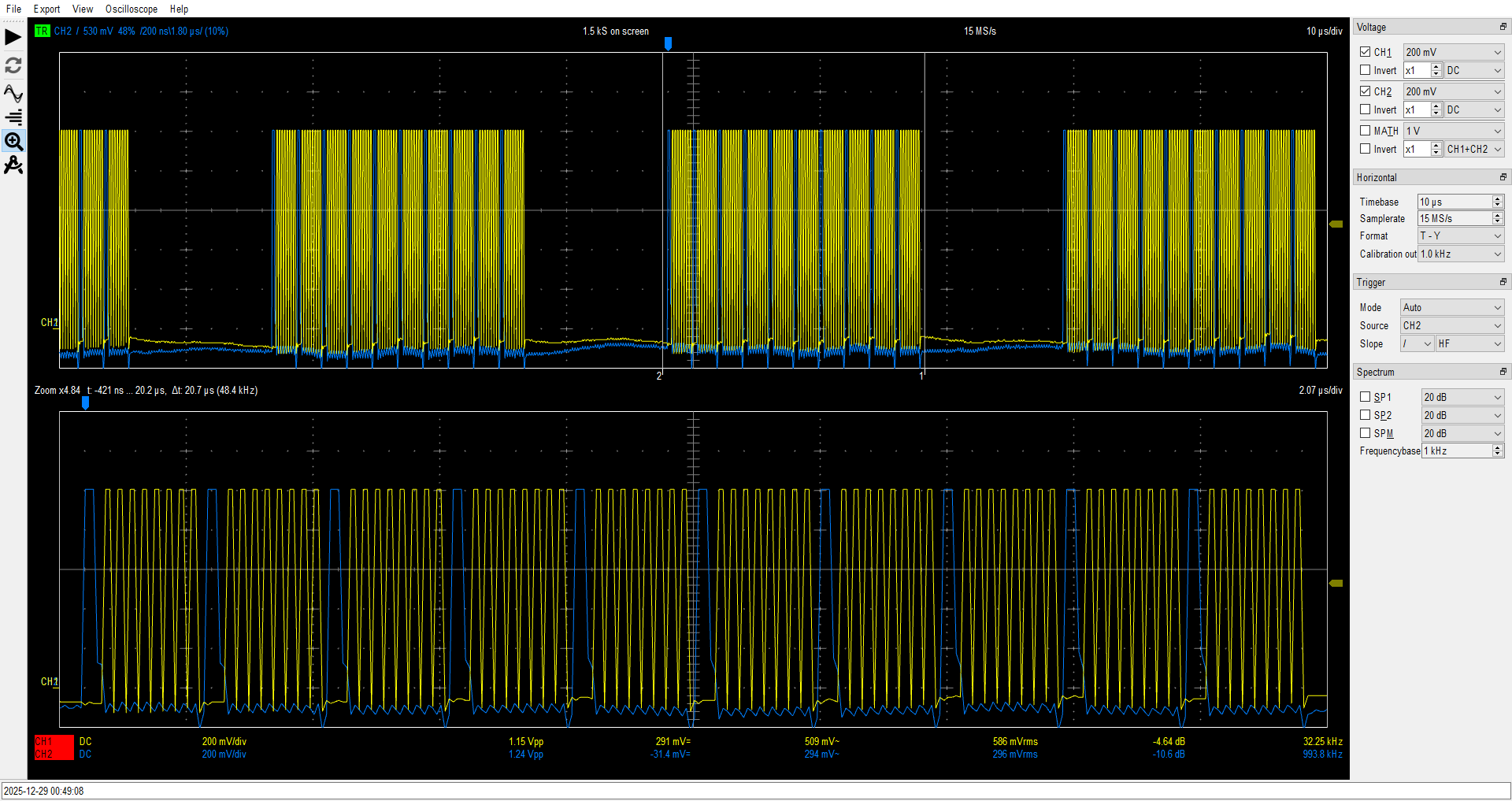
In the above capture the blue is the pulse from VIA CA2 after the inverter, and yellow is again the cleaned up pulses sent to clock the SD card and output shift register.
There are also some resistors and diodes used to allow VIA_PORTB to be connected to the SD card. This allows for the slow speed initialization required by SD cards and to send commands or data to the card. Once initialized all reads are done by simply reading a full byte on VIA_PORTA.
To demo this fast SD hardware I have over 4,500 lines of unrolled routines that read the SD card and write 6,400 bytes to the screen at 20 fps. One obstacle to doing this quickly is that SD cards in READ_MULTIBLOCK mode always send out CRC bytes each 512 byte block and then also need a variable amount of ‘pre-charge’ clock pulses. Somewhere around 10 bytes total each block on the cards I am using. (It varies by a couple bytes from block to block at 5Mhz.)
Keeping track of this for each byte would cut the transfer rate in half at a minimum.
6,400 is not divisible by 512 evenly, so it did not seem easy to unroll at first.
However I realized that 6,400 + 256 IS evenly divisible by 512.
So I created some unrolled routines and always read 256 bytes after each frame and use that for the audio.
This allows
hard-coded routines to toss the CRC/pre-charge bytes after each 512
bytes read.
I did this by creating three large unrolled routines. Since the memory layout has the first screen line start at 2000 hex, and the second line at 2080 hex, etc, I made two large routines: One that can draw up to five 100 pixel lines, starting with a 'Even' row, and another identical but starting with a 'Odd' row. There is a third routine that draws only up to 100 pixels but does not increment the pointer when finished. I used a spreadsheet to quickly create these routines with the needed labels.
Line500_Odd:
 LDA VIA_PORTA   ; 4 cycles 3 bytes
 STA (Screen),Y  ; 6 cycles 2 bytes
 INY             ; 2 cycles 1 byte
Line499:
 LDA VIA_PORTA   ; 4 cycles 3 bytes
 STA (Screen),Y  ; 6 cycles 2 bytes
 INY             ; 2 cycles 1 byte
.... etc ....
Line401:
 LDA VIA_PORTA   ; 4 cycles 3 bytes
 STA (Screen),Y  ; 6 cycles 2 bytes
 INY             ; 2 cycles 1 byte

LDY #$80	 ; Next Line ************************

Line400_Even:
 LDA VIA_PORTA   ; 4 cycles 3 bytes
 STA (Screen),Y  ; 6 cycles 2 bytes
 INY             ; 2 cycles 1 byte
.... etc ....
Line301:
 LDA VIA_PORTA   ; 4 cycles 3 bytes
 STA (Screen),Y  ; 6 cycles 2 bytes
 INY             ; 2 cycles 1 byte

 LDY #$0	 ; Next Line *******************
 INC ScreenH
.... etc ....
This allows the screen to be updated with a main loop that looks like this:
DrawLoop:
 LDA #$20
 STA ScreenH    ; Reset Screen row pointer
 LDY #$0        ; Reset Screen pixel pointer
 JSR Line500_Odd
 JSR Line12
 JSR TossBits   ; CRC routine
 JSR Line88_Even
 JSR Line400_Odd
 JSR Line24
 JSR TossBits   ; CRC routine
.... etc ...
This allows a hard-coded screen fill followed by a 256 byte read into an audio buffer with a CRC routine every 512 bytes.
Since I don’t need to do anything with these CRC bytes I can use the full speed of this hardware by cycle counting:
LDA (VIA_PORTA_Ind) ; 5 cycles byte 1
LDA (DummyZP) ; 5 cycles delay for Pulse Generator circuit to shift out pulse x8 and reset.
Taking only 10 CPU cycles for each byte. 8 to shift the byte and 2 as a 'Dummy' read to allow 5 cycles to finish shifting and reset the Pulse Generator.
All these optimizations together allow 20 FPS Vsync locked full color video and a 4,734 bytes per second audio rate. I just ‘waste’ a few bytes each frame in the audio packet to match the ~235 bytes per frame VIA serial output rate. Wasting ~21 bytes per frame is much faster than counting bytes and much easier to unroll! I only use a single 256 byte buffer and reset the playback pointer after transferring 2 new audio bytes each frame. Because of timing this causes a small amount of degradation in the audio quality as there is a ‘partial’ byte every few frames. I plan on using a larger buffer in the future to enhance the audio playback, but this small buffer allows me to have a very efficient IRQ playback routine, saving many cycles by using the X register only for audio playback, allowing 4.6KBs audio. I did add a 10uf ‘low pass filter’ capacitor to ground on the audio output I was already using from my earlier PCM tests at the kind suggestion of a youtube comment by @itdepends604.
This did improve the audio by filtering out some of the higher end ‘static’. It still sounds very ‘AM radio’, but it is much improved from my earlier tests.
In the end this all works out to a transfer rate of over 130KB a second from the SD card to the screen and audio buffer for this demo!
Pretty fast for a 6502!
I also took this
opportunity to take a few resistors of 1k, 2.2k and 3,3k (x2) and
change the VGA color output from RRGGBB 64 color output to RRRGGGBB
for full 256 color output. I think this cartoon at 256 colors really
shows off what can be done with the 100x64 output of Ben’s Worlds
Worst Video Card!
As for how I created the video and audio data, I used VLC to output the audio from the MP4 video and processed it in Audacity to get the correct bitrate, I then used the same process as the PCM hackaday project linked earlier to create a 1 bit PCM audio file. For the video side of things, I used handbrake CLI to create a MP4 video of the exact framerate I needed. I found out that my 60Hz VGA output is actually more like 60.31Hz, so I needed a framerate of 20.103fps. 3 Python scripts I hacked together were then used to create a video file, 1 to extract the frames from the MP4 as 800x600 PNG image files, a second to then create a stream of 128x64, 256 color images with the right RRRGGGBB color format and memory mapping that matches the layout of the frame buffer that I used for initial testing, and a third script to take the video and audio files and output 100x64 image data interleaved with 256 byte audio data packets containing around 235 bytes at the PCM audio bitrate.
I still have some experimentation on Audio processing and output I want to do as well as another intro to create before I do the new Bad Apple! Demo, but I thought you all might want to see the progress I have made, and may find the SD interface interesting.
All the software as well as the final output of the scripts is at my github:
https://github.com/NormalLuser/BE6502-Fast-SD-Card-Interface
That’s All Folks!