 roelof4
OS-9 uses a 100Hz oscillator driven signal to keep track of time. As mentioned this signal is connected through the PIA (MC68B21/HD63B21) and generates interrupts every 10ms. Upon calling the 'setime' command the PIA is initialised and valid time information becomes available to the system. Often the setime call is included in the 'startup' file which is automatically run at boot time.
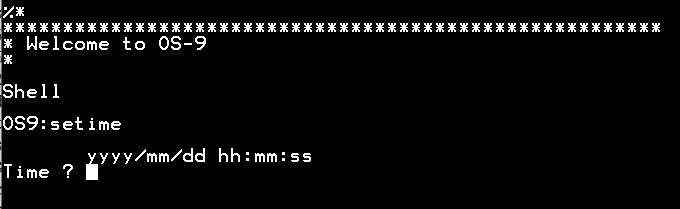
Because there is a battery backed Realtime Clock (DS1302) available there is no need to manually enter date and time information (once the Realtime Clock is setup) every time the system boots.
In order to include the reading of the Realtime Clock at boot time changes are made to the Clock module and the setime command. Before discussing these changes it would be good to discuss the Realtime Clock itself and how it is interfaced to the CPU.
Unfortunately the use of the same Realtime clock chip (MSM5832) as used on the CMS9639 was not an option since this obsolete chip is difficult to source. Since there was little board space available it was decided to go for a chip with a small footprint and a serial interface. The DS1302 provides date, time and a small number of non-volatile RAM locations. Its interface is bespoke and shown below.
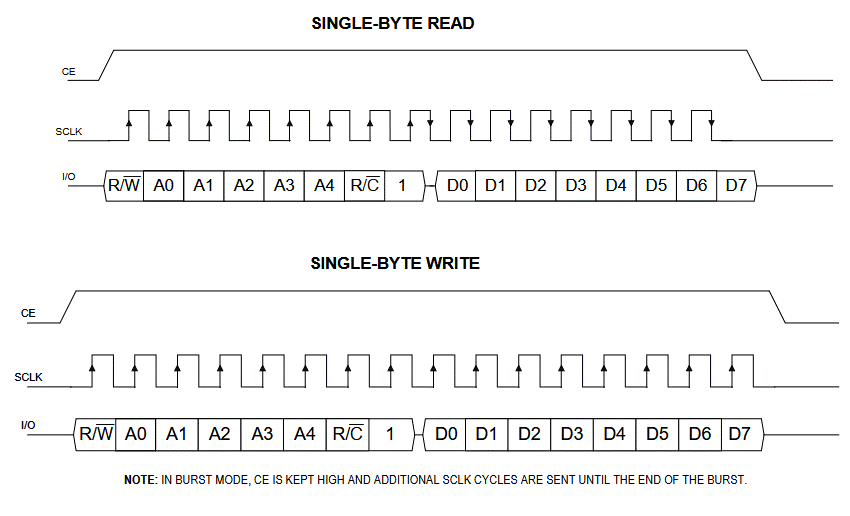
There are only three pins for exchanging data. A ChipEnable selects the device and data (IO) is shifted in/out using a SerialCLocK. Only the IO pin is bidirectional.
Originally I hooked the DS1302 to a couple of unused PIA lines and implemented a software interface to read/write date & time information. That resulted in quite a bit of code (provided) and since there was some space left over in the CPLD chip, it was decided to create a bespoke interface using a Verilog module.
For fun I tried to use one of the AI agents to write a module for me. This turned into a disappointing result that didn't work because the agent misinterpreted the asymmetry between reading & writing and was unable to generate the right code even when this issue was pointed out. After testing about ten versions I gave up :(
Thinking someone would have tackled this already I searched online and found a github repository (link in the code) that implemented burst reading/writing (many registers in one go without transmitting the address info for every register). I modified this code to include single register read/write which I needed to change the trickle charge settings. This code is provided in the file section. I will discuss the detailed instantiation of this module within the top level Verilog code in the near future. Since the actual code is rather large I will try to do this in sections.
From a software perspective this interface takes 8 memory locations ($FFB0..$FFB7) that provide date&time and command/status register ($FFB7). In the command register the user selects the type of operation (burst read/write or single register read/write). The status register shows when the serial interface is busy/ready with any operation.
With this interface tested it was decided to modify the 'year 2000 compliant version' (source available online: y2k upgrade) of the setime command (setime edition version 12) slightly to add an option (-s) to read the Realtime clock date & time information and copy this to the OS-9 time rather than typing it in. Setting of the Realtime Clock is done automatically if the 'setime' command is provided with user date&time information in the usual way (i.e. both OS-9 system time and Realtime Clock are set).
By adding 'setime -s' in the startup file the copying of the date&time info is automatic. The space between setime and -s is optional and 's' can be 'S'.
In the modified Clock module care is taken that the Realtime Clock is present and not in a 'halted' state before initialising.
At this point no use is made of the DS1302 RAM memory but the provided Verilog module and interface is fully prepared for it simply by reading/writing to different addresses within the DS1302 use can be made of these battery backed memory locations for storing data.
Discussions
Become a Hackaday.io Member
Create an account to leave a comment. Already have an account? Log In.