 Prince
Our Hoopi Pedal uses a Daisy Seed (STM32H7) for audio DSP and an ESP32 for WiFi connectivity.
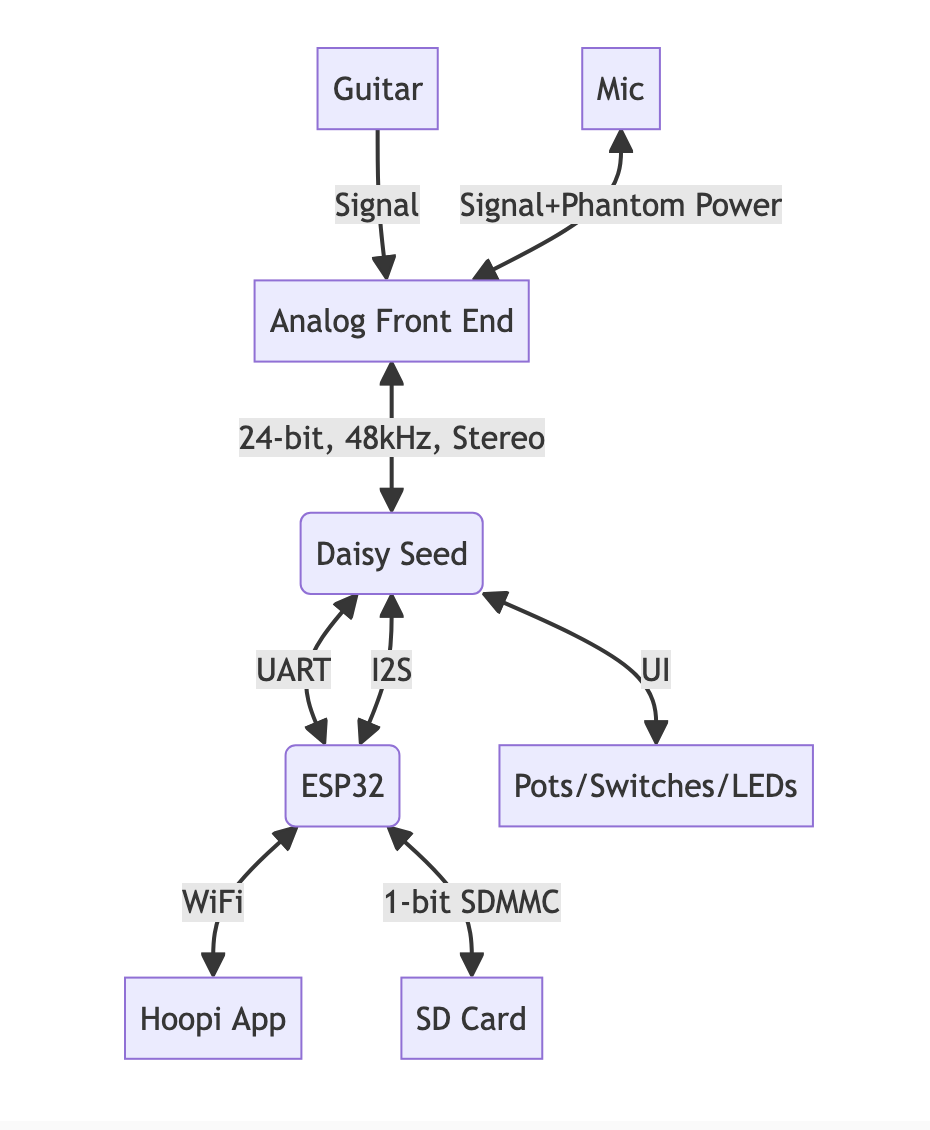 We have the ability to update the audio effects by changing the Daisy's firmware, using over-the-air (OTA) updates.
Over-the-air updates work by:
- Hoopi App checks cloud for updates and downloads firmware
- Hoopi App sends firmware to ESP32 via HTTP
- ESP32 sends firmware to Daisy via UART
- Daisy writes to QSPI flash staging area
- Daisy copies from staging to active area and reboots
The initial implementation took 228 seconds for a 294KB firmware update. Users were waiting nearly 4 minutes, and the "critical window" (where power loss could soft-brick the device) was over 60 seconds.
Note: you might be wondering why we are doing all this inside the application and not in the Daisy's bootloader, which would eliminate the critical section by using staging and active partitions that are swapped using a flag. The Daisy's bootloader is not opensource. We tried implementing our own bootloader but ran into issues with timer/HAL/system initialization that would lock up the app.
// hoopi.cpp - Test mode for QSPI benchmarking
#define DEBUG_PRINT 1
#define TEST_QSPI_SPEED 1  // Enable timing tests

#if TEST_QSPI_SPEED
    // Wait for USB serial connection
    hw.seed.StartLog(true);  // true = blocking wait for connection

    hw.PrintLine("=== QSPI Speed Test ===");

    uint32_t start, elapsed;
    constexpr uint32_t TEST_SIZE = 64 * 1024;  // 64KB test

    // Test 1: Erase timing
    hw.PrintLine("Erasing 64KB at staging area...");
    start = System::GetNow();
    hw.seed.qspi.Erase(OTA_QSPI_STAGING_ADDR, OTA_QSPI_STAGING_ADDR + TEST_SIZE);
    elapsed = System::GetNow() - start;
    hw.PrintLine("Erase 64KB: %lums", elapsed);

    // Test 2: Write timing with different block sizes
    uint8_t* test_buf = new uint8_t[32768];
    memset(test_buf, 0xAA, 32768);

    // 256-byte writes
    start = System::GetNow();
    for (uint32_t i = 0; i < TEST_SIZE; i += 256) {
        hw.seed.qspi.Write(OTA_QSPI_STAGING_ADDR + i, 256, test_buf);
    }
    elapsed = System::GetNow() - start;
    hw.PrintLine("Write 64KB (256B blocks): %lums", elapsed);

    // 32KB writes
    hw.seed.qspi.Erase(OTA_QSPI_STAGING_ADDR, OTA_QSPI_STAGING_ADDR + TEST_SIZE);
    start = System::GetNow();
    for (uint32_t i = 0; i < TEST_SIZE; i += 32768) {
        hw.seed.qspi.Write(OTA_QSPI_STAGING_ADDR + i, 32768, test_buf);
    }
    elapsed = System::GetNow() - start;
    hw.PrintLine("Write 64KB (32KB blocks): %lums", elapsed);

    delete[] test_buf;
    hw.PrintLine("=== Test Complete ===");
#endif
This gave us immediate feedback:
=== QSPI Speed Test ===
Erase 64KB: 1408ms
Write 64KB (256B blocks): 11023ms
Write 64KB (32KB blocks): 137ms
=== Test Complete ===
The 256B vs 32KB write difference (80x!) immediately showed us where to focus.
Optimization 1: 32KB Write Chunks
Problem: The original code wrote firmware in 256-byte pages during the final copy.
// BEFORE: 256-byte page writes (SLOW!)
for (uint32_t i = 0; i < ota_expected_size; i += 256) {
    hw.seed.qspi.Write(OTA_QSPI_ACTIVE_ADDR + i, 256,
                       (uint8_t*)(OTA_QSPI_STAGING_ADDR + i));
}
Solution: Write in 32KB chunks instead. QSPI flash can handle larger writes efficiently.
// AFTER: 32KB chunk writes (5.5x faster!)
constexpr uint32_t CHUNK_SIZE = 32 * 1024;
uint8_t* sram_buf = new uint8_t[CHUNK_SIZE];

while (bytes_copied < ota_expected_size) {
    uint32_t chunk_size = std::min(CHUNK_SIZE, ota_expected_size - bytes_copied);

    // Copy to SRAM buffer first (can't write directly from QSPI)
    memcpy(sram_buf, (uint8_t*)(OTA_QSPI_STAGING_ADDR + bytes_copied), chunk_size);

    // Write full 32KB chunk at once
    hw.seed.qspi.Write(OTA_QSPI_ACTIVE_ADDR + bytes_copied, chunk_size, sram_buf);
    bytes_copied += chunk_size;
}
Result: Critical window reduced from ~62s to ~11s.
Optimization 2: 64KB Block Erase
Problem: libDaisy's QSPI erase used 4KB sector erase commands (0xD7), requiring 256 erase operations for 1MB.
Discovery: We benchmarked the erase operations:
Erase 64KB (16x 4KB sectors): 80,000ms  // Calling EraseSector 16 times
Erase 64KB (bulk Erase):       1,700ms  // Still using 4KB internally
Erase 64KB (64KB block cmd):     115ms  // Using 0xD8 command
The IS25LP080D flash chip supports 64KB block erase (command 0xD8), but libDaisy wasn't using it!
Solution: Patch libDaisy to use 64KB block erase when possible:
// Added to libDaisy's qspi.cpp
QSPIHandle::Result QSPIHandle::Impl::EraseBlock64K(uint32_t address)
{
    QSPI_CommandTypeDef s_command;
    s_command.Instruction = 0xD8;  // 64KB block erase (was 0xD7 for 4KB)
    s_command.AddressMode = QSPI_ADDRESS_1_LINE;
    s_command.AddressSize = QSPI_ADDRESS_24_BITS;
    s_command.Address     = address;
    // ... rest of command setup

    WriteEnable();
    HAL_QSPI_Command(&halqspi_, &s_command, HAL_QPSI_TIMEOUT_DEFAULT_VALUE);
    AutopollingMemReady(HAL_QPSI_TIMEOUT_DEFAULT_VALUE);
    return QSPIHandle::Result::OK;
}

// Modified Erase() to use 64KB blocks when aligned
QSPIHandle::Result QSPIHandle::Impl::Erase(uint32_t start_addr, uint32_t end_addr)
{
    constexpr uint32_t BLOCK_64K = 0x10000;
    constexpr uint32_t SECTOR_4K = 0x1000;

    while (end_addr > start_addr) {
        uint32_t block_addr = start_addr & 0x0FFFFFFF;

        // Use 64KB block erase when aligned and enough space remaining
        if ((block_addr % BLOCK_64K) == 0 && (end_addr - start_addr) >= BLOCK_64K) {
            EraseBlock64K(block_addr);
            start_addr += BLOCK_64K;
        } else {
            EraseSector(block_addr);  // Fall back to 4KB
            start_addr += SECTOR_4K;
        }
    }
    return QSPIHandle::Result::OK;
}
Result: Erase time reduced from ~24s to ~1.6s (15x faster).
Optimization 3: Larger UART Blocks
Problem: Sending firmware in 256-byte blocks meant 1,177 UART packets with protocol overhead for each.
Solution: Increase block size to 4KB, reducing packets from 1,177 to just 74:
// hoopi.h
#define OTA_BLOCK_SIZE    4096   // Was 256
#define UART_MAX_DATA_LEN 4108   // 4096 + header room
#define UART_RING_SIZE    8192   // Larger DMA buffer
Extended frame format for large payloads:
+-------+------+--------+--------+-------+----------+----------+
| START | 0xFE | LEN_LO | LEN_HI |  CMD  |  DATA    |  CRC16   |
+-------+------+--------+--------+-------+----------+----------+
|  0xAA | 0xFE |    2 bytes      | 1 byte| 4096 B   |  2 bytes |
+-------+------+--------+--------+-------+----------+----------+
Result: Total time reduced from 181s to 54s.
Optimization 4: Higher Baud Rate
Problem: At 115200 baud, transferring 294KB takes ~34 seconds just for raw data.
Solution: Increase UART baud rate to 460800 (4x faster):
// hoopi.h - InitUart()
uart_conf.baudrate = 460800;  // Was 115200
We tested 921600 baud but saw instability. 460800 proved reliable.
Result: UART transfer time reduced from ~34s to ~14s.
Final Results
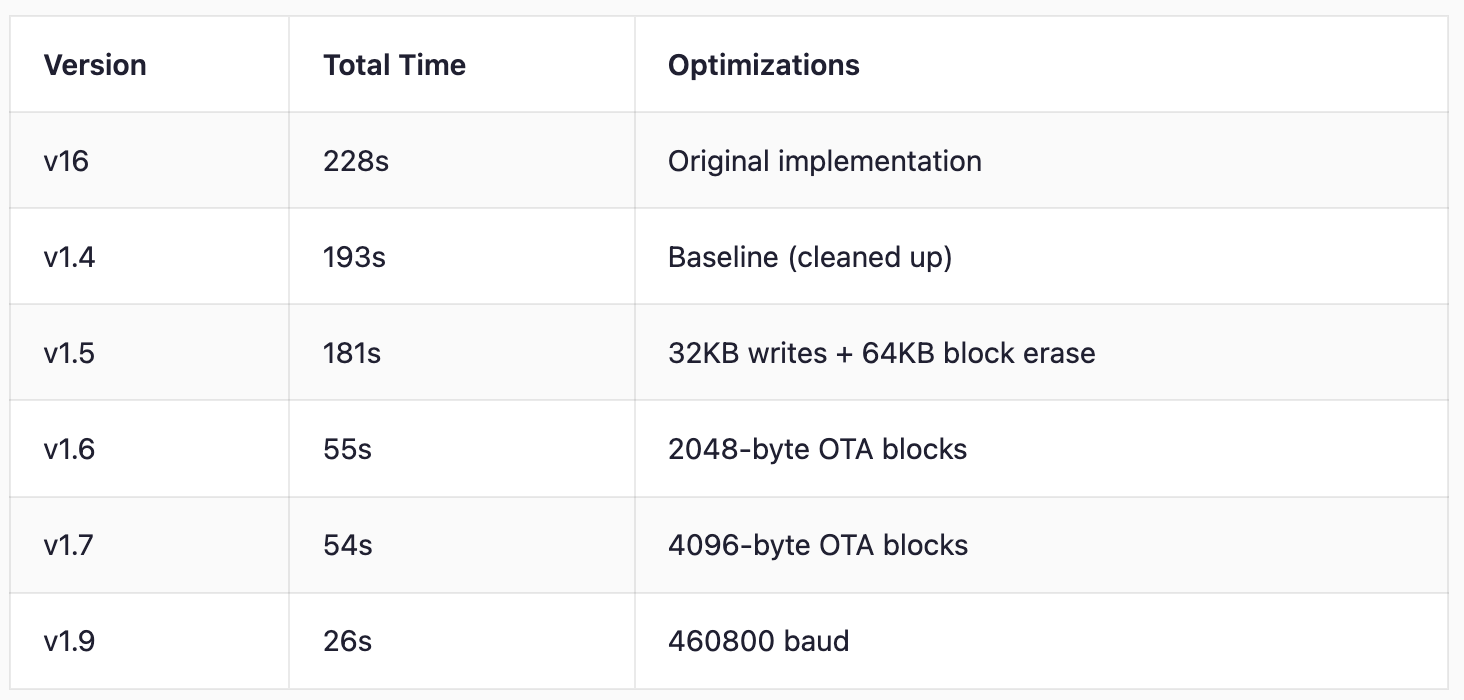
Timing Breakdown (v1.9)
Phase                     Duration
────────────────────────────────────
WiFi upload               ~1.6s
QSPI erase                ~1.6s
UART transfer (74 blocks) ~14s
CRC verification          ~0.1s
Copy to active (critical) ~2.8s
Reboot + confirm          ~4s
────────────────────────────────────
Total                     ~26s
Log Comparison
Before (v16): 228 seconds
I (266660) HOOPI: OTA block 1177/1177 sent (100%)
I (266660) HOOPI: OTA_VERIFY sent
I (266760) OTA: OTA CRC verified: 0xb80f1bb5
I (266760) OTA: OTA_FINISH sent, waiting for copy to complete...
I (271760) OTA: Waiting for copy to complete... 5s
I (276760) OTA: Waiting for copy to complete... 10s
...
I (326760) OTA: Waiting for copy to complete... 60s
I (329000) OTA: OTA_FINISH ACK received - copy complete, Daisy rebooting...
After (v1.9): 26 seconds
I (19469) OTA: State -> STARTED, sending OTA_START...
I (21069) OTA: OTA_START ACK received: block_size=4096, total_blocks=74
I (21069) OTA: State -> SENDING, 74 blocks to send
I (35289) HOOPI: OTA_VERIFY sent
I (35389) OTA: OTA CRC verified: 0x170d76b6
I (35389) OTA: OTA_FINISH sent, waiting for copy to complete...
I (38179) OTA: OTA_FINISH ACK received - copy complete, Daisy rebooting...
I (42439) OTA: FW version 1.9 matches expected, OTA complete!
Key Takeaways
- Build a test harness first - Creating isolated QSPI benchmarks with
StartLog(true)gave us instant feedback without running full OTA cycles. This turned a 4-minute test loop into seconds. - Batch operations - Larger chunks reduce per-operation overhead dramatically (1,177 packets → 74 packets)
- Test incrementally - Each optimization was tested independently before combining, making it easy to isolate regressions
The final result: 8.8x faster updates with a 20x smaller critical window.
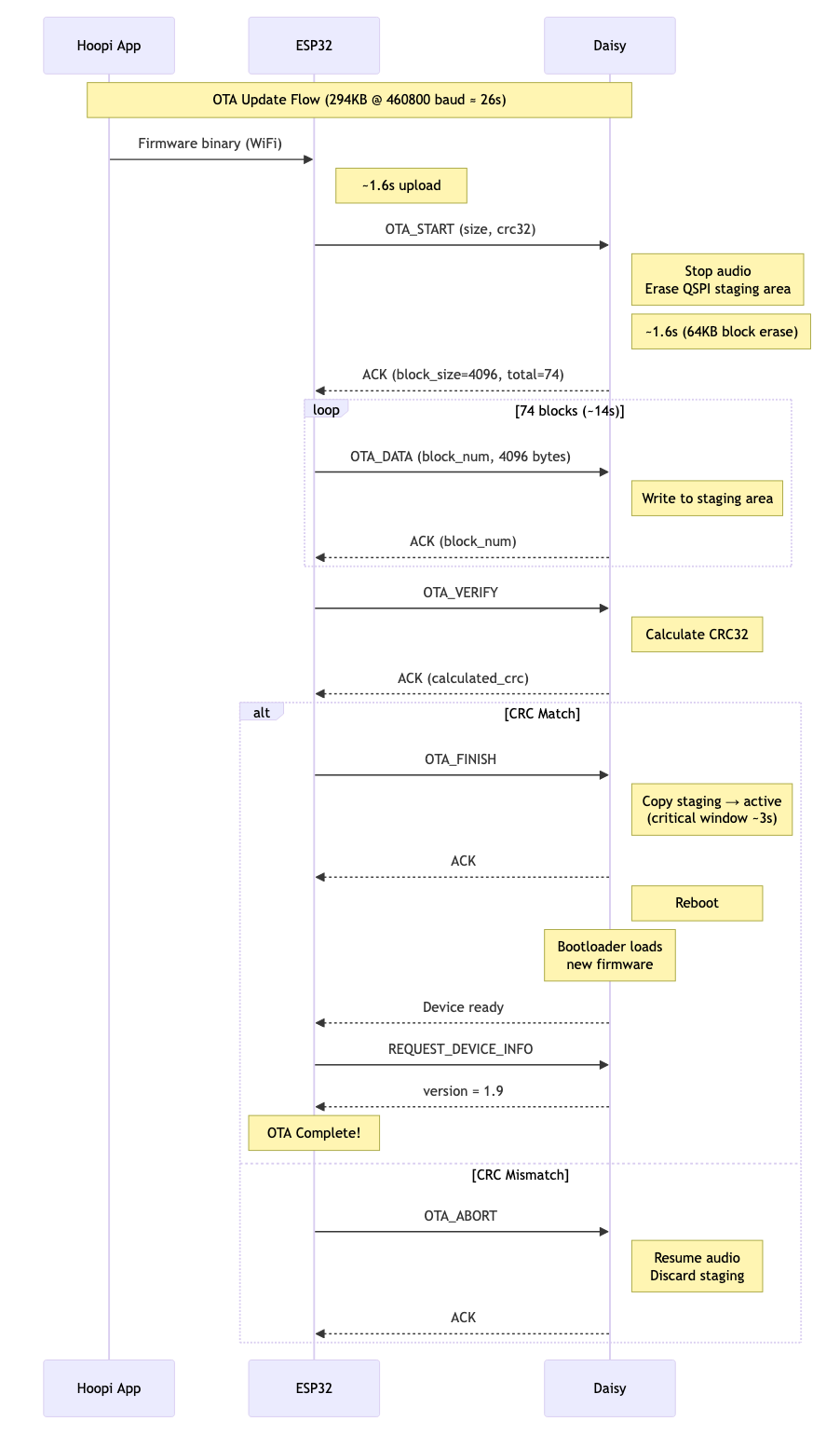
Final sequence chart
Discussions
Become a Hackaday.io Member
Create an account to leave a comment. Already have an account? Log In.