 Markus Hüttner
While the hardware side of the project is still in its final integration phase, a lot of time went into something less visible — the user interface.
From the beginning, the goal was not just to display information, but to create something that feels like a real system.
The CRT-style terminal interface is not meant as decoration.
It’s an integral part of how the device communicates its state.
Instead of hiding everything behind a graphical UI, the system exposes what it is doing:
- startup sequence
- service initialization
- connection status
- playback activity
The boot process became an important part of that experience.
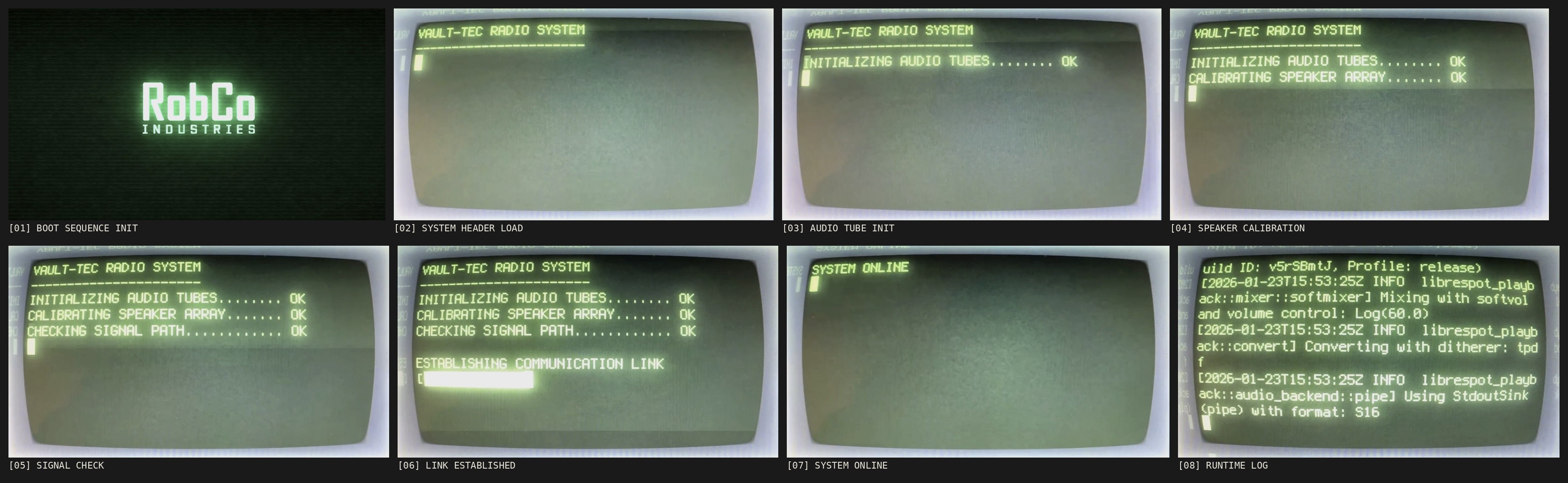
Rather than jumping straight into a finished interface, the system goes through a staged startup sequence that resembles older terminal-based systems.
This includes:
- simulated system messages
- delayed output to create readable progression
-
visual feedback during service startup
![]()
It doesn’t make the system faster.
But it makes it understandable.
The idea is simple:
A device should not feel like a black box.
It should show what it is doing.
Technically, the interface runs in a minimal X session with a lightweight window manager, launching a CRT-style terminal environment.
A custom script controls the startup sequence and hands over to a live system log view once the system is fully operational.
The result is something between a diagnostic terminal and a user interface.
Not designed to be efficient —
but to be readable, transparent and alive.
Discussions
Become a Hackaday.io Member
Create an account to leave a comment. Already have an account? Log In.