 JP Gleyzes
As an RC planes enthusiast, I already designed several planes using foam cutting technics.
To do this you will need a foam cutter machine and a "board" to pilot it. Regarding the board, I already published a cheap FluidNC 4 axis controller.
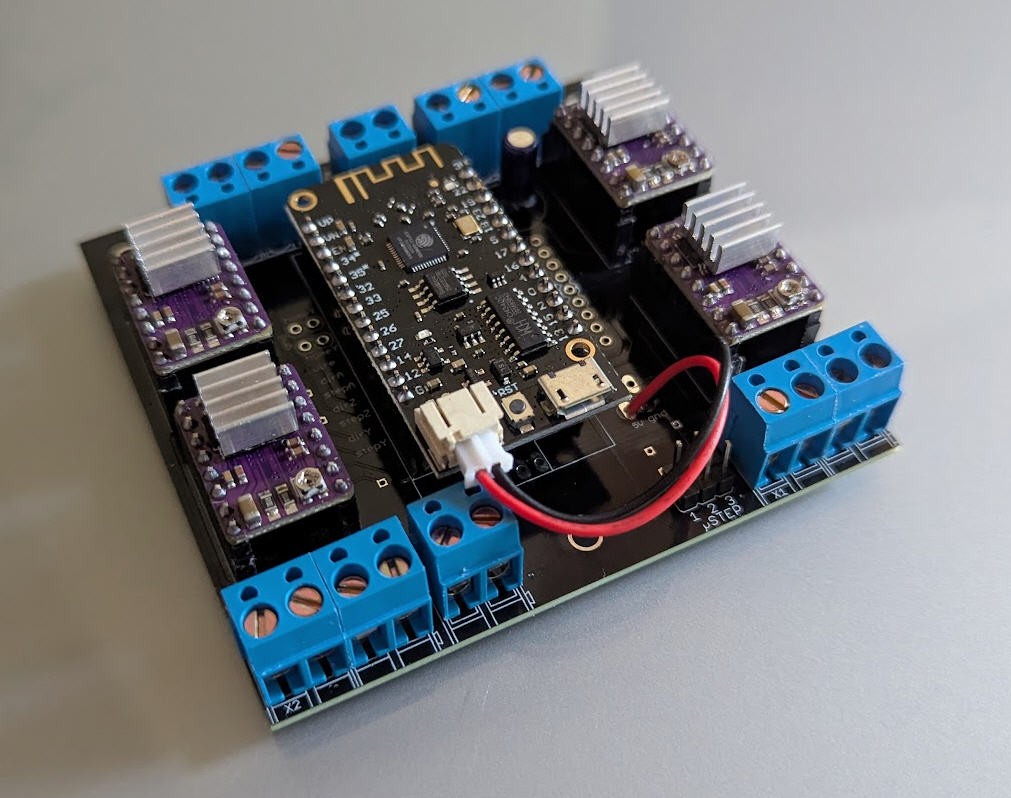
This controller has already proven to work very well. But it needs "software" to produce the Gcode and to control the board. This is exactly what this project is dealing with !
Although several solutions does already exist, none of them were (IMHO) simple and powerful enough for my needs...
So I wrote two applications :
- WiHoWI (Wing hot Wire) devoted to design the Gcode file of the wings
- hoWiGs (hot Wire Gcode Sender) devoted to drive the FluidNC controller
WiHoWI : CNC 4-Axis Hot Wire Wing Cutter
WiHoWI is a specialized CAD/CAM utility designed for 4-axis CNC foam cutting.
This software synchronizes two independent 2D profiles (Root and Tip) to generate precise G-Code for tapered wings, including complex internal cutouts and automatic stock material management.
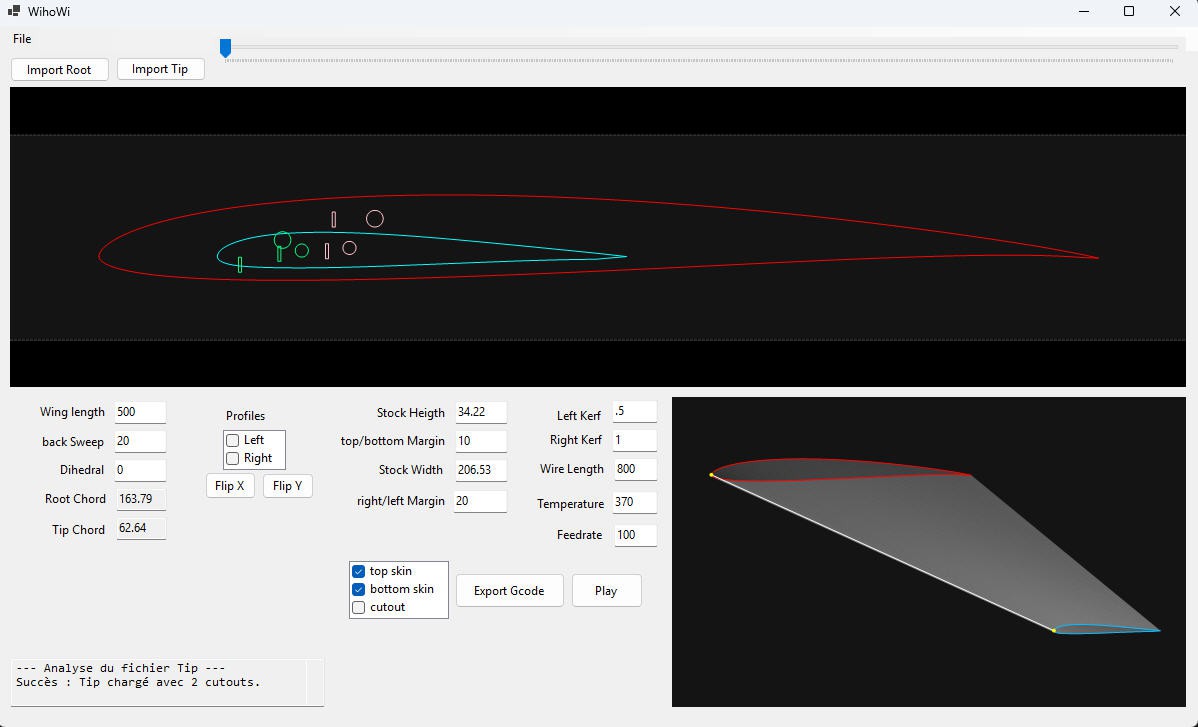
Key Features and usage
Dual Profile Synchronization: Import Profiles: Use the `File > Open` menu to open existing projects (.whw) or use dedicated buttons to load DXF files for the Root and Tip.

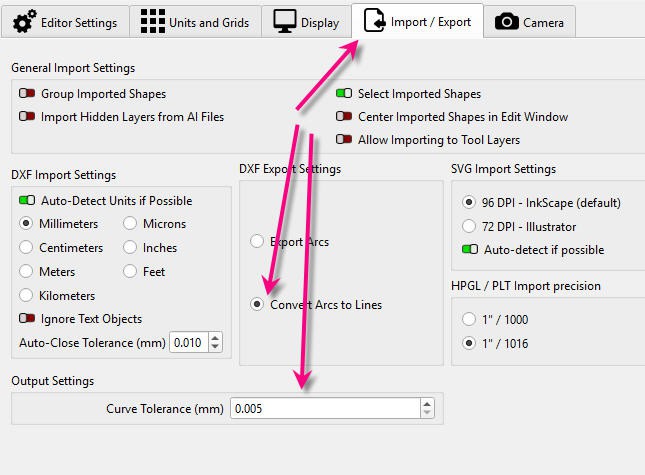
You can use any CAD software able to produce "polylines" dxf. (above lightburn example)
It works also with the free version of QCAD :

remember :
- layer 0 : contains the profile
- layer 1 : contains the cut outs attached to the intados
- layer 2 : contains the cut outs attached to the extrados
Remember also to choose the "polylines" option for lightburn... currently the software does not support Splines...
Define Geometry:
- Enter the Wing Length.
- Adjust Back Sweep and Dihedral
- Note: Root/Tip chords and washout angles are automatically computed from the DXF and cannot be changed manually. Software automatically identifies the Leading Edge (LE) to serve as the pivot point (0,0) for sweep and dihedral calculations.
Dynamic Stock Visualization: Automatically calculates required block dimensions based on dihedral, sweep, and safety margins.
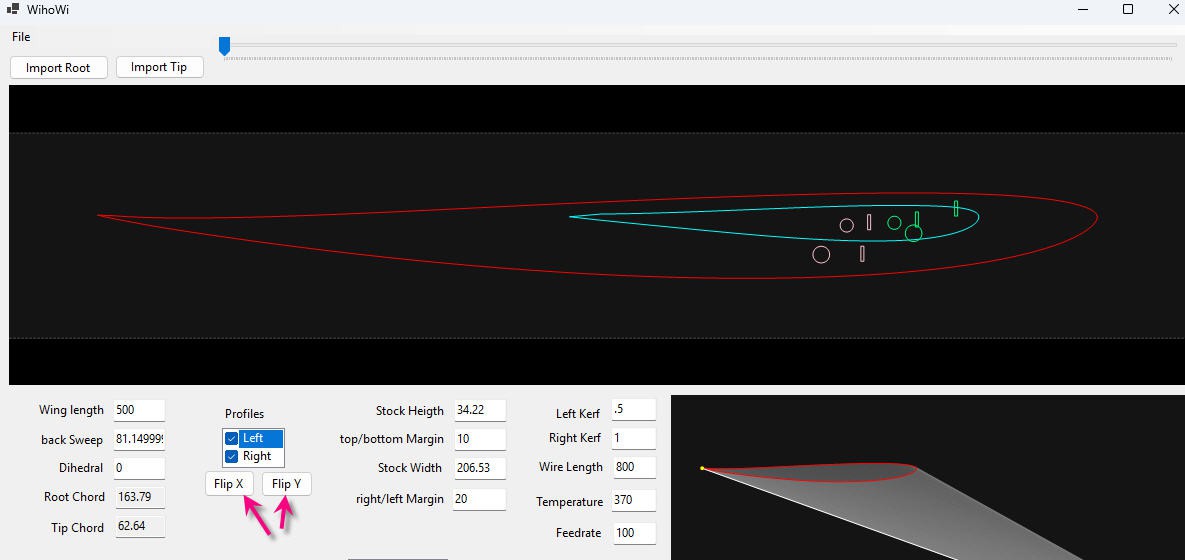
Flipping: Integrated X and Y mirroring to adapt profiles for left/right wing panels without re-designing the CAD file. (tick the profile(s) you want to flip and apply)
Advanced Kerf Compensation: Supports asymmetric kerf values for the left and right towers to account for heat dissipation differences.
4-Axis G-Code Generation:
Produces synchronized X/Y and A/Z movements with controlled transition speeds (G1) to maintain wire tension and accuracy.
you can choose:
- Feedrate: Default cutting speed (expressed in mm/min)
- Temperature: PWM control (0 to 1000) to match material density.
Synchronization: Ensures that both the Root (X/Y) and Tip (A/Z) towers reach their respective destinations at the exact same moment. This critical for tapered wings where the path lengths differ between the two towers.
Remember that CNC Origin is located on the left edge at the bottom of the foam stock.
When ready you have several options to produce the paths
Top Only: will cut only the top skin (from left to right and exit on right stock side)
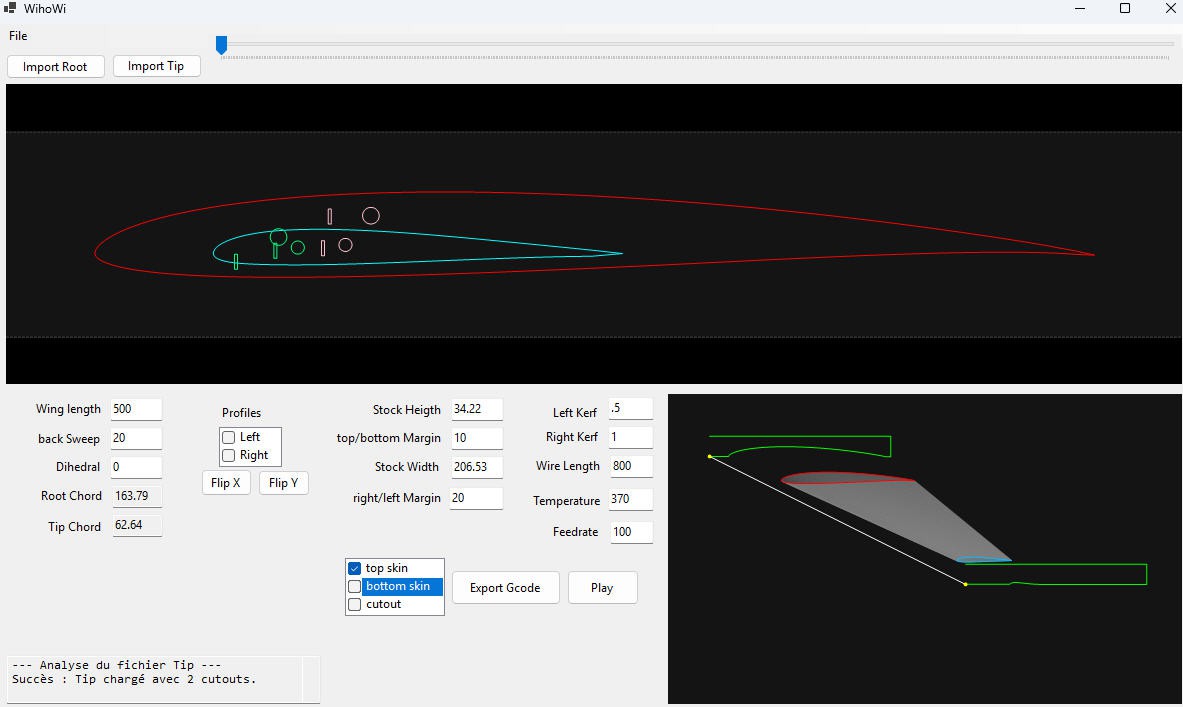
Bottom Only : will cut only the bottom skin (from left to right and exit on right stock side)
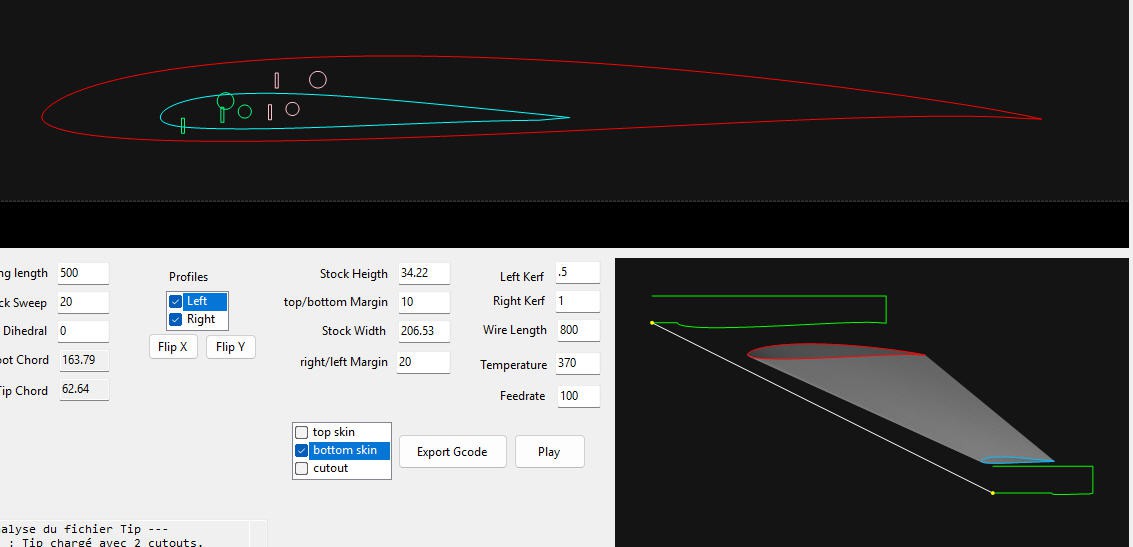
Top + Bottom : will enter left of stock, then cut top skin then cut the bottom skin (from left to right then right to left and exit on left stock side) (note that I also flipped the profiles to enter cut by the trailing edge
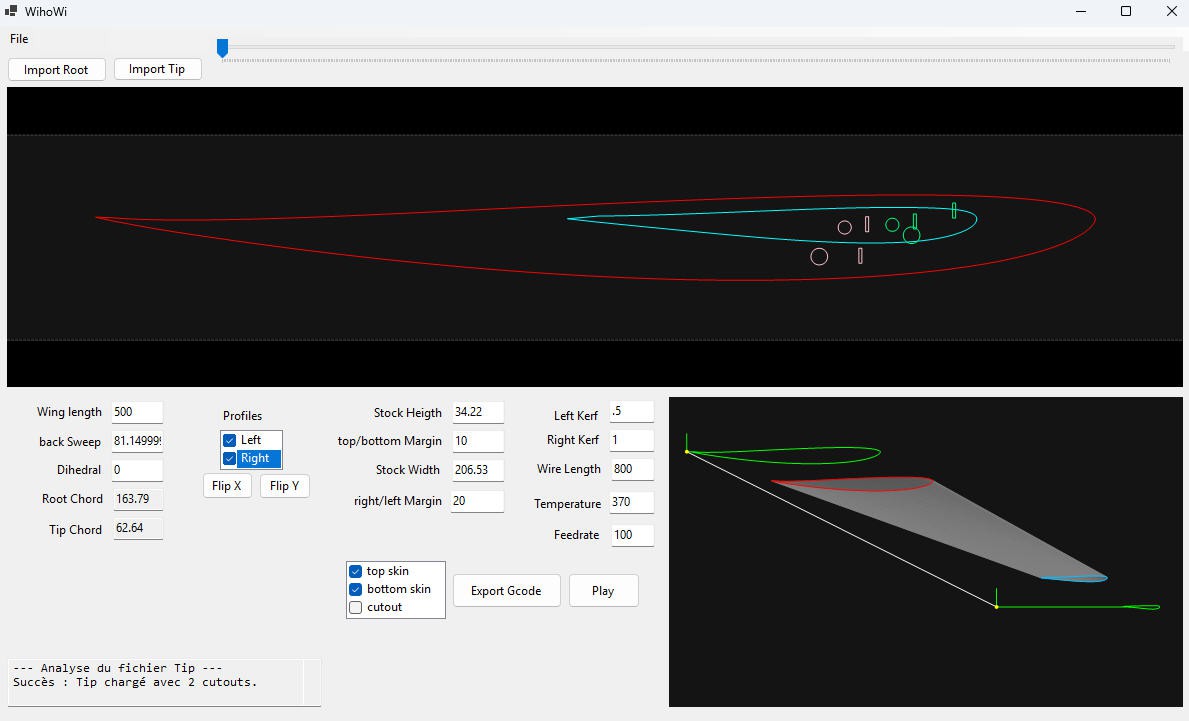
CutOuts
They can be cut in a single path with the core of the wing or in multi paths.
When cut in a single path, the software will garanty that the wire enters and exists at a synchronized point into the foam. Note that intrados and extrados cut outs are attached as expected/described into the dxf.
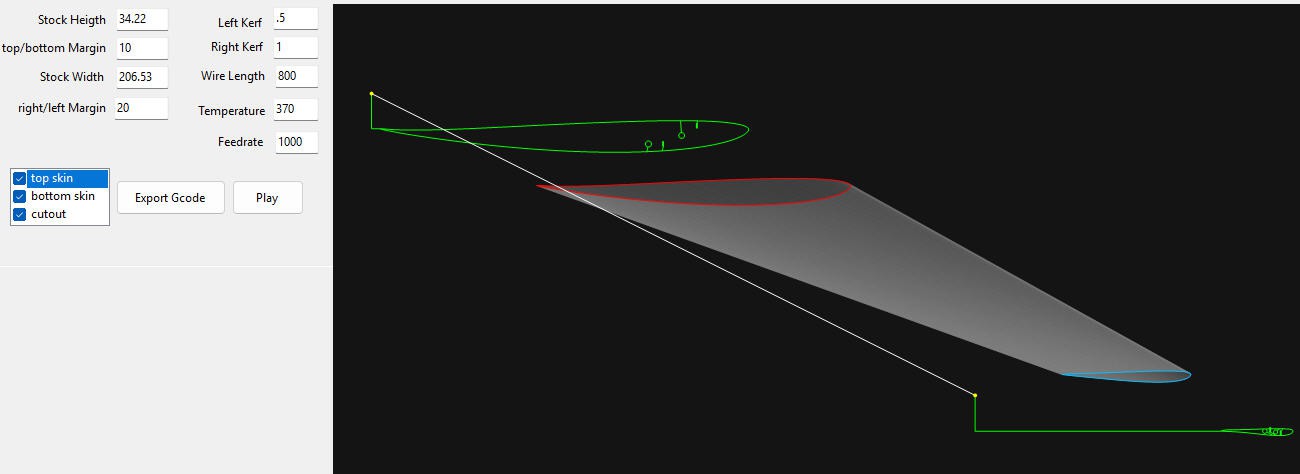
On the following picture, I pressed on the "Play" button which simulates the cut process. You can see that, although not at the same position into the root and the tip, the cut out is perfectly synchronized.
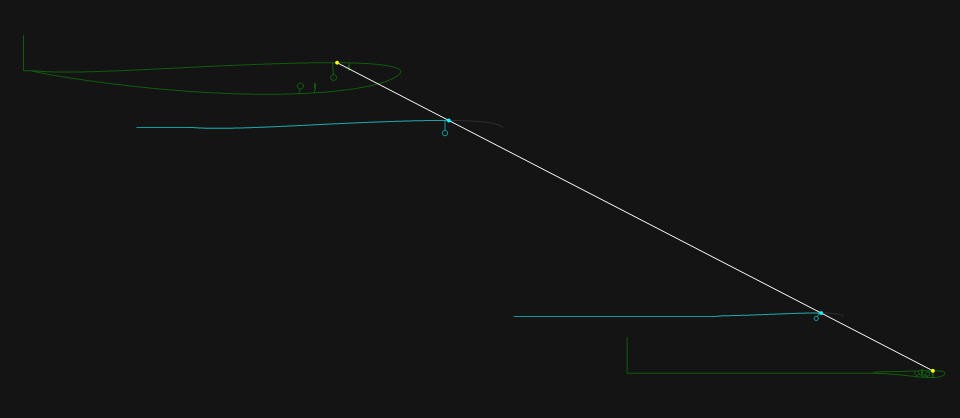
This behavior as howerver some limitations... if the cut out is absolutely not aligned with the natural "sweep" of the wing, then the interpolation process will still work but the wing may be "flattened" by the wire. So be careful to place your cutout in a similar position into the root and the tip !
If you however, want to have "non homothetic" cut outs, then you can use the two paths option ! First path will cut the core (top or bottom skin) while second path will only cut the curouts from the top of the foam
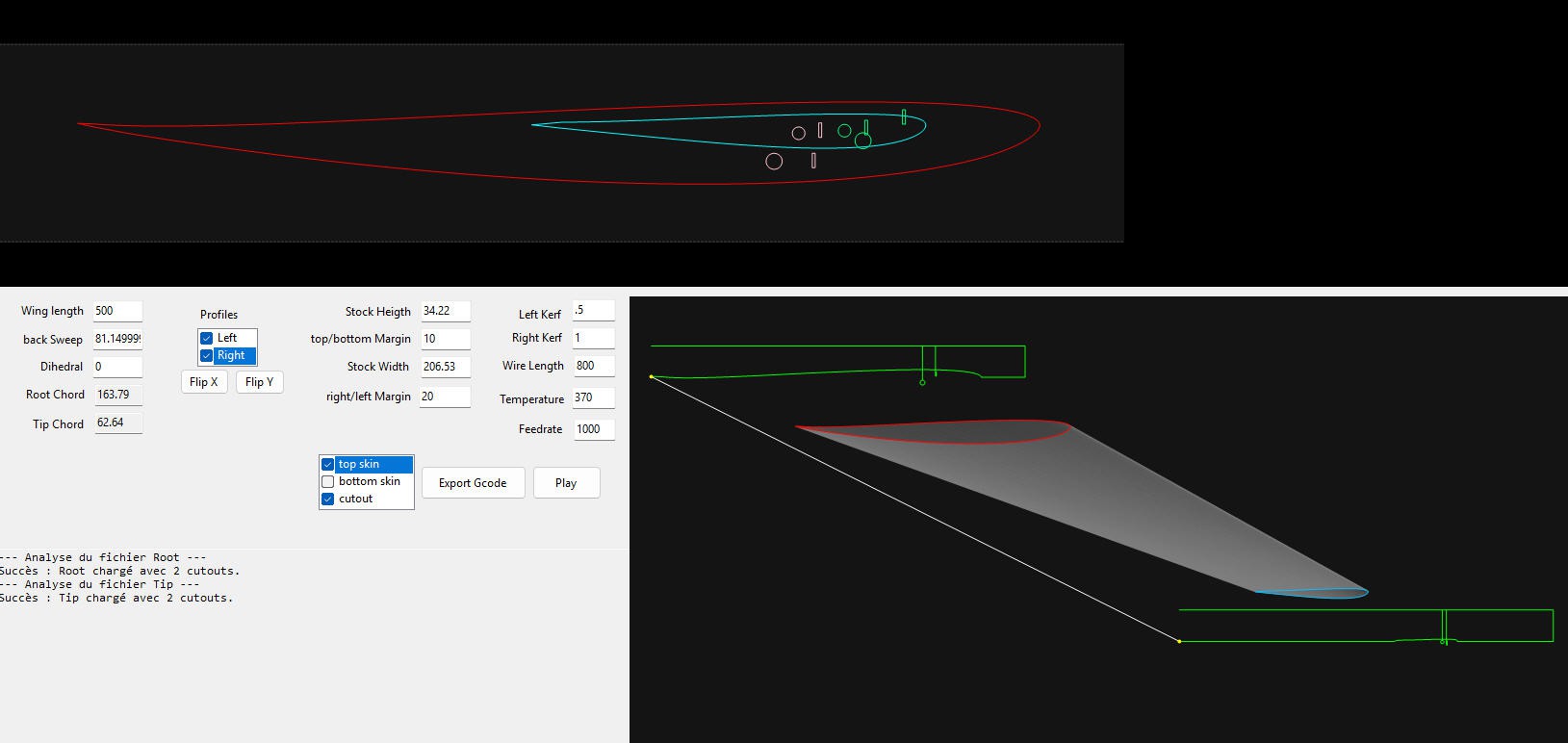
This was some possibilities offered by the software; You can play with"flip" buttons and Gcode export options to explore more !
Project Saving (.whw)
The software saves a proprietary structured text format containing:
Original DXF point cloud (prevents degradation from repeated transformations).
All interface parameters (Feedrate, Wire Length, Kerf, Margins).
Current flip states and layout offsets. You can reopen a saved project to recover all your settings !
Installation
There is no real installation ! Simply download the zip file, unzip it (keeping the folders) and run the .exe. You might be asked to instal .net windows components. Just do it it's safe !
hoWiGS : hotWire Gcode Sender for FluidNC controllers
hoWiGS is the companion application of WiHoWi !
it is "simply" a Minimalist CNC Foam Cutting Gcode Streamer designed for 4 axis CNC running with FluidNC
hoWiGS is a lightweight, high-performance G-code streamer specifically designed to drive 4-axis CNC foam cutters via USB using the FluidNC firmware. It balances a simplified user interface with advanced features required for precision wing manufacturing.
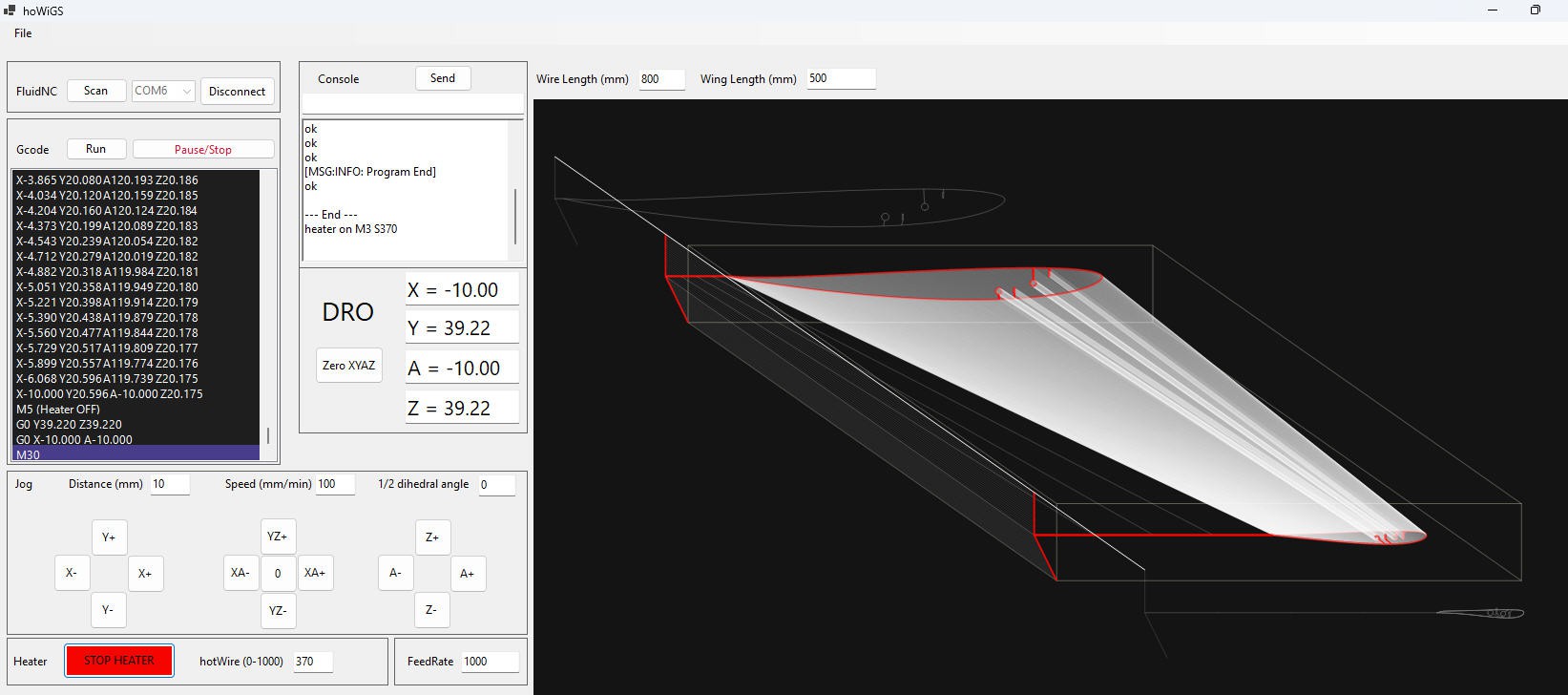
Key Features
Connectivity & Control
- FluidNC Integration: Optimized for 4-axis (XY AZ) control over USB (scan and connect choosen port at predefined default baud rate 115200).
- Real-time Interaction: Input and send custom G-code commands directly to the board via a dedicated console.
- Emergency Management: Reset the machine after alarms, pause/resume ongoing cuts, or "Kill" a cut instantly with a safety long-click on the Stop button.
3D Visualization & Workspace
- Dual-Plane Preview: Real-time 3D display showing profiles mapped both on the physical foam stock and on the motor projection planes.
- Smart Parameter Loading: Automatically extracts cutting parameters (wire length, wing length, etc.) from G-code files generated by WiHoWi, or allows for manual entry.
- Origin Management: Easily define your Work Origin and return to it with a single click.
Advanced Jogging
- Precision Jogging: Move axes by fixed, user-defined increments at a chosen feedrate.
- Continuous Jogging: Dynamic movement that lasts as long as the mouse button is pressed, providing a natural feel for wire positioning.
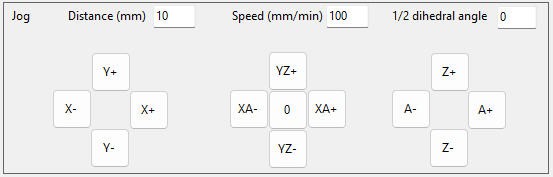
Thermal Management
- Integrated Heater Control: Toggle the wire heater and adjust temperature/power levels.
- Real-time Tuning: Modify temperature settings on the fly even while the G-code is currently streaming.
FeedRate Management
- Integrated FeedRate Control: adjust feedrate for jogging
- Real-time Tuning: Modify FeedRate settings on the fly even while the G-code is currently streaming.
Specialized Cutting Modes
- Guillotine Mode: Quickly trim stock faces without complex G-code.
- position your wire
- set heather on at choosen temperature
- continuous jog (or predefined distance value) to cut a face
- Automatic Dihedral Guillotine: Specialized mode to cut the root or tip faces at the correct angle to account for wing dihedral.
- set the angle value
- set heater on at choosen temperature
- position your wire
- continuous jog (or predefined distance value) to cut a vertical dihedral angle
Usage
It can't be simpler !
- Connect: Select your COM port and connect to the FluidNC board.
- Configure: Load your G-code using the menu. hoWiGS will attempt to auto-fill your wing geometry parameters. (You can swap XY and AZ planes during import to cut right and left wing from the exact same file).
- Prepare: Use the Jogging tools to position the wire at your origin point and set your Work Origin. Remember, if using WiHoWi, that origin is on the front face of the stock and on the machine plate
- Cut: Stream the file. Monitor the 3D view and adjust temperature and feedrate in real-time if necessary for the perfect kerf.
- During cut you can pause the cut, resume it (single click on the pause/stop button). A long click will serve as a "kill switch" and immediately stop the cut. FluidNC may enter into Alarm mode... Another single click will clear the alarm !
Installation
There is no real installation ! Simply download the zip file, unzip it (keeping the folders) and run the .exe. You might be asked to instal .net windows components. Just do it it's safe !
Advanced usage
Into the WiHoWi folder I have added two .dxf files a little "spécial"
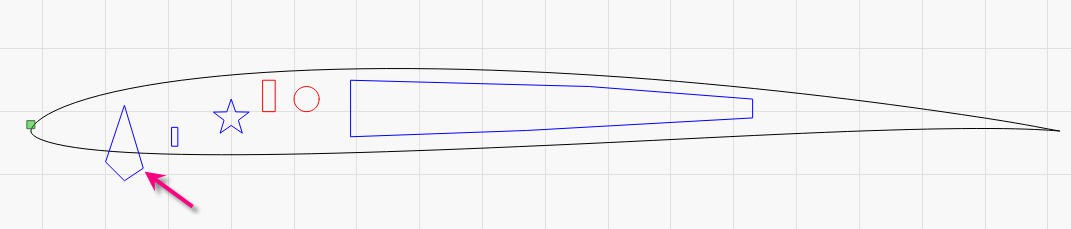
As you can see I have added "star" and "big" cutouts as well as this strange "V shape" one
The big one can be used to cut an "hollow" wing, while the V shape can be used for aileron hinge (although poorly positioned on my example :-))
However this means that you can insert into your dxf :
- CIRCLES (real ones with this name into the dxf file)
- Polylines : any shape provided that root and tip have the exact same number of shapes and the exact same number of edges per shape
Here is the tip of the wing dxf : (note the big hollow cut : same number of points but not same shape)
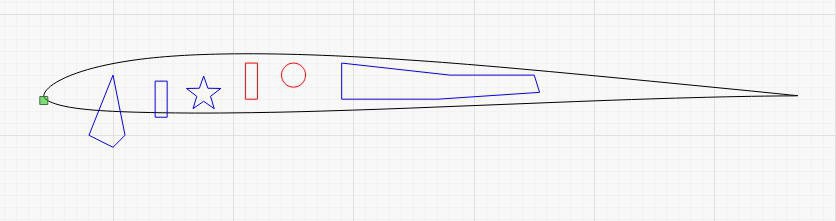
As you can see some of the cutouts are "outside" the profile and have a look now specifically on the V shape one and see how the gcode is generated !
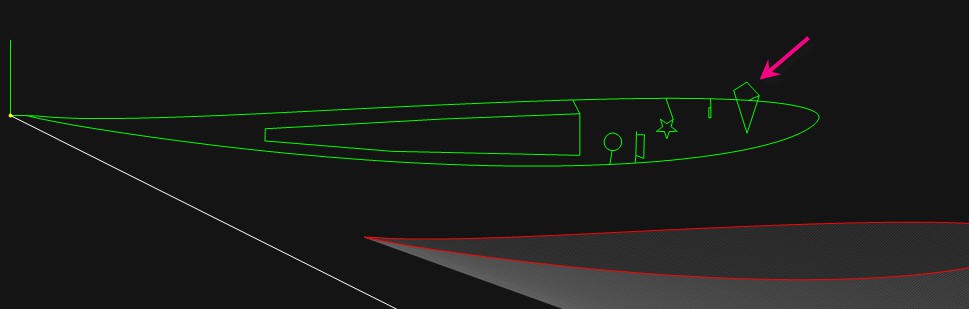
All the shapes are connected to the right side of the wing. Entries are perpendicular the profile.
The V cut will follow segment 1 to 8.
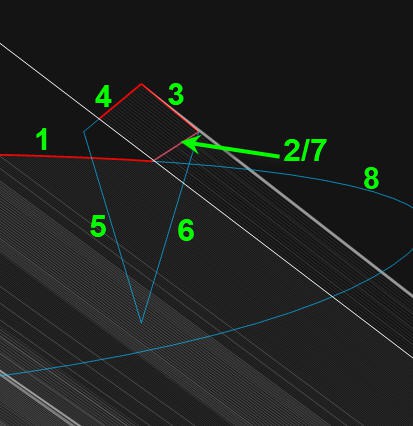
Interestingly it will start by cutting the prfile (top skin) to the middle of the V (1), then perform motion (burning) the shell (2, 3, 4) before plunging to the core for the "V" (5, 6), then finishing the cut again at the midlle of V (7) before going again on the profile (8).
This complex motion has the major advantage to preserve the edges of the V on the profile. The wire doesn't have to "bend" and will follow straight lines (whichis much easier). It will of course damage a little the shell but who cares ?
Here is the result, on the tip side, as sent by FluidNC board to hoWiGS. So it's not a "simulation" it's the Gcode orders interpreted and acknowledged by FluidNC and sent back to my program !
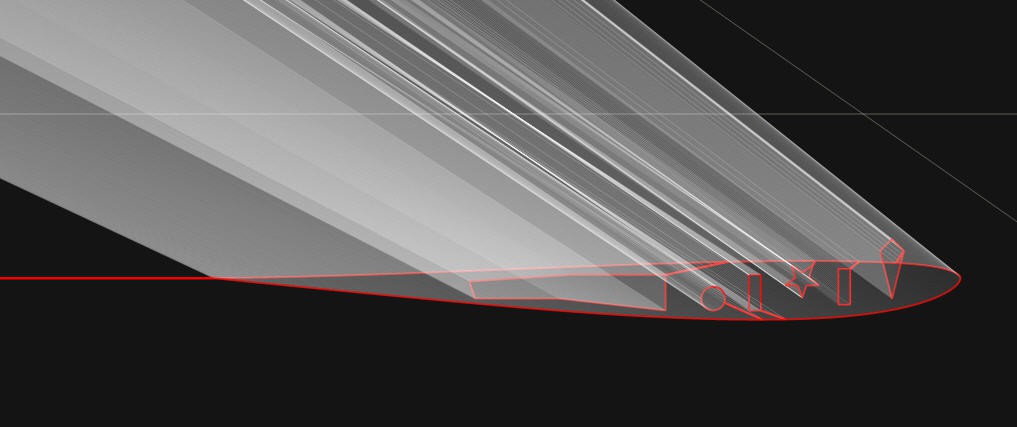
Of course if you prefer to cut the V into a second pass, it is totally feasible and should give the same result.
Designed for simplicity. Built for precision.