Jeroen Brinkman

One button. That's it.
No menus. No scrolling. No holding button A while pressing button B to enter setting mode 3. No touchscreen that doesn't work with slightly damp fingers. One button, two actions: short press to acknowledge a medicine or peek at the time, long press to flip the display. A toddler could operate this. An 85-year-old with arthritic fingers can operate this. That's the point.
A display you can actually read
The TM1637 four-digit seven-segment display is bright, high contrast, and visible across the room. No LCD that washes out in sunlight, no OLED that goes dark when the viewing angle is slightly off. Seven-segment. Old school. Readable. And let's be honest — you probably have one in a parts bin already. The display is off when there's nothing to report, which also means there's no distracting glow on the nightstand at 3 AM.
The schedule is yours to define
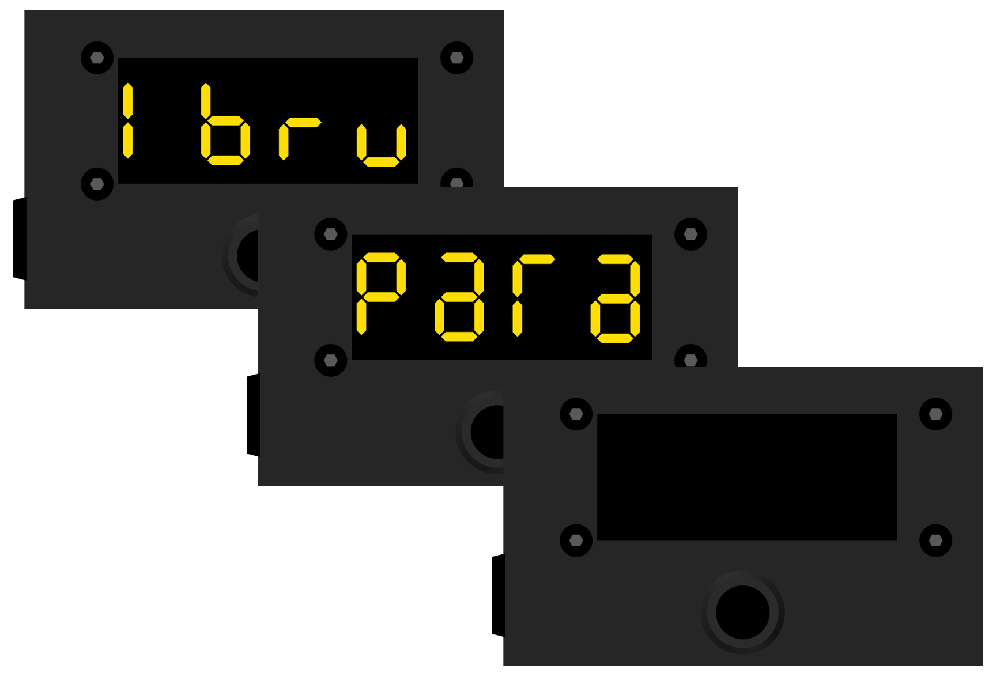
Open the sketch, find the medicine array, and add entries. Each line is one medicine at one moment:
const Medicine medicines[] = {
  // dayOfMonth, dayOfWeek, hour, decade, text
  {0, 1,  8, 3, "Ibup" },   // Weekly on monday  08:30 Ibuprofen    (1st)
  {0, 0,  8, 3, "PaRa" },   // Every day morning 08:00 Paracetamol  (2nd)
};
Day of month, day of week, hour, minute group, label. Multiple medicines at the same time? List them in order. MedMinder shows them one by one, each waiting for a button press before moving on. You can build schedules that would make a pharmacist nod approvingly. At startup it will show every entered medicine.
It watches you
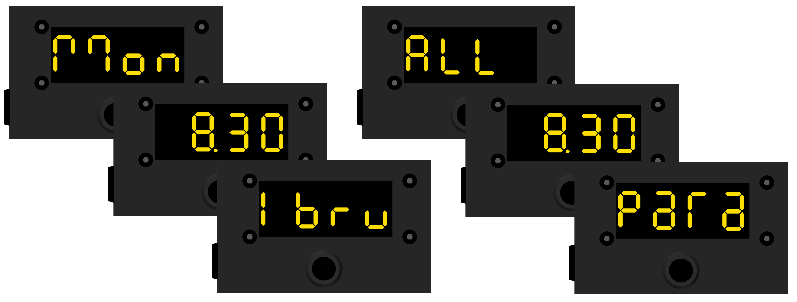
When the alarm fires, the medicine name stays on the display until you press the button. Not for five seconds. Not until the next minute. Until. You. Press. It.
If a second dose becomes due while you still haven't dealt with the first one, the display starts blinking alternating between the overdue medicine and the new one. It will not quietly give up and pretend nothing happened. MedMinder is patient but persistent.
The cable problem, solved
Sometimes it is more convenient to have the cable on the left, but in other cases, the right is better.MedMinder solves this in a very elegant way: hold the button for two seconds and the entire display flips 180 degrees. Cable coming from the left? No problem. Cable coming from the right? Also no problem.
Hardware
- Arduino Nano
- DS3231 RTC module (keeps accurate time, survives power cuts)
- TM1637 four-digit seven-segment display
- One push button
- Small aluminium enclosure — sturdy, small, and it looks like you meant to build it that way
Total cost is around €15 in parts, most of which you likely already own.
The clock sets itself
Upload the firmware, leave it connected to USB for a couple of minutes while the serial monitor counts up, then unplug when it tells you to. The RTC is synchronised to your computer's clock at upload time. European daylight saving time is handled automatically. You never touch the time again unless you upload new firmware.
Finally: What it doesn't do
MedMinder does not connect to Wi-Fi. It does not have a companion app. It does not require an account, a subscription, or permission to send you notifications. It does not know your name. It runs entirely on its own, indefinitely, on five volts from a USB charger, reminding whoever is nearby to take their medicine — reliably, visibly, and without fuss.

 Stefan
 Jeff Wahaus
 icstation