 Ken Yap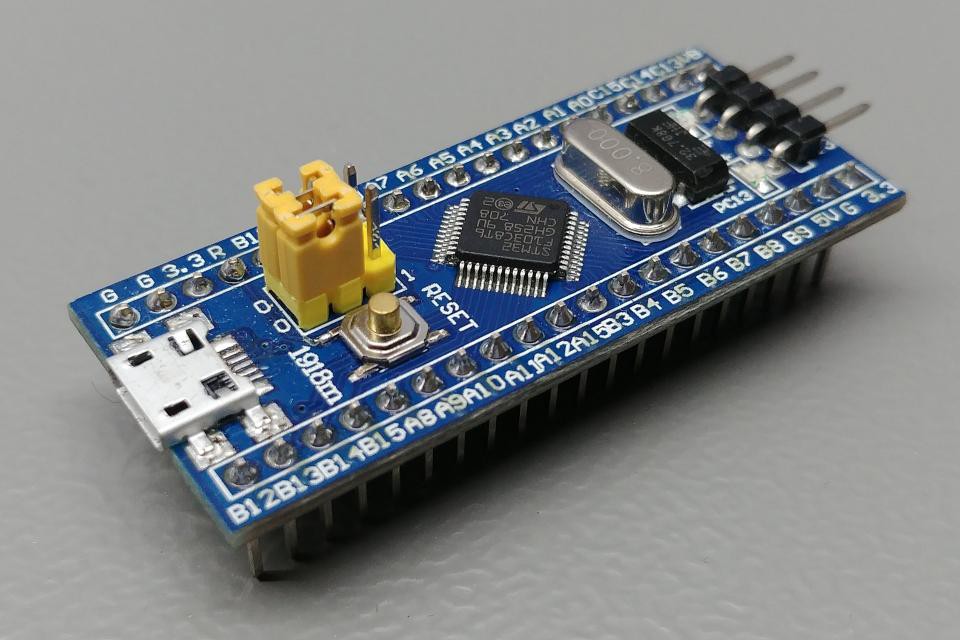
Well that was fun, getting blinky in Rust working on a RPi Pico. But just so that I understand better the steps of building a Rust project using the Embassy framework, I'll try another MCU.
I would like to try the Espressif ESP32 MCUs. The RISC-V based members like the ESP32-C3 are supported, but the older Xtensa based MCUs require a hacked LLVM compiler as it's not a supported ISA yet. The changes are being merged with the main effort but it takes time. The ESP8266 family of MCUs are not supported at all for Rust.
So instead I'll try the STM32 MCU family. It looks quite different from the RPi Pico, but it's also ARM based. For the instructions I turn to the Embassy book, specifically the section on the STM32 HAL. There I absorb the information that the STM32 family is very large, just as I noted when trying out the CubeMX IDE, so the variants are managed with a metapac that's a database of all the variants and is used to direct project generation. Ok, I'll stow that knowledge for later.
Looking for an easy way to start a project, I come across cargo-embassy, a tool that can be added to cargo. So I do:
$ cargo install cargo-embassy
then cargo --list shows a new command: embassy.
$ cargo embassy init stm32-rust-blinky
error: the following required arguments were not provided:
  --chip

Usage: cargo embassy init --chip

For more information, try '--help'.
Ah, I have to specify the chip, makes sense. So:
$ probe-rs chip list | grep -i stm32f103
        STM32F103C4
        STM32F103C6
        STM32F103C8
        STM32F103CB
        STM32F103R4
        STM32F103R6
        STM32F103R8
        STM32F103RB
        STM32F103RC
        STM32F103RD
        STM32F103RE
        STM32F103RF
        STM32F103RG
        STM32F103T4
        STM32F103T6
        STM32F103T8
        STM32F103TB
        STM32F103V8
        STM32F103VB
        STM32F103VC
        STM32F103VD
        STM32F103VE
        STM32F103VF
        STM32F103VG
        STM32F103ZC
        STM32F103ZD
        STM32F103ZE
        STM32F103ZF
        STM32F103ZG
Ah, I have to be more specific:
$ probe-rs chip list | grep -i stm32f103c8
       STM32F103C8
Now:
$ cargo embassy init stm32-rust-blinky --chip stm32f103c8
This gets me a Cargo project called stm32-rust-blinky. Nice when a metatool does a lot of work for you. I just plunge ahead and do:
$ cd stm32-rust-blinky
$ cargo build
info: syncing channel updates for 1.90-x86_64-unknown-linux-gnu
info: latest update on 2025-09-18 for version 1.90.0 (1159e78c4 2025-09-14)
info: downloading 8 components
No no, I didn't want that. 1.90 is an old release of Rust so I interrupt it. Looking at the directory, I see:
$ ls
build.rs  Cargo.lock  Cargo.toml  Embed.toml  rust-toolchain.toml  src
I look inside rust-toolchain.toml and see:
# This file was automatically generated.

[toolchain]
channel = "1.90"
components = ["rust-src", "rustfmt"]
targets = ["thumbv7m-none-eabi"]
Change that 1.90 to stable and retry:
$ cargo build
error: feature `debug` includes `embassy-executor/defmt`, but `embassy-executor` is not a dependency
  --> Cargo.toml:42:9
   |
42 |   debug = [
   |  _________^
43 | |     "defmt",
44 | |     "defmt-rtt",
45 | |     "panic-probe",
...  |
51 | |     "embassy-stm32/defmt",
52 | | ]
   | |_^
error: failed to parse manifest at `stm32-rust-blinky/Cargo.toml`
Much better, new error. Turns out that embassy-executor wasn't listed in the dependencies, so I add this line:
embassy-executor = { version = "0.10.0", features = ["platform-cortex-m", "executor-thread", "defmt"] }
and try cargo build again. This time it failed because I didn't have the target thumb7m-none-eabi. The RPi Pico was a thumb6m-none-eabi. So I do:
$ rustup target add thumb7m-none-eabi
and try cargo-build again. This time it succeeds and leaves an ELF binary in target/thumbv7m-none-eabi/debug/stm32-rust-blinky
$ cargo size
    Finished `dev` profile [optimized + debuginfo] target(s) in 0.05s
   text    data     bss     dec     hex filename
  11952      80    1132   13164    336c stm32-rust-blinky
But I look at the source code in src/main.rs.
#![no_std]
#![no_main]

mod fmt;

#[cfg(not(feature = "defmt"))]
use panic_halt as _;
#[cfg(feature = "defmt")]
use {defmt_rtt as _, panic_probe as _};

use embassy_executor::Spawner;
use embassy_stm32::gpio::{Level, Output, Speed};
use embassy_time::{Duration, Timer};
use fmt::info;

#[embassy_executor::main]
async fn main(_spawner: Spawner) {
    let p = embassy_stm32::init(Default::default());
    let mut led = Output::new(p.PB7, Level::High, Speed::Low);

    loop {
        info!("Hello, World!");
        led.set_high();
        Timer::after(Duration::from_millis(500)).await;
        led.set_low();
        Timer::after(Duration::from_millis(500)).await;
    }
}
Ok, the builtin LED is not on pin PB7, it's on PC13. Also I don't want Hello, world! printed on debug output every second, so I change the source to this:
#![no_std]
#![no_main]

mod fmt;

#[cfg(not(feature = "defmt"))]
use panic_halt as _;
#[cfg(feature = "defmt")]
use {defmt_rtt as _, panic_probe as _};

use embassy_executor::Spawner;
use embassy_stm32::gpio::{Level, Output, Speed};
use embassy_time::{Duration, Timer};
use fmt::info;

#[embassy_executor::main]
async fn main(_spawner: Spawner) {
    let p = embassy_stm32::init(Default::default());
    let mut led = Output::new(p.PC13, Level::High, Speed::Low);

    info!("Hello, World!");
    loop {
        led.set_high();
        Timer::after(Duration::from_millis(500)).await;
        led.set_low();
        Timer::after(Duration::from_millis(500)).await;
    }
}
and do cargo build again. Heck, I'll be reckless and do:
$ cargo run
    Finished `dev` profile [optimized + debuginfo] target(s) in 0.05s
     Running `probe-rs run --chip STM32F103C8 target/thumbv7m-none-eabi/debug/stm32-rust-blinky`
      Erasing ✔ 100% [####################]  12.00 KiB @  24.85 KiB/s (took 0s)                                               Programming ✔ 100% [####################]  12.00 KiB @  19.55 KiB/s (took 1s)                                                  Finished in 1.20s
0.000000 [TRACE] rcc: enabled 0x7:28 (embassy_stm32 src/rcc/mod.rs:363)
0.000000 [TRACE] rcc: enabled 0x5:4 (embassy_stm32 src/rcc/mod.rs:363)
0.000000 [TRACE] rcc: enabled 0x6:0 (embassy_stm32 src/rcc/mod.rs:363)
0.000000 [TRACE] BDCR configured: 00008200 (embassy_stm32 src/rcc/bd.rs:393)
0.000000 [DEBUG] rcc: Clocks { hclk1: MaybeHertz(8000000), pclk1: MaybeHertz(8000000), pclk1_tim: MaybeHertz(8000000), pclk2: MaybeHertz(8000000), pclk2_tim: MaybeHertz(8000000), rtc: MaybeHertz(40000), sys: MaybeHertz(8000000), usb: MaybeHertz(0) } (embassy_stm32 src/rcc/mod.rs:88)
0.000000 [TRACE] rcc: enabled 0x7:2 (embassy_stm32 src/rcc/mod.rs:363)
0.000061 [INFO ] Hello, World! (stm32_rust_blinky stm32-rust-blinky/src/fmt.rs:133)
and voila, a blinking green LED on the Blue Pill. Woohoo! Also note that the log message was printed to the host, so debugging will be possible.
So the hitches stemmed from a metatool that was a bit out of date and wrong in places. This is due to the rapid pace of development in the Rust and Embassy worlds.
Now you might be asking, why all this effort for a blinky. Couldn't we avoid all the Embassy verbiage and write the inner loop like this:
loop {
        if led.is_set_low() {
            led.set_level(Level::High)?;
        } else {
            led.set_level(Level::Low)?;
        }

        // thread::sleep to make sure the watchdog won't trigger
        thread::sleep(Duration::from_millis(500));
    }
Sure you can do that if all you have is an LED to control, because this code blocks at the sleep(). The thing to grasp is that Rust/Embassy can create execution routines for various devices. They are actually coroutines. When one awaits, another routine will be run. If none are ready then the MCU will sleep, which can save power. You can do coroutines in other languages, but Rust with strict control over the ownership and lifetimes of objects makes it possible to guarantee that routines will not trample on each other, and also makes it possible to allocate fixed storage for routines, avoiding the issues with dynamically allocated memory. This makes Rust/Embassy a good fit for embedded software.
The coroutine mechanism is activated by the use of #![no_main] and #[embassy_executor::main] before the async function. Async is a trait. Functions can also block, and this is recommended when the wait is short and coroutine switching would cost more.
In large systems like embedded Linux, you can use process parallelism for handling multiple devices, but the context switching cost is high.
Discussions
Become a Hackaday.io Member
Create an account to leave a comment. Already have an account? Log In.