 Edward Viaene
Let's talk about BenchPod's design decisions. The first version is produced by JLCPCB and is in transit. Once arrived, I'll test the basic functionalities and iterate on the design.
The core problem that BenchPod is built around is that test hardware doesn't scale across a team. A board sits on one engineer's desk, someone else needs it, and people end up waiting or working in the dark. Using a board usually means being in the same room as it is. Flashing firmware, running tests, checking a signal, none of that should require physical presence. So the design goal for v1 was a single board that lives in the lab and that the whole team can reach remotely. The goal is also to not make it too expensive, so you can keep the board attached to every target.
Why RP2350B
The RP2350B is the 80-pin variant, chosen for the extra GPIO since this board has a lot to drive. It also has PIO, which can run protocol logic in dedicated state machines without tying up the main cores. That covers many peripheral mocking use cases without requiring anything more exotic. RP2350B will handle most of the digital stuff (I2C & SPI sensor simulation for example).
Why an FPGA
For everything PIO can't handle, faster protocols, the logic analyzer, analog input capture, there's an iCE40 on board. It's an inexpensive way to get real FPGA capability without the board cost getting out of hand. In v1, the FPGA is handling logic analysis and analog input.
Power control
Being able to turn the target board on and off remotely is more useful than it sounds. It means you can flash a new firmware version, power cycle the board, and watch the serial output without touching anything. That makes BenchPod a natural fit for a testing pipeline: flash, boot, test, repeat. You could also keep devices powered off until you need them, something that might be useful if you have lots of them.
WiFi and the ESP32
The decision to have a separate chip for WiFi rather than a combined solution was deliberate. Keeping connectivity separate from the main MCU means the RP2350B can focus entirely on the testing workload. The ESP32-C3-MINI-1 was the practical choice: it's pre-certified, JLCPCB can assemble it, it's inexpensive, and there's official AT firmware that handles WiFi over UART. A Pico 2 W would have worked too, but it costs more and doesn't have out-of-the-box AT. I might revisit this choice when adding Ethernet, though, or if I find a decent, inexpensive ESP32 alternative to use as a WiFi modem (the alternatives are quite expensive, so I settled on this).
On the analog side
The analog input is the most experimental part of this design. The current setup is basic, 8-bit, and limited bandwidth. The goal for v1 is to validate the signal path and the architecture. If that works, bumping up the resolution and speed is a straightforward next step. I've already started designing v2 analog input/output, and one of the differences is going to be supporting higher voltages, then scaling them down, so we keep the precision.
CAN
CAN support is on the board for when it's needed. The idea is to simulate devices on a CAN bus, which is useful for teams building anything that talks CAN. The details of how that gets exposed in the SDK are still to be worked out.
What v1 actually is
This is a bring-up board. The goal is to find out what works, what doesn't, and what needs a respin. It's not production-ready and isn't trying to be. The schematic and PCB were sent to JLCPCB last week and the boards are now in transit, with delivery expected soon.
Board Layers
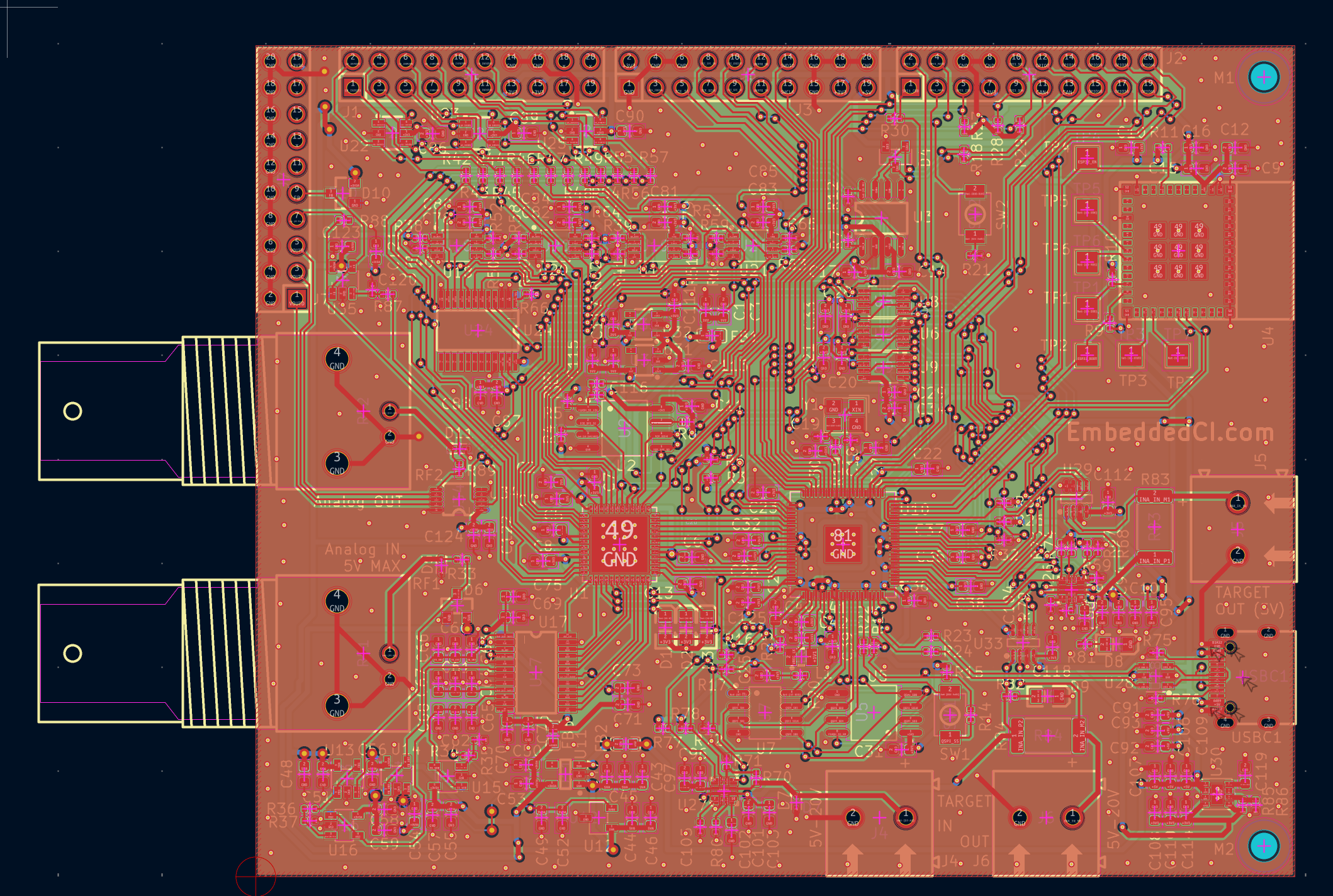
4 layers. Most important signals on the top, then 2 GND layers, then the signals that don't fit on top + power. After watching Rick Hartley's lecture explaining proper grounding, I ended up with 2 solid GND planes to ensure signal integrity for the analog part ([1] YouTube link at the bottom).
The KiCad files are in the GitHub repo. Here's a view of the PCB:
[1] Proper grounding:
Discussions
Become a Hackaday.io Member
Create an account to leave a comment. Already have an account? Log In.