 Spawn
Spawn

After completing this setup, I documented how I did it, follow this guide to learn how.
Get the parts needed.
- Get an adapter that supports LLAPI, I got the Gamer-Pro Advanced.
https://bliss-box.com/products/gamer-pro-advanced
make sure to grab the input cable you want to use. - Get the Bridge. https://bliss-box.com/products/bridge Bliss-Box had the only device that supports LLAPI to consoles, maybe other device like the blueRetro will do this someday, or raphnet, I'm not sure but this was the only one I could find. Also pick up the output cables you want.
- Get a Blender, https://bliss-box.com/products/blender Again, only Bliss-Box seems to make this type of device, and this is the heart and soul of what you need.
- And you will want a controller and a console but guessing you have that ;)
Next understanding. - There are few things to understand here
What is LLAPI? -- This is a protocol that is open and used by a few projects and invented by Bliss-Box. It was a protocol designed to work over exiting USB lines and sends its own data. It is important to note, it does not use USB, its a bit bang 2 wire signal. The device capable of speaking it, looks for a condition on the host. If seen it will communicate this way, otherwise default to USB. The condition is a USB reset and for that reason the two protocols can not coexist. So its a simple way to negotiate the way the device want to talk.
Also the Blender and Bridge only accept LLAPI input, otherwise the device woudl need an expensive chip with 2 USB hosts. It will however output USB on one port. So you effectively have 2 inputs ( LLAPI) and two outputs, 1 LLAPI 1 USB/LLAPI
You can connect two controllers at once but you would need two adapters. If you do this, both controllers have access to the outputs, but I only needed 1 input. The outputs both mimic the same data, like its copied, and I wanted two outputs.
Importantly you can map the inputs and outputs in anyway you like. If you were a car instructor and wanted to teach a kid how to drive, you could use one controller and they could use another one. Plug two inputs in to the Blender and one to the car simulator. OR, send some signals form controller 1 to xyz and some from controller 2 to abc ( hence the name blender ). There is a fully configurable UI but default is everything in , everything out, just want I needed.
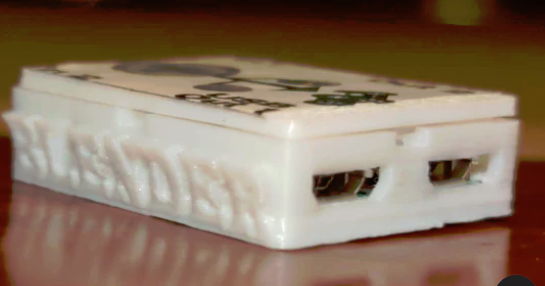

the Bridge is simple enough, but you need to know its modes. Console mode, what I used, is just that it works on non USB consoles. If you want to use it on USB consoles, then select and flash the firmware that does that. Pretty much everything is supported that could be. Flashing is simple once you tell windows how drivers works... not getting into that right now.... The Bridge only accepts LLAPI so I connected it to the output LLAPi only side.
The Blender does output USB, so I just connected a USB cable to the output of USB on the Blender to my PC.
Operation.
This is pretty simple IMO. and can connect it in may ways but its pretty straight forward. inputs, outputs,
My setup.
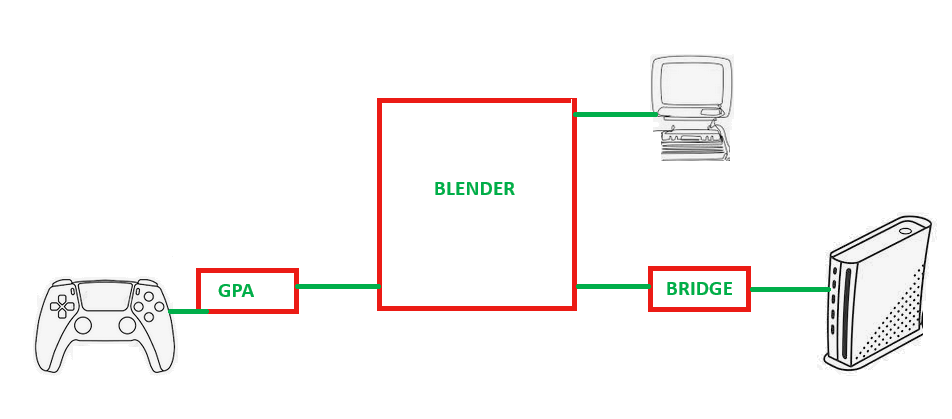 all images are royalty free
Troubles and know how.
- Grounding, -- Not going to get in to any detail here as its not my area of expertise. I got help from Bliss-Box on this, so passing it along. DC devices have a ground potential and not all device share it. so its best to ground two device together if they use other power sources. I found I had to connect everything up but my console. Then connect the Bridge to the consoles first. Lastly connect the Bridge to the Blender. If you see no outputs on the console this maybe your issue.
- Flash the GPA! it comes with older firmware, update it.
- Flash the Bridge it comes with ps3 firmware, update it.
- I did not have to update the Blender, it came ready to go. but I did have to put the Blender in Xinput mode for the game pad tester. Otherwise...
 Oliver
 Michal
 Colin O'Flynn
 Stefan Wagner