 Himanshu Dada

Overview
Temperature control is an essential requirement in many industrial, laboratory, and automation systems. This project demonstrates a simple, yet effective temperature controller built using an Arduino Uno, a MAX6675 Thermocouple Amplifier Module, a K-Type Thermocouple Sensor, and a 5V Relay Module.
The system continuously monitors temperature in real time and automatically controls a relay based on a user-defined temperature threshold. When the measured temperature reaches or exceeds the configured limit, the relay is activated. If the temperature falls below the threshold, the relay is automatically turned off.
For additional safety, the system also detects thermocouple connection failures and immediately disables the relay to prevent unintended operation.
This project can be used for heater control, temperature monitoring systems, industrial automation, incubators, ovens, furnaces, and various DIY temperature-controlled applications.
Features
- Real-time temperature monitoring
- Automatic relay control based on temperature threshold
- Supports K-Type thermocouple sensors
- Temperature display in Celsius and Fahrenheit
- Adjustable temperature threshold from software
- Thermocouple error detection
- Automatic relay shutdown on sensor failure
- Serial Monitor status reporting
- Simple and low-cost hardware design
Hardware Required
| Component | Quantity |
|---|---|
| Arduino Compatible Board (Uno, Nano, etc.) | 1 |
| MAX6675 Thermocouple Module | 1 |
| K-Type Thermocouple Probe | 1 |
| Relay Module (5V or 3.3V depending on MCU) | 1 |
| Jumper Wires | As Required |
| Power Supply | 1 or use Arduino Uno as Power Source |
How the System Works
The K-Type thermocouple measures the surrounding temperature and sends a small voltage signal to the MAX6675 module.
The MAX6675 performs:
- Signal amplification
- Cold-junction compensation
- Analog-to-digital conversion
The Arduino Uno reads the digital temperature data from the MAX6675 through SPI communication.
Every second, the system:
1.Reads the temperature value.
2. Converts the temperature to Celsius and Fahrenheit.
3. Displays the reading on the Serial Monitor.
4.Compares the temperature against the configured threshold.
5. Controls the relay accordingly.
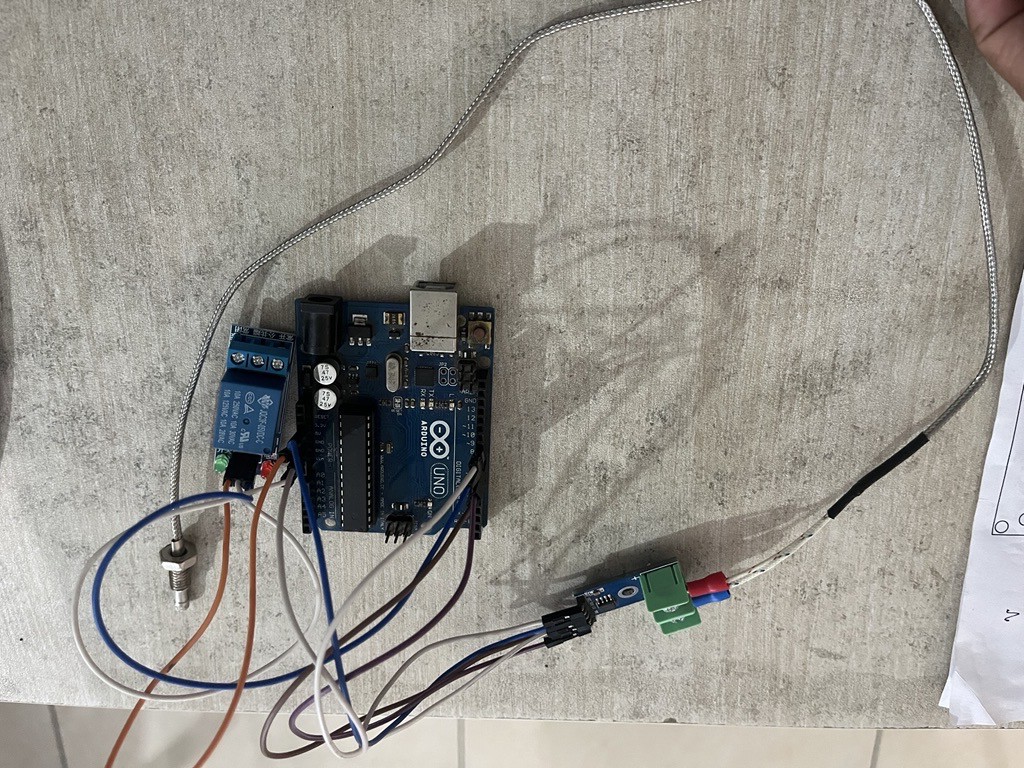
MAX6675 Connections
| MAX6675 Pin | Arduino Pin |
|---|---|
| VCC | 3.3V |
| GND | GND |
| SCK | D9 |
| CS | D6 |
| SO | D7 |
Relay Connections
| Relay Pin | Arduino Pin |
|---|---|
| IN | D8 |
| VCC | 5V |
| GND | GND |
System Operation
Temperature Measurement
The MAX6675 converts the thermocouple voltage into a digital temperature reading.
The Arduino reads:
- Temperature in Celsius
- Temperature in Fahrenheit
every second.
Example:
10.000 --> Temp: 27.50 °C | 81.50 °F
10.000 --> Relay: OFF
Relay Control Logic
The temperature threshold is defined in the code:
#define TEMP_THRESHOLD 30.0
Relay OFF Condition
Temperature < 30°C
Relay remains OFF.
Example:
--> Temp:28 °C --> Relay: OFF --> Temp: 31.75 °C --> Relay: OFF
Relay ON Condition
Temperature ≥ 30°C
Relay turns ON.
on Serial Monior:
215.212 --> Temp: 31.50 °C  |  88.70 °F
215.214 --> Relay: ON
216.215 --> Temp: 31.75 °C  |  89.15 °F
216.217 --> Relay: ON
Thermocouple Error Detection
If the thermocouple becomes disconnected or communication fails:
Thermocouple ERROR! Check wiring.
The relay is immediately turned OFF for safety.
Software Setup
Required Library
Install the MAX6675 library through Arduino IDE Library Manager. or download on github
https://github.com/adafruit/MAX6675-library
Common library:
max6675
Upload Steps
- Open Arduino IDE.
- Install the MAX6675 library.
- Connect your Arduino board.
- Open the project sketch.
- Select the correct board and COM port.
- Click Upload.
- Open Serial Monitor.
- Set baud rate to:
9600
Adjusting Temperature Threshold
Modify the following line:
#define TEMP_THRESHOLD 30.0
Examples:
#define TEMP_THRESHOLD 50.0
Relay turns ON at 50°C.
#define TEMP_THRESHOLD 100.0
Relay turns ON at 100°C.
 Dushyant Ahuja
 electronicsworkshops
 Parker Newman
 Loup Hébert-Chartrand