Close
0%
0%

Zigbee Sniffer & Diagnostics Platform

An ESP32-C6 based 802.15.4/Zigbee sniffer that doesn't stop at packet capture — routing trees, incident forensics, RF spectrum, etc

Similar projects worth following
0 followers
A full-featured IEEE 802.15.4 / Zigbee diagnostic tool built on the ESP32-C6. Unlike the existing ESP32 sniffers that only stream frames to Wireshark, this project adds device discovery, per-device message history, an LQI/RSSI routing tree, incident logging for "device went unresponsive" problems, and RF spectrum / interference analysis using the radio's Energy-Detect (ED) scan.

Go ahead, download the code (zbsniff) and play with it. It will run in demo mode without the ESP32s.

The problem

Zigbee networks fail in ways the controller can't see. Home Assistant tells you a device is "unavailable" — it can't tell you why. Was the frame never transmitted? Transmitted but not acknowledged? Is the mesh routing around a dying router? Is a neighbor's network stomping your channel — or worse, sitting on a different channel but physically close enough to deafen your coordinator's receiver? Every one of those looks identical from the software side: a device that stopped answering.

The usual answer is "flash a dongle and stare at Wireshark." That gets you frames, but a raw frame stream is the starting point of a diagnosis, not the answer. I wanted the layer above: what was happening on-air when the device dropped, correlated with channel noise, the routing topology, and the controller's own logs.

What it is

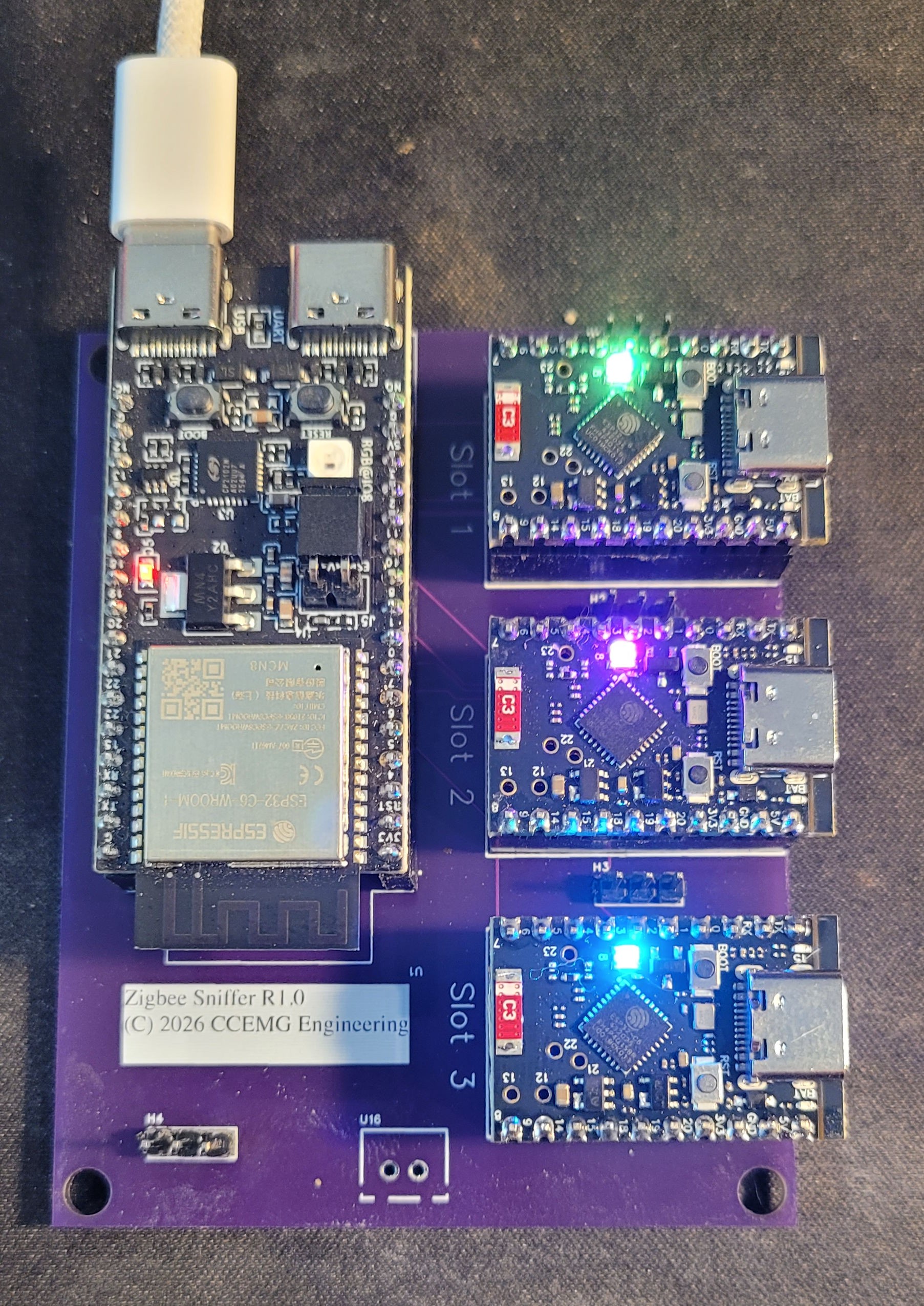
A full diagnostic platform built on the ESP32-C6 (chosen for its native 802.15.4 radio and its price — the SuperMini boards make extra radios almost free):

  • Live capture and decode — MAC / NWK / APS / ZCL, with AES-CCM* decryption when you provide your network key. Export to Wireshark (802.15.4 TAP pcap with RSSI/LQI/channel), CSV, or JSON.
  • Device intelligence — every device heard on-air gets a page: message history, signal trend, first/last seen, and automatic incident logging ("went silent for N minutes, here's the RF context at that moment"). A "why is it going unresponsive?" analysis mines every record for that device — link topology risks, route failures, rejoin events, even matching zigpy/ZHA log entries pulled from Home Assistant.
  • Routing tree — a live LQI/RSSI-annotated graph of the mesh, carefully distinguishing the MAC-layer physical hop from the NWK-layer logical source (they are not the same thing, and conflating them draws fictional meshes).
  • RF spectrum analyzer — energy-detect sweeps across channels 11–26, peak-hold, a waterfall, and a Wi-Fi overlap row so raised noise maps to the Wi-Fi channel sitting on it.
  • Neighbor-network discovery — every PAN heard on-air, tagged yours/foreign, identified by manufacturer OUI, a paired Hue bridge integration (the bridge tells us its channel, so its PAN gets named), and Thread/Matter recognition via 6LoWPAN framing heuristics. Passive survey or active beacon-request scan across all 16 channels.
  • Channel airtime analysis — frames/min stacked by network over up to 24 h, per-channel totals, and a per-network RSSI histogram. This is the "who is loud and how close" view — it exists because of a real failure (see below).
  • Active testing — optional, explicitly-gated TX: probe a device for a MAC ACK to prove its radio is alive on-channel right now, on demand or on a schedule.
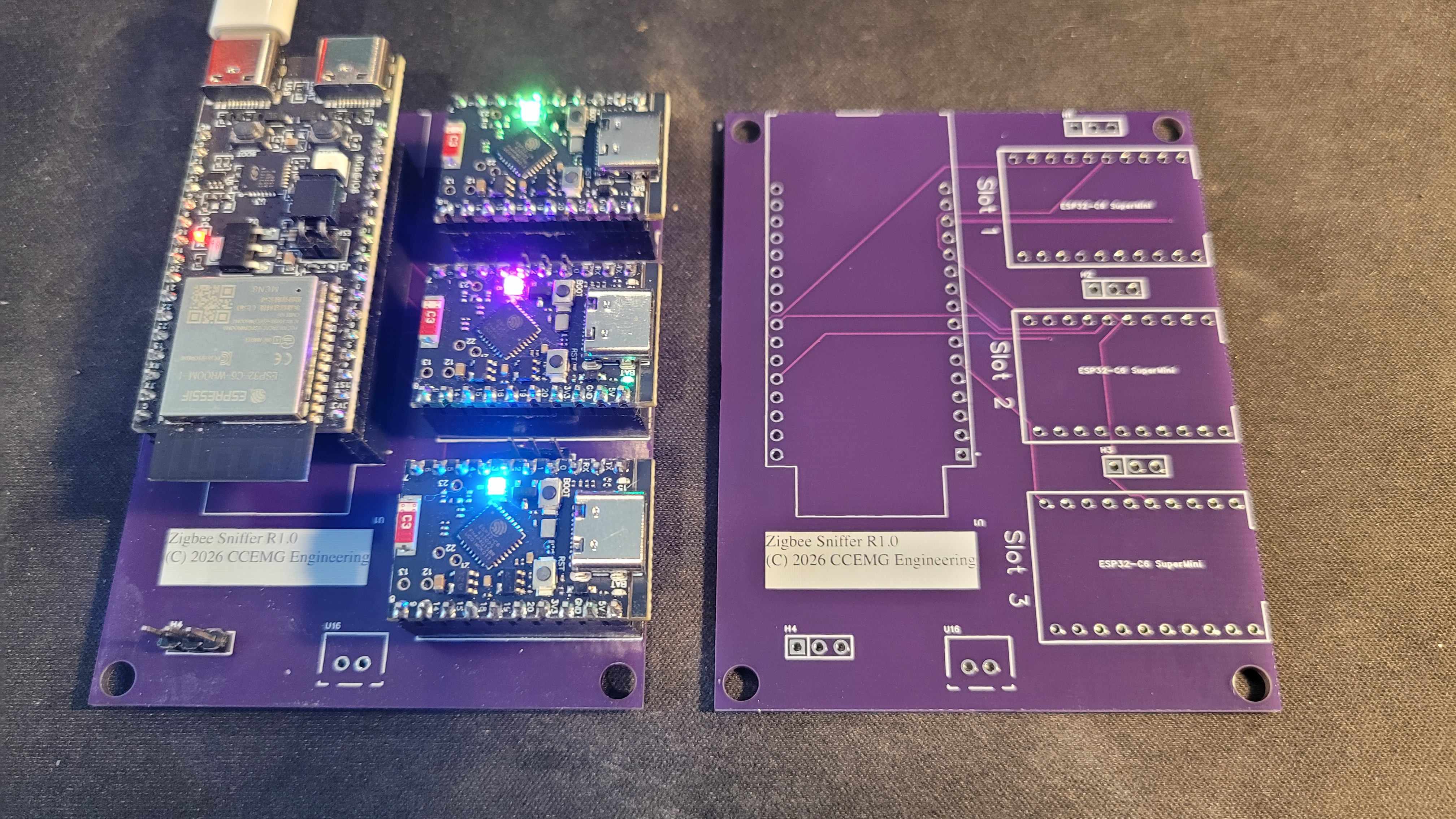
  • Multi-radio — up to four C6s with assignable roles: pin one to your network's channel for gapless capture while another sweeps spectrum, hops channels, monitors the neighbor's network, or runs probes.

Architecture

Three PlatformIO firmware builds share one capture core:

>td >satellite

BuildTransportRole
tetheredUSB serial
SPIDumb capture-and-forward to a primary; runs on the $3 SuperMini
standaloneWi-Fi AP/STASelf-contained web UI, no PC — delegates capture to SPI satellites

That split exists because of a hardware fact discovered the hard way: the C6's Wi-Fi and 802.15.4 radios share one antenna. Run both and Wi-Fi clients can't even associate. So the rule became: a C6 is either a radio or a UI, never both. The standalone build's own radio stays off; satellites feed it.

The primary host is a single-binary Go application — plug a USB C6 into your PC or HA box, run one executable, get the whole web UI (embedded, zero runtime dependencies) with SQLite history. A custom framing protocol (documented in the repo as the source of truth) carries frames, commands, and status over USB or SPI, including relay commands so the host can retune a satellite hanging off another radio's SPI bus.

Firmware updates flow...

Read more »
zbsniff-firmware-0.31.zip

Zip Archive - 1.68 MB - 07/17/2026 at 17:05

Download

zbsniff-windows-amd64.exe.zip

Zip Archive - 9.38 MB - 07/17/2026 at 17:05

Download

zbsniff-1.0.0-windows-amd64.zip

Zip Archive - 4.87 MB - 07/17/2026 at 17:05

Download

user-guide.pdf

Adobe Portable Document Format - 3.09 MB - 07/17/2026 at 17:03

Preview

quickstart.pdf

Adobe Portable Document Format - 343.90 kB - 07/17/2026 at 17:03

Preview

View all 6 files

  • 1 × ESP32-C6-DevKitC-1 (8MB)
  • 3 × ESP32-C6 SuperMini
  • 1 × custom SPI aggregator carrier PCB

  • The Week the Sniffer Earned Its Keep

    michael3 hours ago 0 comments

    # The Week the Sniffer Earned Its Keep

    Every project has a moment where it stops being a thing you build and becomes a thing you use.
    This week my own Zigbee network fell apart in three different ways, and for the first time the
    sniffer wasn't the project — it was the tool I reached for. It found two root causes I would never
    have guessed from Home Assistant's side alone, missed a third in a way that taught me something,
    and picked up a new dashboard panel as a direct result. Worth writing down while the bruises are
    fresh.

    ## The garage doors that wouldn't come back

    It started innocently: after re-pairing every device on the network, my two Tuya garage door
    controllers came back half-broken — contact sensor present, control switch gone. The trail led
    through custom ZHA quirk files, a deprecated quirks API, a truncated file copy (2,971 bytes where
    5,118 should have been — always check the byte count), and finally a genuinely subtle change in
    how modern ZHA decides whether to create a switch entity at all: a virtual cluster that answers
    "unsupported" for an attribute it never got a value for quietly loses its entity. The device
    never reports datapoint 1 on join — it's a stateless trigger — so the fix was seeding a default.

    All of that was software, and all of it was fixable. What the sniffer added was the part that
    wasn't: its device page for the garage showed **the only path this device has ever had is a direct
    link to the coordinator at −96 dBm, with no router to fall back on**, a failed re-interview logged
    by zigpy, and a real rejoin event. The quirk was correct by the end. The radio floor it stood on
    was not. I ordered different hardware for the garage and stopped fighting physics — but I got to
    stop because the dashboard *told me which battle I was actually losing*, instead of letting me
    keep polishing a quirk file against a −96 dBm wall.

    ## Then nothing would pair at all

    A day later the whole network went strange: every outbound command failing with `NWK_NO_ROUTE`,
    requests queuing thirty seconds deep, pairing dead — while inbound reports kept trickling in like
    nothing was wrong. I had theories. Zombie routers from the week's churn. Frame-counter desync.
    Each was plausible, each fit some of the log, and each was wrong.

    What fixed it was unplugging the Hue bridge.

    Here's the part that made it a lesson instead of an anecdote: I assumed channel overlap — Hue
    picks from the same ZLL channels my network uses, case closed. Then the sniffer showed the Hue
    network sitting on **channel 25**, five channels and 25 MHz away from my network on 20. It had
    always been there. The interference wasn't in frequency at all — it was in *space*. The bridge
    sat close enough to my coordinator that its transmissions were blocking the coordinator's
    receiver regardless of channel (the classic front-end desense every RF person warns about and
    every smart-home person forgets, because the bridge lives next to the router, which lives next to
    the Home Assistant box, which is where the coordinator is plugged in).

    The clue had been on the sniffer's screen the whole time: one Hue device, **199,813 frames at
    −54 dBm**. A very loud neighbor, very close to somewhere that mattered. I just didn't have a view
    that put "how much air does each network use, and how loudly" in one place — so I found the answer
    the dumb way, by unplugging things until the network came back.

    ## The panel that should have existed already

    That stung enough to become a feature the same day. The dashboard now has a **Channel airtime**
    panel: frames-per-minute stacked by network over a 15-minute-to-24-hour window, per-channel
    totals, and — the part this week proved matters — an **RSSI histogram per network**. High frame
    rate plus a distribution piled at the loud end is the "busy transmitter, physically close"
    signature, and it reads in about ten seconds. Your network is always blue; the neighbors keep
    stable colors (checked against color-blindness simulations, since a chart you can't read is
    decoration); the Hue-bridge...

    Read more »

  • The Neighbors, the Simulator, and a Narrow Miss on the Schematic

    michael3 hours ago 0 comments

    # The Neighbors, the Simulator, and a Narrow Miss on the Schematic

    Satellite OTA finally works. That felt like the big remaining risk on the hardware side, so this
    stretch has been a mix of catching up on things that got deferred while that fire was burning, plus
    one hardware review that turned out to matter more than expected.

    ## A demo that doesn't lie about itself

    Not everyone testing this has a satellite carrier board, three extra radios, and a Hue bridge
    sitting around. So: a demo mode, which runs the entire dashboard against a fully simulated
    network — a home mesh with a coordinator, routers, and end devices spread across rooms, a Hue
    bridge network, a generic foreign Zigbee network, and (see below) a Thread network too — generated
    through the exact same decode and decrypt pipeline real hardware uses, not a special-cased "fake
    data" branch bolted onto the UI.

    The rule I care about more than any of the simulated detail: it should never be possible to mistake
    this for a real capture. A visible "DEMO MODE" badge stays on screen the entire time it's active,
    and if the host can't find a C6 within a few seconds, it *asks* — retry, or enter demo mode — rather
    than quietly switching over on its own. Getting the RF spectrum tab to lie convincingly took a
    second pass, too: real Zigbee traffic is bursty, a device transmits for a millisecond and then goes
    quiet, so even a channel with an active network should read as noise floor most of the time. The
    first version had every "active" channel reading solid hot on every single sweep, which looks
    exactly like a jammer, not a network — a good reminder that a convincing simulation has to be
    convincingly *boring* most of the time, not maximally dramatic.

    ## Recognizing the neighbors

    Thread — which is what nearly all Matter devices run on top of — shares the exact same 802.15.4
    radio and MAC layer as Zigbee. It just uses a completely different network layer above that: 6LoWPAN
    and IPv6, instead of Zigbee's own NWK header. Frames from a Thread network were already failing the
    Zigbee NWK-version check and falling back gracefully to MAC-only recording — the missing piece was
    just noticing *why* they were failing.

    A cheap check against known 6LoWPAN framing patterns, added right at that existing fallback point,
    now recognizes a Thread network for what it is and labels it "Thread network (likely Matter)"
    instead of leaving it an unexplained bare PAN id on the Networks tab. It can't prove the traffic is
    specifically Matter without that network's own key — same limit as any other foreign, encrypted
    network — but going from "unrecognized" to "honestly labeled" is real progress.

    ## A schematic almost went to fab wrong

    The carrier board design has existed on paper for a while — netlist, pinout table, the works — but
    a document isn't hardware, and the real test arrived this week in the form of an actual PADS
    schematic export to review before it goes anywhere near a fab house.

    Good thing it got a second look. One satellite's module was tagged under a part number for a chip
    with no 802.15.4 radio at all — an easy mix-up buried in a component library, and exactly the kind
    of thing that's invisible until a board comes back and one radio just doesn't work. A third
    satellite was missing one of its two required control lines back to the primary entirely — present
    on paper, absent from the actual net. Two satellites had gotten wired directly to each other instead
    of each going back to the primary the way they're supposed to. One satellite had no path to power
    at all. Every one of those got caught, fixed, and then re-verified pin-by-pin against the actual
    firmware GPIO definitions, using the real schematic symbol's pin diagram rather than guessing from
    a generic reference. In the process, a leftover reference file in the repo turned out to still
    document an *old* pin assignment the firmware had quietly moved away from months ago for good
    reason — fixed that too, so it can't mislead the next pass.

    None of those were exotic bugs. They...

    Read more »

  • The Satellite That Wouldn't Update

    michael3 hours ago 0 comments

    # The Satellite That Wouldn't Update

    I did not expect firmware updates to be the hard part. The satellites are wired up, the SPI relay
    works, captures flow both directions — updating a satellite over that same link should be the easy
    victory lap. It has instead been the hardest bug of the whole project, and it's worth writing down
    while it's still fresh, because the shape of it is genuinely strange: **the fix for corrupted OTA
    transfers was itself a firmware update, and installing it needed an uncorrupted transfer to
    arrive.** A chicken-and-egg problem, for real, not just a figure of speech.

    ## Every transfer, eventually, corrupts

    The symptom: push a firmware image to a satellite over SPI, and somewhere in the transfer, the
    image comes out wrong. Not every time in the same place, not always fatally, but often enough that
    "eventually" is really "almost always" once an image is more than a couple hundred kilobytes.

    SPI over a real physical link drops things sometimes — a reply gets lost, the host doesn't hear a
    chunk's acknowledgment in time, and it does the only reasonable thing: resends that chunk. That's
    supposed to be harmless. It is not harmless. The satellite's OTA write path had no way to tell a
    **resent** chunk from **new** data — it just appends whatever it receives, in order, wherever its
    internal write pointer currently is. Resend a chunk, and it gets written a second time, shifting
    every byte after it over by one chunk's length. The image downstream of that point is now garbage,
    and nothing detects it until the very end, when the device tries to boot the result and can't.

    Somewhere in the middle of chasing that, a second, unrelated bug showed up: erasing the whole flash
    partition in one call before writing anything, which seemed like the obviously-correct way to do
    it, is a single long blocking operation — long enough, on this single-core chip, to starve the idle
    task that the hardware watchdog is monitoring. The device would just reset, silently, mid-transfer,
    with no crash log because nothing actually crashed — the watchdog did exactly what it's supposed to
    do.

    ## The fix, and the trap

    Both got fixed properly. The satellite now writes straight to the raw flash partition instead of
    going through the higher-level OTA API's own internal, stateful write-pointer tracking — every
    chunk carries its own byte offset, and the satellite keeps track of how much it's actually applied,
    so a resent chunk gets recognized and *skipped*, never double-written. Flash erasing happens
    incrementally, one sector at a time as data actually arrives, instead of one long upfront blocking
    call that trips the watchdog.

    Except: getting that fix from source code onto an actual running satellite means an OTA
    transfer — the exact thing that's broken. Every attempt to update a satellite to the fixed firmware
    was itself vulnerable to the bug the fix was supposed to solve, because the satellite currently
    running had no idea how to survive a resent chunk. Fixing OTA over OTA doesn't work when the thing
    being fixed is the very thing doing the delivering.

    The way out was the boring, obvious one: a manual USB reflash, once, by hand. Even that had its own
    detour — the standard "hold BOOT, tap RESET" trick to force a chip into its bootloader dropped it
    into its *native* USB download mode, which turned out to be a completely different electrical path
    than the external UART adapter I'd been using to watch its console logs the whole time. Wrong port,
    wrong assumptions, a bit of head-scratching before realizing the fix was simply plugging the
    satellite's own USB port directly into the computer instead.

    ## Proof

    With the real fix actually running on the hardware, the thing I actually set out to test — updating
    a satellite over the SPI carrier link, the normal way, no cables, no manual reflash — got to run for
    real. Twice. A push from one version to the next, and then another push right after that, both
    needing constant chunk retries the entire way through — this link really is lossy, that...

    Read more »

  • One Radio Hears One Channel

    michael3 hours ago 0 comments

    # One Radio Hears One Channel

    The dashboard is solid now — routing tree, diagnostics, active testing, device naming, all of it
    running against a single tethered C6. And that single radio is exactly the limitation I keep
    running into.

    One radio, one channel, all the time. If I want to know what's happening on channel 15 while I'm
    watching channel 20, I have to interrupt my own capture and go look — which means I can't actually
    watch both at once, which means the survey that finds a noisy neighbor network is a snapshot, not
    a standing watch. The obvious answer is more radios. The interesting question is how to wire them
    up without turning this into four separate gadgets that don't talk to each other.

    ## Satellites, not separate tools

    The design that makes sense: keep one primary C6 as the "brain" of the setup — the one talking USB
    to the host — and let up to three additional C6 boards act as satellites, each free to sit on its
    own channel, each relayed back through the primary over a shared SPI bus instead of needing their
    own USB connection. One host, one dashboard, one coherent view — it just happens to be assembled
    from up to four radios instead of one.

    That means an actual SPI relay layer: the primary as SPI master, each satellite as an SPI slave,
    a wire protocol for commands going out and captured frames coming back, in both directions, without
    either side blocking the other. And because this now has to be real hardware, not just firmware —
    a carrier board: one PCB to host a primary and up to three satellites with clean shared power and a
    defined pinout, instead of a nest of loose jumper wires that falls apart if you look at it wrong.

    ## Deciding who does what

    More radios also means a new problem I didn't have with just one: who does what. If a satellite is
    already pinned to sniffing channel 20 and I ask for a spectrum sweep, should it just start sweeping
    and silently stop hearing anything on channel 20? That's a surprise I don't want to hand anyone.

    So radios now get **roles** — sniffer, spectrum, tester, hopper, or just "any" — and requesting a
    function walks through an actual allocation decision: use a radio already dedicated to that job if
    one exists, otherwise grab a free "any" radio, and if the only candidate is already busy doing
    something else, ask before interrupting it rather than just doing it. With one radio that means an
    occasional confirmation prompt. With two or more, most things just work without ever asking.

    The carrier board design is drawn up, the pin assignments are set, and the firmware side — the SPI
    relay, the per-satellite command routing — compiles and runs against real hardware on a bench. Next
    is actually getting a satellite to take a firmware update over that link instead of needing to be
    plugged into USB by hand every time something changes.

  • First Light: The Dashboard Finds Its Feet

    michael3 hours ago 0 comments

    # First Light: The Dashboard Finds Its Feet

    The plan was: a cheap radio doing the listening, a small host doing the thinking, a dashboard that
    tells you what's actually wrong instead of just what happened. This week that plan turned into
    something that actually runs.

    ## The first real build

    The tethered C6 is capturing. The Go host is decoding, decrypting, and serving a web dashboard over
    it. And — because I wanted the whole shape of the thing working before polishing any one piece —
    the first build landed all of it at once: a live routing tree, a live-frames view, an RF spectrum
    tab, active device testing, and a first pass at OTA updates so I'm not stuck re-flashing over USB
    every time the firmware changes. Zigbee-network discovery came right alongside it: a passive
    survey that hops channels listening for traffic, and an active scan that transmits a beacon
    request so even quiet, idle networks answer back.

    Watching the routing tree build itself for the first time, live, from real captured traffic — that
    was the moment this stopped being a plan and started being a thing I actually use.

    ## Making it survive being left alone

    A tool that's only useful while you're staring at it isn't the tool I set out to build. The whole
    point is catching a device that goes quiet at 2am while nobody's watching. So the next stretch of
    work wasn't new features — it was making the thing trustworthy enough to leave running.

    The serial link would occasionally just... go away, and the dashboard would sit there showing stale
    data with no indication anything was wrong. That's now fixed: the host notices the silence and
    reconnects on its own, no manual intervention. And the actual diagnosis engine landed — automatic
    incident detection, watching for a device that used to talk regularly and then didn't, logging
    both the silence and the recovery with a timestamp on each. That incident log is really the heart
    of the whole project, and now it exists.

    Also found and fixed a UI freeze that only showed up after leaving an energy-detect sweep running
    for a while — exactly the kind of bug you only catch by actually doing the thing the tool is
    supposed to be good for: running unattended, for hours.

    ## Giving devices an identity

    A routing tree full of bare hex addresses is technically correct and practically useless. This
    week's other big push was naming things.

    Every device's extended address carries a manufacturer OUI — readable even on traffic I can't
    decrypt, since it lives in the unencrypted NWK header — so devices now show up labeled by vendor
    instead of `0x4a2f`. Pairing a Philips Hue bridge gives the Hue network authoritative naming for
    free, no guessing required. Parsing ZDO device-announce messages gives a reliable map from short
    address to IEEE address without waiting to get lucky on a join.

    On top of that: a frame inspector that shows a layer-by-layer decode of any captured frame, with
    pcap export so I can hand a capture to Wireshark when I want a second opinion. Device
    interrogation, so clicking a device can show its actual capabilities and a hop-by-hop traceroute
    back to the coordinator. None of this was strictly required to answer "did this device go silent"
    — but a dashboard that shows you a name, a manufacturer, and a path home is a dashboard you'll
    actually leave open.

    It's starting to feel less like a packet dump and more like a tool.

  • The Case of the Vanishing Smart Bulb

    michael3 hours ago 0 comments

    # The Case of the Vanishing Smart Bulb

    There's a bug every smart home eventually gets, and it's always the same shape: a device just...
    stops. Home Assistant shows it "unavailable." I power-cycle it, and it comes back like nothing
    happened. A week later, it does it again. Is it the device? The mesh? Something on the same radio
    channel drowning it out? There's no way to know — because Zigbee, for all it gets right, gives you
    absolutely no visibility into why a device went quiet. No check-engine light. No log. Just
    silence, and a guess.

    I'm tired of guessing.

    ## The gap nobody's filling

    The "real" way to see what's happening on a Zigbee network is to sniff the actual radio traffic —
    but that means either buying a purpose-built sniffer dongle or learning to read raw 802.15.4
    frames in Wireshark by hand. Neither of those is something a person troubleshooting their porch
    light should have to do. The tools that exist are built for protocol engineers, not for "why did
    my door sensor go offline at 2am."

    That gap is the whole reason I'm starting this project: not just a sniffer, but something that
    looks at the traffic and tells you, in plain terms, what's actually wrong.

    ## The idea

    Here's the thing that made it click: an ESP32-C6 already *has* the radio this needs. It's a
    mainstream, cheap microcontroller with a native 802.15.4 radio built in — the same radio family
    Zigbee itself runs on. Point one at the air, decode what comes back, and I've got a sniffer for
    the price of a dev board instead of a specialty tool.

    But a raw packet capture isn't the goal. The goal is a device that watches the network the way an
    engineer would if they had nothing else to do all day: noticing when something that used to talk
    regularly goes silent, noticing when a neighbor's network shows up on my channel, noticing when
    the air itself is just noisy. Capture is the input. Diagnosis is the point.

    ## The plan

    A few decisions are shaping this before a single line of firmware exists:

    **Split the brain from the ears.** The C6 is small — plenty of headroom to listen to the radio,
    not enough to also decrypt, store, and analyze a running history of thousands of frames while
    serving a web dashboard. So the design splits the job in two: the microcontroller does nothing but
    capture and hand frames off, and a small host program — decoding, decrypting, storing, and serving
    the actual dashboard — does the thinking. The radio stays cheap and disposable; the intelligence
    lives somewhere with real CPU and RAM to spare.

    **Show the mesh, not just the packets.** A list of frames scrolling past tells you traffic exists.
    It doesn't tell you *how the network is shaped* — which devices route through which, and how far
    a signal has to travel to get home. So a live routing tree is part of the plan from day one: watch
    the mesh build itself in real time, not just read a log about it.

    **Separate "the device is broken" from "the radio channel is a mess."** One of the most common
    false alarms in any wireless troubleshooting is blaming the device for what's actually
    interference. So the design includes an RF view of the spectrum itself from the start — because
    "is channel 15 just noisy right now" is a question I need to be able to answer *before* I start
    suspecting the hardware.

    **Findings, not just facts.** Anyone can dump a table of every frame captured. Far fewer tools tell
    you which three things in that table are actually worth worrying about. The plan is automatic
    diagnostics from the outset: rank what the data shows by how much it should matter, instead of
    handing over a firehose and calling it a feature.

    **Listen first, act only on purpose.** The default posture is entirely passive — it never has to
    transmit a single bit to tell you what's wrong. Anything that *does* transmit — actively probing a
    device to confirm it's alive, for instance — is a deliberate, clearly separate action, not
    something that happens by accident while I'm just trying to look at my own network.

    ## Where this starts

    That's the...

    Read more »

View all 6 project logs

Enjoy this project?

Share

Discussions

Does this project spark your interest?

Become a member to follow this project and never miss any updates