 diddy
diddy

Overview
Craptronics Plc brings you the Junk-Phonic 9000 is a single photograph of a boombox that has been talked into working. There's no 3D model, no canvas-drawn cabinet, no sprite sheet — just a real product photo, sliced apart in the places where buttons and dials already exist, and rebuilt as a living interface using nothing but HTML, CSS, and the Web Audio API.
Load an mp3 into it and it plays through a cassette deck with genuine wow & flutter — not a filter that makes things sound "vintage," but a continuous playback-rate wobble that behaves like an actual worn tape transport, pitch drift and all. Tune the internet radio and the VU needles sweep with real programme level. Turn up the bass and the woofers — cut from the same photo, layered back on top of it — visibly vibrate to the actual waveform, not just a generic "louder = bigger" pulse. Press Crap Bass Boost, which despite the name is a boxy telephone-band filter that removes bass, and the woofers audibly and visibly calm down, because that's genuinely what's happening to the signal.
It was built by Craptronics Plc, who also produced the Crap-turon 5000, and the tape currently loaded in the deck is a mix called Hits 1982, which has never existed and never will.
How it's built
The photo is the UI
Every control is an absolutely-positioned HTML element sitting directly on top of the source photograph, with its coordinates measured from the actual image pixels rather than guessed. Concretely: the photo is loaded into Python/PIL, then thresholded and scanned for the distinctive colours or brightness signatures of each control — the yellow REC button, the amber VU meter glow, the dark cassette window, the chrome speaker rims — to pull out exact bounding boxes in pixel space. Those get converted to percentages of the image's width/height, which is what lets every overlay track correctly regardless of how large the photo is rendered (the whole page scales as one fluid unit, from a phone screen up to a 1600px-wide desktop layout).
The two speaker cones use the same trick in reverse: they're crops of the original photo's own woofers, repositioned in a <div> on top of the now-cone-less base image, so they can be independently scaled and brightened without touching the rest of the photo.
Where a control needed to fit into genuinely tiny real estate (the tape transport buttons sit in a strip of chassis roughly 40px wide at native resolution), the UI shrinks to icon-only pill buttons rather than breaking the photo's geometry. Where a piece of text was baked directly into the photo — the brand logo — it was inpainted out (a clean patch of the panel stretched over the old logo) and redrawn with new text, rather than faked with an HTML overlay.
Audio architecture
Two independent AudioContexts run side by side, exactly mirroring the two physical audio sources:
Tape A (Web Audio graph, per file loaded):
<audio> element ──▶ highpass (80Hz) ──▶ lowpass (8kHz) ──▶ compressor ──▶ tone stage ──▶ destination │ ▶ analyser (level meter)
- The highpass/lowpass/compressor stage is the "worn tape" character — a fixed EQ+dynamics preset modelling a well-used cassette's frequency response.
- A
requestAnimationFrameloop continuously nudgesplaybackRatewith layered sine waves (a slow ~0.1Hz "wow" plus a faster ~0.8Hz "flutter," plus a touch of random jitter) — this is what makes the pitch audibly drift rather than just sound EQ'd. - Reverse playback ("Auto Reverse") doesn't use the
<audio>element at all, since HTML5 audio has no reverse-playback mode. Instead the file is decoded once viadecodeAudioData, the channel data is reversed sample-by-sample into a freshAudioBuffer, and that gets played through anAudioBufferSourceNode— with the same wow/flutter and tone-shaping chain applied, so backwards playback sounds identically "tape-y." - A dedicated
preservesPitch = falsesetting on the audio element turned out to matter a lot: with...

 mircemk
 E/S Pronk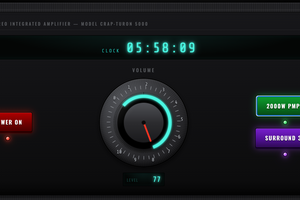
 Victor Serrano