 Scottsky
The gap I'm closing
Bench diagnostics live at two extremes. Either you're squinting at a terminal over SSH on a headless box, or you're hauling a laptop to the bench to open a full-size GUI. Headless is too little. The full interface is far too much.
Here's what I kept noticing: for any single diagnostic question, I'm pressing about two buttons of that tool and watching about two numbers come back. The other 90% of the interface is just in the way. I don't need the ribbon menus, the config panels, the twelve tabs. I need to plug a thing in, glance at a 3.5" screen, and get my answer.
Scottina is that middle ground. It doesn't invent new tools — it gives the ones you already trust a front panel sized to the one question you're asking.
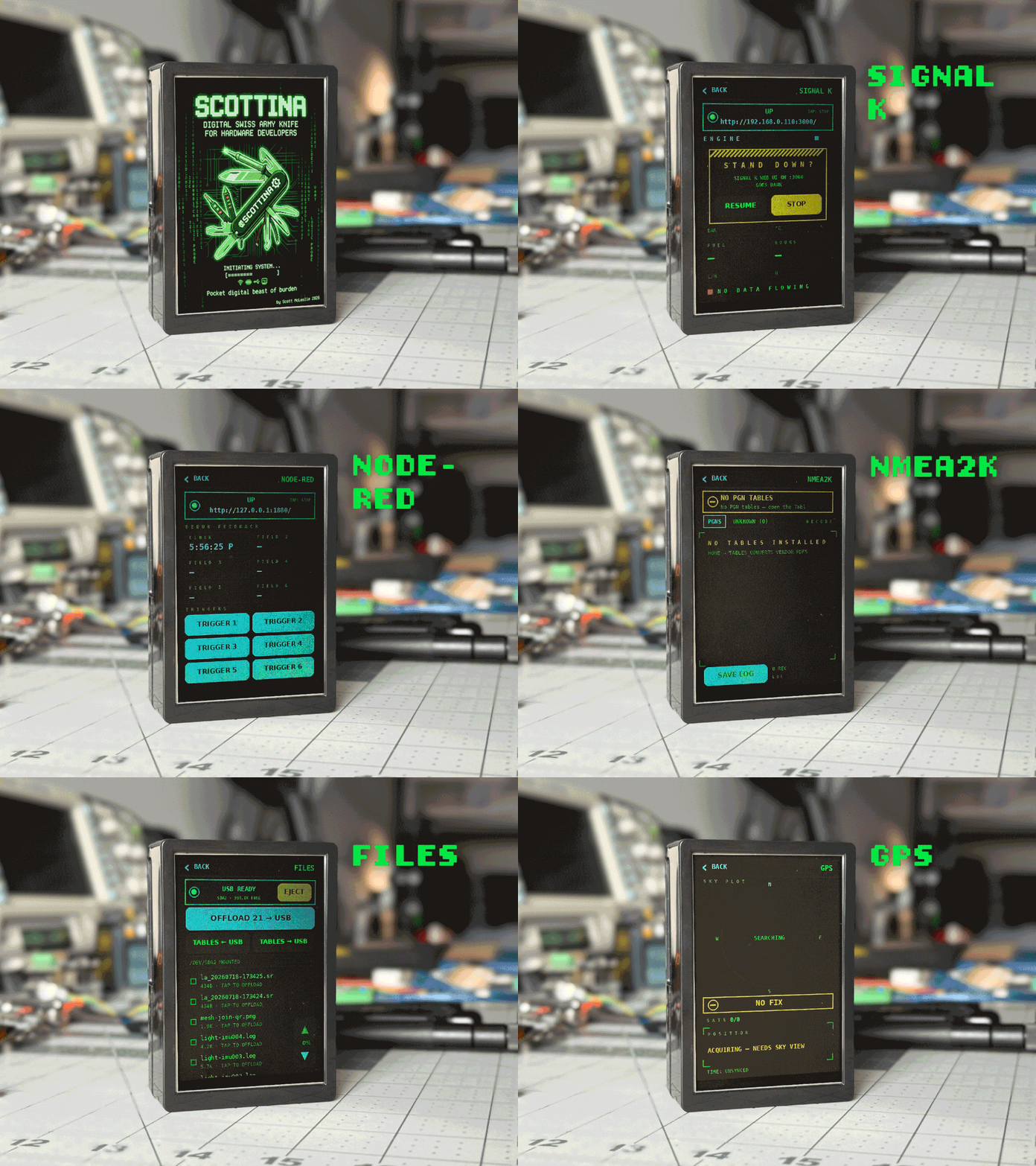
What it is
A Raspberry Pi 5 running Kali, driving a 3.5" ILI9486 SPI touchscreen with resistive touch. It boots straight to a tap-driven tile grid — no keyboard, no mouse, no desktop, no X server. It renders directly to the framebuffer and reads touch from evdev, so there is no display server that can lose the panel.
Plug in a USB device and its tile appears on the home grid. Unplug it and the tile goes away. Each device screen is cut down to the functions you actually reach for.
What it is not
It is not a Flipper Zero, not a Marauder deployment, not a wardriving toy. It shares some radios and some Kali tools with those, but the scope is strictly diagnostics — no offensive or attack tooling. That boundary is enforced in code, not convention: the UI is physically incapable of expressing an offensive operation.
One deliberate exception: CAN bus has normal TX/RX, because heartbeats and replies are how you diagnose a bus at all. A listen-only CAN tool can't tell you whether the node is deaf or just quiet.
What this feels like in day-to-day work
- Pulling a Pi off the rack without the usual dance. No hooking up a monitor and keyboard just to join Wi-Fi. No hunting for Ethernet. No arp-scanning into a forest of identical "Raspberry Pi Foundation" MACs and SSHing in blind. Scottina joins networks headless from the touchscreen, and the moment it's up, the IP is right there in the header.
- Guessing the CAN bitrate so you don't have to. Plug in a USB-CAN transceiver and it autodetects the device and sweeps bitrates listen-only, keeping whatever rate actually yields frames. With your DBC tables preloaded, you get decoded, normalized messages. No laptop, no full CAN suite.
- New-board bring-up before you write a line of driver code. Tap the I2C scanner, confirm the sensor is really acking at the address you expect. "Is it my wiring or my code?" answered in five seconds.
Two small touches I'm weirdly proud of
Scottina's own IP is always in the header. When you need to reach it from a phone or laptop, you're never hunting.
Every web-app screen shows the exact URL:port. These bigger tools ship their own browser UIs. Scottina launches the app, probes the port until it actually answers — the tile only goes green when the thing is really serving, not merely spawned — then shows you what to type. No guessing which port Node-RED landed on today.
Where it is now
v1.0 is running on my bench daily. Network, radio, bus, GPS, and web-app tooling all front-ended as tiles. GPS is integrated and outdoor-validated — gpsd and chrony for a disciplined clock, plus a phosphor-CRT sky plot because I couldn't resist.
Build logs will walk through the design decisions, the things that fought back, and the parts I got wrong the first time.
And Scottina Prime isn't the only board on this bench. More on that later.