 Udi Tirosh
This one is by popular demand: teachers using VA5 in classrooms kept asking for it.
VA5 remembered just one Wi-Fi network. That's fine on a bench. It is not fine when the device moves between a classroom and a library on different access points, or goes home with a teacher for the weekend.
Every move meant the same ritual — power on, wait fifteen seconds for the connect to time out, join VOICE-AGENT-XXYY from your phone, and retype an SSID and password with your thumbs. And because the old firmware erased the credentials it had just failed with, you did the whole thing again in the other direction on the way back. That erase was reasonable-looking code with a wrong assumption behind it: a failed connect almost never means a wrong password. It means the access point is rebooting, or you're out of range.
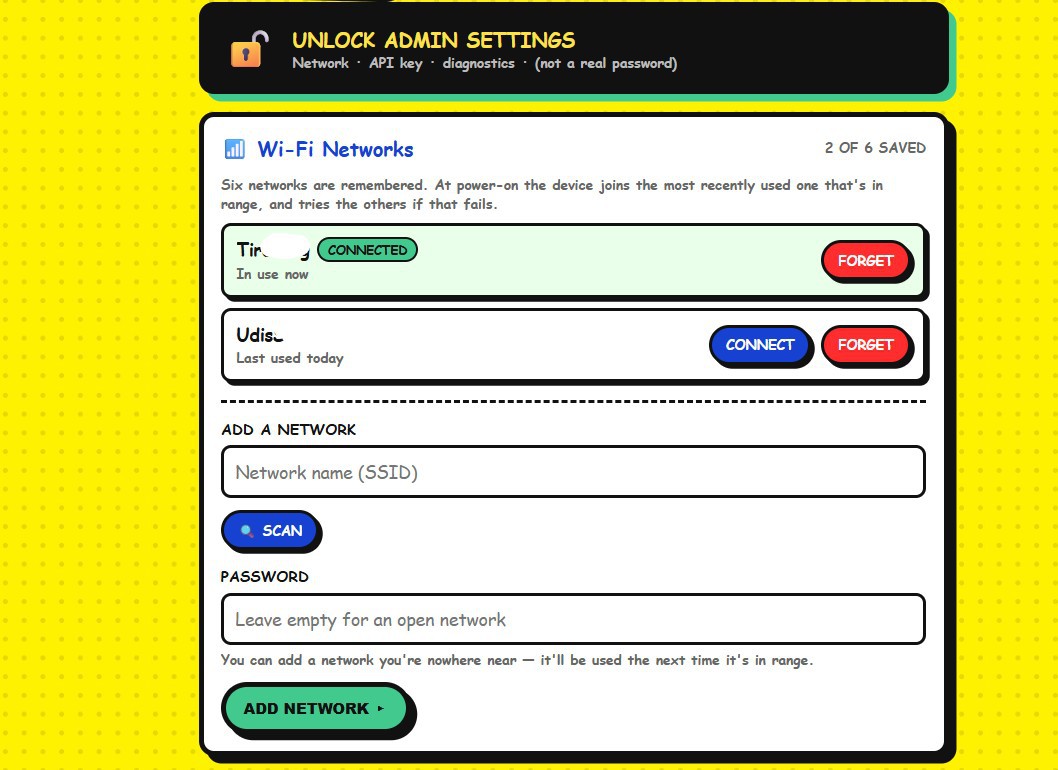
So VA5 now remembers six WIFIs
(I was not sure about the numner and am still undecided on 6-7)
At boot it scans, keeps the saved networks that are actually in range, and joins the one you used most recently. If that one doesn't answer it tries the next, and only opens the setup portal once they have all failed. Nothing is ever erased for failing — an access point that was switched off for a week is still in the list when you come back to it.
Two things fell out of that which turned out to matter more than I expected.
You can add a network you're nowhere near. Type in the staffroom SSID and password while you're still at home, and it gets used the first time it's in range. A device can be handed to somebody already knowing where it's going.
(Plus) Holding the push-to-talk button while powering on jumps straight to the setup portal. No waiting on a device patiently working through six networks that aren't there.
It's in v0.14: https://github.com/iollama/Voice-Assistant-5
Discussions
Become a Hackaday.io Member
Create an account to leave a comment. Already have an account? Log In.