 Shubhan Mital
Detecting the marker is only half the job: the arm also needs to know exactly where it is on the table. Our script
marker_position.py
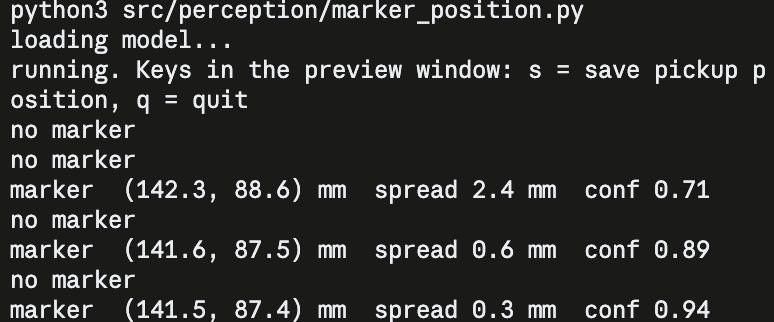
handles this step. It loads our trained detection model, watches the live camera feed and converts each detection into a real-world position in millimetres that the arm can reach for. For every frame, it reports the marker's coordinates, the spread (how much the position varies across recent readings, so lower means steadier) and the model's confidence that it's looking at a marker.
In this test, the readings settle quickly. As the detection locks on, the confidence rises and the spread drops from 2.4 mm to just 0.3 mm, so the marker's position holds steady at about (141.5, 87.4) mm. The occasional "no marker" lines are frames where the model wasn't sure enough to report a detection, and the script simply skips them. Once the reading is stable, pressing s saves it as the pickup position. That's the "remembered start location" the arm uses to put the marker back at the end of each run.
Live output from marker_position.py: as the model locks onto the marker, the confidence climbs from 0.71 to 0.94 and the position settles to within 0.3 mm.
Discussions
Become a Hackaday.io Member
Create an account to leave a comment. Already have an account? Log In.