Close
0%
0%

Beyond the Track: A Three-Log RTK GNSS Road Test

A Windows workflow that keeps receiver output, correction data, and application events together for a reviewable RTK GNSS road test.

Similar projects worth following
0 followers
This field-tested project pairs a SCOUT PRO RTK+DR receiver with a Windows 11 laptop running KALMIX Trace 1.5.7.

It keeps receiver NMEA output, incoming RTCM3 corrections, and application events from the same drive together for later review—without treating “NTRIP connected” as proof of RTK Fixed or making an accuracy claim.

Why this project exists

A GNSS road test can produce a route and a connection indicator while leaving an important question unanswered: what was happening in the receiver, correction path, and Windows host at the same time?

This project documents a field-tested workflow that keeps those records together for later review. It is not an accuracy benchmark and does not claim RTK or DR performance.

Tested setup

SCOUT PRO RTK+DR GNSS receiver
SCOUT PRO integrated USB-C cable connected directly to a Windows 11 laptop
KALMIX Trace 1.5.7
NTRIP-delivered RTCM3 corrections
Test date: September 4, 2026

What Trace records

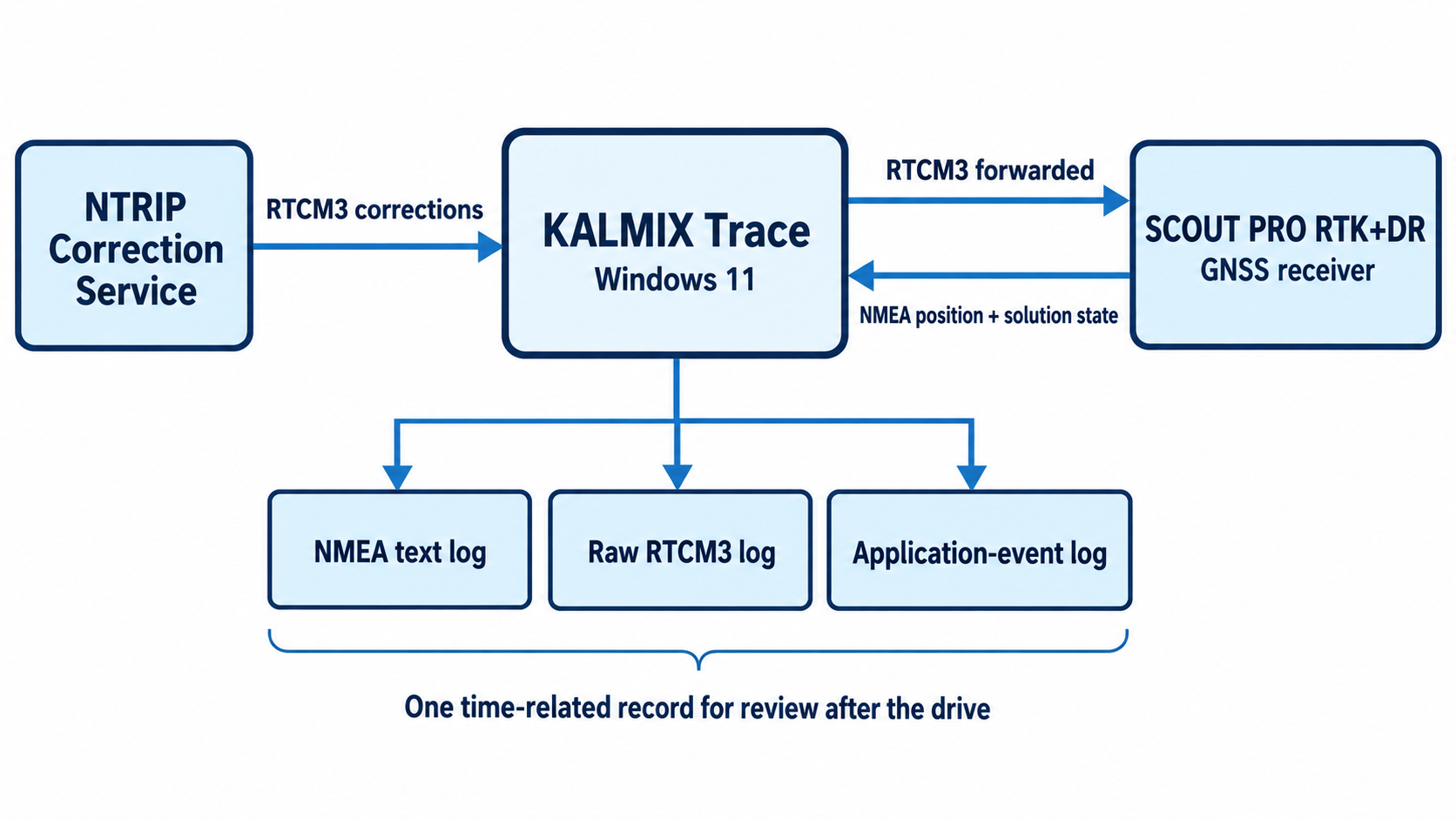
KALMIX Trace preserves three complementary records from one session:

  • Receiver-reported NMEA output
  • RTCM3 corrections received by the Windows host
  • Application events such as serial-port and correction-service connections

These records help distinguish a serial-stream issue, a host-side correction-path issue, and a receiver-reported solution-state transition.

Interpretation limits

An NTRIP connection does not by itself prove RTK Fixed. This project does not measure absolute position error against an independent reference trajectory, calculate RTK, or establish DR drift.

Public resources

TRACE Log Analyzer and redacted examples:
https://github.com/KalmixTech/trace-log-analyzer

KALMIX Trace v1.5.7:
https://github.com/KalmixTech/Kalmix-Software/releases/tag/trace-v1.5.7

Related troubleshooting article:
https://dev.to/kalmix_tech/ntrip-connected-isnt-rtk-fixed-a-windows-gnss-troubleshooting-checklist-2ejc
  • 1 × SCOUT PRO RTK+DR GNSS receiver Receiver used in the road test; configured for 20 Hz output.
  • 1 × Windows 11 laptop Runs KALMIX Trace and stores the session logs.
  • 1 × KALMIX Trace 1.5.7 Displays NMEA, forwards RTCM3 corrections, and records session files.

  • Beyond the Track: Reading NMEA, RTCM3, and App Events Together

    Clivia2 hours ago 0 comments

    A route is useful, but it is not the whole test record

    It is tempting to reduce a GNSS drive test to a coloured route on a map. That route can show where a receiver reported a state, but it usually cannot answer the next question: what was happening in the data path at the same time?

    For this test, we placed a SCOUT PRO RTK+DR receiver on a vehicle, connected its integrated USB-C cable directly to a Windows 11 laptop, and used KALMIX Trace 1.5.7 during the drive. The goal was not to create an accuracy benchmark. We wanted a record that would still be useful after the vehicle returned: one that could distinguish a missing serial stream, a correction-path question, and a receiver-reported solution-state transition.

    Figure 1. Trace preserves receiver output, correction data, and application events as one time-related road-test record.

    Three records, three different questions

    We enabled logging before connecting the serial port and the correction service. That produced three files from the same drive:

    NMEA text: What did the receiver report as its position, solution state, satellite count, and related fields?

    Raw RTCM3: Was the correction stream retained at the host for the same session?

    Application events: When did Trace open and close the serial port, start or end the correction connection, and exit?

    None of the files is sufficient by itself. NMEA can show that a receiver changed from Fixed to Float, but it cannot independently prove why. An RTCM3 file can show that correction data existed at the host, but it cannot prove that every message was used by the receiver. Application events give the Windows-side timing, but they do not replace receiver output.

    Together, they narrow the question before someone starts changing settings at random.

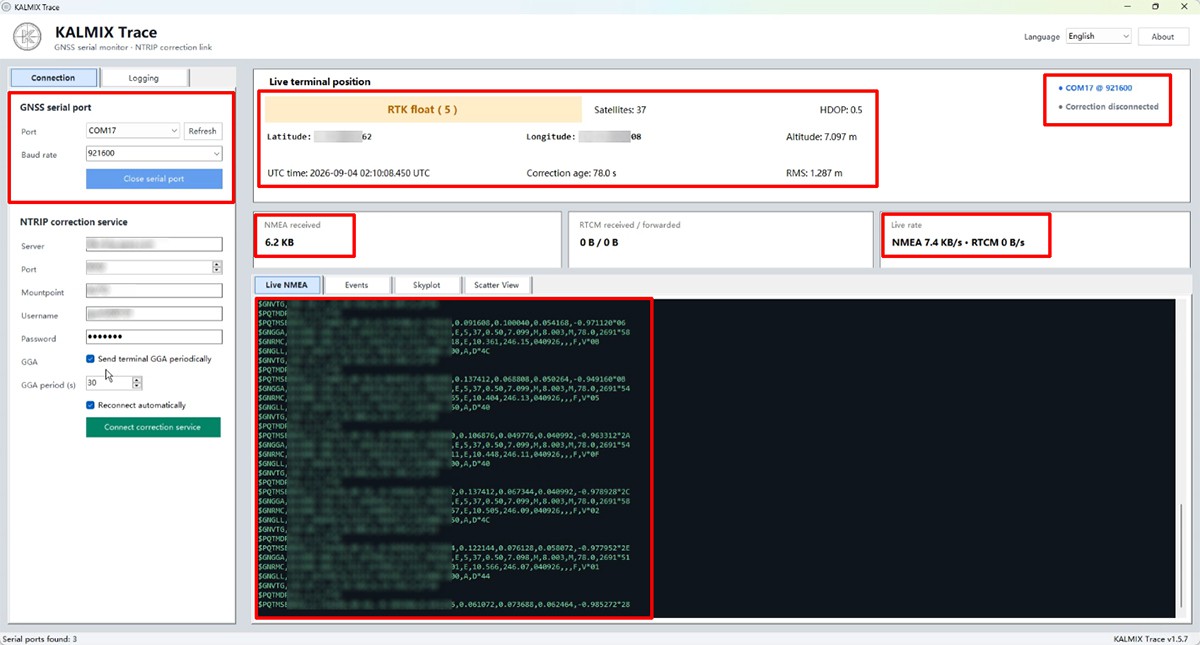
    Figure 2. A readable live NMEA stream confirms that the receiver serial connection is active before correction troubleshooting begins.

    “Connected” is not the same as “Fixed”

    One easy mistake is to treat an NTRIP connection indicator as the answer to the whole RTK question. It is not. “Connected” says the Windows host has reached the correction service. A useful review still checks whether RTCM is arriving and being forwarded, then checks the solution state reported by the receiver.

    This distinction matters especially during dynamic testing, where sky view, multipath, local conditions, the correction source, receiver configuration, and convergence time can all affect what the receiver reports. A clean diagnostic record should make those uncertainties visible instead of assigning a cause too quickly.

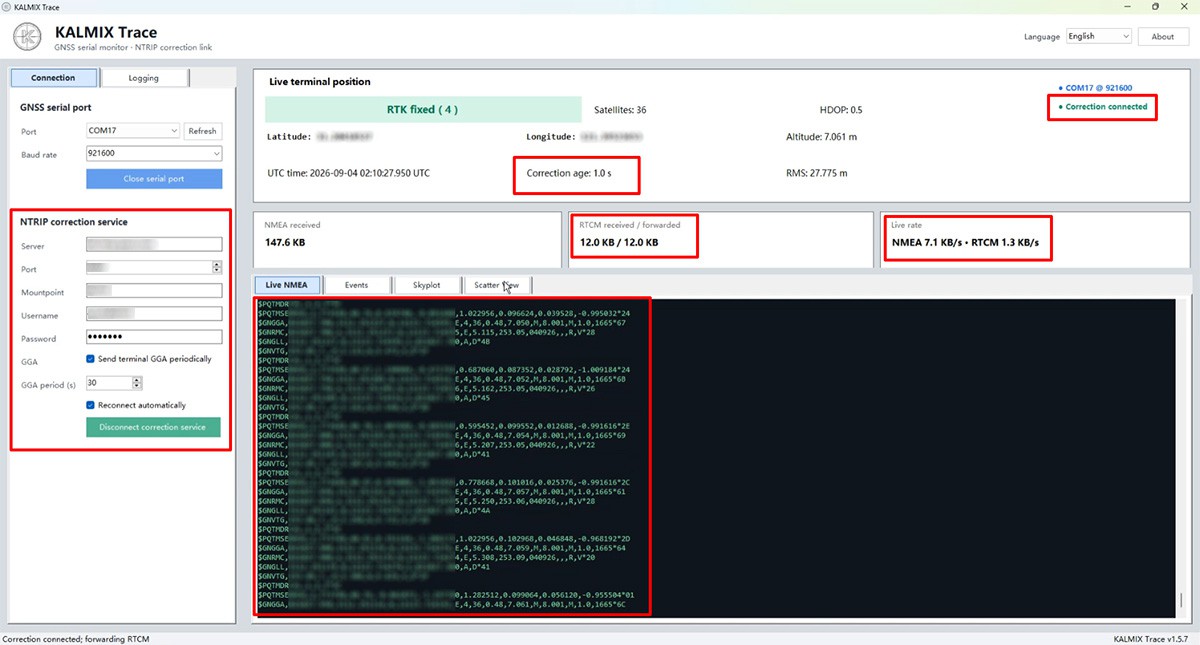
    Figure 3. Correction data being received and forwarded is a separate observation from the receiver-reported solution state.

    What we check after the drive

    The first review is deliberately conservative.

    First, check the start and end of each file and retain the Windows time zone for application events.

    Next, use one position-epoch NMEA sentence type to examine continuity. Do not count every NMEA line as a separate position update.

    Then locate transitions between the receiver-reported Standalone, Float, and Fixed states.

    Confirm that the RTCM3 record belongs to the same timestamped session.

    Finally, align any connection event, screen recording, or permitted road footage before suggesting a possible explanation.

    In our reference session, the three records shared one timestamp prefix. That is a simple but valuable detail: it ties the NMEA output, raw correction record, and application events to one driving session rather than three unrelated files copied into the same folder later.

    What this method does not prove

    This logging method does not measure absolute position error. It does not prove that a state transition was caused by a particular tree, building, road segment, or correction outage. It also does not establish whether dead reckoning contributed to a solution without additional evidence and an appropriate...

    Read more »

View project log

Enjoy this project?

Share

Discussions

Does this project spark your interest?

Become a member to follow this project and never miss any updates