 diddy
diddyOFFgrid-SDR 1.5 is out. It's still one file (index.html), still runs from a pen drive, and still needs no internet, but this release adds a neural network, a self-filling logbook, and a stack of tools for digging weak signals out of the noise.
Download it from GitHub: https://github.com/diddy-boy/OFFgrid-SDR
No stick needed to try it: open index.html?demo, and every new feature has a simulated station to play with.
==== AI VOICE CLEANER ====
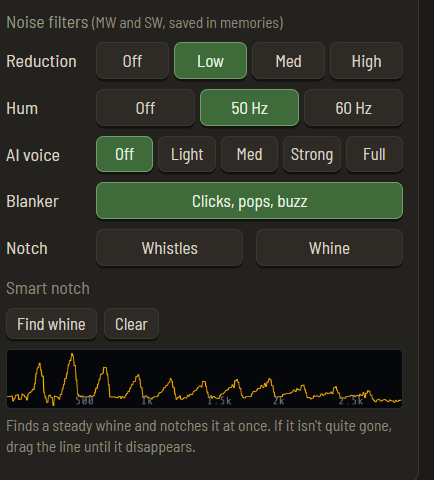
The headline feature. OFFgrid-SDR now includes RNNoise, a small neural network trained to separate speech from noise. It clears hiss, roar and noise-type jamming from voices in AM, SAM, SSB and FM voice, and in testing it took pure noise down by over 30 dB while leaving speech untouched.
• Four strengths: Light, Med, Strong and Full, in Audio & gain next to the other noise filters
• Built for speech: the stronger settings quieten music, and Full silences it. Light and Med blend in some of the original audio, so music stays audible
• It runs entirely inside the page, offline: the compiled network (about 112 KB) is embedded in index.html as WebAssembly, and only loads when you switch it on
On weak, hissy SSB it's genuinely impressive. Credit to Jean-Marc Valin and the Xiph.Org Foundation for RNNoise, and to Jitsi for the WebAssembly build.
==== SMART NOTCH ====
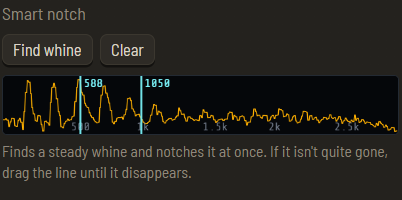
That steady whine from a heterodyne on a broadcast station? Press Whine. OFFgrid-SDR listens to the last 3 seconds of audio, finds a tone that stays at exactly the same pitch the whole time (speech and music move about; a whine doesn't), and notches it at once.
• On the demo whistle it cut the whine by over 50 dB
• It skips mains hum and points you to the Hum button instead
• A strip shows the audio you're hearing: click to drop a notch where you like (with a hover preview), drag a notch until the whine disappears, scroll to nudge it, right-click to remove it
• Up to three notches, cleared when you change station
==== THE LOGBOOK ====
OFFgrid-SDR now keeps a log for you: date and time (UTC), frequency, mode, signal (average and peak S/N), station and notes.
• Stations you stay on for 30 seconds are logged by themselves, and so are decoder results: NAVTEX messages, DSC calls, SSTV pictures and fax charts
• The station is filled in offline wherever OFFgrid-SDR can work it out: your own labels, RDS, the built-in station lists, the decoders, and callsigns picked out of CW, RTTY and PSK31 ("DE G4ABC")
• Edit any entry in place, export it as CSV for a spreadsheet, or have OFFgrid-SDR keep a CSV file up to date automatically
==== FREQUENCY LABELS ====
Right-click the spectrum or waterfall and name a frequency ("Local repeater", "BBC WS"). The label shows as a tag on the spectrum and under the frequency readout, fills in the logbook's station column, and travels in settings backups, so a kit can be sent out already labelled.
==== THE SPECTRUM: ALERTS, PEAK HOLD AND SIGNAL INFO ====
• New-signal alerts: a ring flashes on the spectrum where a signal appears on a frequency that has been empty for two minutes. Great on a quiet ham band or the airband
• Peak hold and averaging: a faint line of the strongest recent levels, and a smoother trace so weak steady signals stand out
• Signal info popup (optional): hover over a signal for its frequency, level, dB over the noise, width, band plan, known frequencies (FT8, WSPR, beacons, time stations and more) and your own label or memory
The alerts took some getting right. The first version treated "louder than usual" as new, and on a broadcast band every station fading back in set it off. Now each spot on the band remembers when it last had a signal, and an alert needs the spot to have been empty for two minutes. Three deeply fading broadcast stations: no alerts. A weak intermittent CW signal on 30 m: caught.
==== REPLAY: SCROLL BACK THROUGH IT ALL ====
The waterfall buffer from 1.4 could hold 60 seconds, but you could only see what fitted on screen. Now:
• While paused, the mouse wheel scrolls back through the whole buffer, with the time marks moving along
• ⇕ Whole buffer squeezes all of it onto the screen
• An FM replay decodes its own RDS
• The waterfall keeps running while OFFgrid-SDR sits in a background tab. Browsers pause drawing in background tabs, so the waterfall now builds its rows from the incoming radio data instead: come back, and everything you missed is there to scroll back to and replay
==== FOR OLDER AND SLOWER COMPUTERS ====
• Low-power mode halves the samples and the drawing. In testing on a computer slowed to a quarter of normal speed, the default settings broke up badly, while Low-power mode played with no audio gaps at all
• OFFgrid-SDR suggests Low-power mode when it notices the computer struggling: audio gaps, a very slow display or high CPU, for half a minute. It never switches it on by itself
• On phones and low-memory computers, the longer replay buffers are greyed out, so the browser can't run out of memory
It also runs well on a budget Lenovo 300e Chromebook, in laptop and tablet mode, landscape and portrait.
==== SMALLER CHANGES AND FIXES ====
• AGC speed (Slow, Medium, Fast) for SSB and CW
• SSTV in LSB on 40 m and 80 m, chosen automatically
• Airband names: type a 25 kHz-style name such as 120.625 and those channels keep the names you'd see on a chart, while 8.33 names like 123.805 keep the 8.33 style
• Ham bands always open in their own mode (LSB, USB or FM), and a mode AUTO picks is for that one signal only
• AUTO is instant on the airband, PMR446 and marine VHF
• A much sharper filter in AUTO's analysis: strong neighbouring stations, and the stick's DC spike, can no longer fold in as phantom signals (76 to 108 dB of rejection, up from 11 to 20 dB). Thanks to the reader who pointed this out after the 1.4 log
• PSK31 now locks on reliably, and the Hellschreiber strip no longer freezes
• New demo stations: an off-channel AM station for AUTO, a whistle-and-hum station for the smart notch, and an SSTV picture in LSB
Download OFFgrid-SDR: https://github.com/diddy-boy/OFFgrid-SDR
Thanks as ever to Jacobo Tarrío, whose webrtlsdr and signals libraries make it all possible, and to everyone who has tried OFFgrid-SDR and sent feedback.
If OFFgrid-SDR is useful to you, there's a "Buy me a coffee" button in the ? help panel.
73!
Discussions
Become a Hackaday.io Member
Create an account to leave a comment. Already have an account? Log In.