 troseph

Why I made it
I had an idea for a PrusaSlicer add-on that would work a bit like the cut feature. Instead of cutting the model, you would select a section and make that section longer or shorter.
That became StretchSection, a standalone webpage. You can use it alongside whatever slicer you already have.
The goal is to make a small change to an STL in an easy and predictable way. For example, you could add length to the middle of a bracket while keeping the ends the same size.
Try it here: https://stretch.parametricfab.com/
What it does
Open an STL, choose a direction, and set two parallel planes. Enter how much you want to add or remove from the section between them.
The start side can stay fixed, the end side can stay fixed, or the change can happen around the center. The parts outside the selected section keep their shape and size. They move as needed to stay connected.
Everything inside the section stretches along the chosen direction. A hole inside the section will stretch too. Width and height perpendicular to the stretch direction stay the same.
There are X, Y, and Z presets, custom angles, and a way to pick the direction from a model face. You can type the plane positions, drag the round handles, or pick points on the model.
Export saves the current preview as a binary STL. Apply commits the change so you can work on another section. There is undo and redo for applied changes.
How it works
The app splits triangles where they cross the two planes. It then changes the length of the middle section and moves the outside sections along the chosen direction.
Splitting at the planes matters. Moving only the existing vertices can pull triangles across the boundary and change more of the model than intended.
It uses JavaScript and Three.js. The mesh work happens in the browser, with the boundary splitting handled by a worker when available. Your STL is not uploaded to the server. The exported webpage has its libraries bundled in, so it can be hosted as ordinary static files.
The example
The Files section includes a bracket before and after the edit. In this example the direction is X, Start is 30 mm, End is 70 mm, and the change is +20 mm with the start side fixed.
The selected section goes from 40 mm to 60 mm. The full part goes from about 101.20 mm to 121.20 mm long. The middle hole stretches. The two end holes and the ends keep their shape and size.
| Before: 40 mm section | After: 60 mm section (+20 mm) |
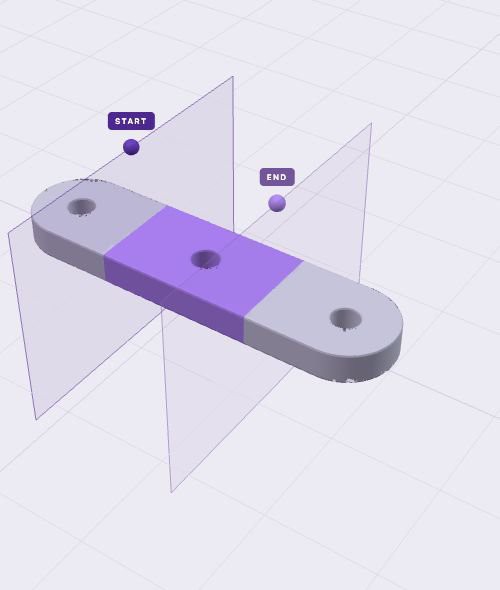 | 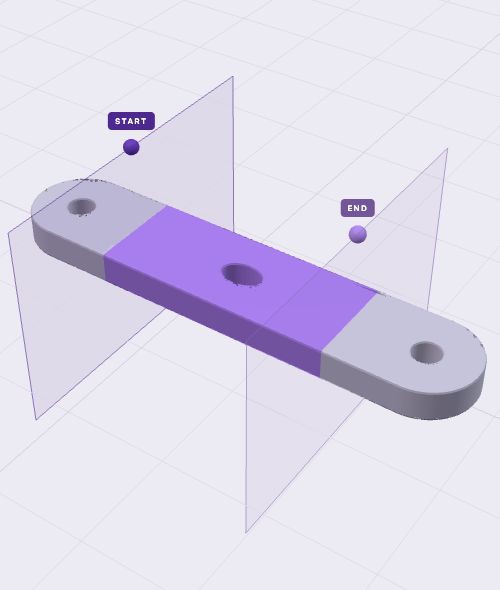 |
These are digital examples. More checks with real prints are still needed.
AI development
I supplied the idea, the workflow, and the changes I wanted. Codex generated most of the code and the initial tests, and helped with this write-up.
The app currently has 12 automated tests covering things like section boundaries, anchors, shrinking, rotated planes, connected surfaces, and STL export/reload. It has also been checked in the macOS in-app browser. Those tests are useful, but independent code review and more real-world testing are still needed.
There is no AI running when you use the editor. The edits are ordinary mesh calculations.
Current limits
- One STL at a time, up to 500,000 imported triangles and a 100 MB file.
- Coordinates are treated as millimeters. STL files do not store units.
- The new section length must stay greater than zero.
- Details inside the selected section deform along with it.
- It does not repair an already damaged or open mesh.
- It keeps the imported coordinate system. You may need to place the result back on the bed in your slicer.
- It needs a browser with WebGL 2. More testing on Windows, Linux, and other browsers is still needed.
- The session stays in memory. Export your model before reloading or closing the page.
Source and license
The source download includes the mesh code, interface, tests, build scripts, and the finished webpage. The project code and example models are available under the MIT License. Three.js has its own MIT notice, which is included with the downloads....
Read more »