 manbir


Connections and Components:
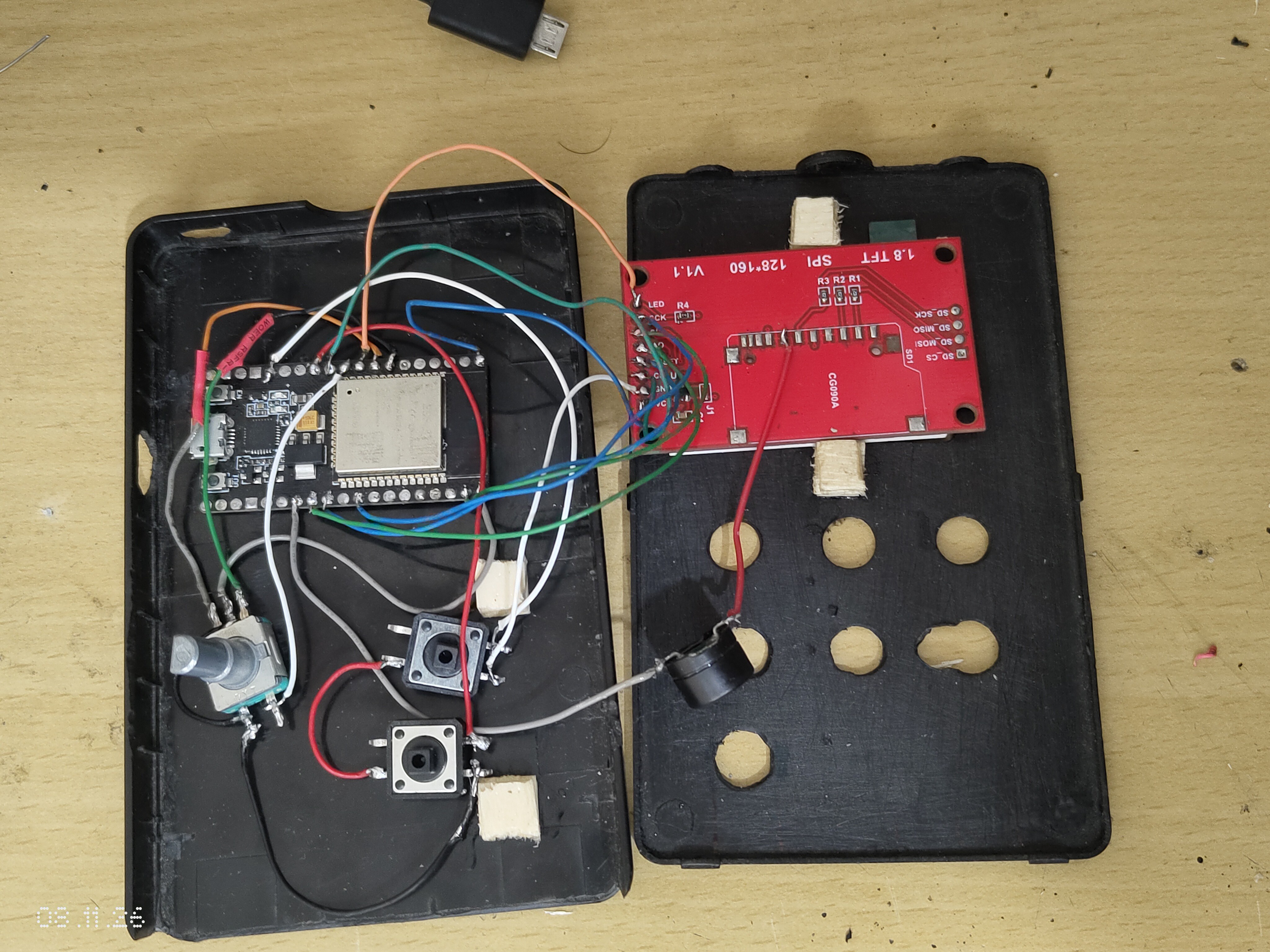
Wiring:
| Component | Pin | GPIO |
|---|---|---|
| TFT SCK/SCL | SCK | 18 |
| TFT MOSI/SDA | SDA | 23 |
| TFT CS | CS | 27 |
| TFT DC/A0 | DC | 16 |
| TFT RESET | RST | 17 |
| TFT LED/backlight | LED | 25 |
| Encoder CLK | CLK | 32 |
| Encoder DT | DT | 33 |
| Encoder SW | SW | 26 |
| Encoder + | VCC | 3V3 |
| Encoder GND | GND | GND |
| Button 1 | one leg | 13 |
| Button 2 | one leg | 14 |
| Buzzer signal | + / signal | 4 |
| Buzzer ground | - | GND |
DeskClock.ino (ESP32 firmware)
- Libraries: Adafruit GFX, Adafruit ST7735, ArduinoJson 7.x, LittleFS (custom wallpaper and unsent sessions) and the ESP32 core’s FreeRTOS and timer support.
- Display: every frame is drawn into a 128×160 off-screen buffer, then sent to the screen in one go, which avoids flicker. A background layer holds the wallpaper, dimmed per screen.
- Screens: one screen enum with a draw function and an input handler for each, using shapes and fonts from Adafruit GFX. The built-in wallpapers are drawn in code.
- Input: a 1 kHz FreeRTOS task reads and debounces the encoder. Buttons are polled with short and long press detection, and everything goes into a small event queue.
- Timer: it runs on the ESP32’s own clock. Sessions are saved to flash if the PC is not connected, and re-sent until the PC acknowledges them.
- Clock and stats: the time comes from the PC, which sends the time and time-zone offset. The device keeps counting from there.
- Serial protocol: newline-delimited JSON at 115200 baud (PING, GET_STATUS, SYNC_TIME, SET_CONFIG, CONTROL, EVENT_ACK). Wallpaper upload uses binary chunks with sequence numbers and CRC16, then an end command.
Desk Clock.py (Windows tray app)
- Libraries: pyserial (talks to the ESP32), pystray (tray icon and menu), Pillow (tray icon and wallpaper conversion). The rest is the Python standard library: threading, queue, json, csv, subprocess, logging.
- Threads: a worker thread runs all menu actions, so the tray never freezes. A reader thread owns serial input, and a supervisor thread handles auto-connect, a heartbeat and an hourly clock sync.
- Connection: it skips Bluetooth COM ports, finds the board by sending a PING, and doesn’t reset the ESP32 on connect.
- Wallpaper: it centre-crops and resizes the image to 128×160, converts it to RGB565, and sends 1 KB chunks with CRC and retry.
- Data: finished sessions go to
desk_clock_data.jsonanddesk_clock_sessions.csv, without duplicates. Errors are written todesk_clock.log.