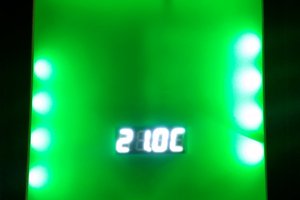
This is a simple remote thermometer that reads ambient temps with a Dallas-Maxim 1-wire temperature sensor (DS18B20 or DS1822) and displays the temperature on a single RGB LED tuned to a predetermined color scale (blue for cold, red for hot, green for "comfortable". These are small enough and cheap enough to place in multiple locations around a room to monitor for hot/cold spots. A large number of these spaced appropriately can be videoed and used to track heating/cooling trends over time.
The simplest color map would be a table with one entry per temperature increment available from the sensor. Given a spread of room temps from -20°C to +40°C, that's a table of longwords well under 1K even at 0.5° intervals. There's no need for that much redundancy, and it might be advisable to keep the entire memory footprint down in case there's reason to scale back to, say, a Tiny 4313 where a 1K table has a noticeable impact on space left for code. Computers are good at math, so the usual trick is a small table of inflection points and a handful of statements to interpolate between them...
// temp_to_color - convert temp x 10 to ready-to-use color value for RGB LED
Adafruit_NeoPixel strip = Adafruit_NeoPixel(1, PIN, NEO_GRB + NEO_KHZ800);
uint8_t cmap[] = {
0xff, 0xff, 0xff, // -9C - white
0x00, 0x00, 0xff, // 3C - blue
0xff, 0x00, 0x00, // 15C - green
0xc0, 0xff, 0x00, // 27C - orange
0x00, 0xff, 0x00, // 39C - red
}
uint32_t temp_to_color(int degree_tenths)
{
uint32_t c;
uint8_t i;
int floor_t;
float scale;
// Grab extremes (colder than -9C and warmer than 39C) and return max colors
if (degree_tenths <= -90)
c = strip.Color(cmap[0], cmap[1], cmap[2]);
else if (degree_tenths >= 390)
c = strip.Color(cmap[12], cmap[13], cmap[14]);
else {
i = ((degree_tenths + 90) / 120) * 3; // set floor at -9C and scale range
floor_t = (i * 40) - 90; // get the bottom temp of this range
scale = (degree_tenths - floor_t)/ 120.0; // calc how far along this range
// get colors by interpolating this range and adding it to the base color
c = strip.Color(cmap[i] + (cmap[i+3]-cmap[i])*scale,
cmap[i+1] + (cmap[i+4]-cmap[i+1])*scale,
cmap[i+2] + (cmap[i+5]-cmap[i+2])*scale);
}
return(c);
}
This should take care of temps below and above what the table can handle, and gradiate the colors along the continuum. It has the additional advantage of being easier to tweak than editing a massive table.
With the heavy lifting done by the libraries, the core code just needs to call for a temp conversion, map temp to a color, set the color, then sleep for a time and repeat endlessly. Enhancements include adding a simple button interface to mark a set-point, and perhaps to discover additional DS182x/WS2811 pairs on extension wires.
It's been a while since I've picked up a 1-Wire sensor, and I come to find that the venerable DS1820 has been retired. Looks like the current recommended parts are the DS1822 for 2°C accuracy and the DS18B20 for 0.5°C accuracy (the DS18S20 is a drop-in for the original DS1820).
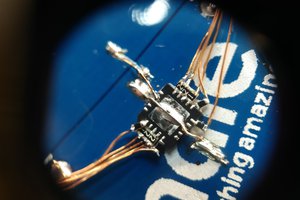
The hardware design of the LED Thermometer is straightforward. The WS2811 LED consumes one pin, and the 18B20 consumes one pin for data. Given the nature of both the WS8211 and 18B20, it's easy to add multiple pairs of temperature sensors and display LEDs chained back to the first one, the only issue being matching up the sequence of LEDs with the random nature of 18B20 addresses on the bus, but requiring them to be added one at a time and saving the station addresses in EEPROM could simplify the expansion process.
Any digital I/O pins can be used for the WS2812 LED or the DS1822 OneWire temperature sensor. For easy placement, the code expects to see the LED on D6 and the sensor on D8. If you decide to move them, just change the constants in the code.
Besides running +5V and GND to both the LED and the sensor, you'll need a 4.7K pullup on the DS1822 data line per the OneWire spec.
That's it! Three components.
2
Step 2
Here's a functional program to initialize the hardware, read temps, and display temps as colors. Enhancements such as multiple sensors/LEDs per Trinket are possible but left as an exercise for the reader.
/*
trinket_thermo
---------------------------------------------------------------------------------
Trinket-based therometer with color output
When Who What
30-Dec-2014 erd Incorporate basic color conversion process
2-Jan-2015 erd Update color conversion process
2-Jan-2015 erd Final changes for production hardware
*/#include <Adafruit_NeoPixel.h>#include <OneWire.h>#define LEDNUM 1#define LEDPIN 6#define TEMPPIN 8
Adafruit_NeoPixel strip = Adafruit_NeoPixel(LEDNUM, LEDPIN, NEO_RGB + NEO_KHZ800);
OneWire ds(TEMPPIN);
// function prototypesuint32_t temp_to_color(int);
// set up hardwarevoidsetup(){
uint32_t i;
// init LED
strip.setPixelColor(0, 0); // one LED for now
strip.begin();
strip.show(); // Initialize color to 'off'
}
//// collect temp, display temp, repeat forever//voidloop(){
uint8_t i;
uint32_t color;
// OneWire storagebyte present = 0;
byte type_s;
byte data[12];
byte addr[8];
float celsius, fahrenheit;
// scan OneWire busif ( !ds.search(addr)) {
ds.reset_search();
delay(250);
return; // holdover from vendor example
}
// the first ROM byte indicates which chipswitch (addr[0]) {
case0x10:
//Serial.println(" Chip = DS18S20"); // or old DS1820
type_s = 1;
break;
case0x28:
//Serial.println(" Chip = DS18B20");
type_s = 0;
break;
case0x22:
//Serial.println(" Chip = DS1822");
type_s = 0;
break;
default:
while(1) // loop forever if no DS182x found
;
}
// reset OneWire and tell DS182x to acquire temperature
ds.reset();
ds.select(addr);
ds.write(0x44,1); // start conversion, with parasite power on at the end
delay(1000); // maybe 750ms is enough, maybe not// we might do a ds.depower() here, but the reset will take care of it.
present = ds.reset();
ds.select(addr);
ds.write(0xBE); // Read Scratchpad// read data from OneWire busfor ( i = 0; i < 9; i++) // we need 9 bytes
data[i] = ds.read();
// convert the data to actual temperature
unsigned int raw = (data[1] << 8) | data[0];
if (type_s) {
raw = raw << 3; // 9 bit resolution defaultif (data[7] == 0x10) {
// count remain gives full 12 bit resolution
raw = (raw & 0xFFF0) + 12 - data[6];
}
} else {
byte cfg = (data[4] & 0x60);
if (cfg == 0x00) raw = raw << 3; // 9 bit resolution, 93.75 mselseif(cfg == 0x20) raw = raw << 2; // 10 bit res, 187.5 mselseif(cfg == 0x40) raw = raw << 1; // 11 bit res, 375 ms// default is 12 bit resolution, 750 ms conversion time
}
celsius = (float)raw / 16.0;
// set pixel color
color = temp_to_color(int(celsius*10)); // color routine takes int of 10X temp
strip.setPixelColor(0,color);
strip.show();
}
// Ranges of colors in RGB order
uint8_t cmap[] = {
0xff, 0xff, 0xff, // -9C - white0x00, 0x00, 0xff, // 3C - blue0x00, 0xff, 0x00, // 15C - green0x80, 0x66, 0x00, // 27C - orange0xff, 0x00, 0x00, // 39C - red
};
uint32_t temp_to_color(int degree_tenths){
uint32_t c;
uint8_t i;
int floor_t;
float scale;
// Grab extremes (colder than -9C and warmer than 39C) and return max colorsif (degree_tenths <= -90)
c = strip.Color(cmap[0], cmap[1], cmap[2]);
elseif(degree_tenths >= 390)
c = strip.Color(cmap[12], cmap[13], cmap[14]);
else {
i = ((degree_tenths + 90) / 120) * 3; // set floor at -9C and scale range
floor_t = (i * 40) - 90; // get the bottom temp of this range
scale = (degree_tenths - floor_t)/ 120.0; // calc how far along this range// get colors by interpolating this range and adding it to the base color
c = strip.Color(cmap[i] + (cmap[i+3]-cmap[i])*scale,
cmap[i+1] + (cmap[i+4]-cmap[i+1])*scale,
cmap[i+2] + (cmap[i+5]-cmap[i+2])*scale);
}
return(c);
}
3
Step 3
Download the OneWire library and the NeoPixel library then install them for your platform. Compile and upload the sketch to your Trinket.
Hey Ethan! Welcome to the Trinket Everyday Carry Contest! Don't forget to add an image and a project log so we can include you in the first giveaway drawing. It's happening at 9pm EST tomorrow, January 2, 2014