 Henryk Plötz
Luckily reverse engineering funky binary protocols is one of my specialities, so, let's see …
Data seems to arrive in 8-byte packets always. Indeed, this appears to be a property of what they did with the HID spec (more on that in a moment). The timing between 8-byte packets is irregular. In each packet there seem to be two groups of 4 byte each. The second byte of each group is always the same.
Getting more data by re-starting the Windows software makes things more confusing: The second byte of each group is still constant, but different now. It's numerically close though, so, time-based? This sucks.
Maybe I can learn something more from the USB HID device descriptor… (Intermission music playing while I google how to get the HID descriptor under Linux)
# echo 1-1.2:1.0 > /sys/bus/usb/drivers/usbhid/unbind
# lsusb -vd 04d9:a052

Bus 001 Device 014: ID 04d9:a052 Holtek Semiconductor, Inc.
Device Descriptor:
  bLength                18
  bDescriptorType         1
  bcdUSB               1.10
  bDeviceClass            0 (Defined at Interface level)
  bDeviceSubClass         0
  bDeviceProtocol         0
  bMaxPacketSize0         8
  idVendor           0x04d9 Holtek Semiconductor, Inc.
  idProduct          0xa052
  bcdDevice            1.00
  iManufacturer           1 Holtek
  iProduct                2 USB-zyTemp
  iSerial                 3 1.40
  bNumConfigurations      1
  Configuration Descriptor:
    bLength                 9
    bDescriptorType         2
    wTotalLength           34
    bNumInterfaces          1
    bConfigurationValue     1
    iConfiguration          0
    bmAttributes         0x80
      (Bus Powered)
    MaxPower              100mA
    Interface Descriptor:
      bLength                 9
      bDescriptorType         4
      bInterfaceNumber        0
      bAlternateSetting       0
      bNumEndpoints           1
      bInterfaceClass         3 Human Interface Device
      bInterfaceSubClass      0 No Subclass
      bInterfaceProtocol      0 None
      iInterface              0
        HID Device Descriptor:
          bLength                 9
          bDescriptorType        33
          bcdHID               1.10
          bCountryCode            0 Not supported
          bNumDescriptors         1
          bDescriptorType        34 Report
          wDescriptorLength      53
          Report Descriptor: (length is 53)
            Item(Global): Usage Page, data= [ 0x00 0xff ] 65280
                            (null)
            Item(Local ): Usage, data= [ 0x01 ] 1
                            (null)
            Item(Main  ): Collection, data= [ 0x01 ] 1
                            Application
            Item(Global): Logical Minimum, data= [ 0x00 ] 0
            Item(Global): Logical Maximum, data= [ 0xff 0x00 ] 255
            Item(Local ): Usage Minimum, data= [ 0x00 ] 0
                            (null)
            Item(Local ): Usage Maximum, data= [ 0xff ] 255
                            (null)
            Item(Global): Report Count, data= [ 0x08 ] 8
            Item(Global): Report Size, data= [ 0x08 ] 8
            Item(Main  ): Feature, data= [ 0x02 ] 2
                            Data Variable Absolute No_Wrap Linear
                            Preferred_State No_Null_Position Non_Volatile Bitfield
            Item(Global): Logical Minimum, data= [ 0x00 ] 0
            Item(Global): Logical Maximum, data= [ 0xff 0x00 ] 255
            Item(Local ): Usage Minimum, data= [ 0x00 ] 0
                            (null)
            Item(Local ): Usage Maximum, data= [ 0xff ] 255
                            (null)
            Item(Global): Report Count, data= [ 0x08 ] 8
            Item(Global): Report Size, data= [ 0x08 ] 8
            Item(Main  ): Input, data= [ 0x02 ] 2
                            Data Variable Absolute No_Wrap Linear
                            Preferred_State No_Null_Position Non_Volatile Bitfield
            Item(Global): Logical Minimum, data= [ 0x00 ] 0
            Item(Global): Logical Maximum, data= [ 0xff 0x00 ] 255
            Item(Local ): Usage Minimum, data= [ 0x00 ] 0
                            (null)
            Item(Local ): Usage Maximum, data= [ 0xff ] 255
                            (null)
            Item(Global): Report Count, data= [ 0x08 ] 8
            Item(Global): Report Size, data= [ 0x08 ] 8
            Item(Main  ): Output, data= [ 0x02 ] 2
                            Data Variable Absolute No_Wrap Linear
                            Preferred_State No_Null_Position Non_Volatile Bitfield
            Item(Main  ): End Collection, data=none
      Endpoint Descriptor:
        bLength                 7
        bDescriptorType         5
        bEndpointAddress     0x81  EP 1 IN
        bmAttributes            3
          Transfer Type            Interrupt
          Synch Type               None
          Usage Type               Data
        wMaxPacketSize     0x0008  1x 8 bytes
        bInterval              10
Device Status:     0x0000
  (Bus Powered)
Now, that's just patently unhelpful. All it says is that there's report types that contain 8 items of values 0 through 255 each. In other words: 8 bytes. Yeah, I could have guessed that.Okay, maybe looking more closely what the Windows software does will help me:
# modprobe usbmon
# wireshark -i usbmon1
will let me record (on the VM host) what the software does (in the VM guest) when started. And at least that's mildly enlightening: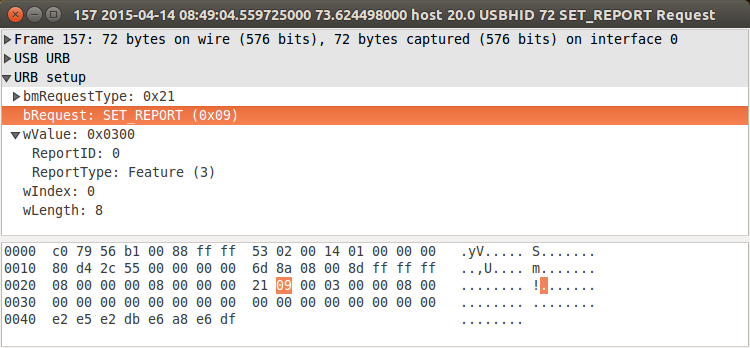
which is an outgoing HID SET_REPORT with 8 bytes of data, after which the device starts sending reports of 8 bytes of data using INTERRUPT IN:
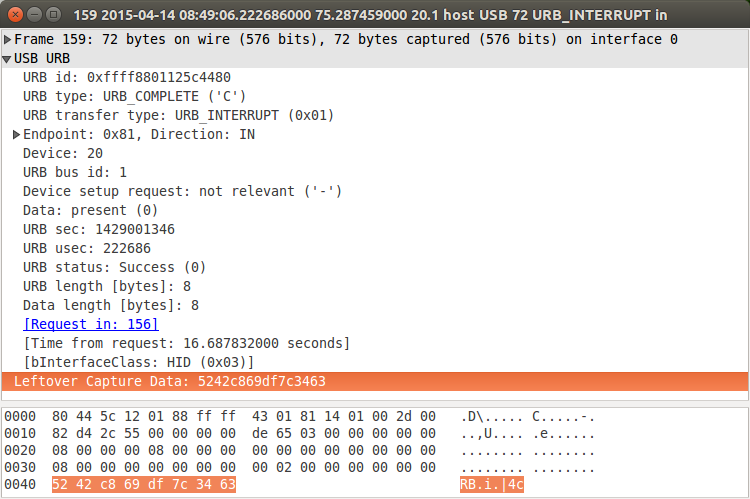
These 8-byte packets are then what I was seeing in the output of /dev/hidrawX.
Repeating different captures shows: The SET_REPORT generated by the windows software is different each time (though the DF byte at the end is constant). Also note that the device won't send anything before receiving this packet, so in order to gather data for analyzing on my Linux box I have to use the Windows software at least once after plugging the device in.
Discussions
Become a Hackaday.io Member
Create an account to leave a comment. Already have an account? Log In.
Personally, I would go a more hardware-centric route for reverse engineering. If you check out that Russian link, there are two ICs that look sort of interesting. There's the big one, no datasheet available online, from my very brief searching. It'll be the brains. Then there's a small IC right near the USB port. It's very likely that that's just a bridge.
On the end of that bridge chip (pins 3 & 4), there are two lines that look like they might be going to the big IC. If you tap those with a logic analyser or BusPirate or similar, I would bet that it's an I2C, SPI, UART signal, something similar. And it will be a lot easier to decode the protocol there instead of dealing with USB junk, too.
That would be my strategy, anyway.
Are you sure? yes | no