 danjovic
The standard SDCC and GPUTILS packages does not support PIC microcontrollers, unlike their counterpart on Windows.
To provide them you have to install from the sources. Here's a quick guide on Linux Mint/XFCE 22.3
First Step: Install missing libraries and tools
sudo apt-get update
sudo apt-get install bison flex zlib1g-dev libboost-dev libboost-graph-dev
Second Step: Download GPUTILS source from https://sourceforge.net/projects/gputils/files/
Create a temporary directory then unpack the sources
cd ~
mkdir tmp1
tar xjf /...path..to...source.../gputils-1.5.2.tar.bz2
Enter the sources directory, then configure, compile and install
cd tmp1/gputils-1.5.2/
./configure
make
sudo make install
Third Step: Download SDCC source from https://sourceforge.net/projects/sdcc/files/
Create a temporary directory then unpack the sources
cd ~
mkdir tmp2
tar xjf /...path..to..source.../sdcc-src-4.5.0.tar.bz2
Enter the sources directory, then configure, compile and install
cd tmp2/sdcc-4.5.0/
./configure
make
sudo make install
It will take forever, but when it finishes, check if the binary was propely installed
cd ~
sdcc -v
The compiler shall respond with the architectures it support:
SDCC : mcs51/z80/z180/r2k/r2ka/r3ka/sm83/tlcs90/ez80_z80/z80n/r800/ds390/pic16/pic14/TININative/ds400/hc08/s08/stm8/pdk13/pdk14/pdk15/mos6502/mos65c02/f8 TD- 4.5.0 #15242 (Linux)
published under GNU General Public License (GPL)
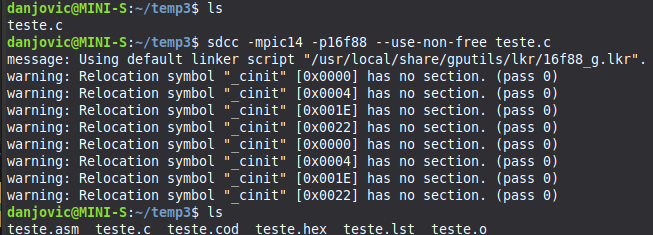
The final test is to compile a test program with following command line
sdcc -mpic14 -p16f88 --use-non-free teste.c
Test program
#include <pic16f88.h>

// Configurações do Microcontrolador (Fuses)
// Oscilador interno, Watchdog desligado, Master Clear habilitado
unsigned int __at(0x2007) CONFIG1 = _INTRC_IO & _WDT_OFF & _MCLR_ON & _LVP_OFF;

void delay(unsigned int tempo) {
    unsigned int i, j;
    for(i = 0; i < tempo; i++)
        for(j = 0; j < 100; j++); // Atraso simples
}

void main(void) {
    // Configura o oscilador interno para 8 MHz
    OSCCON = 0x70;

    // Configura RB0 como saída digital
    TRISB = 0xFE; // 1111 1110 (0 = saída)
    PORTB = 0x00; // Inicia todos os pinos em nível baixo

    while(1) {
        RB0 = 1; // Liga o LED no pino 6 (RB0)
        delay(500);
        RB0 = 0; // Desliga o LED
        delay(500);
    }
}
The compilation may generate some warnings but at the end the .hex is generated with success.
Discussions
Become a Hackaday.io Member
Create an account to leave a comment. Already have an account? Log In.
As far as I remember, the last time I have installed SDCC on a Linux box the only extra step required was to run a Perl script to build the C header files based on .asm headers or to copy the non-free headers from a Windows installation of SDCC.
I still have some PICs here. They are pretty oudated but still have much wood to burn, lol !
Are you sure? yes | no
Interesting. On my distro, sdcc is compiled with PIC support and in fact generates a .asm file, but fails when invoking gpasm, which is obtained by installing the gputils package. I remember playing with the PIC backend a while back without having to rebuild sdcc, only needed to install gputils. I also had to install the non-free includes which can be unpacked from the tarball. Fortunately I don't have any PIC MCUs except for a couple of benighted 16C5x OTP(!) chips with only a 2 level stack, so gave up PICs as a lost cause so didn't keep gputils up to date when I upgraded my distro.
However it seems Ubuntu repos provided gputils 1.5.2 only in recent animals.
Are you sure? yes | no