 Maarten Janssen
At the end of the year there is one more OPL Studio software update. It's v2.5.0 and probably the longest I've ever spend on updating one of the application modules. In v2.5.0 the media player has gotten a big update. The new software can be downloaded from the OPL Studio Github page.
The New Media Player
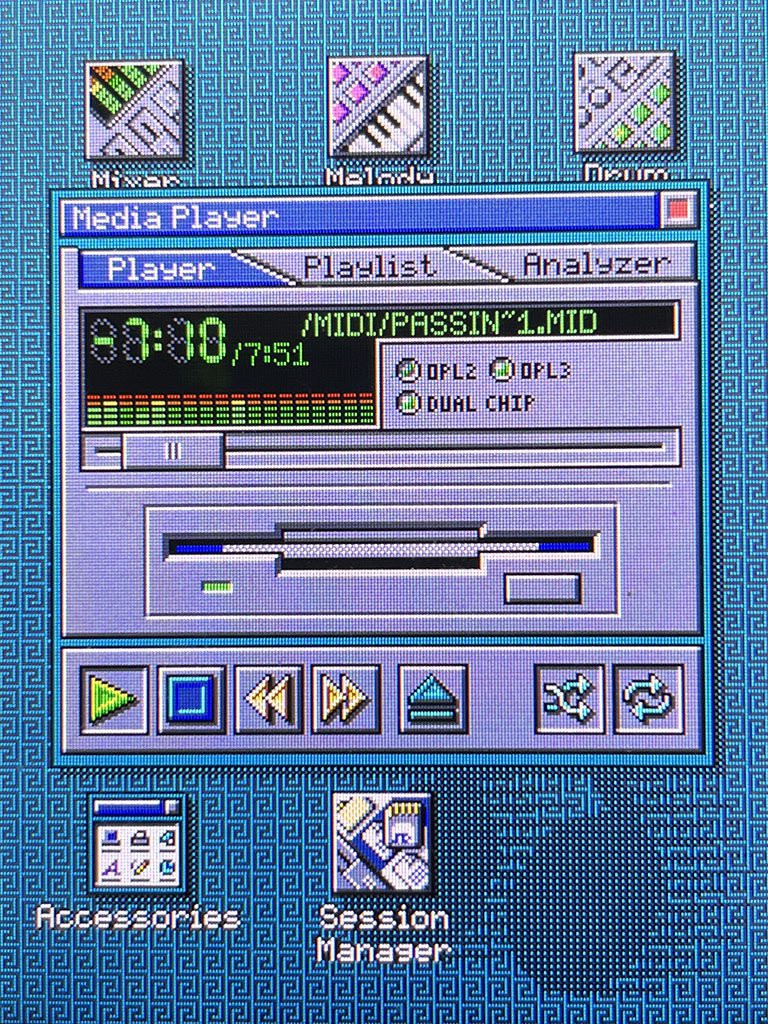
The media player has a nice new UI with big 7-segment displays for the playout time. You can click the time to switch between count up and count down time. Indicator LEDs for the OPL type and a better VU meter that now shows all 18 OPL3 channels. Of course the floppy disk is still there and there are two additional buttons for repeat and shuffle that work with the new playlist.
The Headaches Caused by a Simple Playlist
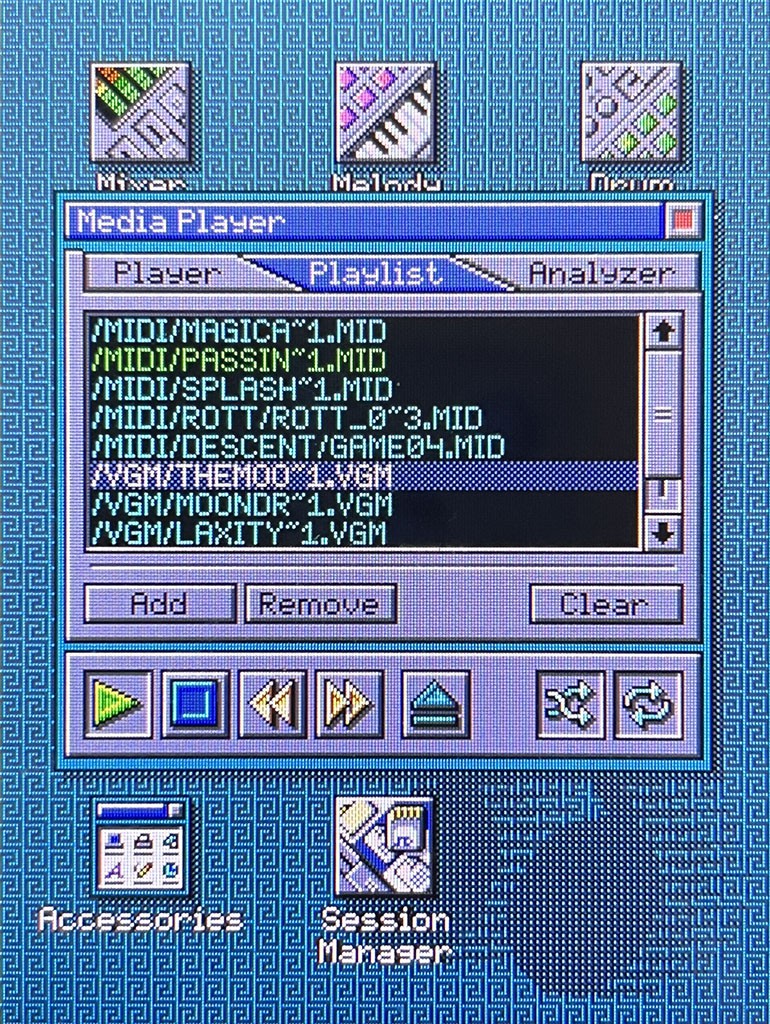
I wanted to have a playlist for the media player since I first implemented it and OPL Studio users have also requested this feature several times. So a few months ago it was finally time to implement what I though would be a simple addition. I was so wrong!
The playlist is nothing more than an array of media file paths. While that's easy enough on your regular computer, it quickly becomes a problem on a micocontroller with 1MB of memory. A user might download the full OPL Archive, drop it on an SD card and use it as a playlist. That's never going to fit in memory. So how to deal with this?
My first idea was that a playlist can only be a reference to a folder on the SD card and that the user needs to take care of compiling the playlist offline on their computer. It's a simple solution but not very flexibe and user friendly. Still it required some significant extra UI work, because apart from all of the additions to the player I also need new dialogs, for example a folder selection to select the playlist folder.
I didn't like this idea so what I went for was to have the playlist as a file on the SD card. It eliminates the issues with large playlists, though I still need to be a bit smart about performance when updating the playlist and searching through a potentially large file, but the implementation in the media player app would be much simpler.
So this is what I ended up doing and once I was able to select files add / remove them to my playlist I though I had passed all hurdles. However some very strange things started happening... Whenever I needed to go from one song to the next on the playlist OPL Studio would give me a bunch of errors about not being able to load a file and generic SD card errors. Also whenever I was opening the playlist while one song was playing it would just jump to another song.
After a lot of head scratching I found the issue and I was not happy. The SD library I was using was unable to deal with multiple File handles at a time it seemed. A quick look at the SD.h file confirmed what I was fearing:
// Note that currently only one file can be open at a time.
A look at the Github repository showed that also the latest version of the library does not support multiple files at once. I started to think... Should I look for a different library? Should I extend my SD card controller to simulate multiple files by quickly opening, closing and seeking between files? It seemed difficult but doable (maybe), but really not worth it just for a playlist.
Back to the drawingboard! Finally what I ended up doing was to have the playlist reserve 2kb of memory when the media player is opened. This is where the file entries will be stored. The playlist will still be loaded and saved from the SD card when the media player opens and closes. But the number of entries on the playlist will be limited by the 2kb memory block. So the full OPL Archive in one playlist is not going to happen, but a playlist of about 100 songs is still possible. Though you need a lot of patience to make such a playlist as for now adding a complete directory at once is not yet supported.
The Analyzer
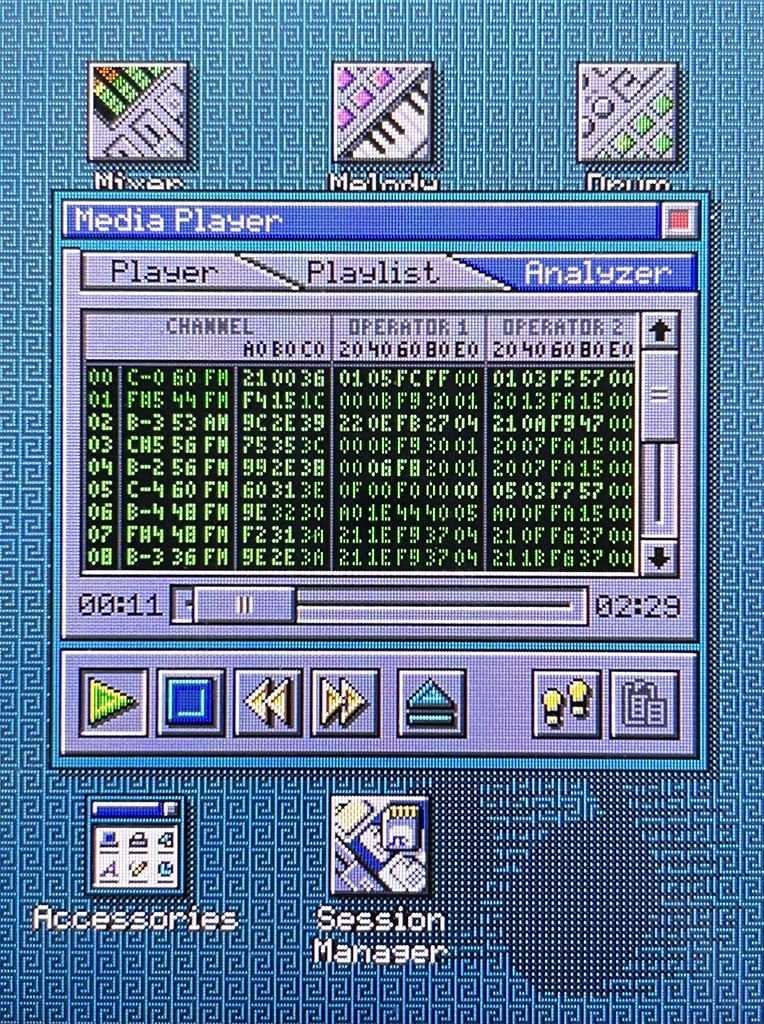
The coolest the new feature in the media player is the analyzer. Another feature that I started working on during the summer, but which turned out to be much more complicated than I had thought. The analyzer allows you to see what's happening inside the OPL chips while a song is playing. You will see all the registers of the chips and their values. As a register value changes the register will light up briefly to show what has been changed. This is already a fun kind of visualization, but it also has a functional purpose. You can mute channels to isolate sounds and enter a step mode where you can step through a song update by update. This allows you see all register changes slowly to uncover the secrets of the best OPL2 music. And to finalize the functionality of the analyzer, there is a copy button. When you have a chanel highlighted you can make a copy of its registers and in the patch editor paste the register dump as a new 2-OP or 4-OP patch.
This has been one of my dream functionalities finally realized. To play the OPL music of some DOS game, like Commander Keen for exmaple, grab a register dump from one of the channels and be able to make my own music using the instrument exactly as it was used in the game by Bobby Prince. The analyzer can't copy any fancy effects such as vibratos or tremolos that trackers often add, but with the analyzer you can see what's going on at register level and add these effects to the copied patch using patch effects in the patch editor.
Analog Crosstalk and Hardware Update
Another thing that caused me to go down the rabbit hole was crosstalk on the CV/T inputs. When one of the analog inputs was reading a value, one or more of the other inputs would sometimes also change value. I've know about this bug for a long time and always assumed that it was a hardware bug. So because I am working on a hardware update anyway I decided to dig in and come up with a new circuit for the analog inputs.
After a few days of experimenting I got no where. I was still getting crosstalk on my inputs and could not figure out what was going on. So it was time to strip down the software to the bare minimum to really focus on the issue. And that's when it occurred to me... I had forgotten to add a delay in the software before reading the analog value to allow the multiplexer to settle after I change the input channel. Oops! That one should've been cought a long time ago. But at least adding the delay fixed the issues and the analog inputs now read out perfectly!
So that's one less thing to update on the new hardware. So what will change then? Probably not much... There are going to be some changes to get rid of some power supply noise at least. But apart from that for now just some internal layout changes.
Discussions
Become a Hackaday.io Member
Create an account to leave a comment. Already have an account? Log In.