DeepSOIC
-
New headset, new controller, same thumbstick, same problem, same fix
02/11/2026 at 12:19 • 0 commentsQuest3. It took a year of occasional use for it to develop a problem with the left thumbstick.
So i took it apart and gave it the same treatment. There are a few differences though.
Quest3's controllers are much simpler in design, and are significantly easier to take apart, and MUCH easier to hack. This is mostly thanks to how easy it is to screw just 3 parts together to have an almost fully working controller with all the electronics exposed. Thanks, Oculus Meta!
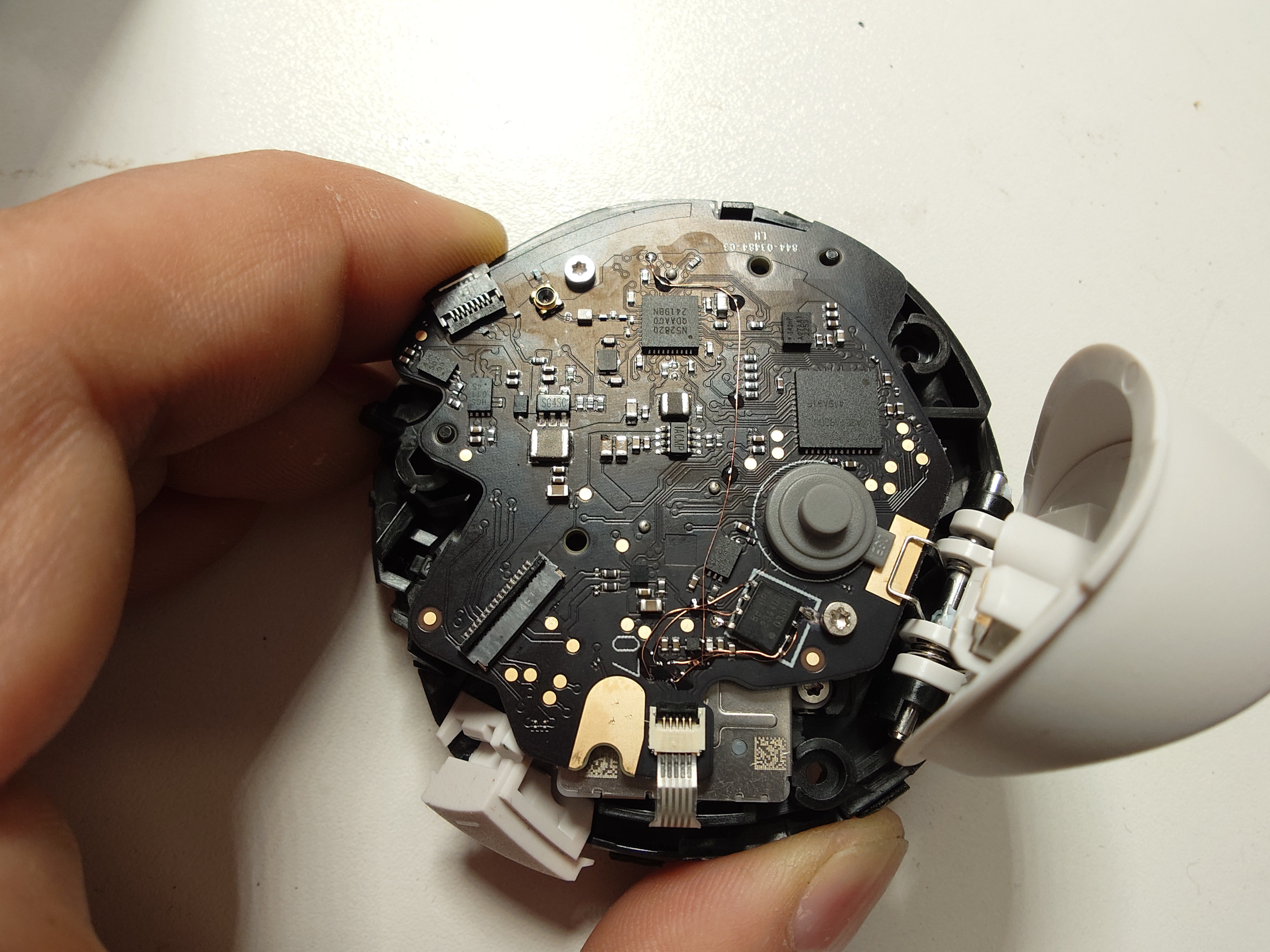
Now, there is no dedicated switch ic that turns on the power to the thumbstick, its power pin is connected to just an output pin of a microcontroller ("uc"). The uc periodically pulls it high for something like 70 microseconds to read the state of the thumbstick.
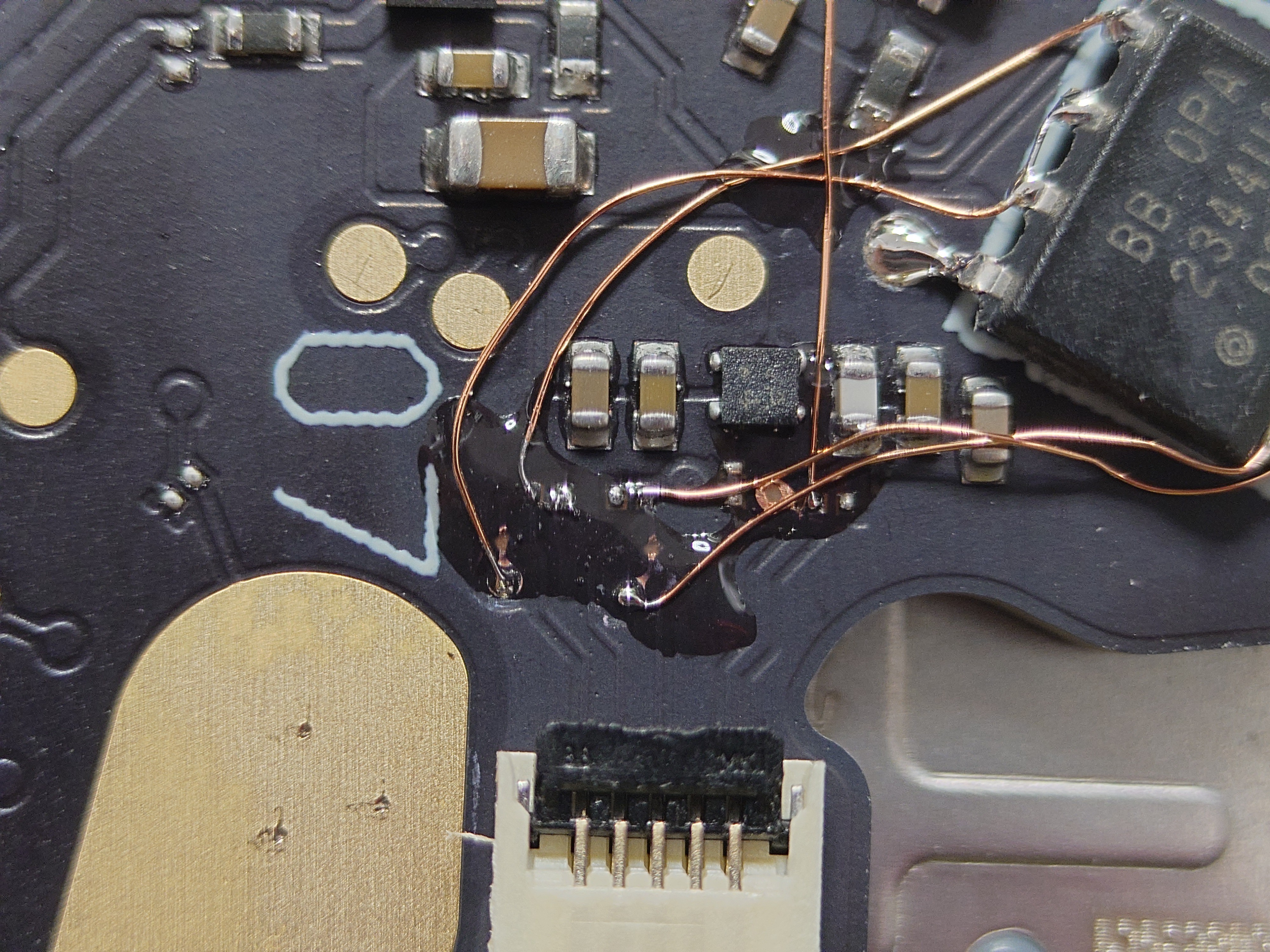
Now, the supply voltage is only 2V, so i can't use the same opamp in the same manner anymore (OPA2344 needs at least 2.5V to work). But it turns out, there is 3.3V rail test pad available right next to the thumbstick connector. And that 3.3V rail is only active when the controller is awake. How nice! So i just powered the opamp from that.
I have also rewired the power source for the thumbstick to the enable pin for that same 3.3V rail, so the thumbstick is now powered continuously. That should make the circuit even more resistant to the loss of wiper contact.
![]() (that long vertical wire is the new "power" for the thumbstick)
(that long vertical wire is the new "power" for the thumbstick)![]()
I have also taken apart the thumbstick potentiometer again, to check how much wear there is. I found it to be in a very good state, the potentiometer surfaces have basically no visible wear, and should last for much more. I think the problem is that there was a little bit of oil on them, and that oil probably has attracted some insulating dust. Sorry, forgot to take photos...
-
oculus support: no pots for me
01/12/2022 at 22:28 • 0 commentsI reached out to oculus support to buy some replacement tumbstick pots. The answer is:
"... we don't sell or we don't have replacement for joystick part only. I would suggest you to send us your defective controller for us to review and check for it for a possible replacement."
That's pretty unfortunate. I suppose, we won't see these joysticks on sale until it becomes clear they are a much needed consumable. Hoping for the best though, in spite of all this right-to-repair buzz getting traction.
I also asked them, what is the part number - the support person could not find it out.
-
the most difficult fix ever
01/12/2022 at 00:25 • 0 commentspotentiometers get bad in that the extra resistance between the wiper and the track gets very large and unstable. How can we counter that? well, connecting it to an amplifier with very high input impedance may help. So that's what i did.
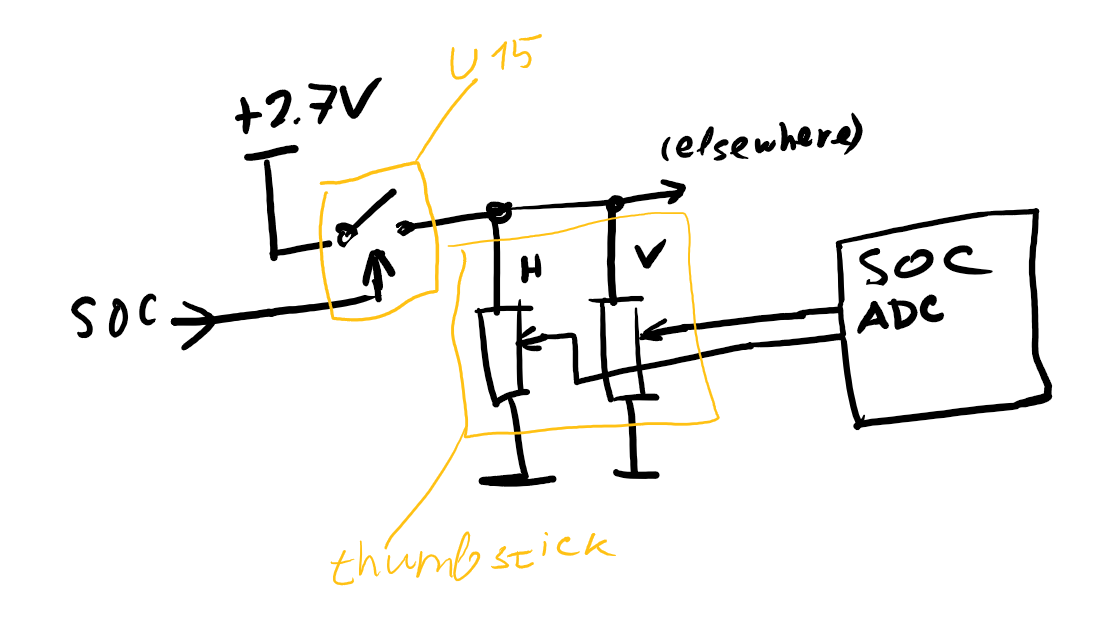
This is the original schematic:
![]()
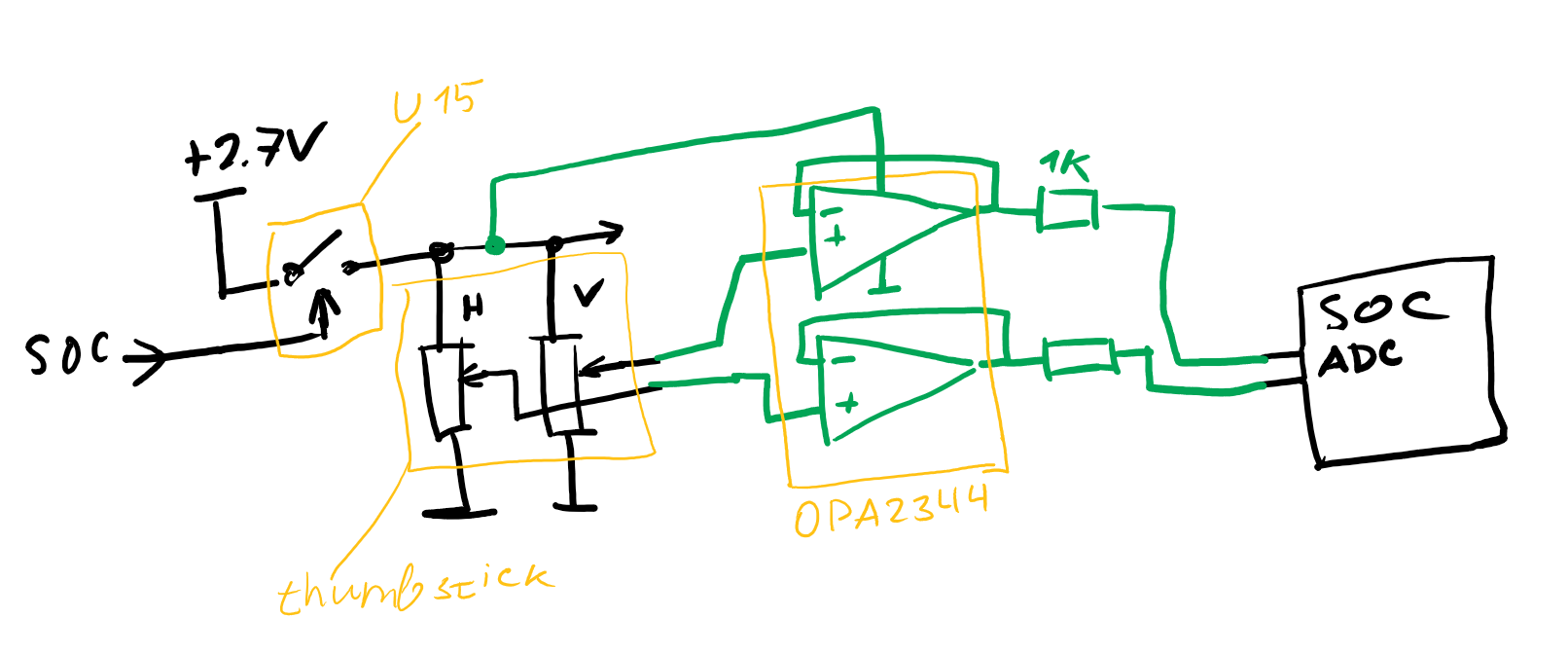
And this is my modification:
![]()
I used an OPA2344 opamp, which is a rail-to-rail dual thing with cmos inputs. CMOS inputs have extremely low bias currents, making the circuit tolerate incredibly high source impedances. Any other rail-to-rail opamp with cmos/jfet inputs and working off of 2.7 volts should do.
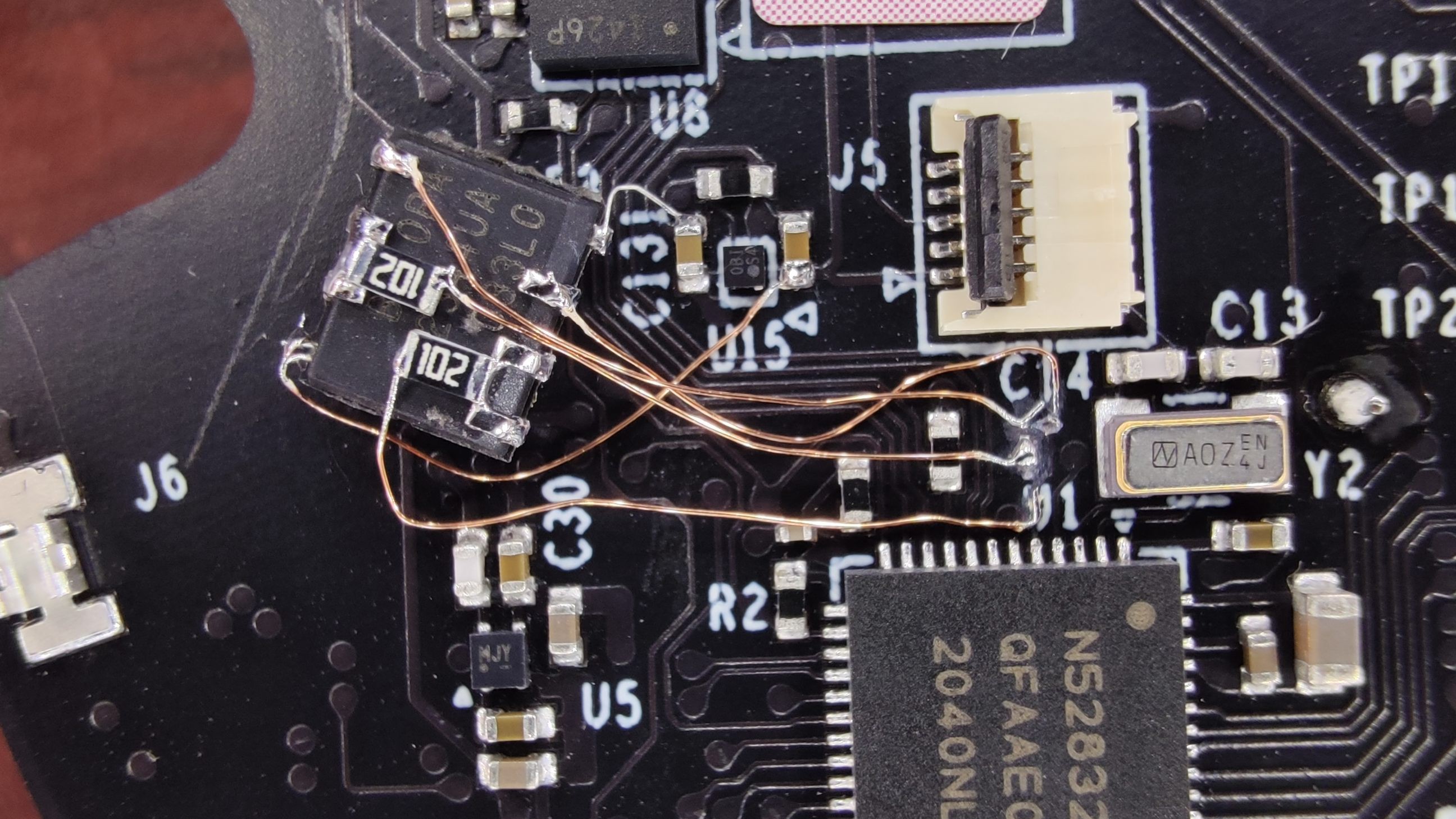
Here's how it looks:
![]()
It was one of the most delicate pcb surgery i've ever done. Cutting, stripping and soldering to hair-thin pcb tracks is tricky. Note that there are a lot of mechanical parts right above the pcb, finding a place to put the amplifier so that it doesn't interfere took some effort.
The thumbstick works perfectly now. But i have to admit, the thumbstick kinda fixed itself by when i took apart the controller to probe things. So, my fix might not be the fix. I'll report how it holds up.
Update: as of 2022-04-06 (4 months since the mod), no issues.
Update: 2022-04-11 i'm noticing that both left and right thumbsticks are slightly misbehaving. I'll let them get worse a bit...
-
problems begin - left thumbstick jitter
01/11/2022 at 17:23 • 0 comments8 month since i got quest2, i have noticeable gameplay problems due to bad left thumbstick. For example, in resident evil 4, i notice sometimes unexpectedly move backwards a bit. In calibration tool, i see the dot jumping downwards while i move it up. The overall behavior is very similar to this:
Quest2/Quest3 thumbstick teardown and fix
the component that is so prone to failure on all vr controllers, apparently
 (that long vertical wire is the new "power" for the thumbstick)