 TechSpiderbot

Sphaericae uses an Arduino-based control core connected to a Raspberry Pi vision system. This diagram reflects the current Arduino firmware architecture;
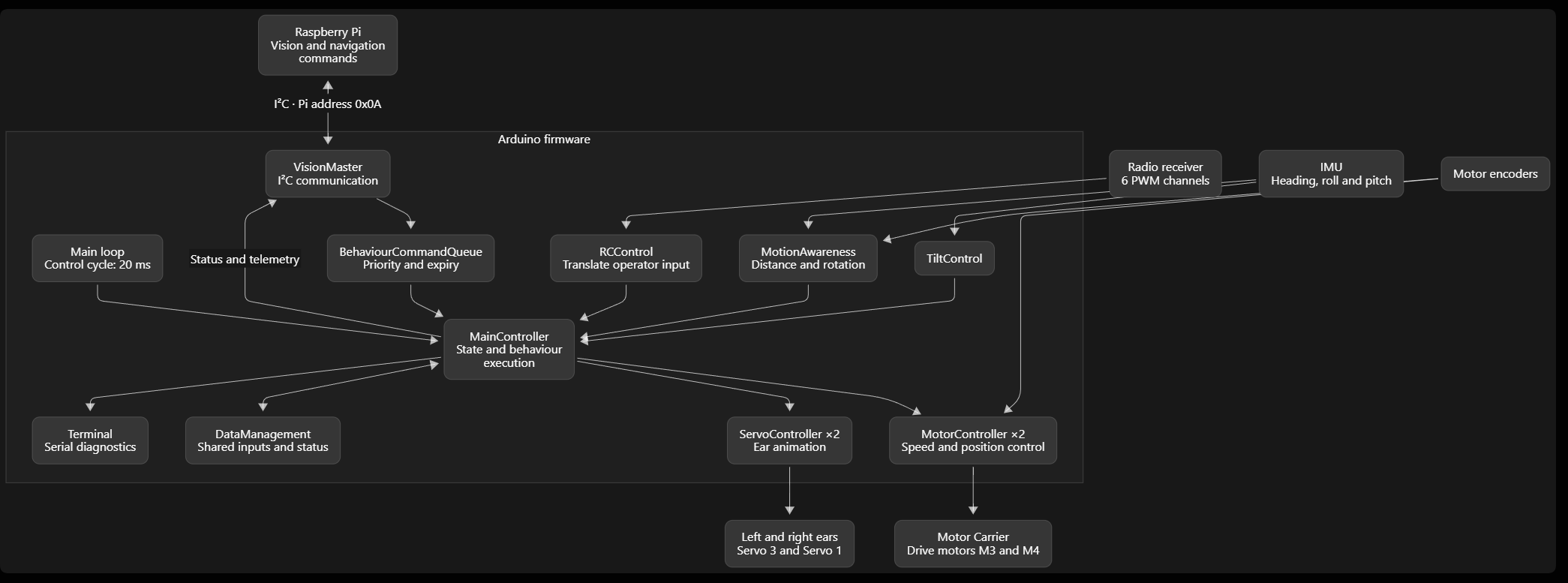
The Raspberry Pi handles high-level processing, including vision, environmental mapping, navigation, and behavioral logic, while the Arduino control core manages real-time motion control, sensor processing, and actuator execution.

Sphaericae starts in IDLE. It waits quietly for the initiation to finish, then performs idle movements.
When you move a radio stick or change a switch, it enters MANUAL CONTROL. This interrupts exploration and cancels the current Pi command. Holding a stick away from centre keeps manual control active.
After 60 seconds without radio activity, it returns to IDLE.
After another 60 - 120 seconds in IDLE, it enters EXPLORING and starts mapping through the Pi.
When mapping finishes, it will target interest points on the map, navigate to these points, executes a behavior and when satisfied remove to the next. Mapping does not automatically repeat; restarting the firmware by entering manual mode allows a new session.
If the battery drops below 11 volts, it enters ERROR, stops the motors, and suspends normal control while the battery remains low.
INIT is only a brief internal starting value before IDLE.
Above them are operating states: initialization, idle, exploring, manual control, and error. Idle selects occasional swing, twist, or tilt actions; exploration takes commands from the Pi; manual control responds to the radio.
Each control cycle runs:
1. Input: read radio channels.
2. Vision: exchange Pi commands and status during exploration.
3. Behaviour: select an action; higher-priority queued commands can interrupt an active command.
4. Control: update motors, ears, and motion feedback.
5. Debug: Serial status updates
The vision interaction follows a request → observe → act → report cycle:
- Arduino sends WAKE when exploration starts.
- Arduino sends READ to request the next vision result.
- Pi prepares a command and responds with DATA_READY.
- Arduino executes the command, then includes completed movement telemetry in the next request.
- After a behavior has been executed, a follow up request will be send.
Behaviours
Sphaericae defines 20 behaviours in its firmware:
| Group | Behaviour | intended action |
| Expression | Listening | Pause, raise both ears, adjust, then relax |
| Curious scan | Perk ears and scan left and right | |
| Ear twitch | Twitch one ear, optionally repeat | |
| Questioning | Raise one ear, lower the other, and tilt | |
| Alert | Stop and rapidly raise both ears | |
| Relaxing | Stop, slowly lower ears, and settle | |
| Peeking | Twist cautiously toward one side and inspect | |
| Excited | Quick ear movements and a small body swing | |
| Body motion | Stabilizing | Stop active movement and let wobble settle |
| Swing | Move back and forth | |
| Twist | Rotate side to side | |
| Tilt | Tilt the body upward or downward | |
| Navigation | Drafting | Explore using Pi movement parameters |
| Seeking | Investigate an area or target | |
| Moving | Drive forward or backward | |
| Swift turn | Turn through a requested angle | |
| Looking | Look up, down, left, or right | |
| Collision response | Collision stop | Stop after the Pi detects collision risk |
| Collision retreat | Retreat slowly | |
| Collision turn away | Turn slowly in the Pi-specified direction |
These are the defined intentions, not confirmation that every behavior has a complete, distinct implementation.
 Ahmet Oğuz Mermerkaya
 Ted Mieske
 Ray
Ray
 tayfunulu
Any video?