Close
0%
0%

Sphaericae amica

Project #7801

Similar projects worth following
Sphaericae began in 2022 as a project to create a remote-controlled ball droid with a built-in autonomous exploration mode. She is a free-spirited and curious companion who eagerly responds to your commands. When left alone, however, her independent personality takes over: she begins exploring her surroundings, searching for interesting objects and areas. She may circle a new discovery, inspect it from different angles, and move on once her curiosity is satisfied.

Her personality are expressed through animated events. When she feels lonely, she may begin searching and spinning. She also enjoys playing hide-and-seek, so every now and then she may quietly disappear and wait to be found.

Sphaericae uses an Arduino-based control core connected to a Raspberry Pi vision system. This diagram reflects the current Arduino firmware architecture;
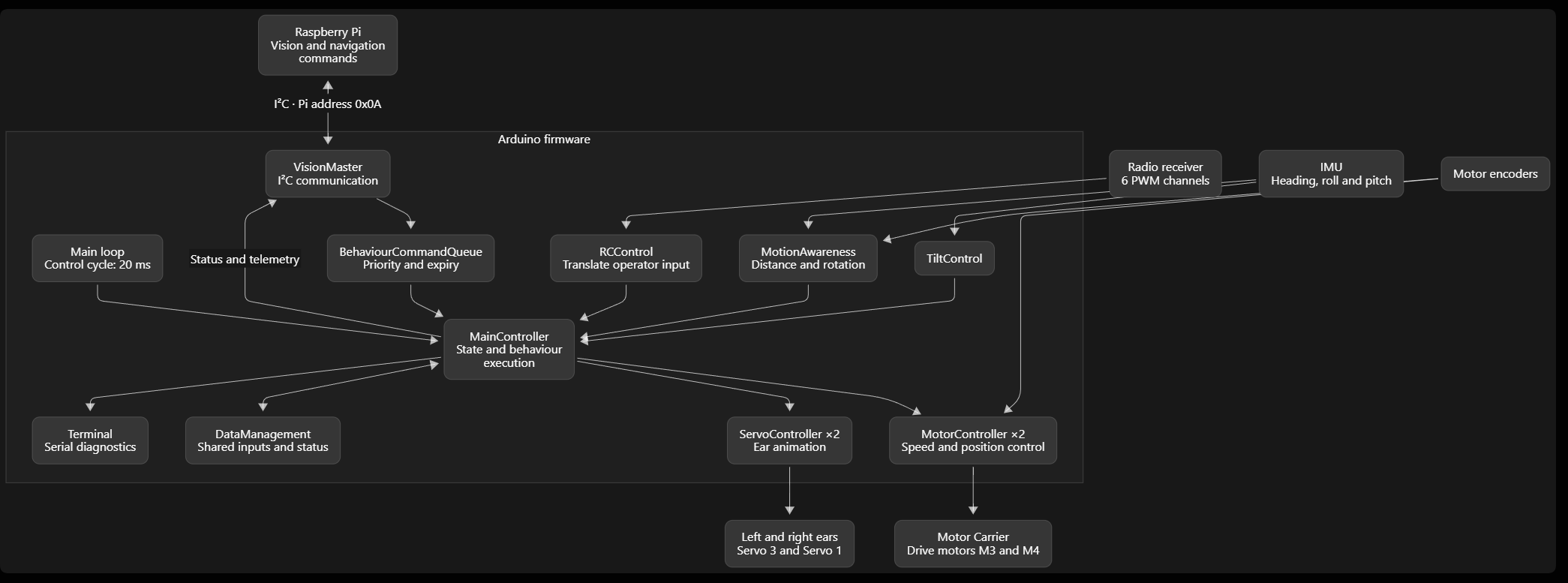
The Raspberry Pi handles high-level processing, including vision, environmental mapping, navigation, and behavioral logic, while the Arduino control core manages real-time motion control, sensor processing, and actuator execution.


Sphaericae starts in IDLE. It waits quietly for the initiation to finish, then performs idle movements.

When you move a radio stick or change a switch, it enters MANUAL CONTROL. This interrupts exploration and cancels the current Pi command. Holding a stick away from centre keeps manual control active.

After 60 seconds without radio activity, it returns to IDLE.

After another 60 - 120 seconds in IDLE, it enters EXPLORING and starts mapping through the Pi.

When mapping finishes, it will target interest points on the map, navigate to these points, executes a behavior and when satisfied remove to the next. Mapping does not automatically repeat; restarting the firmware by entering manual mode allows a new session.

If the battery drops below 11 volts, it enters ERROR, stops the motors, and suspends normal control while the battery remains low. 

INIT is only a brief internal starting value before IDLE.


Above them are operating states: initialization, idle, exploring, manual control, and error. Idle selects occasional swing, twist, or tilt actions; exploration takes commands from the Pi; manual control responds to the radio.

Each control cycle runs:
1. Input: read radio channels.
2. Vision: exchange Pi commands and status during exploration.
3. Behaviour: select an action; higher-priority queued commands can interrupt an active command.
4. Control: update motors, ears, and motion feedback.
5. Debug: Serial status updates

The vision interaction follows a request → observe → act → report cycle:

  1. Arduino sends WAKE when exploration starts.
  2. Arduino sends READ to request the next vision result.
  3. Pi prepares a command and responds with DATA_READY.
  4. Arduino executes the command, then includes completed movement telemetry in the next request.
  5. After a behavior has been executed, a follow up request will be send.


Behaviours

Sphaericae defines 20 behaviours in its firmware:

GroupBehaviourintended action
ExpressionListeningPause, raise both ears, adjust, then relax
Curious scanPerk ears and scan left and right
Ear twitchTwitch one ear, optionally repeat
QuestioningRaise one ear, lower the other, and tilt
AlertStop and rapidly raise both ears
RelaxingStop, slowly lower ears, and settle
PeekingTwist cautiously toward one side and inspect
ExcitedQuick ear movements and a small body swing
Body motionStabilizingStop active movement and let wobble settle
SwingMove back and forth
TwistRotate side to side
TiltTilt the body upward or downward
NavigationDraftingExplore using Pi movement parameters
SeekingInvestigate an area or target
MovingDrive forward or backward
Swift turnTurn through a requested angle
LookingLook up, down, left, or right
Collision responseCollision stopStop after the Pi detects collision risk
Collision retreatRetreat slowly
Collision turn awayTurn slowly in the Pi-specified direction

These are the defined intentions, not confirmation that every behavior has a complete, distinct implementation.
sphaericae-model_files.zip

Sphaericae_v2 (Printables export)

x-zip-compressed - 7.77 MB - 09/06/2026 at 07:44

Download

  • Vision System and Mapping

    TechSpiderbota day ago 0 comments

    1 Receive request → 2 Snapshot→ 3 Observations→ 4 Update map → 5 Choose behavior → 6 Return data


    1. Receive a request

    The Pi is setup as a slave module and awaits for a request. Each request has an ID so it can distinguish new work from a repeated message.

    Example: Request 12 arrives. The Pi processes one observation and saves its response. If request 12 arrives again, it returns that saved response instead of recalculating the data.

    2. Snapshot

    The Pi obtains an image from the camera after the robot has settled. It associates the image with the current mapping step and estimated viewing direction.

    Example: “This is view 3. The camera is facing approximately 90 degrees to the right of its starting direction.” That direction needs to come from movement feedback and, potentially, visual alignment. The picture itself does not tell the Pi its heading.

    3.Observations

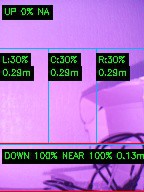
    The Pi analyses the image, the image is broken down into 5 sections; Right; Center; Left; Down (near field); and Up

    4a. Estimate where the obstacles are

    Image position indicates the direction of an object, while distance is estimated using infrared-assisted monocular vision. Infrared LEDs illuminate nearby objects, allowing the camera to distinguish them from the background under both daylight and low-light conditions.

    The Raspberry Pi analyzes the object's response to the infrared illumination and uses the resulting image characteristics to estimate its distance. Objects detected within the near field are classified as immediate obstacles and are prioritized by the navigation system.

    4b. Add the observation to the map

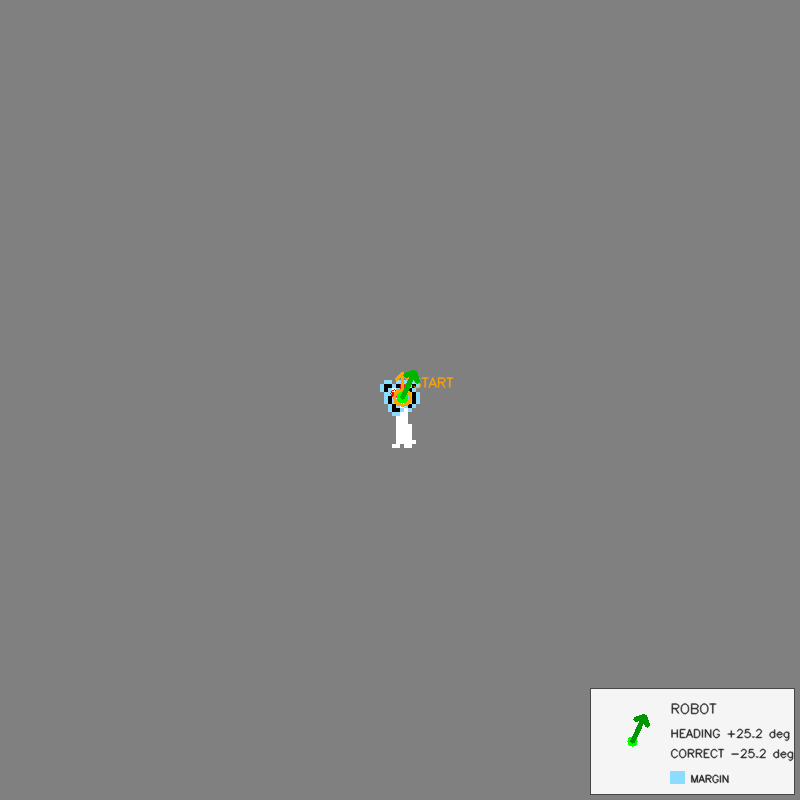
    The Pi combines the observation with its estimated position and heading. Think of drawing a room while turning around: every new view adds information to the same drawing.

    Example: The first view records a wall ahead. After a turn, the next image shows the same wall near the edge and a doorway beside it. The Pi should extend the existing wall and add the doorway, rather than create an unrelated second wall.

    5. Choose the next action

    During mapping, the Pi chooses the next behavior and plans it route. During navigation, it chooses a movement through sufficiently clear space. The Pi must consider the robot’s size. A visible gap is useful only if the robot can physically fit through it.

    6. Return the command and repeat

    The Pi packages its decision as a behavior, distance or angle, speed, and mapping step. It reports that the result is ready and saves the response for possible retries.

    Example: “Turn right by 45 degrees at 20 percent speed; this response belongs to mapping step 3.”

    On the next request, movement feedback helps the Pi update its estimated viewing direction. It then takes the next observation and repeats the cycle.

View project log

Enjoy this project?

Share

Discussions

Jacob David C Cunningham wrote 08/07/2022 at 01:36 point

Any video?

  Are you sure? yes | no

Similar Projects

Does this project spark your interest?

Become a member to follow this project and never miss any updates