A movable platform with Home Assistant.
Not a member? You should Sign up.
Already have an account? Log in.
To make the experience fit your profile, pick a username and tell us what interests you.
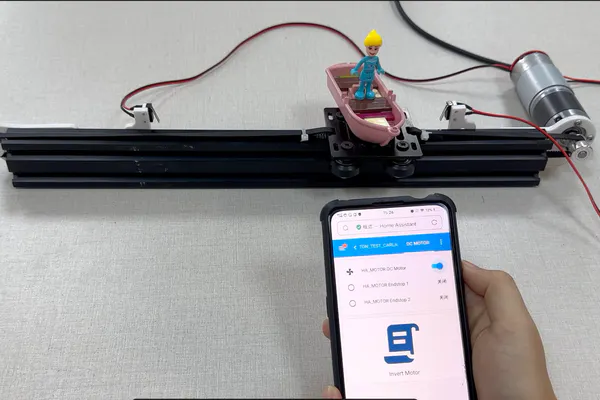
The platform begin to move when I open the HA_MOTER DC Motern and stop automatically when it touch the terminal at the edge.
And when I click the HA_MOTER DC Moter, on the pop-up page, I can control the platform direction of movement and speed of movement.
1.Install the printout on the slide rail
2.Install the 2 collision switches for position limiting on the printout
3.Install the DC Motor for Home Assistant_GA36Y-555 on the printout
4.Install the GT2 Timing Pulley on the DC Motor for Home Assistant_GA36Y-555
5.Install the Idler Pulley wheel on the printout
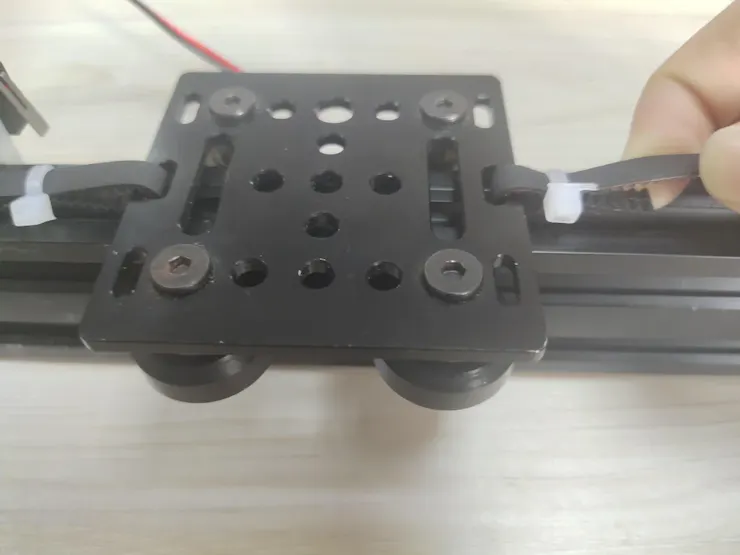
6.Pass the belt through the slide gap and around the idler and timing pulleys, securing it to V-Slot Gantry Kit - 20mm
1.V-Slot Gantry Kit - 20mm
2.Idler Pulley wheel
3.GT2 Timing Pulley
4.GT2 Belts
5.V-SloT Linear Rail
6.Assembly Hardware
7.Some components need to be printed by BambuLab printer,the 3d file you can click Here.
8.DC Motor for Home Assistant_GA36Y-555
9.AC/DC adaptor
View all 4 project logs
Create an account to leave a comment. Already have an account? Log In.
Mark Liu
Tom Jacobs
paweljarosz
Ai-Thinker
Become a member to follow this project and never miss any updates
By using our website and services, you expressly agree to the placement of our performance, functionality, and advertising cookies. Learn More
Yes, delete it Cancel
You are about to report the project "How to DIY a Movable Platform With Home Assistant", please tell us the reason.
Your application has been submitted.
Are you sure you want to remove yourself as a member for this project?
Project owner will be notified upon removal.