 Zaggo
ZaggoThe first device I built was the GNS 430 GPS unit. Here's the finished thing:
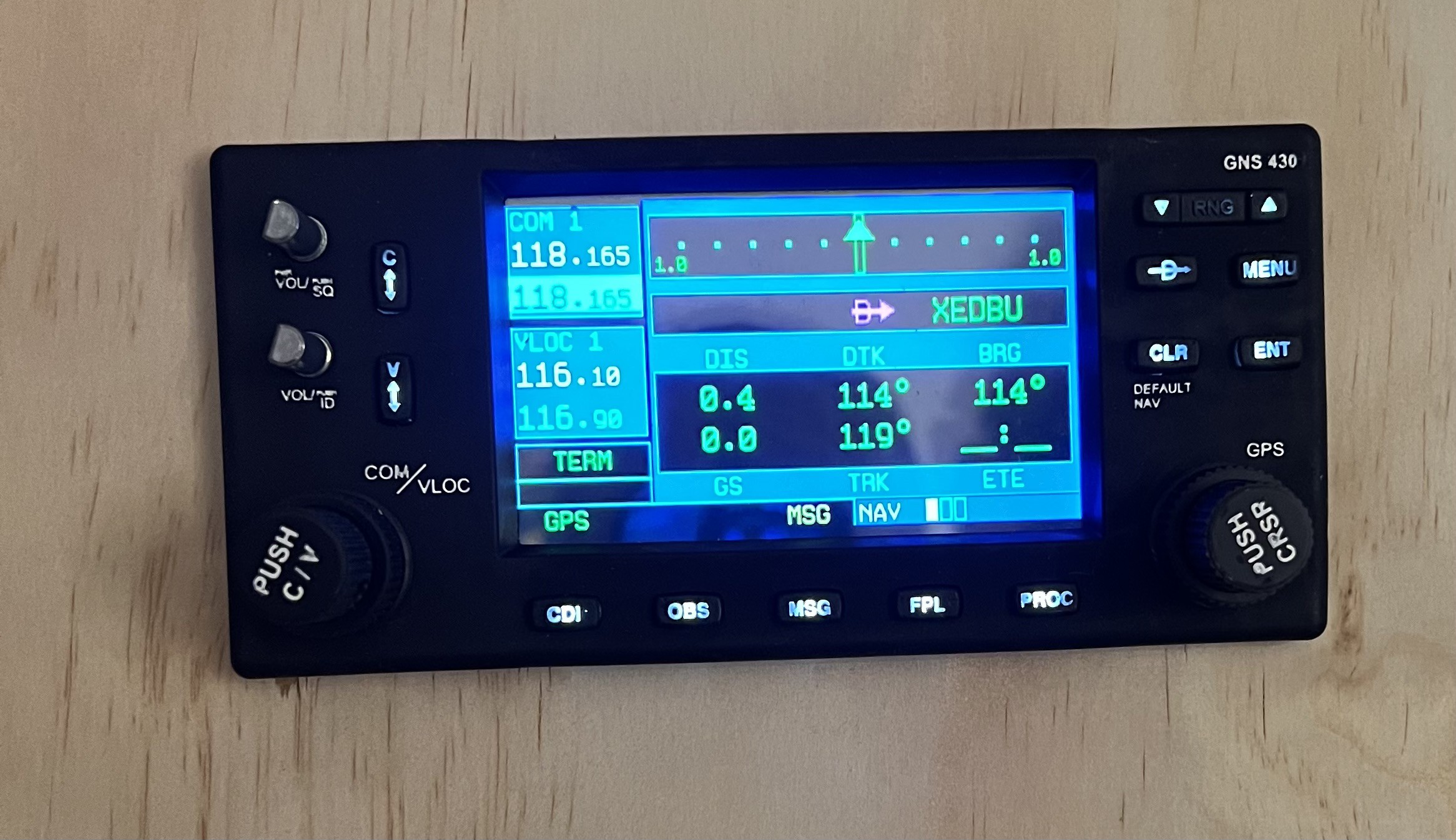
I wanted this to have with backlit buttons and real dual rotary encoders. After searching the web for a while it became clear, that I had to design this myself.
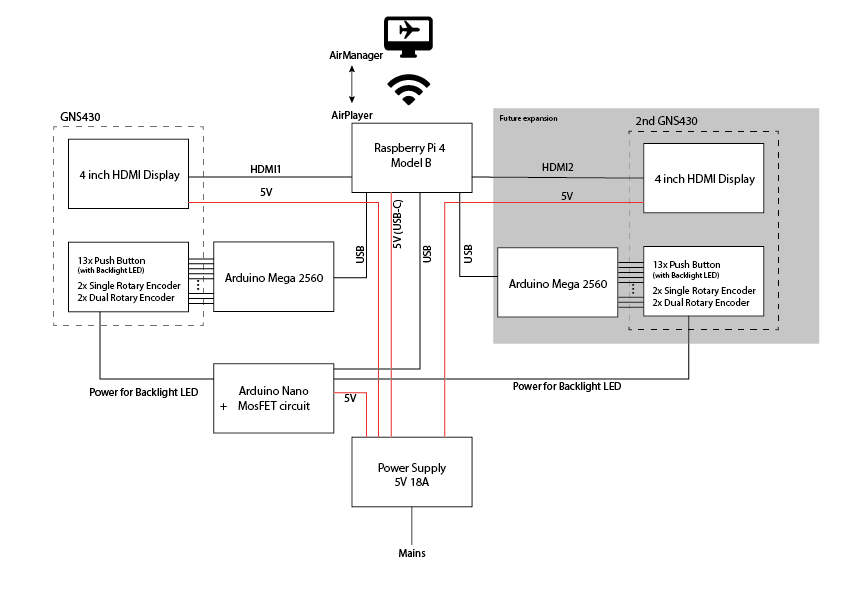
The screen content comes directly from the flight sim. But since I'm currently running the sim on a Macbook Pro, and thus do not have an option to connect too many external displays, I use AirManager for grabbing the GPS' display content directly from XPlane and sending it via a network connection to a Raspberry Pi 4. This works surprisingly well, even over wifi. Unfortunately the Raspberry doesn't have enough GPIO pins to also drive all the buttons and encoders. I originally planned to build two GNS 430 units anyway (as there are two of them in the simulator) and it's no problem for the Raspberry Pi 4 with its 2 HDMI connectors (and the AirManager/AirPlayer combo) to provide the display content for both of them. So I decided to use a separate Arduino Mega 2560 for interfacing with all the hardware buttons and encoders. To my pleasant surprise, it's even possible to connect the Arduino(s) directly to the Rasperry Pi and setup AirManager/AirPlayer in such a way, that all information is transported via the netrwork connection. This greatly reduces the need for cables between the dashboard and the computer. In fact, there is actually 0 (zero) cables between the main computer and the dashboard, since everything is working great so far with just a WiFi connection between the Mac and the Raspberry Pi. The only cable going to the dashboard is a power cable!
Here's the current wiring schematic of the GNS 430:
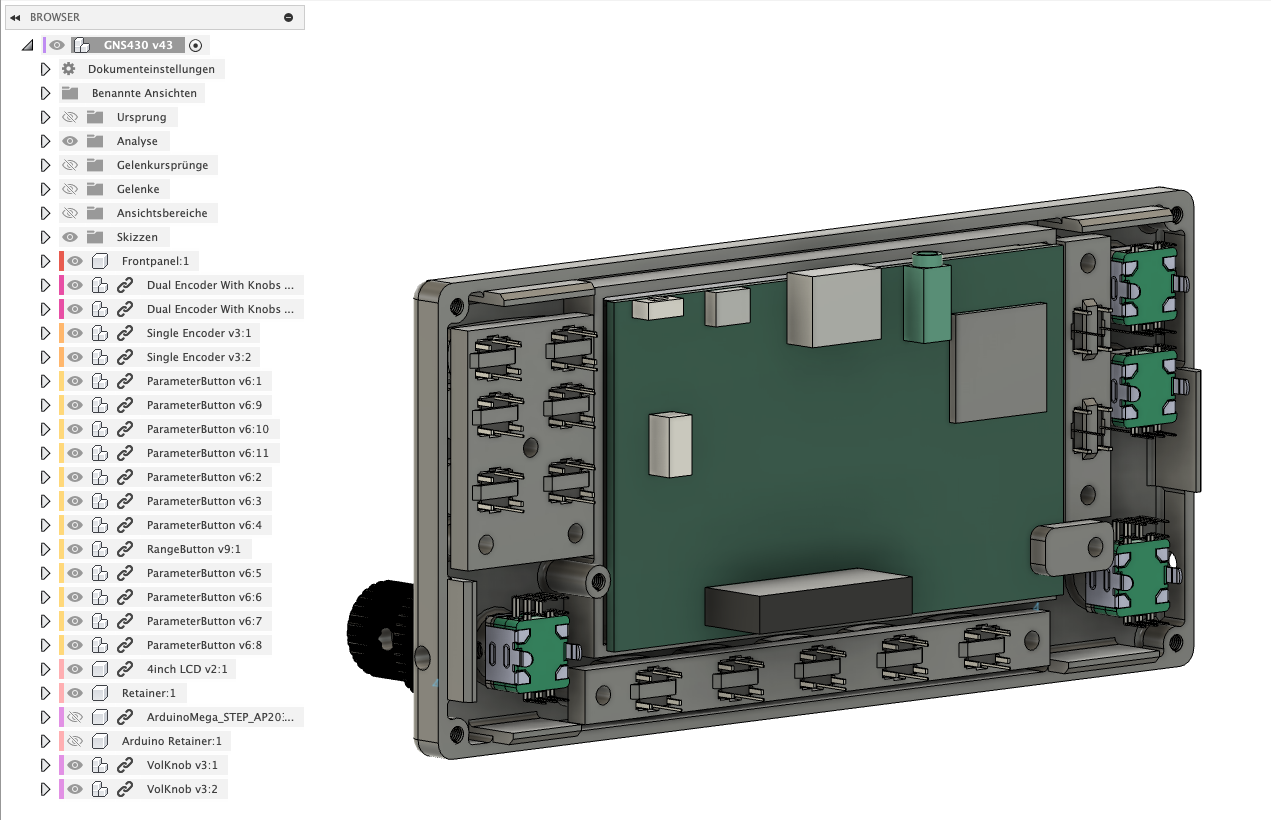
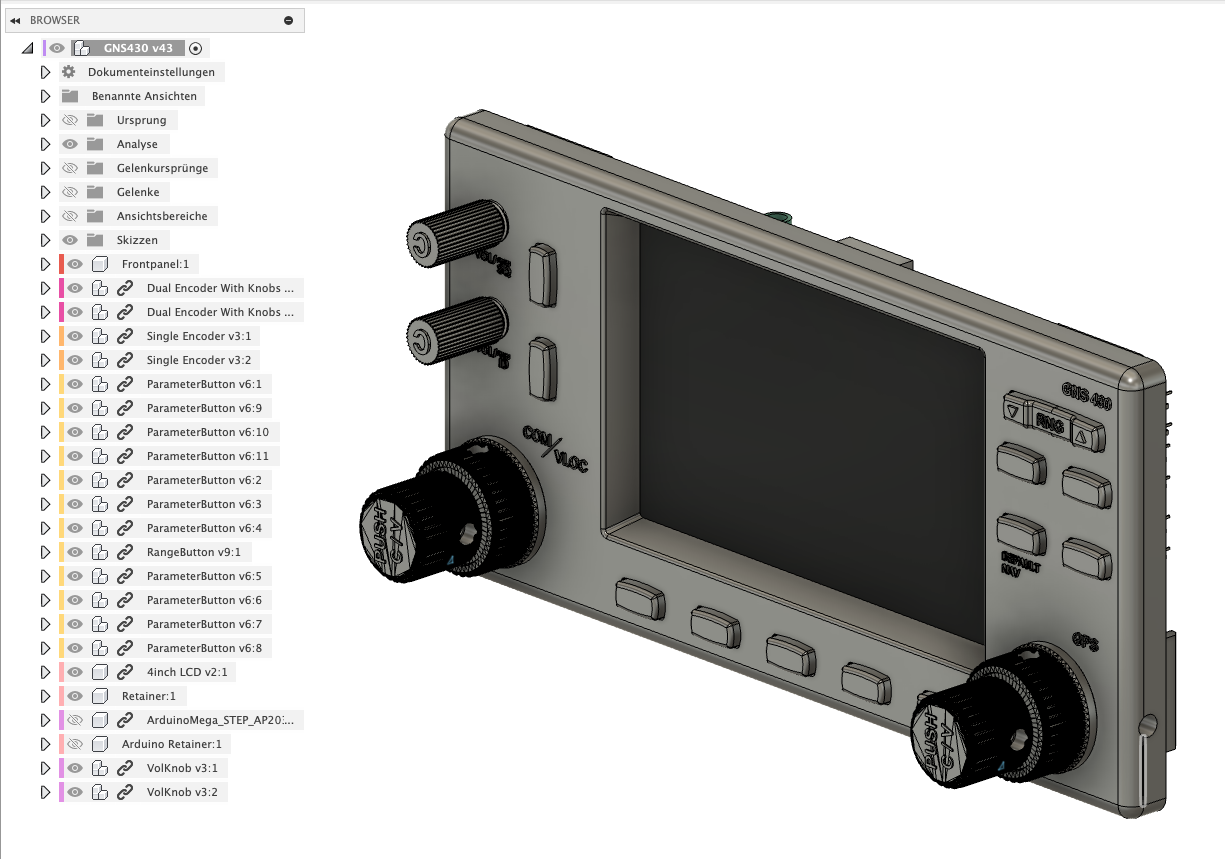
I did draw the whole design in Fusion. I was able to use some parts (like the rotary encoders) from GrabCAD, but most parts (including the backlit push buttons and the LCD) I drew myself.
After a few failed test prints of the tiny push button covers with my > 10 years old LulzBot TAZ 6 it was clear, that a FDM printer wouldn't cut it (at least mine). So after more than 15 years of FDM printing, I decided that it would be time to give resin printers a try and bought a Elegoo Mars 3 Pro.
Using a resin printer after years and years of FDM printing is maybe a story for a different time, but I finally managed do successfully print first push buttons!
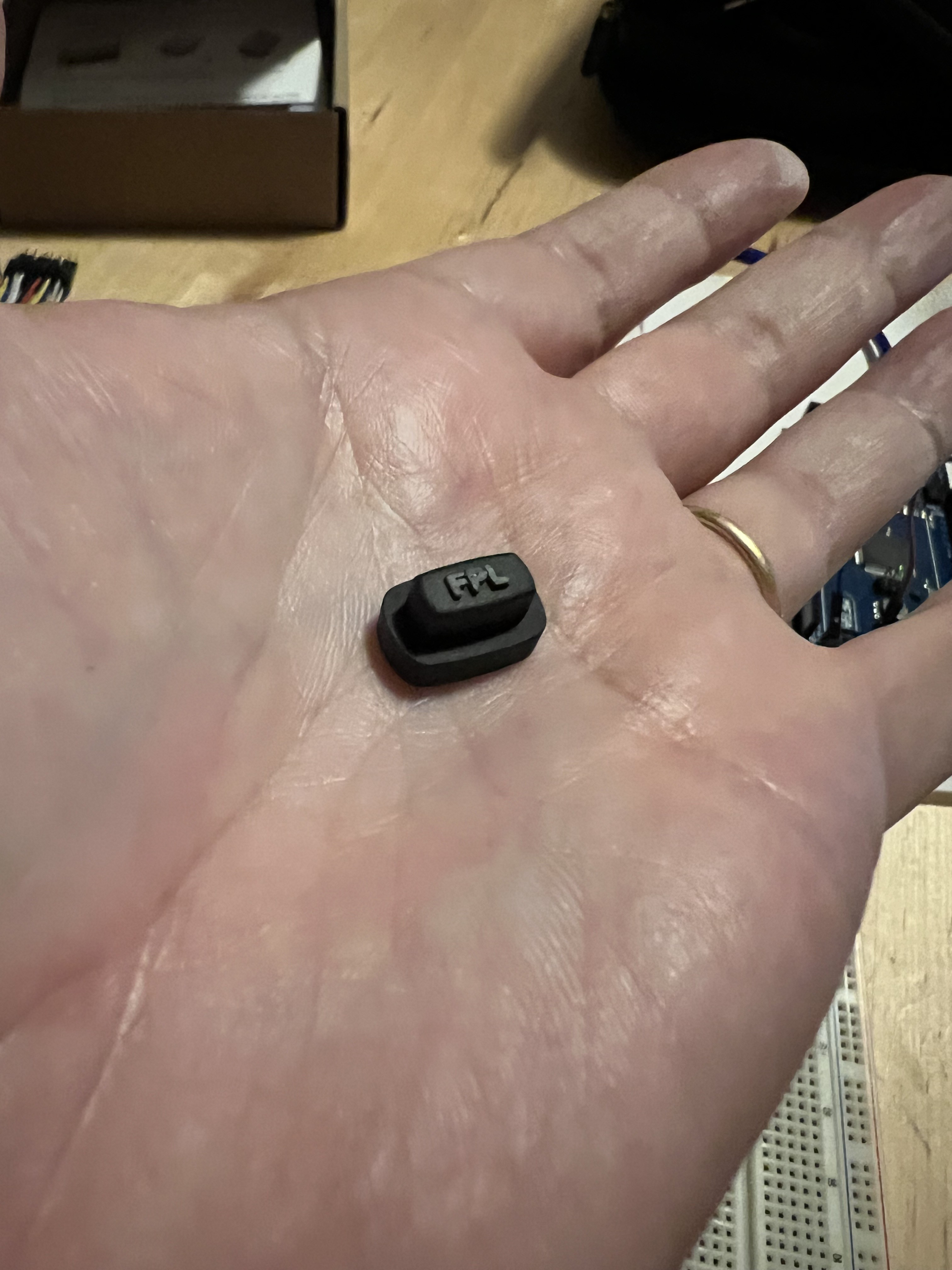
I printed these with clear resin and airbrushed them black afterwards. Finally I sanded off the black coating from the embossed text and voila: A backlit push button:
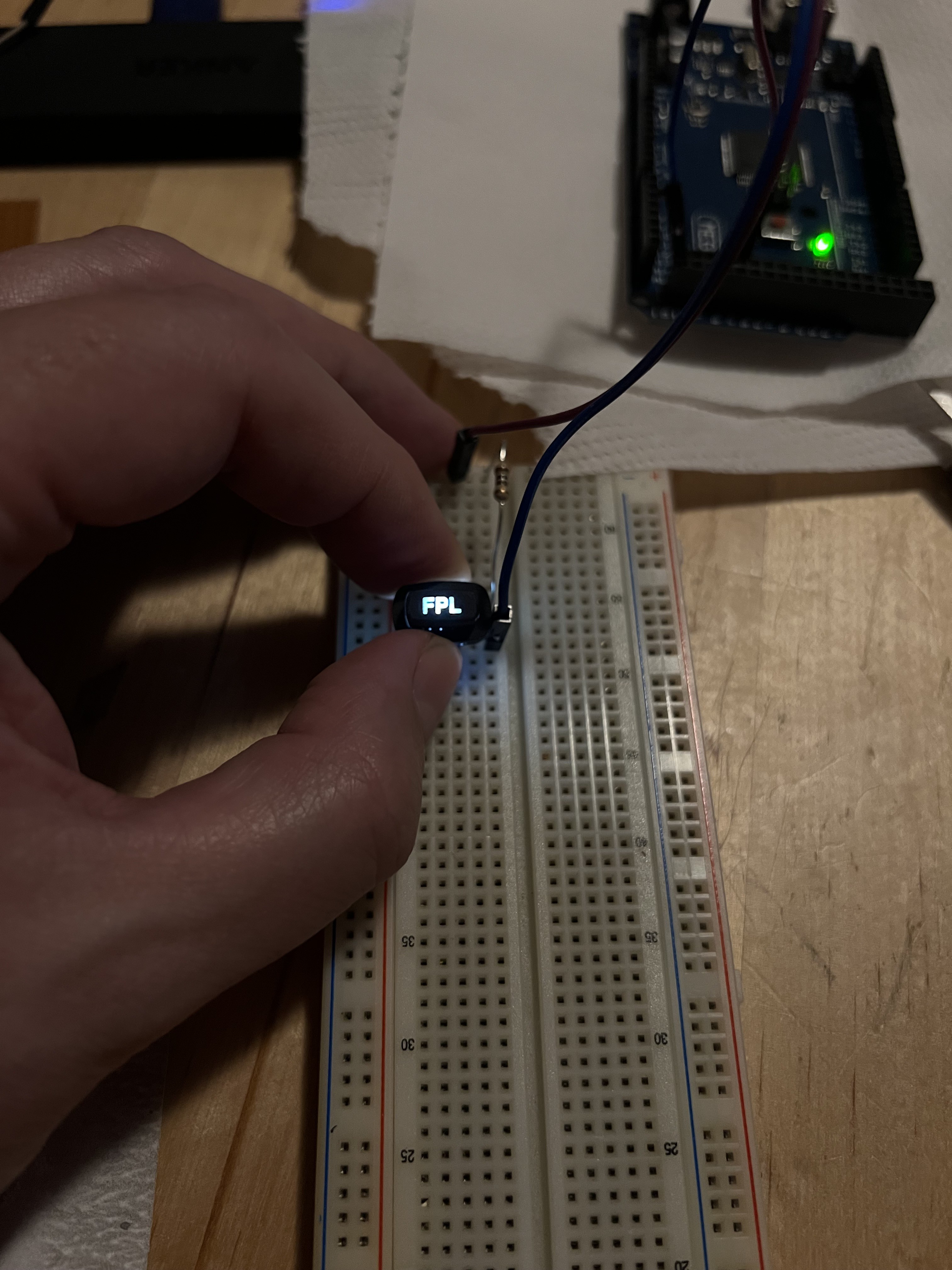
I ordered most of the hardware for cheap from Ali Express (rotary encoders and a bag of 100 pcs "6x6x7mm through hole reset micro push button tactile momentary switch with led (white)"), and a 4 inch IPS display with HDMI port from Amazon (not so cheap).
The white text on the frontpanel and the encoder knobs is also 3D printed, embossed text. But this time the part was printed with black resin and the embossed text later painted white (with a white paint pen).
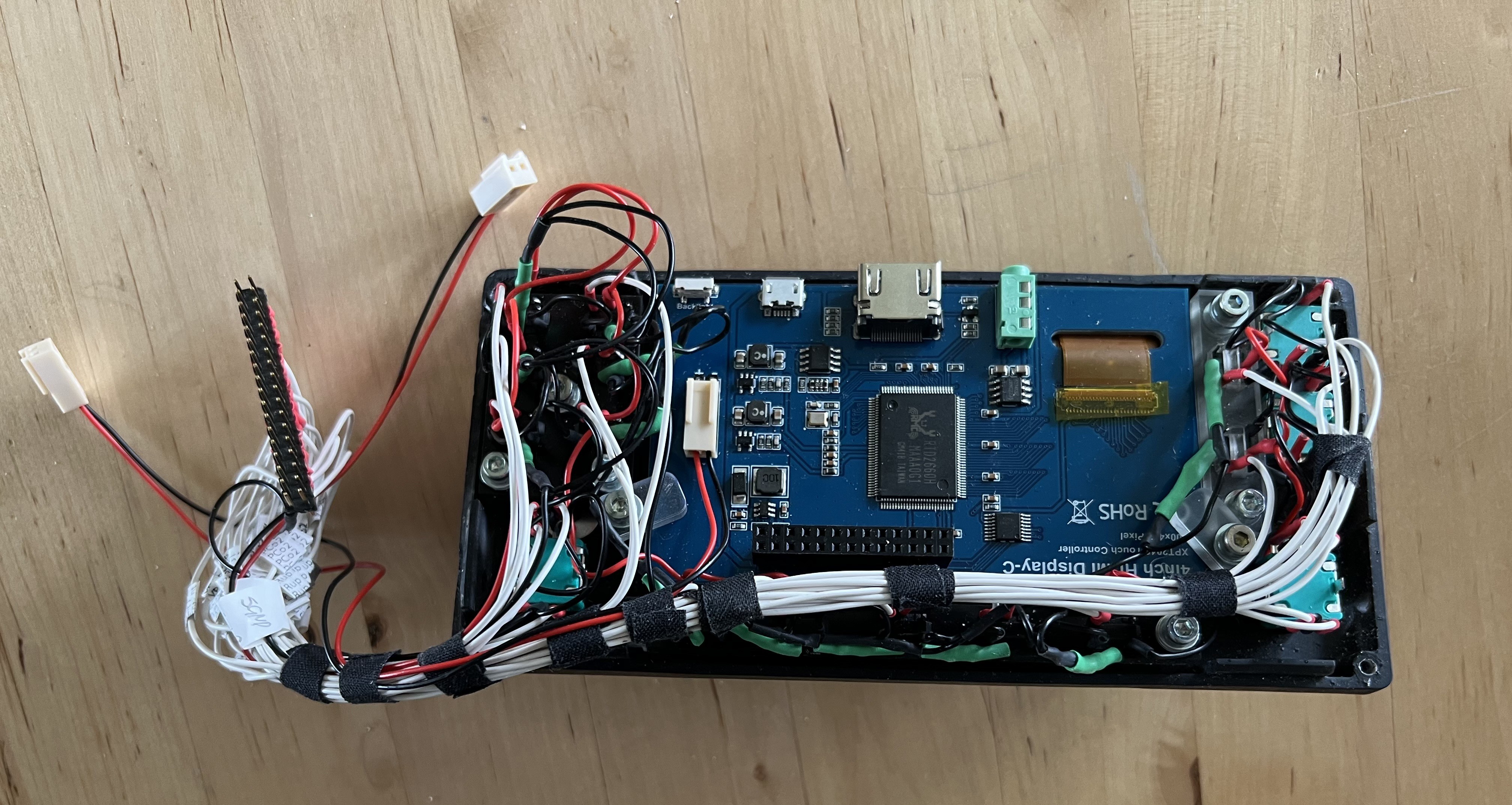
And here's the thing, all cabled up, after assembly:
On the software side, I wrote a LUA script for my GNS 430 in AirManager (I'm new to AirManager and also LUA, so please let me know if I can optimize the code!).
The LCD-Content is fetched from XPlane and send to the AirPlayer instance on the Raspberry Pi with this simple command:
video_stream_id = video_stream_add("xpl/GNS430_1", 0, 0, 800, 480)
All the buttons and encoders are then mapped by a script, running on the Arduino Mega:
------------------
-- GPS PushButtons
------------------

cvol_event = 0

function cvol_pressed()
  print("cvol_pressed")
  xpl_command("sim/GPS/g430n1_cvol", "BEGIN")

  local event = cvol_event
  timer_start(2000, function(count)
    if event == cvol_event then
        print("Shutdown")
        shut_down("SYSTEM")
    end
  end)
end

function cvol_released()
   cvol_event = cvol_event + 1
   -- print("cvol_released, cvol_down is now "..cvol_down)
   xpl_command("sim/GPS/g430n1_cvol", "END")
end

hw_button_add("CVol", cvol_pressed, cvol_released)

function vvol_pressed()
  print("vvol_pressed")
  xpl_command("sim/GPS/g430n1_vvol", "BEGIN")
end

function vvol_released()
  xpl_command("sim/GPS/g430n1_vvol", "END")
end

hw_button_add("VVol", vvol_pressed, vvol_released)

function comff_pressed()
  print("comff_pressed")
  xpl_command("sim/GPS/g430n1_com_ff", "BEGIN")
end

function comff_released()
  xpl_command("sim/GPS/g430n1_com_ff", "END")
end

hw_button_add("Com FF", comff_pressed, comff_released)

function navff_pressed()
  print("navff_pressed")
  xpl_command("sim/GPS/g430n1_nav_ff", "BEGIN")
end

function navff_released()
  xpl_command("sim/GPS/g430n1_nav_ff", "END")
end

hw_button_add("Nav FF", navff_pressed, navff_released)

function nav_com_tog_pressed()
  print("nav_com_tog_pressed")
  xpl_command("sim/GPS/g430n1_nav_com_tog", "BEGIN")
end

function nav_com_tog_released()
  xpl_command("sim/GPS/g430n1_nav_com_tog", "END")
end

hw_button_add("NavCom Toggle", nav_com_tog_pressed, nav_com_tog_released)

function cdi_pressed()
  print("cdi_pressed")
  xpl_command("sim/GPS/g430n1_cdi", "BEGIN")
end

function cdi_released()
  xpl_command("sim/GPS/g430n1_cdi", "END")
end

hw_button_add("CDI", cdi_pressed, cdi_released)

function obs_pressed()
  print("obs_pressed")
  xpl_command("sim/GPS/g430n1_obs", "BEGIN")
end

function obs_released()
  xpl_command("sim/GPS/g430n1_obs", "END")
end

hw_button_add("OBS", obs_pressed, obs_released)

function msg_pressed()
  print("msg_pressed")
  xpl_command("sim/GPS/g430n1_msg", "BEGIN")
end

function msg_released()
  xpl_command("sim/GPS/g430n1_msg", "END")
end

hw_button_add("MSG", msg_pressed, msg_released)

function fpl_pressed()
  print("fpl_pressed")
  xpl_command("sim/GPS/g430n1_fpl", "BEGIN")
end

function fpl_released()
  xpl_command("sim/GPS/g430n1_fpl", "END")
end

hw_button_add("FPL", fpl_pressed, fpl_released)

function proc_pressed()
  print("proc_pressed")
  xpl_command("sim/GPS/g430n1_proc", "BEGIN")
end

function proc_released()
  xpl_command("sim/GPS/g430n1_proc", "END")
end

hw_button_add("PROC", proc_pressed, proc_released)

function rng_dn_pressed()
  print("rng_dn_pressed")
  xpl_command("sim/GPS/g430n1_zoom_out", "BEGIN")
end

function rng_dn_released()
  xpl_command("sim/GPS/g430n1_zoom_out", "END")
end

hw_button_add("RNG Down", rng_dn_pressed, rng_dn_released)

function rng_up_pressed()
  print("rng_up_pressed")
  xpl_command("sim/GPS/g430n1_zoom_in", "BEGIN")
end

function rng_up_released()
  xpl_command("sim/GPS/g430n1_zoom_in", "END")
end

hw_button_add("RNG Up", rng_up_pressed, rng_up_released)

function direct_pressed()
  print("direct_pressed")
  xpl_command("sim/GPS/g430n1_direct", "BEGIN")
end

function direct_released()
  xpl_command("sim/GPS/g430n1_direct", "END")
end

hw_button_add("DIRECT", direct_pressed, direct_released)

function menu_pressed()
  print("menu_pressed")
  xpl_command("sim/GPS/g430n1_menu", "BEGIN")
end

function menu_released()
  xpl_command("sim/GPS/g430n1_menu", "END")
end

hw_button_add("MENU", menu_pressed, menu_released)

function clr_pressed()
  print("clr_pressed")
  xpl_command("sim/GPS/g430n1_clr", "BEGIN")
end

function clr_released()
  xpl_command("sim/GPS/g430n1_clr", "END")
end

hw_button_add("CLR",clr_pressed, clr_released)

function ent_pressed()
  print("ent_pressed")
  xpl_command("sim/GPS/g430n1_ent", "BEGIN")
end

function ent_released()
  xpl_command("sim/GPS/g430n1_ent", "END")
end

hw_button_add("ENT", ent_pressed, ent_released)

function cursor_pressed()
  print("cursor_pressed")
  xpl_command("sim/GPS/g430n1_cursor", "BEGIN")
end

function cursor_released()
  xpl_command("sim/GPS/g430n1_cursor", "END")
end

hw_button_add("CRSR", cursor_pressed, cursor_released)

-- Create a new rotary encoder
function page_change(direction)
  if direction == 1 then
    print("The page turned clockwise")
    xpl_command("sim/GPS/g430n1_page_up", "ONCE")
  end

  if direction == -1 then
    print("The page turned counterclockwise")
    xpl_command("sim/GPS/g430n1_page_dn", "ONCE")
  end
end

hw_dial_add("PAGE", page_change)

-- Create a new rotary encoder
function chapter_change(direction)
  if direction == 1 then
    print("The chapter turned clockwise")
    xpl_command("sim/GPS/g430n1_chapter_up", "ONCE")
  end

  if direction == -1 then
    print("The chapter turned counterclockwise")
    xpl_command("sim/GPS/g430n1_chapter_dn", "ONCE")
  end
end

hw_dial_add("CHAPTER", chapter_change)

-- Create a new rotary encoder
function cv_fine_change(direction)
  if direction == 1 then
    print("The cv_fine turned clockwise")
    xpl_command("sim/GPS/g430n1_fine_up", "ONCE")
  end

  if direction == -1 then
    print("The cv_fine turned counterclockwise")
    xpl_command("sim/GPS/g430n1_fine_down", "ONCE")
  end
end

hw_dial_add("CV_FINE", cv_fine_change)

-- Create a new rotary encoder
function cv_coarse_change(direction)
  if direction == 1 then
    print("The cv_coarse turned clockwise")
    xpl_command("sim/GPS/g430n1_coarse_up", "ONCE")
  end

  if direction == -1 then
    print("The cv_coarse turned counterclockwise")
    xpl_command("sim/GPS/g430n1_coarse_down", "ONCE")
  end
end

hw_dial_add("CV_COARSE", cv_coarse_change)

-- Create a new rotary encoder
function cvol_change(direction)
  if direction == 1 then
    print("The cvol turned clockwise")
    xpl_command("sim/GPS/g430n1_cvol_up", "ONCE")
  end

  if direction == -1 then
    print("The cvol turned counterclockwise")
    xpl_command("sim/GPS/g430n1_cvol_dn", "ONCE")
  end
end

hw_dial_add("C_VOL", cvol_change)

-- Create a new rotary encoder
function vvol_change(direction)
  if direction == 1 then
    print("The vvol turned clockwise")
    xpl_command("sim/GPS/g430n1_vvol_up", "ONCE")
  end

  if direction == -1 then
    print("The vvol turned counterclockwise")
    xpl_command("sim/GPS/g430n1_vvol_dn", "ONCE")
  end
end

hw_dial_add("V_VOL", vvol_change)
Maybe the most fancy feature on this code is right at the beginning, where I managed to translate a "long press" on the "Pwr VOL/SQ" encoder button to a system shutdown of the Raspberry Pi. That way, I'm able to correctly shut down the Raspberry without the need for a SSH shell or just cutting the power and hoping for the best.
Discussions
Become a Hackaday.io Member
Create an account to leave a comment. Already have an account? Log In.
Absolutely fantastic writeup mate, looks like an outstanding final product too. So outstanding that I would love to give it a crack and make one myself, if you would be willing to share the 3D printer files :D
Are you sure? yes | no
Hi Felix, thanks! Sorry for the delay, I didn't see your comment until today and I'm probably half a year late, but here's the design file for the GNS430:
https://github.com/zaggo/PA28Cockpit
Cheers!
Are you sure? yes | no