 Vedran
With the concept confirmed, it's time to look into the software side of the project. When it comes to connecting 3D mouse to the computer and letting it interact with e.g. CAD software, there's generally 2 approaches in DIY projects. One approach is to simply emulate a mouse and a keyboard, then convert 3D mouse movements into the keyboard shortcuts combined with mouse movements. Other option is to use 3D Connexion driver and tweak your mouse to be recognized as a 3D Connexion device.
Mouse/Keyboard approach
I've been testing so far the mouse/keyboard approach, and while it is pretty decent, it comes with some annoyances. Biggest one for me is that you're essentially controlling a mouse pointer, which is bound by the screen size - it cannot be moved more than the screen edges. Furthermore, when the motion is completed, mouse pointer has to be retracted back to where it started. At least I'd like that, in order to not have to jump to a regular mouse to reposition the pointer.
Mouse acceleration
I tackled this in one of my tests, by simply counting the displacement and then moving the cursor back by the same displacement. For example, which orbiting a part, mouse pointer perhaps moved +60 points in X direction and +5 in Y direction, so when orbiting stops, moving the cursor by -60, -5 should get it back to where it started. While this probably works fine on linux & mac, turns out windows has on-by-default feature called "Enhance pointer precision" that completely messes this up.
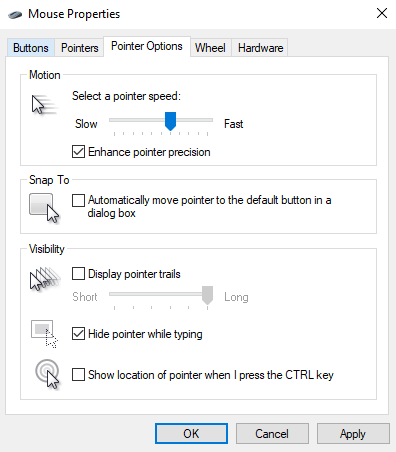
"Enhance pointer precision" takes into account pointer acceleration when moving around the screen. So now, to properly retract the pointer back to where it started, it's not enough to track how much it moved, but also how fast it was accelerating. If a pointer moved by +60, -5 over 5 second, and we try to retract that in a single mouse movement, we will blow past original mouse position due to mismatched acceleration. Instead, it's necessary to match to original acceleration during retraction. With that in mind, retract algorithm gets fairly complex and inconsistent when accounting for all possible movement. Simple option would be to just disable mouse "Enhance pointer precision" in Windows.
Another smaller limitation is that emulating a mouse/keyboard relies on using in-app shortcuts. These shortcuts can differ from app to app, requiring more work to create a solution that works with multiple programs.
3D Connexion driver approach
Another way to interface 3D mouse with the PC is via 3D Connexion driver. Basically, someone (my search leads me here https://github.com/AndunHH/spacemouse ) has spent time reverse-engineering communication protocol 3Dconnexion uses to interact with their 3D mice. Using this information, it is possible to emulate a USB device that follows the same protocol. In other words, a DIY space mouse can be recognized as a legit 3D Connexion device and leverage their proprietary driver for interaction with supported CAD software.
From what I could see online, this approach solves both of my annoyances with keyboard/mouse approach but it comes at a cost of relying on proprietary software, outside of my control. Basically, things could stop working at any point for any reason.
There's also an ethical question that rarely comes to my mind when working on DIY projects, but here somehow it inadvertently seems to poke me every time I consider this option. Despite seeming to be a superior approach, it somehow doesn't feel right to base my solution on it.
Summary
Choice of the approach here mandates hardware required to go forward with this project. I have written the test code so far to run on Teensy 3, using arduino framework. However, teensy currently doesn't support implementing custom USB descriptors needed to test 3D Connexion solution. So this would prompt a different MCU.
Taking into account that I likely want to take this project wireless as well, I'll probably ditch Teensy 3.2 in favor of something like ESP32 S3 that supports both wired and wireless keyboard/mouse but also a custom USB device needed to test 3D Connexion driver - I would like to give it a try at least to see how well it does.
Discussions
Become a Hackaday.io Member
Create an account to leave a comment. Already have an account? Log In.