 yaluke
The binary file dumped earlier from the flash memory is not merely a collection of random data. In this chapter, I'll demonstrate how to analyze and extract useful information from such a binary file for further analysis and potential modifications. I'll be using Kali Linux for this process, but other Linux distributions should work similarly.
Useful links
https://openwrt.org/toh/tp-link/tl-wr1043nd
https://openwrt.org/docs/techref/flash.layout
Initially, I planned to use the flash layout information provided by OpenWrt. However, I quickly realized that my router uses the original TP-Link firmware (version TL-WR1043ND_V1_140319), which differs from OpenWrt's layout. Therefore, there are no shortcuts—I must analyze the flash data manually.
First Raw View
Based on general information from OpenWrt documentation, I expected the following basic layout:
- Bootloader at the beginning
- Firmware header and kernel data following the bootloader
- SquashFS filesystem containing Linux files
- SoC-specific data stored at the end of the flash memory
To verify this structure, I used `binwalk`, a tool that analyzes binary files to identify embedded filesystems, compressed data, and known signatures. Running:
binwalk flash_data.bin
produced the following output:

From this analysis, I identified several key areas:
- 0x00000000: Bootloader section
- 0x00020000 (128 kB): TP-Link firmware header
- 0x00020200 (512 bytes later): Compressed Linux kernel (size: 1023.5 kB)
- 0x120000 (1152 kB): SquashFS filesystem containing the Linux file structure
Notably, no explicit information about SoC-specific data appeared at this stage. Thus, further manual analysis was necessary.
Extracting Firmware Components
Bootloader Extraction
The bootloader occupies the first 128 kB of flash memory. To extract it into a separate file, I used the Linux `dd` command, which copies specific parts of a file based on given parameters:
dd bs=1024 count=256 if=flash_data.bin of=bootloader.bin
Here, `bs` specifies chunk size (1024 bytes = 1kB), and `count` specifies how many chunks to copy (128 chunks × 1024 bytes = 128kB).
A bootloader is responsible for initializing hardware and loading an operating system. To confirm its architecture type, I ran:
binwalk -Y bootloader.bin
This confirmed that router uses MIPS architecture:

TP-Link Header
Following the bootloader is a small TP-Link header occupying exactly 512 bytes. Extracting it is straightforward:
dd bs=512 count=1 skip=256 if=flash_data.bin of=tplink_header.bin
Linux Kernel
Next, I extracted the compressed Linux kernel using similar logic:
dd bs=512 count=2047 skip=257 if=flash_data.bin of=kernel.bin
Since this kernel is compressed, it can be manually decompressed using:
binwalk -Me kernel.bin
This command produces _kernel.bin.extracted folder with uncompressed Linux kernel inside. As kernel is also valid executable file we can confirm architecture using binwalk -Y, similar to the bootloader case.
Linux Filesystem (SquashFS)
The SquashFS filesystem starts at offset `0x120000` (1152 kB) and occupies exactly `3852370` bytes. To extract it:
dd if=flash_data.bin bs=1 skip=1179648 count=3852370 of=filesystem.bin
Then, to unpack its contents using `binwalk`:
binwalk -Me filesystem.bin
This command produces a directory containing the extracted Linux file structure:
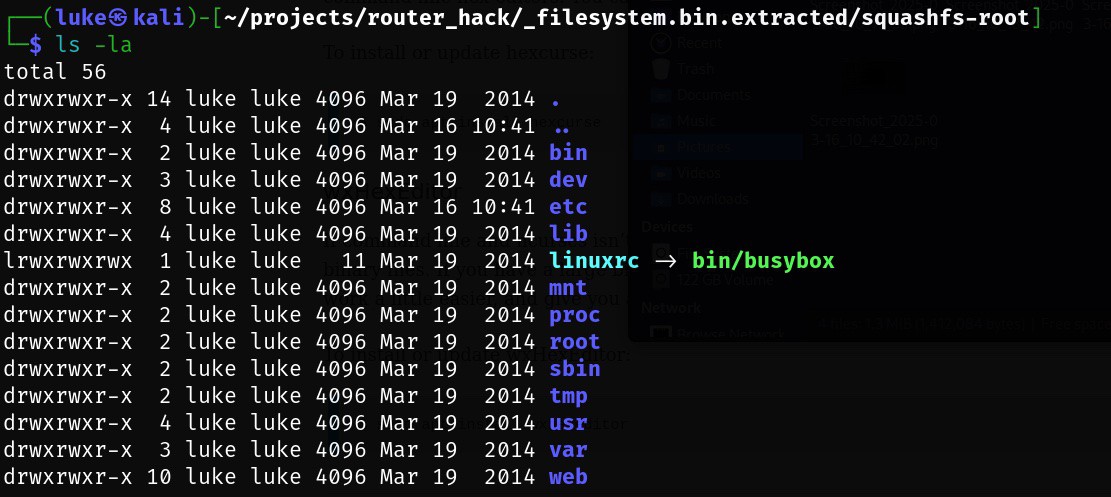
Alternatively, another useful tool called `sasquatch` can also handle SquashFS extraction efficiently:
sasquatch -C lzma -be filesystem.bin
Both methods successfully revealed the internal filesystem structure.
Identifying SoC-Specific Data
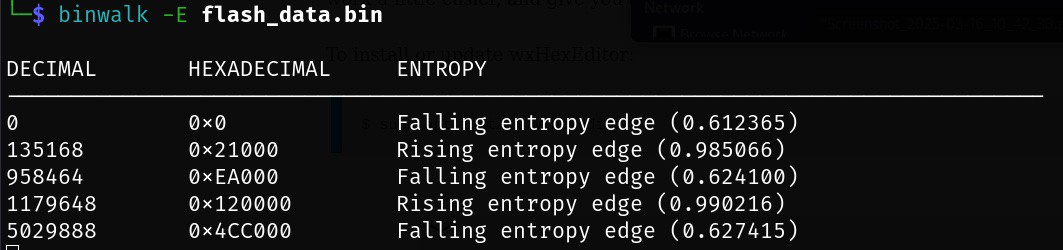
To locate SoC-specific data stored at the end of flash memory, I used entropy analysis (`binwalk -E`). Entropy measures randomness within data; low entropy typically indicates padding (`0x00` or `0xFF`) or uncompressed code sections, while high entropy suggests compressed or encrypted data. Running entropy analysis with standard parameters:
binwalk -E flash_data.bin
showed clear entropy variations indicating different data types:
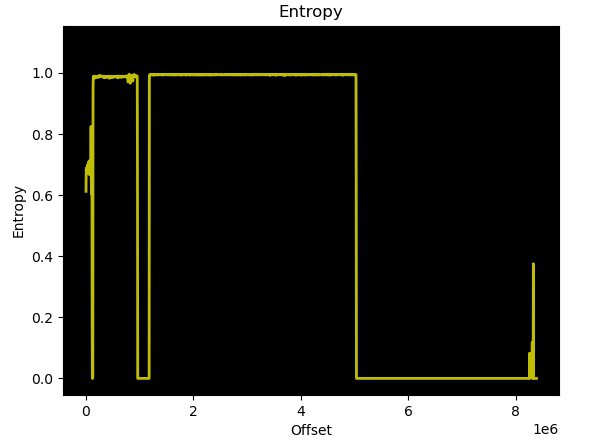
Further detailed inspection using a hex viewer revealed padding (`0xFF`) changing into structured data at offset `0x7E0000`. Upon closer inspection, router MAC addresses were clearly identifiable in this region. Further also users/passwords identified in the previous chapter can be identified. Based on OpenWrt data this part is ART = Atheros Radio Test which contains except of MAC addresses, also calibration data for the Wi-Fi.
Thus, extracting SoC-specific data was straightforward using:
dd if=flash_data.bin bs=1 skip=8064 of=soc_specific.bin
Although each component was individually extracted above for clarity and educational purposes, you can achieve similar results in one step using binwalk's recursive extraction feature:
binwalk -Me flash_data.bin
This command automatically identifies and recursively extracts all embedded components from the dumped flash memory file.
Complete Flash Memory Layout Summary
Below is a complete summary of the identified flash memory layout for my TP-Link TL-WR1043ND router running original firmware version TL-WR1043ND_V1_140319:
| Offset | Size | Content |
| 0x00000000 | 128 kB | Bootloader - responsible for hardware initialization and OS loading |
| 0x00020000 | 512 B | TP-Link Header - contains metadata specific to TP-Link firmware |
| 0x00020200 | 1023.5 kB | Compressed Linux Kernel image for MIPS architecture |
| 0x00120000 | ~3.7 MB | SquashFS Filesystem - contains all Linux system files. |
| 0x007E0000 | 128 kB | SoC-specific Data - includes device-specific details such as MAC addresses, user credentials and ART = Atheros Radio Test |
Discussions
Become a Hackaday.io Member
Create an account to leave a comment. Already have an account? Log In.